CP/M 6502-Style

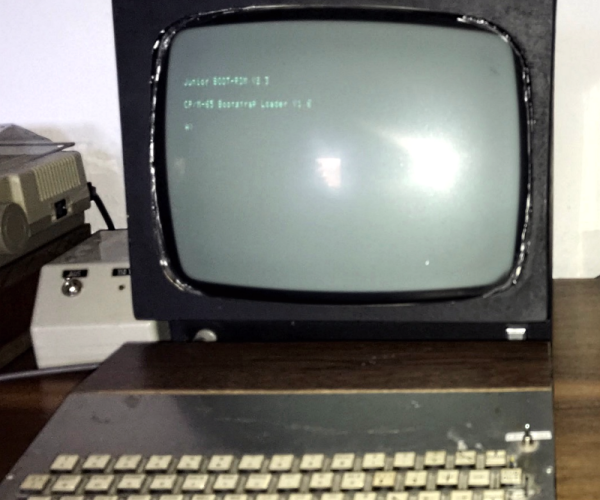
There are projects you create to share with the world, but there are also those you do just because you want something for yourself. Lucky for us, [Dietrich-L]’s 30-year-long project to create CPM-65, a CP/M-like OS for the 6502, has become both.

[Dietrich-L] does admit that the documentation is “sparse” and “for my personal needs.” Still, the OS has most of what you’d expect and runs well on the target system, a heavily-modified Elektor Junior with 57 kB of RAM. The disk structure is compatible with CP/M, although the Transient Program Area (TPA) apparently starts at $200, which is a bit different from a typical CP/M. Apparently, the system uses some low memory which necessitated the relocation. Just in case you were hoping, CPM-65 doesn’t emulate an 8080 system, so you can’t run normal CP/M programs. You just get a similar operating environment and tools.

The 31 commands listed include an assembler, BASIC, Forth, an editor, and some disk tools, along with a debugger. Xmodem is available, too. Everything is written in assembly for the CPM-65 assembler, so bootstrapping could be an issue if you need to make any changes.

Speaking of changes, there is some documentation in the docs sub-directory, including the layout of [Dietrich-L]’s system, which would be handy if you were trying to run this on your own hardware. You’ll also find basic commands for the editor, details of the assembler, and some other documents.

[Dietrich-L] notes that he was unaware when he started the project that there were other similar projects. DOS/65 (which has a port for the Commodore 64), OUP/M (which hasn’t been updated since 1983), and CPM65 (apparently no relation, but very impressive), which appeared in 2022.

If you need a 6502 computer, grab a breadboard, although adding the disk drive is an exercise left to the reader. Or, grab an FPGA but expect more work.

Thanks [Stephen Walters] for the tip!

Apple Never Gave Them USB. Now, They’re Getting It For Themselves

These days we use USB as a default for everything from low-speed serial ports to high-capacity storage, and the ubiquitous connector has evolved into a truly multi-purpose interface. It’s difficult to believe then, that the first Apple Mac to be designed with a USB interface was shipped without it; but that’s the case with 1997’s grey Power Mac G3.

On the personality board are all the footprints for a single USB 1.1 port, but USB-hungry Apple fanboys had to wait for the translucent iMac and later G3 before they had a machine with the parts fitted. [Croissantking] is righting that particular wrong, by piecing together the missing Apple circuit using parts from contemporary cards for PCs. Over a long forum thread there are a few teething problems, but it certainly seems as though grey G3 owners will soon be able to have reliable USB upgrades.

If omitting USB from a 1997 Mac seems unexpected, it’s as well to remember how slow the first USB versions were. At the time SCSI was king in the high-speed peripheral world, and USB seemed more appropriate as a replacement for Apple Desktop Bus and the serial port. Even when they embraced USB they were reluctant to follow the standards of the PC world, as we remember finding out when for curiosity’s sake we tried swapping the mice and keyboards between an iMac and a Windows PC. We have USB’s success to thank for releasing Mac users from a world of hugely overpriced proprietary peripherals.

If you fancy hacking a ’90s PowerMac, make sure you get one that works.

Thanks [Doug] for the tip.

Working With Old High-Voltage EPROMs Is Fussy

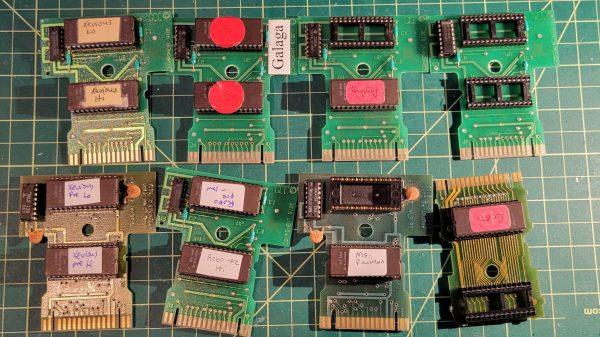
EPROMs, those UV-erasable memory chips of the 80s and 90s, once played a crucial role in countless electronic devices. They’ve become relics of a bygone era, but for enthusiasts of vintage electronics, the allure of these light-sensitive devices remains strong. Today, we’re diving into [Kevin Osborn]’s nostalgic journey as he uncovers the secrets of old EPROMs loaded with Atari 7800 code.

[Kevin] used to work at General Computer Company, which produced the Atari 7800 and several games for the system. Thus, he had a handful of old carts and development EPROMs sitting up in his attic along with an old console. Recently, he decided to try and uncover what was on the EPROMs and begun an investigation. They wouldn’t run in his Atari, and he quickly realized why: the EPROMs weren’t cryptographically signed, so the system wouldn’t load them. Continue reading “Working With Old High-Voltage EPROMs Is Fussy”

EPROM Does VGA

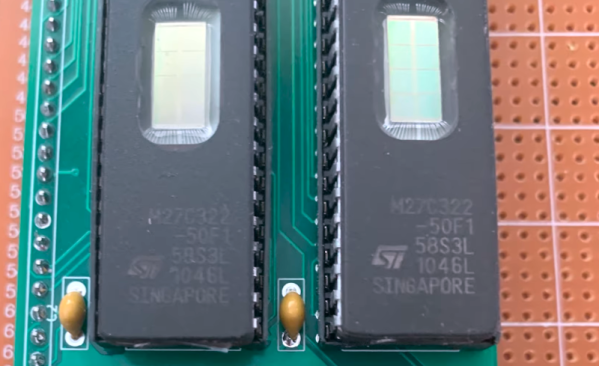
If you wanted to create a VGA card, you might think about using an FPGA. But there are simpler ways to generate patterns, including an old-fashioned EPROM, as [DrMattRegan] points out in a recent video.

Generating video signals is an exercise in periodicity. After all, an old-fashioned CRT just scans at a certain horizontal frequency and refreshes the entire screen each time it starts over. VGA is made to drive this technology. An EPROM chip can easily generate repeating patterns when driven by a counter at a known frequency.

As you might expect, there were a few software glitches to work out, but in the end, the circuit did its job, displaying a fixed image on a VGA monitor.

If you haven’t run into [Matt] before, he has a complete series on how he built a “wire-by-wire” Apple II clone. We will warn you, though. Don’t click on the link unless you have some spare time. The 18 videos take over two hours to work through, but there is some beautiful prototyping and a lot of good information in them.

You can go even lower tech for a VGA card, if you like. Just try not to look like this breadboard.

Continue reading “EPROM Does VGA”

An Old Netbook Spills Its Secrets

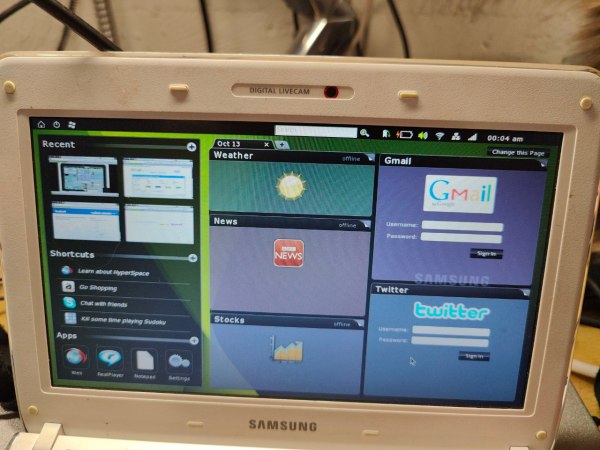
For a brief moment in the late ’00s, netbooks dominated the low-cost mobile computing market. These were small, low-cost, low-power laptops, some tiny enough to only have a seven-inch display, and usually with extremely limiting hardware even for the time. There aren’t very many reasons to own a machine of this era today, since even the cheapest of tablets or Chromebooks are typically far more capable than the Atom-based devices from over a decade ago. There is one set of these netbooks from that time with a secret up its sleeve, though: Phoenix Hyperspace.

Hyperspace was envisioned as a way for these slow, low-power computers to instantly boot or switch between operating systems. [cathoderaydude] wanted to figure out what made this piece of software tick, so he grabbed one of the only netbooks that it was ever installed on, a Samsung N210. The machine has both Windows 7 and a custom Linux distribution installed on it, and with Hyperspace it’s possible to switch almost seamlessly between them in about six seconds; effectively instantly for the time. Continue reading “An Old Netbook Spills Its Secrets”

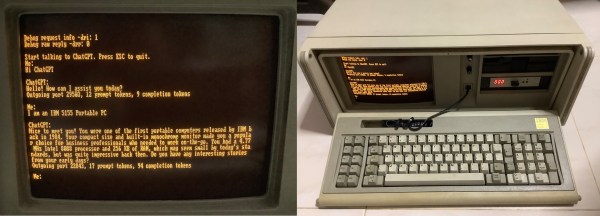
A ChatGPT client running on an IBM Portable PC

MS-DOS Client Brings ChatGPT To The IBM PC

AI-powered chatbots are clearly the future of computing, and it’s only a matter of time before you’ll see them appear on every internet-connected gadget. If you thought you were safe from this by sticking to an ancient MS-DOS PC though, think again: [Yeo Kheng Meng] has recently written a ChatGPT client that runs on DOS.

[Yeo Kheng Meng] didn’t cheat by simply running MS-DOS on a modern PC, either: he tested the client on a real 1984 vintage IBM 5155 Portable PC. This semi-portable PC/XT model sports a 4.77 MHz 8088 CPU, 640 kB of RAM and a CGA video card with a built-in monochrome monitor. An NE2000 ISA network card, running in 8-bit mode, enables the Portable to connect to the internet.

Running the client couldn’t be simpler: just run doschgpt.exe and type in your question. [Yeo Kheng Meng] developed this program using the Open Watcom C/C++ compiler, which was the compiler of choice for most DOS game developers back in the day. Networking support was provided by an era-appropriate packet driver together with MTCP, a TCP/IP stack developed by [Michael Brutman] for DOS-based internet applications.

Connecting to the ChatGPT API and parsing the results was pretty straightforward, but implementing the required TLS encryption was not. Even if there was a library available for MS-DOS, the 5155 wouldn’t have enough CPU power to run it in real time, so [Yeo Kheng Meng] decided to run that bit of the networking stack on a modern PC and send an unencrypted HTTP stream to the DOS client.

The end result is a delightful retro-futuristic setup that seems to have come straight out of a 1980s science fiction movie. We can already picture it together with a Commodore 64 reporting the news and an IRC server running on an IBM PC. Continue reading “MS-DOS Client Brings ChatGPT To The IBM PC”

The 4004 Upgrade You’ve Been Waiting For

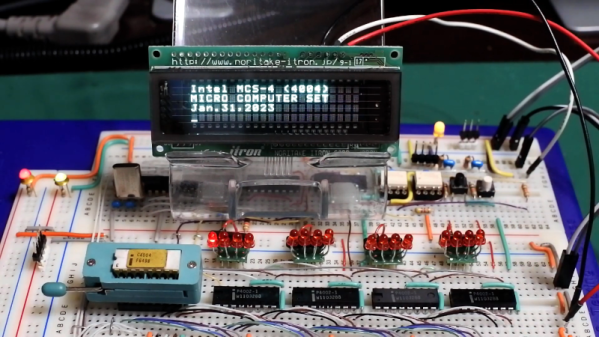
You know how it is. You have an older computer, and you can’t run the latest software on it. Time to upgrade, right? Well, if you have been in this situation a very long time, [ryomuk] may have an answer for you. The emu8080on4004 project (Google Translate) offers a way to run 8080 code on a 4004 CPU. Finally!

The 4004 development board is a homebrew affair, and the emulator works well enough that an 8080 Tiny BASIC interpreter ran with very few changes to the source code. You can see it working in the video below. It would be cool to run CP/M, but we imagine that would be a little harder, especially resource-wise.

A few things are missing. For example, the DAA instruction doesn’t exist, and there are no provisions for interrupts. There’s only one I/O port, and using the IN instruction will block until you receive a serial port character. There is an option to implement the parity flag in the 8080 flags register, but its operation is untested.

Still, pretty impressive for a 4-bit CPU running at 740 kHz with very little memory. If you want to see more about the development board itself, check out the second video below. Want to know more about the chip that launched a family of processors that is still around? Read its biography. You can also read about the designer who put his signature on the die.

Continue reading “The 4004 Upgrade You’ve Been Waiting For”