Gift Idea From 1969: A Kitchen Computer

The end of the year is often a time for people to exchange presents and — of course — the rich want to buy each other the best presents. The Neiman Marcus company was famous for having a catalog of gift ideas. Many were what you’d consider normal gifts, but there were usually extreme ones, like a tank trunk filled with 100,000 gallons of cologne. One year, the strange gift was an authentic Chinese junk complete with sails and teak decks. They apparently sold three at $11,500 (in 1962 money, no less). Over the top? In 1969, they featured a kitchen computer.

Wait a minute! In 1969, computers were the purview of big companies, universities, and NASA, right? Well, not really. By that time, some industrial minicomputers were not millions of dollars but were still many thousands of dollars. The price in the catalog for the kitchen computer was $10,600. That’s about $86,000 in today’s money. The actual machine was a Honeywell 316, based on one of the computers that helped run the early Internet.

Continue reading “Gift Idea From 1969: A Kitchen Computer”

Dirty TRS-80 Has A Surprise Hack

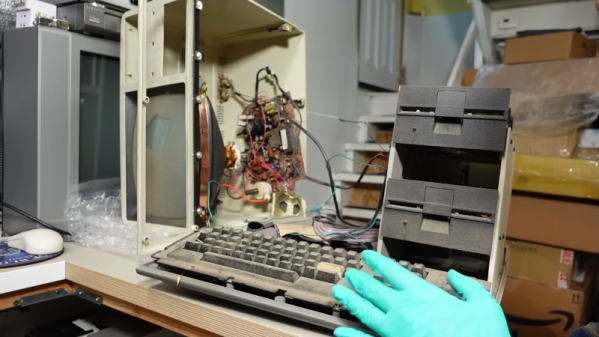
[Adrian] had a TRS-80 model IV that looks like it was stored in a mulch pile. However, it seemed to have some surprises. The first hint that something was up was that the keyboard looks like a model III and there are two mystery knobs in the back.

So what’s going on? You” have to watch [Adrian’s] video below to find out. At about the six-minute mark, you’ll find that things are not at all what you might think.

Continue reading “Dirty TRS-80 Has A Surprise Hack”

The PalmPilot Returns, This Time In Your Browser

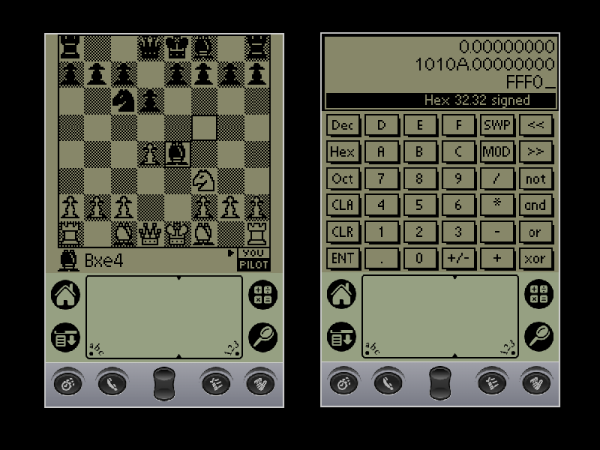
The PalmPilot doesn’t seem to get much retrocomputing love, but maybe it should. After all, it might not have been the very first handheld, but it was probably the most successful, and that ultimately led to the era of the smartphone. Whether you miss your old Palm applications, or never got to experience them the first time around, fear not. You can now relive them in all their glory in your browser thanks to the Internet Archive project.

There are over 500 applications and games all running in a browser-based emulator. Some of the programs don’t seem to work well, and some don’t make sense in the context of a virtual environment. But many work fine, and if you want the classic apps, just open up anything and press the home button. If you want a review of the Palm IIIe PDA from 1999, check out [VWestlife’s] video, below.

The Grafitti handwriting recognition system was state-of-the-art for the day. The key was the system could more easily recognize printing if it were mostly single strokes that always worked the same way. For example, the “A” had no crossbar and the “F” was missing the bottom horizontal line. As much as possible, you make letters with a single stroke and there was only one way to form each letter. Good times!

What was high tech back then you can now build out of spare parts. If you happen to have a Palm, you might consider giving it a much-needed backlight.

Continue reading “The PalmPilot Returns, This Time In Your Browser”

A Cycle-Accurate Intel 8088 Core For All Your Retro PC Needs

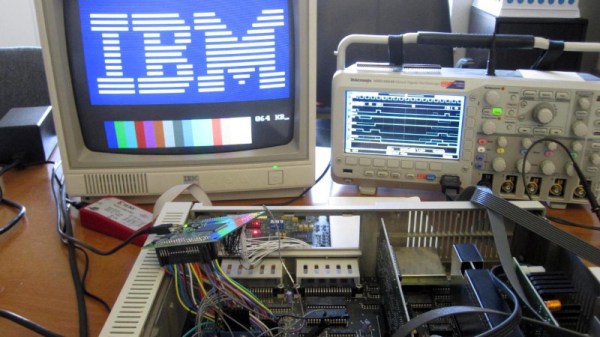
A problem faced increasingly by retrocomputer enthusiasts everywhere is the supply of chips. Once a piece of silicon goes out of production its demand can be supplied for a time by old stock and second hand parts, but as they become rare so the cost of what can be dubious parts accelerates out of reach. Happily for CPUs at least, there’s a ray of hope in the form of FPGA-based cores which can replace the real thing, and for early PC owners there’s a new one from [Ted Fried]. MCL86 is a cycle accurate Intel 8088 FPGA Core that can be used within an FPGA design or as a standalone in-circuit replacement for a real 8088. It even has a full-speed mode that sacrifices cycle accuracy and can accelerate those 8088 instructions by 400%.

Reading the posts on his blog, it’s clear that this is a capable design, and it’s even been extended with a mode that adds cache RAM to mirror the system memory at the processor’s speed. You can find all the code in a GitHub repository should you be curious enough to investigate for yourself. We’ve pondered in the past where the x86 single board computers are, perhaps it could be projects like this that provide some of them.

Stack Trace From The 1950s Punches Again

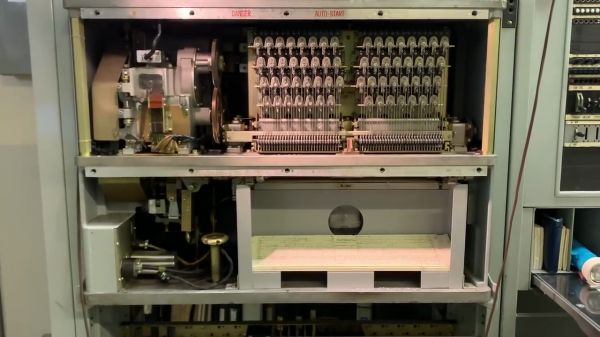
This repair/tutorial video by the telephone Connections Museum of Seattle features an amazing piece of electro-mechanical technology from the 1950s — the 5XB trouble recorder. Museum volunteer Sarah the “Switch Witch” has a deep passion for old phone equipment, and gives an excellent description of the trouble recorder, the problems it solved, and how it works, and how they went about fixing it.

As central office switching became more complex and more dense, the manual methods of hunting down faults became unmanageable. Semi-automatic approaches using trouble lamps, but even that had its limits. This “stack trace”, which could have hundreds of indicators, had to be frozen while the technician recorded the status on a form. If another fault came along during this time, it was lost. The solution, using the available technology of the day, was a mind-boggling punched card apparatus that punches over a thousand bits of information when an switching error is detected or when various watchdog timers expire.

Continue reading “Stack Trace From The 1950s Punches Again”

A Handy Guide To The Humble BBS

Some of us who’ve been online since the early days fondly remember the web of yore — with its flashing banners, wildly distracting backgrounds, and automatic side-scrolling text. But there was a time before the worldwide web and the Internet as we recognize it today, and the way of communicating in this before-time was through Bulletin Board Systems, or BBS. There are still some who can cite this deep magic today, and this page is perhaps the definitive guide to this style of retrocomputing.

This how-to is managed by [Blake.Patterson] who is using a wide variety of antique machines and some modern hardware in order to access the BBSes still in service. He notes in this guide that it’s possible to use telnet and a modern computer to access them, but using something like an Amiga or Atari will give you the full experience. There are some tools that convert the telephone modem signals from that original hardware to something that modern networking equipment can understand, and while the experience might be slightly faster as a result, it does seem to preserve the nostalgia factor quite well.

For those looking for more specific guides, we’ve featured [Blake]’s work a few times in the past, once with an antique Epson PX-8 laptop and again with a modern ESP8266. It doesn’t take much computing power to get connected to these old services, so grab whatever you can and start BBSing!

NABU PC – A 1984 Z-80 Computer You Can Buy Today

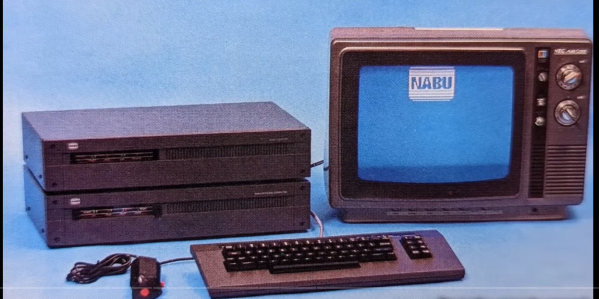
Want to hack on brand new 8-bit 1980s hardware? Until recently you needed a time machine, or deep pockets to do this. All that has recently changed with the NABU PC. A retro machine that can be bought brand new for $59.99, (plus shipping) no time machine needed.

[Adrian] has one in his Digital Basement, and breaks it all down for us. The NABU PC was a Canadian computer.  Designed to connect to the cable TV network, the standard system had no internal secondary storage. You read that right; the NABU used the cable network to download and play games, view documents — just about anything you’d want to do with a computer. Cable modems back in the 80s — maybe someone did have a time machine?

Unfortunately, the NABU network failed. Not due to the PC’s hardware, but because the cable system back then was not designed for bidirectional data. While the NABU PC did see a limited release in Canada, was never widely successful. When production was shut down, the machines couldn’t be liquidated, as they didn’t do anything without the network. So in the warehouse, they sat, until this month, where can find them being sold on eBay.

So what’s inside a NABU? It starts with a Z-80 CPU sporting 64 kB of RAM. A TMS9918 handles video, while a General Instrument AY-3-8910 does the sound.  There are also two UARTs. An 8251 for serial io to the keyboard and joysticks, and a high-performance UART chip to handle comms with the network adapter. The keyboard is loaded with good old ALPS switches, and [Adrian] found it rather impressive.

That’s all well and good, but what can you actually do with a NABU PC? Right now, not much. The ROM software comes up and looks for the network adapter, then complains when it doesn’t find it. This means it’s hacking time! An army of retrocomputing enthusiasts are already working on bringing back the NABU computer. Check [Adrian]’s video description for all the documentation links, and check here on Hackaday for the latest updates!

This isn’t our first time watching this sort of liquidation — remember the HP touchpad?

Continue reading “NABU PC – A 1984 Z-80 Computer You Can Buy Today”