Circuit Playground – An Electronics Reference App From Adafruit

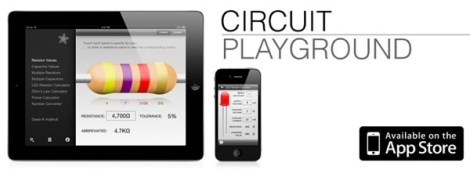
It’s not everyday that we review software around here, but the folks at Adafruit recently put together an iOS app that I figured might be of interest. Their iPad/iPhone compatible application is called “Circuit Playground”, and it includes all sorts of handy electronics reference tools. For the context of this review, it should be noted that I paid for the application myself, and that I have had no communication with the Adafruit team regarding my assessment of the app.

Continue reading “Circuit Playground – An Electronics Reference App From Adafruit”
Using Google Documents As A Web Proxy

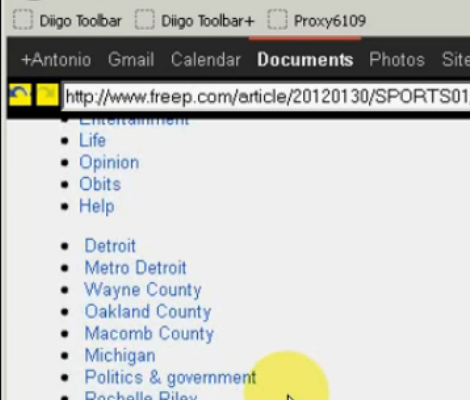
As weird as it might sound, there’s a way to use Google documents as a web proxy. The image above is a screenshot of [Antonio] demonstrating how he can view text data from any site through the web giant’s cloud applications. Certain sites may be blocked from your location, but the big G can load whatever it wants. If all you need is the text, then so can you.

The hack takes advantage of the =IMPORTDATA() function of Google Spreadsheet. We guess the command is meant to make import of XML data possible, but hey, that’s pretty much what HTML data is too, right? But what good it the raw webpage code in a spreadsheet? This is where [Antonio] made a pretty brilliant leap in putting this one together. He authored a bookmarklet that provies a navigation interface, hides the raw code which is stored in the spreasheet, and renders it in the browser. This ties together a user supplied URL, reloading data on the hidden spreadsheet and refreshing the window as necessary. See for yourself in the clip after the break.

Continue reading “Using Google Documents As A Web Proxy”

How To Add Flair To A Webpage That Shows Your Project Data

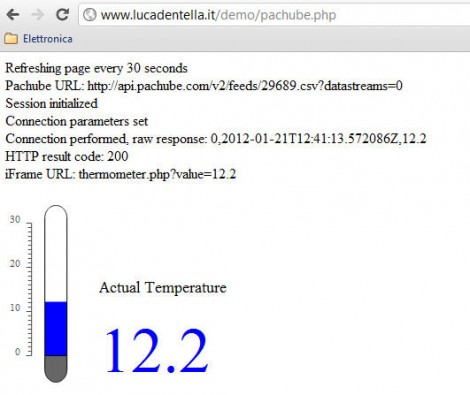
This temperature display may not knock your socks off, but it’s a simple demonstration of how you can used vector graphics as a web readout for data (translated). [Luca] wrote this four page tutorial to help others, he makes it look really easy, and the sky’s the limit on eye candy once you get he basics in place.

The first step is to create the dynamic SVG (vector graphic) file using Inkscape that will be used by the webpage. This starts with a static background, in this case the grey parts of the thermometer which will not change. Over the top the blue parts were added, with just a bit of XML editing to give those parts a hook which will be used in the next step. The demo above will have a moving blue bar and changing numeric output to match data coming in from a temperature sensor.

An SVG file is just a text file that is rendered as a graphic when loaded. [Luca] shows you how to used the identifiers set up when making the graphic to dynamically change the size and value of the blue parts with server-side PHP before sending the graphic to the browser. With that in place you just need to give the PHP file access to the data. He shows how to use the Pachube API but you could just as easily get this via serial or otherwise.

Real-time Depth Smoothing For The Kinect

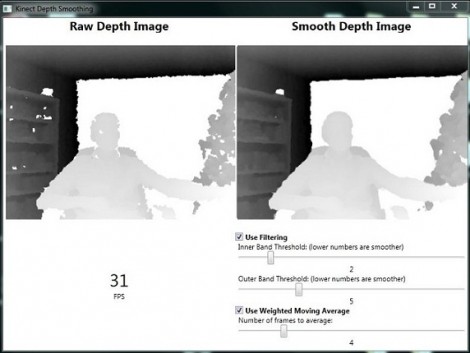
[Karl] set out to improve the depth image that the Kinect camera is able to feed into a computer. He’s come up with a pre-processing package which smooths the depth data in real-time.

There are a few problems here, one is that the Kinect has a fairly low resolution, it is also depth limited to a range of about 8 meters from the device (an issue we hadn’t considered when looking at Kinect-based mapping solutions). But the drawbacks of those shortcomings can be mitigated by improving the data that it does collect. [Karl’s] approach is twofold: pixel filtering, and averaging of movement.

The pixel filtering works with the depth data to help clarify the outlines of objects. Weighted moving average is used to help reduce the amount of flickering areas rendered from frame to frame. [Karl] included a nice GUI with the code which lets you tweak the filter settings until they’re just right. See a demo of that interface in the clip after the break and let us know what you might use this for by leaving a comment.

Continue reading “Real-time Depth Smoothing For The Kinect”

Doom For Your Calculator Gets A Color Upgrade

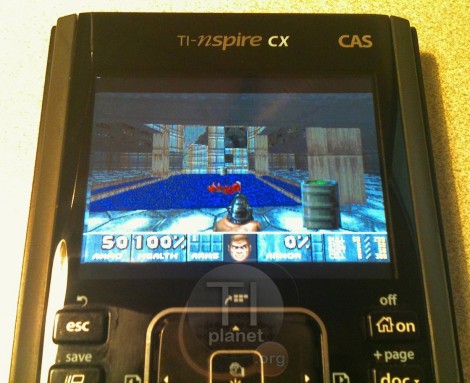
You’re not still playing nDoom in black and white, are you? What decade do live in? Thankfully, the Doom port for TI-nspire calculators has been upgraded to support color. That is if you’ve got the hardware to run it.

The video after the break (and the image above) shows a TI-nspire CX running the popular first-person-shooter. It’s seen several upgrades since the beta version which we saw piggy-backed with a different TI-83 hack a year ago. The control scheme has been tweaked, and a menu system was added. It’s not the same on-screen menu that you would see with the DOS version of the game, but it accomplishes that same thing. This port is packaged with the Ndless program that unlocks the hardware so that you can perform your own hacks.

Unfortunately there is still no sound available for the game but that is a project for a different time. We know it must be possible because we’ve seen a TI-84+ used to play music stored on a thumb drive. Continue reading “Doom For Your Calculator Gets A Color Upgrade”

Forget Siri – Make Wolfram Alpha Your Personal Assistant

So you can spend a bundle on a new phone and it comes with a voice-activated digital assistant. But let’s be honest, it’s much more satisfying if you coded up this feature yourself. Here’s a guide on doing just that by combining an Asterisk server with the Wolfram Alpha API.

Asterisk is a package we are already familiar with. It’s an open source Private Branch Exchange suite that lets you build your own telephone network. Chances are, you’re not going to build one just for this project, but if you do make sure to document the process and let us know about it. With the Asterisk server in place you just need to give the assistant script an extension (in this case it’s 4747).

But then there’s the problem of translating your speech into text which can be submitted as a Wolfram query. There’s an API for that too which uses Google to do that translation. From there you can tweak abbreviations and other parameters, but all-in-all your new assistant is ready to go. Call it up and ask what to do when you have a flat tire (yeah, that commercial drives us crazy too).

[Thanks M]

Help [Chris] Boot His Cray-1 Supercomputer

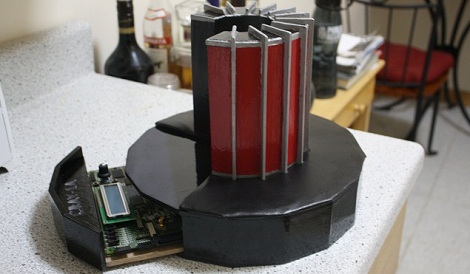
[Chris Fenton] needs your help. After constructing a 1/10th scale, cycle accurate Cray-1 supercomputer and finding a disk with Cray software on it, he’s ready to start loading the OS. There’s a small problem, though: no one knows how to boot the thing.

[Chris] posted a disk image for a Cray-1/X-MP with the help of the people at archive.org. Now he needs your help – if you think you can reverse engineer the file system, [Chris] will pay handsomely with a miniature model of a Cray printed on his MakerBot. In any case, it seems like a fun challenge.

From our quick glance at the disk image with a HEX editor, it looks like [Chris] has something special on his hands. We see a few references to “Cray memory and registers,” as well as “IOP-0 Kernel, Version 4.2.2” in the header along with a few dates referencing July of 1989.  This is consistent with the history of the source disk pack. If you think you’ve got what it takes to reverse engineer the file system of a Cray-1, this is your chance.