VCF East 2018: The Mail Order App Store

Today we take the concept of a centralized software repository for granted. Whether it’s apt or the App Store, pretty much every device we use today has a way to pull applications in without the user manually having to search for them on the wilds of the Internet. Not only is this more convenient for the end user, but at least in theory, more secure since you won’t be pulling binaries off of some random website.

But centralized software distribution doesn’t just benefit the user, it can help developers as well. As platforms like Steam have shown, once you lower the bar to the point that all you need to get your software on the marketplace is a good idea, smaller developers get a chance to shine. You don’t need to find a publisher or pay out of pocket to have a bunch of discs pressed, just put your game or program out there and see what happens. Markus “Notch” Persson saw his hobby project Minecraft turn into one of the biggest entertainment franchises in decades, but one has to wonder if it would have ever gotten released commercially if he first had to convince a publisher that somebody would want to play a game about digging holes.

In the days before digital distribution was practical, things were even worse. If you wanted to sell your game or program, it needed to be advertised somewhere, needed to be put on physical media, and it needed to get shipped out to the customer. All this took capital that would easily be beyond many independent developers, to say nothing of single individuals.

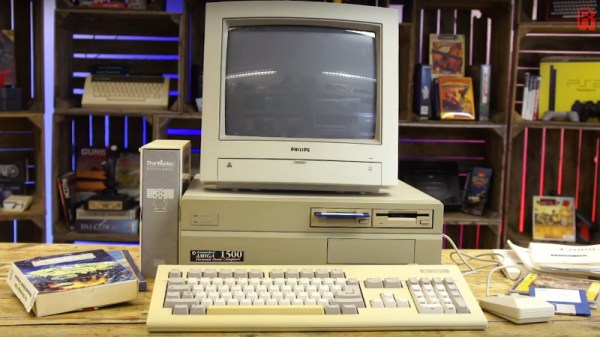
But at the recent Vintage Computer Festival East, [Allan Bushman] showed off relics from a little known chapter of early home computing: the Atari Program Exchange (APX). In a wholly unique approach to software distribution at the time, individuals were given a platform by which their software would be advertised and sold to owners of 8-bit machines such as the Atari 400/800 and later XL series computers. In the early days, when the line between computer user and computer programmer was especially blurry, the APX let anyone with the skill turn their ideas into profit. Continue reading “VCF East 2018: The Mail Order App Store”

Rolling Old School With Copy Protection From The 1980s

Oh, for the old days when sailing the seas of piracy was as simple as hooking a couple of VCRs together with a dubbing cable. Sure, the video quality degraded with each generation, but it was so bad to start out with that not paying $25 for a copy of “Ghostbusters” was a value proposition. But then came The Man with all his “rules” and “laws” about not stealing, and suddenly tapes weren’t so easy to copy.

If you’ve ever wondered how copy protection worked in pre-digital media, wonder no more. [Technology Connections] has done a nice primer on one of the main copy protection scheme from the VHS days. It was dubbed “Analog Protection System” or “Analog Copy Protection” by Macrovision, the company that developed it. Ironically, Macrovision the company later morphed into the TiVo Corporation.

The idea for Macrovision copy protection was to leverage the difference between what a TV would accept as a valid analog signal and what the VCR could handle. It used the vertical blanking interval (VBI) in the analog signal, the time during which the electron beam returns to the top of the frame. Normally the VBI has signals that the VCR uses to set its recording levels, but Macrovision figured out that sending extra signals in the VBI fooled the VCR’s automatic gain controls into varying the brightness of the recorded scenes. They also messed with the vertical synchronization, and the effect was to make dubbed tapes unwatchable, even by 1985 standards.

Copy protection was pretty effective, and pretty clever given the constraints. With Digital Rights Management, it’s easier to put limits on almost anything — coffee makers, arcade games, and even kitty litter all sport copy protection these days. It almost makes us nostalgic for the 80s.

Continue reading “Rolling Old School With Copy Protection From The 1980s”

VCF East 2018: The Desktop ENIAC

The ENIAC, or Electronic Numerical Integrator and Computer, is essentially the Great Great Grandfather of whatever device you’re currently reading these words on. Developed during World War II for what would be about $7 million USD today, it was designed to calculate artillery firing tables. Once word got out about its capabilities, it was also put to work on such heady tasks as assisting with John von Neumann’s research into the hydrogen bomb. The success of ENIAC lead directly into the development of EDVAC, which adopted some of the now standard computing concepts such as binary arithmetic and the idea of stored programs. The rest, as they say, is history.

But ENIAC wasn’t just hugely expensive and successful, it was also just plain huge. While it’s somewhat difficult for the modern mind to comprehend, ENIAC was approximately 100 feet long and weighed in at a whopping 27 tons. In its final configuration in 1956, it contained about 18,000 vacuum tubes, 7,000 diodes, 70,000 resistors, 10,000 capacitors, and 6,000 switches. All that hardware comes with a mighty thirst for power: the ENIAC could easily suck down 150 kW of electricity. At the time this all seemed perfectly reasonable for a machine that could perform 5,000 instructions per second, but today an Arduino would run circles around it.

This vast discrepancy between the power and size of modern hardware versus such primordial computers was on full display at the Vintage Computer Festival East, where Brian Stuart demonstrated his very impressive ENIAC emulator. Like any good vintage hardware emulator, his project not only accurately recreates the capabilities of the original hardware, but attempts to give the modern operator a taste of the unique experience of operating a machine that had its heyday when “computers” were still people with slide rules. Continue reading “VCF East 2018: The Desktop ENIAC”

A Smarter PSU Converter Leaves The Magic Smoke Inside

Over the years, computers have become faster, but at the same time, more power hungry as well. Way back around the 386 era, most PCs were using the AT standard for power supplies. Since then, the world moved on to the now ubiquitous ATX standard. Hobbyists working on older machines will typically use these readily available supplies with basic adapters to run old machines, but [Samuel] built a better one.

Most AT to ATX adapters are basic passive units, routing the various power lines where they need to go and tying the right pin high to switch the ATX supply on. However, using these with older machines can be fraught with danger. Modern supplies are designed to deliver huge currents, over 20 A in some cases, to run modern hardware. Conversely, a motherboard from the early 90s might only need 2 or 3A. In the case of a short circuit, caused by damage or a failed component, the modern supply will deliver huge current, often damaging the board, due to the overcurrent limit being set so high.

[Samuel]’s solution is to lean on modern electronics to build an ATX to AT adapter with programmable current protection. This allows the current limit to be set far lower in order to protect delicate boards. The board can be set up in both a “fast blow” and a “slow blow” mode to suit various working conditions, and [Samuel] reports that with alternative cabling, it can also be used to power up other old hardware such as Macintosh or Amiga boards. The board is even packed with extra useful features like circuitry to generate the sometimes-needed -5V rail. It’s all programmed through DIP switches and even has an OLED display for feedback.

It’s an adapter that could save some rare old hardware that’s simply irreplaceable, and for that reason alone, we think it’s a highly important build. We’ve talked about appropriate fusing and current limiting before, too – namely, with LED strips. 


Spared No Expense: Cloning The Jurassic Park Explorer

While you’d be hard pressed to find any serious figures on such things, we’d wager there’s never been a vehicle from a TV show or movie that has been duplicated by fans more than the Staff Jeeps from Jurassic Park. Which is no great surprise: not only do they look cool, but it’s a relatively easy build. A decent paint job and some stickers will turn a stock Wrangler into a “JP Jeep” that John Hammond himself would be proud of.

While no less iconic, there are far fewer DIY builds of the highly customized Ford Explorer “Tour Vehicles”. As a rather large stretch of the film takes place within them, the interiors were much more detailed and bears little resemblance to the stock Explorer. Building a truly screen accurate Jurassic Park Tour Vehicle was considered so difficult that nobody has pulled it off since the movie came out in 1993. That is until [Brock Afentul] of PropCulture decided to take on the challenge.

In an epic journey spanning five years, [Brock] has created what he believes is the most accurate Jurassic Park Tour Vehicle ever produced; and looking at the side by side shots he’s done comparing his Explorer to the ones from the movie, it’s hard to disagree. A massive amount of work went into the interior, leaving essentially nothing untouched. While previous builds have tried to modify the stock dashboard to look like the one from the movie, he built a completely new dash from MDF and foam and coated it in fiberglass. The center console featuring the large display was also faithfully reproduced from the movie, and runs screen accurate animations, maps, and tour information. The seats also had to be replaced, multiple times in fact, as he had a considerable amount of trouble getting somebody to upholster them to his standards.

But perhaps the most difficult component of all was the clear acrylic roof bubble. These were critical to filming the movie, as they not only let the viewer see down into the Tour Vehicles but also let the characters see out during the iconic tyrannosaurus attack. But because the roof bubble was created only for the movie and never existed as a real aftermarket product, it usually gets ignored in Tour Vehicle builds. It’s simply too difficult to produce for most people. The omission of the bubble was always considered a case of artistic license; in the same way nobody expects a replica DeLorean from Back to the Future to actually fly or travel through time.

But [Brock] wanted to take his Tour Vehicle all the way, so he partnered up with a local glass shop that let him rent time in their oven so he could heat up acrylic sheets. Once heated to the appropriate temperature, they could be removed and wrapped around a mold to make the bubble. The process took weeks to perfect, but in the end he and a few friends got the hang of it and were able to produce a gorgeous roof bubble that they fitted to the already very impressive Explorer.

While previous Jurassic Park Tour Vehicle replicas were unquestionably awesome, this build really does take it to the next level. Short of equipping the garage with a movie-accurate super computer, it’s hard to see how the bar can get any higher.

A Parallel Port Synthesiser For Your DOS PC

It is a great shame that back in the days when a typical home computer had easy low-level hardware access that is absent from today’s machines, the cost of taking advantage of it was so high. Professional PCBs were way out of reach of a home constructor, and many of the integrated circuits that might have been used were expensive and difficult to source in small quantities.

Here in the 21st century we have both cheap PCBs and easy access to a wealth of semiconductors, so enthusiasts for older hardware can set to work on projects that would have been impossible back in the day. Such an offering is [Serdef]’s Tiny Parallel Port General MIDI Synthesizer for DOS PCs, a very professionally produced synth that you might have paid a lot of money to own three decades ago.

At its heart is a SAM2695 synthesiser chip, and the board uses the parallel port as an 8-bit I/O port. The software side is handled by a TSR (a Terminate and Stay Resident driver loaded at startup, for those of you who are not DOS aficionados), and there are demonstrations of it running with a few classic games.

If the chip used here interests you, you might like to look at a similar project for an Arduino. The Kickstarter we covered is now long over, but you can also find it on GitHub.

Wireless Headphone Hack Dangles Batteries Like Earrings

Koss Porta Pro headphones are something of a rarity in the world of audio gear: they’re widely regarded as sounding great, but don’t cost an exorbitant amount of money. Since the line was introduced in 1984, they’ve been the go-to headphones for those who don’t subscribe to the idea that you should have to take out a loan from the bank just to enjoy your music.

[Jake Bickhard] is a confirmed Porta Pro disciple, owning enough pairs of them that he’s cagey about confirming how many are actually kicking around his home. The only thing he doesn’t like about them is the fact that they’re wired. As it happens, Koss just recently came out with a Bluetooth version of the venerable headphones. But he thought he could do just as well combining a pair of his with a water damaged pair of Bluetooth earbuds he had lying around.

The Porta Pros are easy to take apart, and removing the old wire was no problem. He then cut the “buds” on the Bluetooth earbuds he had, with the intention of just striping the wires and soldering it up to the pads on the Porta speakers. But things didn’t quite go as expected.

What [Jake] hadn’t realized was that the battery for the Bluetooth earbuds wasn’t in the main housing, the power comes from a tiny battery inside each bud. That meant he needed to keep the batteries connected even though the Porta Pro obviously doesn’t have a spot to mount them. In the future he says he’ll address the issue properly, but for now the two batteries hang from the headphones: making it look like he’s wearing the world’s ugliest earrings. But at least he’s happy with the performance of the finished modification, saying they’re even louder now than when they were when wired.

This is a perfect project if you’re cursed with a mobile device that had enough “courage” to take the headphone jack away from you. Though you might first want to study the fine art of soldering headphone wires.