Retrotechtacular: Programming By Card

The recent Supercon 6 badge, if you haven’t seen it, was an old-fashioned type computer with a blinky light front panel. It was reminiscent of an Altair 8800, a PDP-11, or DG Nova. However, even back in the day, only a few people really programmed a computer with switches. Typically, you might use the switches to toggle in a first-level bootloader that would then load a better bootloader from some kind of storage like magnetic or paper tape. Most people didn’t really use the switches.

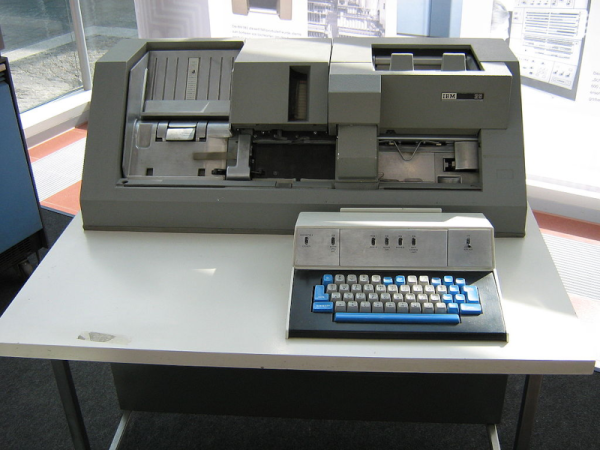
What most people did do, however, was punch cards.  Technically, Hollerith cards, although we mostly just called them cards, punched cards, or IBM cards. There were a lot of different machines you could use to punch cards, but none were as popular, I would guess, as the IBM 029. Certainly, the models in the series were overwhelmingly what people used to punch cards.

For the uninitiated, a card was about the size of an old-fashioned dollar bill — the ones in style when Herman Hollerith invented them. The card was made of material not quite as thick as a standard file folder and was divided into 80 columns and 12 rows. Later cards had more columns, but those never really caught on to the same scale as the classic 80-column card. Continue reading “Retrotechtacular: Programming By Card”

Illustrated Kristina with an IBM Model M keyboard floating between her hands.

Keebin’ With Kristina: The One With The Pumpkin Keyboard

Oh, the places plastic has taken us. One of the arguably better inventions might be the fake carve-able pumpkin, which is more or less guaranteed not to shrivel up and rot on your porch, though it might get smashed by wily teenagers along with its organic brethren next door.

Though they will be around much longer, the fake kind lend themselves to all kinds of creations, including this one from [BunkEbear] which was “a nightmare” to build. Yeah, we bet it was along the lines of [Aaron Rasmussen]’s spherical keyboard, except inside out, since that one’s concave.

This tasty keyboard is modeled after the Malling-Hansen writing ball, which is arguably the first commercial typewriter and dates to 1865. [BunkEbear]’s pumpkin version features the 54-key layout, plus two additional for Shift and Escape to suit modern needs. Since the inside of the pumpkin is pretty small, [BunkEbear] wired all the connections close together on the protoboard, and used JST extension cables between the Glorious Panda switches themselves and the Arduino Pro Micro.

Continue reading “Keebin’ With Kristina: The One With The Pumpkin Keyboard”

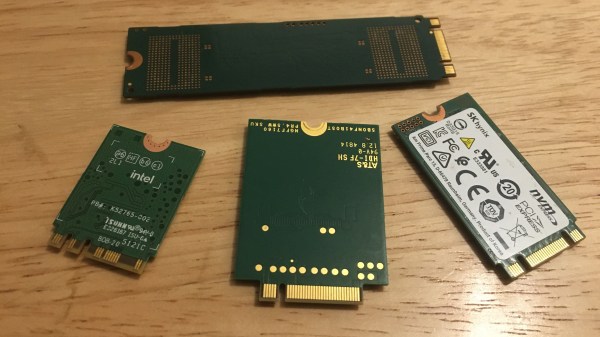
Four M.2 cards of different sizes on a desk surface

M.2 For Hackers – Cards

Last time, I’ve explained everything you could want to know if you wanted to put an M.2 socket onto your board. Today, let’s build M.2 cards! There’s a myriad of M.2 sockets out there that are just asking for a special card to be inserted into it, and perhaps, it’s going to be your creation that fits.

Why Build Cards?

Laptops and other x86 mainboards often come with M.2 slots. Do you have a free B-key slot? You can put a RP2040 and bunch of sensors on a B-key PCB as an experimental platform carried safely inside your laptop. Would you like to do some more advanced FPGA experiments? Here’s a miniscule FPGA board that fits inside your laptop and lets you play with PCIe on this same laptop – the entire setup having a super low footprint. Are you looking for an extra PCIe link because you’re reusing your laptop as a home server? Again, your WiFi slot will provide you with that. Want to get some PCIe out of a SteamDeck? Building a M-key 2230 card seems to be your only hope! Continue reading “M.2 For Hackers – Cards”

Dosimetry: Measuring Radiation

Thanks to stints as an X-ray technician in my early 20s followed by work in various biology labs into my early 40s, I’ve been classified as an “occupationally exposed worker” with regard to ionizing radiation for a lot of my life. And while the jobs I’ve done under that umbrella have been vastly different, they’ve all had some common ground. One is the required annual radiation safety training classes. Since the physics never changed and the regulations rarely did, these sessions would inevitably bore everyone to tears, which was a pity because it always felt like something I should be paying very close attention to, like the safety briefings flight attendants give but everyone ignores.

The other thing in common was the need to keep track of how much radiation my colleagues and I were exposed to. Aside from the obvious health and safety implications for us personally, there were legal and regulatory considerations for the various institutions involved, which explained the ritual of finding your name on a printout and signing off on the dose measured by your dosimeter for the month.

Dosimetry has come a long way since I was actively considered occupationally exposed, and even further from the times when very little was known about the effects of radiation on living tissue. What the early pioneers of radiochemistry learned about the dangers of exposure was hard-won indeed, but gave us the insights needed to develop dosimetric methods and tools that make working with radiation far safer than it ever was.

Continue reading “Dosimetry: Measuring Radiation”

Hackaday Links Column Banner

Hackaday Links: November 6, 2022

Remember the chip shortage? We sure do, mainly because as far as we can tell, it’s still going on, at least judging by the fact that you can’t get a Raspberry Pi for love or money. But that must just be noise, because according to a report in the Straits Times, the chip shortage is not only over, it’s reversed course enough that there’s now a glut of semiconductors out there. The article claims that the root cause of this is slowing demand for products like smartphones, an industry that’s seeing wave after wave of orders to semiconductor manufacturers like TSMC canceled. Chips for PCs are apparently in abundance now too, as the spasm of panic buying machine for remote working during the pandemic winds down. Automakers are still feeling the pinch, though, so much so that Toyota is now shipping only one smart key with new cars, instead of the usual two. So there seems to be some way to go before balance is restored to the market, but whatever — just call us when Amazon no longer has to offer financing on an 8 GB Pi.

Continue reading “Hackaday Links: November 6, 2022”

This Week In Security: OpenSSL Fizzle, Java XML, And Nothing As It Seems

The security world held our collective breaths early this week for the big OpenSSL vulnerability announcement. Turns out it’s two separate issues, both related to punycode handling, and they’ve been downgraded to high severity instead of critical. Punycode, by the way, is the system for using non-ASCII Unicode characters in domain names. The first vulnerability, CVE-2022-3602, is a buffer overflow that writes four arbitrary bytes to the stack. Notably, the vulnerable code is only run after a certificate’s chain is verified. A malicious certificate would need to be either properly signed by a Certificate Authority, or manually trusted without a valid signature.

A couple sources have worked out the details of this vulnerability. It’s an off-by-one error in a loop, where the buffer length is checked earlier in the loop than the length variable is incremented. Because of the logic slip, the loop can potentially run one too many times. That loop processes the Unicode characters, encoded at the end of the punycode string, and injects them in the proper place, sliding the rest of the string over a byte in memory as a result. If the total output length is 513 characters, that’s a single character overflow. A Unicode character takes up four bytes, so there’s your four-byte overflow. Continue reading “This Week In Security: OpenSSL Fizzle, Java XML, And Nothing As It Seems”

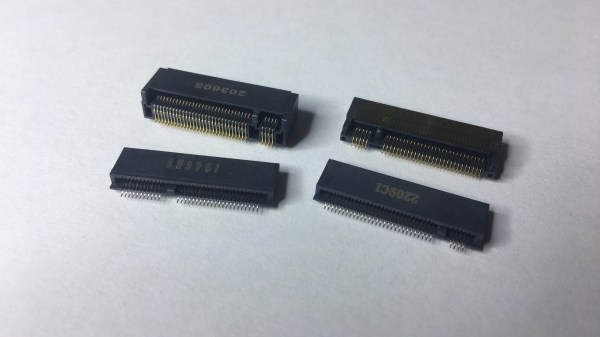
M.2 For Hackers – Connectors

In the first M.2 article, I’ve described real-world types and usecases of M.2 devices, so that you don’t get confused when dealing with various cards and ports available out there. I’ve also designed quite a few M.2 cards and card-accepting adapters myself. And today, I’d like to tell you everything you need to know in order to build M.2 tech on your own.

There’s two sides to building with M.2 – adding M.2 sockets onto your PCBs, and building the PCBs that are M.2 cards. I’ll cover both of these, starting with the former, and knowing how to deal with M.2 sockets might be the only thing you ever need. Apart from what I’ll be describing, there’s some decent guides you can learn bits and pieces from, like the Sparkfun MicroMod design guide, most of which is MicroMod-specific but includes quite a few M.2 tips and tricks too.

First, Let’s Talk About The Y-Key

What could you do with a M.2 socket on your PCB? For a start, many tasty hobbyist-friendly SoMs and CPUs now have a PCIe interface accessible, and if you’re building a development board or a simple breakout, an M.2 socket will let you connect an NVMe SSD for all your high-speed low-power storage needs – many Raspberry Pi Compute Module mainboards have M.2 M-key sockets specifically for that, and there’s NVMe support in the RPi firmware to boot. Plus, you can always plug a full-sized PCIe adapter or an extender into such a socket and connect a PCIe network card or other much-needed device – even perhaps, an external GPU! However, as much as PCIe-equipped SoMs are tasty, they’re far from the only reason to use M.2 sockets.

Continue reading “M.2 For Hackers – Connectors”