Reverse Engineering The SEGA Mega Drive

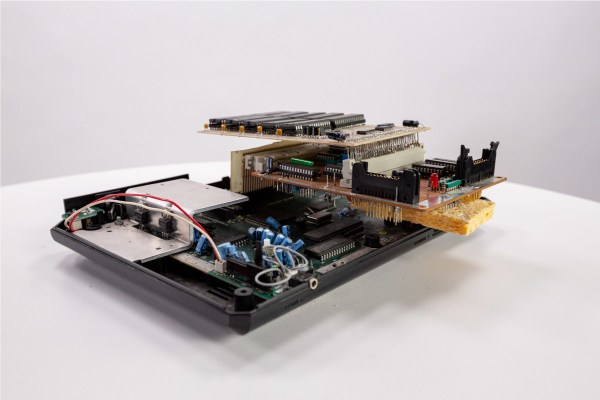
With the widespread adoption of emulators, almost anyone can start playing video games from bygone eras. Some systems are even capable of supporting homebrew games, with several having active communities that are still creating new games even decades later. This ease of programming for non-PC platforms wasn’t always so easy, though. If you wanted to develop games on a now-antique console when it was still relatively new, you had to jump through a lot of hoops. [Tore] shows us how it would have been done with his Sega Mega Drive development kit that he built from scratch.

While [Tore] had an Atari ST, he wanted to do something a little more cutting edge and at the time there was nothing better than the Mega Drive (or the Genesis as it was known in North America). It had a number of features that lent the platform to development, namely the Motorola 68000 chip that was very common for the time and as a result had plenty of documentation available. He still needed to do quite a bit of reverse engineering of the system to get a proper dev board running, though, starting with figuring out how the cartridge system worked. He was able to build a memory bank that functioned as a re-writable game cartridge.

With the hard parts out of the way [Tore] set about building the glue logic, the startup firmware which interfaced with his Atari ST, and then of course wiring it all together. He was eventually able to get far enough along to send programs to the Mega Drive that would allow him to control sprites on a screen with the controller, but unfortunately he was interrupted before he could develop any complete games. The amount of research and work to get this far is incredible, though, and there may be some helpful nuggets for anyone in the homebrew Mega Drive community today. If you don’t want to get this deep into the Mega Drive hardware, though, you can build a cartridge that allows for development on native Sega hardware instead.

Acid-Damaged Game Boy Restored

The original Game Boy was the greatest selling handheld video game system of all time, only to be surpassed by one of its successors. It still retains the #2 position by a wide margin, but even so, they’re getting along in years now and finding one in perfect working condition might be harder than you think. What’s more likely is you find one that’s missing components, has a malfunctioning screen, or has had its electronics corroded by the battery acid from a decades-old set of AAs.

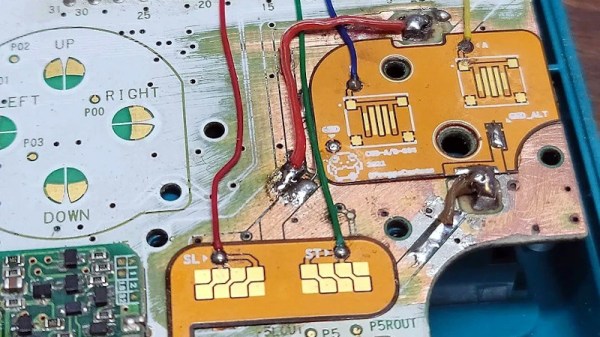
That latter situation is where [Taylor] found himself and decided on performing a full restoration on this classic. To get started, he removed all of the components from the damaged area so he could see the paths of the traces. After doing some cleaning of the damage and removing the solder mask, he used 30 gauge wire to bridge the damaged parts of the PCB before repopulating all of the parts back to their rightful locations. A few needed to be replaced, but in the end the Game Boy was restored to its former 90s glory.

This build is an excellent example of what can be done with a finely tipped soldering iron while also being a reminder not to leave AA batteries in any devices for extended periods of time. The AA battery was always a weak point for the original Game Boys, so if you decide you want to get rid of batteries of any kind you can build one that does just that.

Continue reading “Acid-Damaged Game Boy Restored” →

Miniature Space Invaders game

Arduino And An OLED Make This Space Invaders Cabinet Tiny

For as simple as it appears now, Space Invaders was one machine from the Golden Age of video games that always seemed to have a long line waiting for a chance to lose a couple of quarters. And by way of celebrating the seminal game’s influence, [Nick Cranch] has executed what might just be the world’s smallest Space Invaders replica.

It appears that this started mainly as an exercise in what’s possible with what’s on hand, which included a couple of quite small OLED displays. For the build photos it looks like there’s an Arduino Nano running the show; [Nick] relates that the chosen hardware proved challenging, and that he had to hack the driver library to make it work. Once he got a working game, [Nick] didn’t rest on his laurels. Rather, he went the extra mile and built a miniature cabinet to house everything in.

The video quality below may be poor, but it’s more than enough to see how much work he put into detailing the cabinet. The graphics of the original US release of the game cabinet are accurately represented, right down to the art on the front glass. The cabinet itself is made from 1.5 mm plywood which he cut by hand. It even looks like he recreated the original scheme of cellophane overlays on the monochrome screen to add a little color to the game. Nice touch!

We really appreciate the attention to detail here, with our only quibble being no schematics or code being posted. Hopefully, we’ll see those later, but for now, this looks like a fun project and a nice trip down memory lane. But if you think it’s too small, no worries — we’ve got a much, much bigger version of the game too.

Continue reading “Arduino And An OLED Make This Space Invaders Cabinet Tiny” →

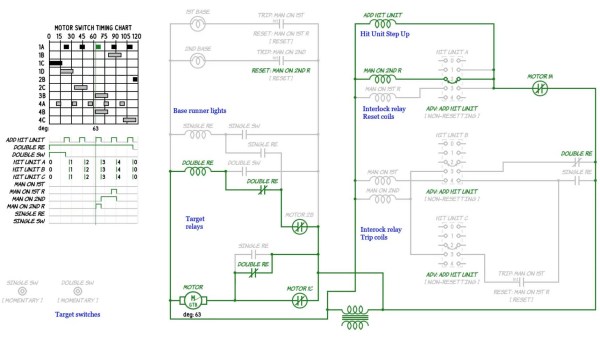
A screenshot of pinball schematics

Get A Grip On Troubleshooting Your Vintage Pinball Machine

Restoring vintage technology can be a tricky business, especially without the appropriate schematics and documentation. To this end [Mark] has spent the past twelve months building a comprehensive schematic editor and circuit simulator library for electromechanical pinball machines.

Rather than explore each and every table in excruciating detail, the emSim software aims to examine how specific circuits work, and how they are used as part of the gaming experience. The aim of the project is to aid in the diagnosis and repair of vintage electromechanical pinball machines, the types that rely on a dizzying array of switches, gears, motors and coils in their operation, operating like clockwork underneath the play field. While these older pinball machines typically use alternating current, the game logic (for the most part) is still binary, and can be effectively described with Boolean operators.

Like any machine with moving parts, these systems will eventually wear down and require servicing, a task which may not be in the wheelhouse for your casual pinball enthusiast. [Mark]’s hope is that his circuit simulations will allow just about anyone to repair these classic tables, and keep them around for future generations to explore and enjoy.

If tinkering with pinball innards isn’t for you, then make sure to check out our coverage of this awesome virtual pinball table.

Low Cost Haptic VR Gloves Work With Hacked Steam Games

[Lucas VRTech] has made some significant progress with building force-feedback type haptic gloves for use with Steam VR games. The idea is pretty straightforward: the end of the finger is attached to a cable, which is pulled from inside a sprung-loaded spool; the kind used for hanging ID cards on.

The spool body can rotate, but a peg protruding from it engages with the arm of a co-located servo motor. This produces a programmable stop position. But it is a hard stop, and it is not possible with the current hardware to detect precisely when the stop is reached, nor is it possible to control the force it is pushing with. Such features are not difficult to achieve, its just a matter of a little more development with some custom mechatronics.

The current prototype has a focus on cost, which is great as an early development platform. By leveraging 3D printing and off-the-shelf parts that are easy to source; just a handful (chuckle!) of potentiometers, some servo motors and one from any number of ESP32 dev boards and you’re done. The real work is on the software side of things, as the games themselves need to be modified to play ball with the VR glove hardware. This has been achieved with a combination of a custom steam driver they call OpenGloves, and community developed per-game mods. A few titles are available to test right now, so this is definitely something some of us could build in a weekend and get involved with.

The hardware source for the glove mount and per-finger units can be found on the project GitHub, together with the ESP32 source for Arduino.

For some other haptic-related inspiration, here’s a force-feedback mouse, and for a more hand-off feedback, we have a wind-blaster project.

Continue reading “Low Cost Haptic VR Gloves Work With Hacked Steam Games” →

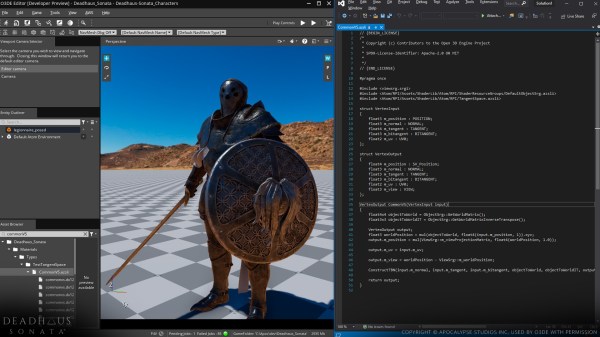
Open 3D Engine editor with Amazon Shader Language file and asset from the game Deadhaus Sonata open. (Credit: O3DE project)

Open 3D Engine: Amazon’s Old Clothes Or A Game Engine To Truly Get Excited About?

Recently Amazon announced that they would be open sourcing the 3D engine and related behind their Amazon Lumberyard game tooling effort. As Lumberyard is based on CryEngine 3.8  (~2015 vintage), this raises the question of whether this new open source engine – creatively named Open 3D Engine (O3DE) – is an open source version of a CryTek engine, and what this brings to those of us who like to tinker with 2D, 3D games and similar.

When reading through the marketing materials, one might be forgiven for thinking that O3DE is the best thing since sliced 3D bread, and is Amazon’s benevolent gift to the unwashed masses to free them from the chains imposed on them by proprietary engines like Unity and Unreal Engine. A closer look reveals however that O3DE is Lumberyard, but with many parts of Lumberyard replaced, including the renderer still in the process of being rewritten from the old CryEngine code.

What Makes a Good Game Engine?

My own game development attempts started with the Half Life engine and the Valve Hammer editor, as well as the Doom map editor. This meant that some expectations were set before encountering today’s game engines and their tools. The development experience with the Hammer editor in the late 1990s was pretty much WYSIWYG, and when I was just getting started with Unreal Engine 4 (UE4) a number of years back this was pretty much the same experience, making it relatively easy to hit the ground running. Continue reading “Open 3D Engine: Amazon’s Old Clothes Or A Game Engine To Truly Get Excited About?” →

DE10-Lite Dev Board / Game Controller

DE10-Lite-Ful FPGA Dev Board Hack Plays The 1981 Classic Defender

We’re not sure what the assignment was, but the results of [Garret Carter]’s homework for his Digital System Design class at Tennessee Tech couldn’t help but capture our attention. Below the break you can see what [Garrett] describes as a “simplified stylized version” of the 1981 arcade hit “Defender”.

With the goal of keeping the price low but keeping performance as high as possible, [Garrett] set forth to program the DE10-Lite FPGA development board in VHDL. The results are convincing, and while not perfect, came in under budget.

The DE10-Lite board gave [Garrett] the opportunity to get even more creative, using the dev board’s onboard switches, buttons, 7-segment LED’s and accelerometer to full effect. In this case, the dev board is not only the game, but also the controller and status display. A very neat hack indeed!

If you want to make your own, you can get the full project details at [Garrett]’s Github page. And [Garrett], we don’t know what marks your professor will give, but we give you an A+, would definitely play again.

While FPGA development boards aren’t necessarily inexpensive, our own Jenny List shows where you might be able to find a used but workable FPGA board for a fraction of the cost, If you know where to look.

Continue reading “DE10-Lite-Ful FPGA Dev Board Hack Plays The 1981 Classic Defender” →