Embed With Elliot: Microcontroller Makefiles

Last time on Embed with Elliot, I began my celebration of the make command’s 40th birthday next month. We discussed using the default rules and how to augment them with your own variables defined in a makefile. Next, I’ll walk you through some makefiles that can be used for real-world microcontroller code development. This week, we’ll focus on one for the AVR platform, and later on, I’ll run through a slightly more complicated version for the ST32M series of ARM Cortex micros.

Along the way, we’ll pick up a couple of tricks, but the aim is to keep the makefiles minimal, readable, and easily extensible. Once you get a little taste of the power of writing your own makefiles, you probably won’t be able to stop adding bells and whistles — custom routines for flashing, checking the size of binaries, generating assembly listings, etc. I’ll leave the extras up to you, but you’ll eventually find that anything you do can be automated with a makefile.

Continue reading “Embed With Elliot: Microcontroller Makefiles”

Retrotechtacular: Eidophor, An Unknown Widely Used Projector

If you own a video projector, be it a module small enough to fit in a mobile phone or one designed for a cinema screen, the chances are it will have a DLP at its heart. An array of microscopic mirrors on an integrated circuit, the current state of the art in video projection technology.

Perhaps you own an older video projector, or maybe a cheaper new one. If so the chances are it’ll have a small LCD screen doing its work, taking the place of the Kodachrome in something very similar to your grandparents’ slide projector or their grandparents’ magic lantern.

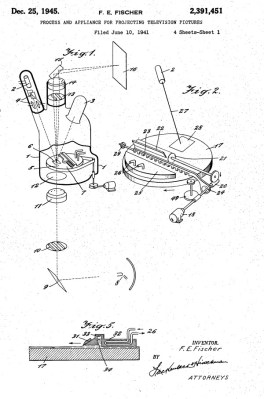
eidophore-patent-image-600pxLCD technology was invented in the 1970s, while DLP was invented at the end of the 1980s. So how did the video projectors that were such a staple of televised spectaculars in the preceding decades work? For that matter, how did NASA project their status displays on the huge screen at Mission Control? Certainly not with CRT technology, even the brightest CRT projectors weren’t up to filling a cinema-sized screen.

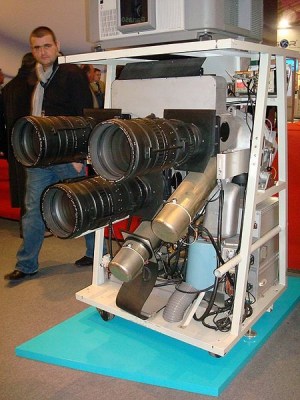
The answer came from the Eidophor (Greek: ‘eido’ and ‘phor’, ‘image’ and ‘bearer’), a device invented in the years before World War II by the Swiss physicist Dr. Fritz Fischer and granted a US patent in 1945. It featured a complex vacuum device in which an electron gun painted the video frames as a raster on an oil-covered mirror in the light path of a fairly conventional projector. High-voltage electric charges have the effect of deforming the surface of mineral oils, and it was this effect that was exploited to vary the effectiveness of the mirror as the raster was drawn. An unfortunate side-effect of tracing an oil surface with an electron beam is that a charge will build up on the oil surface, so the entire oil-covered mirror assembly had to rotate within its vacuum enclosure and pass under an electrode which removed any charge build-up.

Eidophor-wikipedia
Eidophor [by Topquark2 CC-BY-SA 3.0]
The resulting machine as seen in this 1952 issue of Popular Science was very large, complex, and expensive to run, but delivered by far the brightest and sharpest projected video available. In a literal sense they painted the backdrop to our culture, as they found a home not only in NASA’s control room but in television studios and at large televised events. This Shirley Bassey performance from the 1960s for example, or the spectacular video light show on this rather poor quality VHS YouTube clip from Seville Expo 1992.

You will probably be unaware of the exact date you last saw an eidophor performance. Quince Imaging tell us their last one was used at the TWA Dome in St Louis in July 2000. Eidophores may have become more compact over the decades but they remained costly to run, and through the 1990s they were suplanted by DLP devices that did substantially the same job with a lot less fuss.

It is not often that a search in the Hackaday archives for a technology returns no results, but the eidophor is one of those cases. Perhaps that is a fitting epitaph for a device that created its own show but never starred in it, that it is only its spectacular performances that live on.

Hackaday Links: March 13, 2016

Way back in 2014, Heathkit was a mystery. We knew someone was trying to revive the brand, but that was about it. Adafruit pulled out all the stops to solve this mystery and came up with nothing. The only clue to the existence of Heathkit was a random person who found a geocache in Brooklyn Bridge Park. Since then, Heathkit has released an odd AM radio kit and $150 antenna. These offerings only present more mysteries, but at least [Paul] was finally rewarded for finding the Heathkit geocache. Heathkit sent [Paul] the AM radio kit. He says it’s neat and well documented.

[David] is doing his masters thesis on, “The motivation of the maker community”. That means empirical data, and that (usually) means surveymonkey. You can take his survey on the motivations of the maker community here.

America’s best loved companies, Verizon and Makerbot, together at last.

The BeagleBone Black was launched in 2013. The BeagleBone Green – a Seeed joint – showed up last August. The BeagleBone Blue, released just a few months ago, is a collaboration between the UCSD engineering department and TI. Now there’s the BeagleBone Enhanced. Yes, they should have picked another color. Perhaps ecru. The BB Enhanced sports one Gigabyte of RAM, Gigabit Ethernet, two USB ports and two USBs via an expansion header, optional serial NOR Flash for a bootloader, optional six-axis gyro, and optional barometer.

Atmel is changing a few AVRs. There is a new die for the ATMega 44, 88, 168, and the ‘Arduino chip’, the ATMega328. Most of the changes are relatively inconsequential – slightly higher current consumption in power save mode – but one of these changes is going to trip up a lot of people. The Device ID, also known as the source of the avrdude: initialization failed, rc=-1 error, has changed on a lot of chips.

Makeit Labs in Nashua, New Hampshire has a problem. They were awarded $250,000 in tax credits to help them move and renovate. Sounds like a very good problem, right? Not so: they need to sell these tax credits before the end of the month, or they lose them. They’re looking for a few businesses in New Hampshire to buy these tax credits. From [Peter Walsh]: “Under the credit program, a typical business donating $10,000 would save $9,000 on their state and federal taxes! That $10,000 donation would cost them only $1006!” Does that make sense? No, it’s taxes, of course not. If you’re a business in New Hampshire and are looking to reduce your tax burden, this is the solution.

So I mentioned MRRF, right? You should go to MRRF. It’s next weekend.

Birthday Celebrations The Pi Way

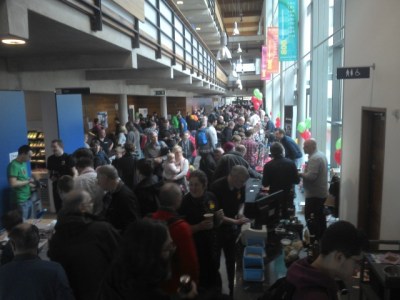
The William Gates Building concourse packed with Pi enthusiasts

On a damp and cold Saturday in early March the Cambridge University Computer Laboratory threw open its doors to the Raspberry Pi community. The previous Monday had been the fourth (or first, if you are a leap year pedant!) birthday of the little single-board computer, and last weekend saw its official birthday celebration.

The festivities took the form of an exhibition floor with both traders and community show-and-tell exhibits, plus a packed schedule of workshops and talks. With the Raspberry Pi 3 launch only a few days before there were no surprise announcements of exciting new hardware, but it did provide a good networking opportunity for the Pi community and a chance to test the state of the Raspberry Pi nation.

The most obvious first impression at the event was that it was one that catered for a diverse range of ages and ability groups. Side-by-side with parents and their children were educators, and the maker community. The range of exhibits was therefore slanted somewhat towards a younger age range with games and interactive exhibits, and there was more than a slight educational flavour to the event. This was entirely in keeping with the Foundation’s objectives, and since it is events like these that are inspiring the Hackaday readers of the next decade, a very welcome sight. Join us after the break for a look at all that was happening at the event.

Continue reading “Birthday Celebrations The Pi Way”

Hacklet 99 – Soldering Tools

If there is one tool every hardware hacker needs, it’s a good soldering setup. Soldering irons, heat guns, reflow ovens and the like make up the tools of the trade for building electronic circuits. Spend enough time working with a tool, and you’ll find a way to improve it. It’s no surprise that hackers, makers, and engineers have been hacking their soldering tools for decades. This week’s Hacklet features some of the best soldering tool projects on Hackaday.io!
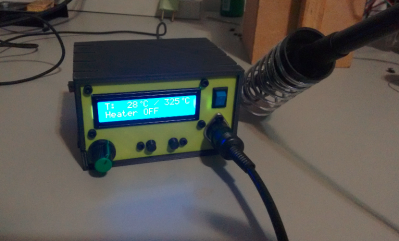
hakkoWe start with  [Kuro] a Hakko 907 based Soldering Station. Hakko 907 and 936 soldering station clones from the Far East are available all over the internet. While the heaters work, none of them have very good temperature controllers. [Kuro] turned a problem into a project by building his own soldering station. These irons are rated for 24 V. 24 volt power supplies are not very common, but it’s easy to find old 19 volt supplies from discarded laptops. [Kuro] found that the lower voltage works just fine. An Arduino nano controls the show, with user output displayed on a 2 line LCD. The finished controller works better than the original, and probably would give a real Hakko model a run for its money.
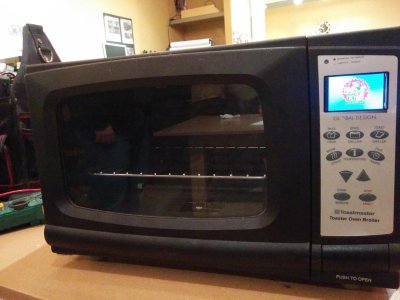
reflowNext up is [Sukasa] with Reflow Oven. When MakerSpace Nanaimo needed a reflow oven, [Sukasa] jumped in with this design. The idea was to create an oven that looked unmodified – just think of it as the toaster oven of the future, or the reflow oven of today. A Netduino plus 2 is the main controller. User information is displayed on a color TFT LCD. This oven is even internet connected, with an internally hosted web page and JSON data feed. The Netduino controls two beefy Solid State Relays (SSRs). The SSRs handle the dirty work of switching the oven’s heating elements. Two fans keep air moving to avoid hot spots. Precision temperature sensing is achieved through a pair of Adafruit MAX31855 breakout boards reading thermocouples.
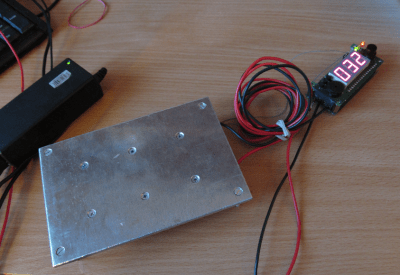
plateNext we have [Jaromir Sukuba] with Soldering preheat plate. When soldering surface mount components, like QFN or BGA parts, it helps to pre-heat the whole board. There are commercial products to do this using hot air and other techniques, but it really comes down to making a hotplate. [Jaromir] figured he could do a pretty good job at this, so he built his own with a 3mm aluminum plate. Heat comes from 6 resistors in TO-220 cases. A Microchip PIC18 monitors a thermocouple and keeps things from getting too hot. For power, [Jaromir] had the same idea as [Kuro] did, and used a 19V power brick from an old laptop.
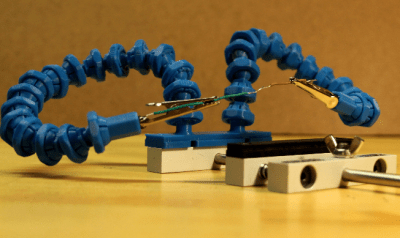
gooseFinally we have [Alex Rich] with Locking ball and socket gooseneck system. [Alex] came up with the Stickvise, so it’s fitting that he comes up with an awesome upgrade for it. We’ve all fought with “helping hands” while soldering. You never get them at quite the right angle. This system fixes that with a simple ball and gooseneck setup. [Alex] saw a similar design and printed it out. While it worked, the pieces popped apart too easily. [Alex] redesigned the system, adding a threaded locking ring. These new goosenecks stay put, holding your work exactly where you want it.

If you want to see more soldering tool projects, check out our brand new soldering tools list! If I missed your project, don’t be shy! Just drop me a message on Hackaday.io. That’s it for this week’s Hacklet. As always, see you next week. Same hack time, same hack channel, bringing you the best of Hackaday.io!

Embed With Elliot: March Makefile Madness

The make tool turns the big 4-0 next month, and we thought we’d start up the festivities early. In a two-part series, I’ll cover some of the make background that I think is particularly useful, and then focus on microcontroller-specific applications. If you’re still cut-and-pasting a general purpose makefile to run your toolchain, hopefully you’ll get enough insight here to start rolling your own. It can be a lot simpler than it appears!

Just as soon as the C programming language was invented, and projects started to get a little bit bigger than a “hello world”, it became obvious that some tool was needed to organize and automate compilation. After all, if you’ve got a program that’s spread over a number of files, modules, or libraries, it’s a hassle to have to re-compile them all any time you make a change to just a single section of code. If some parts haven’t changed, you’re just wasting time by re-compiling them. But who can keep track of all of this? Make can!

Continue reading “Embed With Elliot: March Makefile Madness”

Tools Of The Trade – Solder Paste Dispensing

The general process of circuit board assembly goes like this: You order your PCBs. You also order your components. For surface mount components, you apply solder paste to the pads, put the components on top, and then heat the board up so the solder paste flows and makes a bond. Then for through hole components you put the leads through the holes, and solder them with an iron or a solder wave or dip. Then you do an inspection for defects, program any microcontrollers, and finally test the completed board to make sure everything runs.

The tricky part is in volumes. If you’re only doing a few boards, it’s usually easiest to assemble them by hand. In the thousands you usually outsource. But new tools, and cheap hacked tools, have made it easier to automate small batches, and scale up into the thousands before outsourcing assembly.

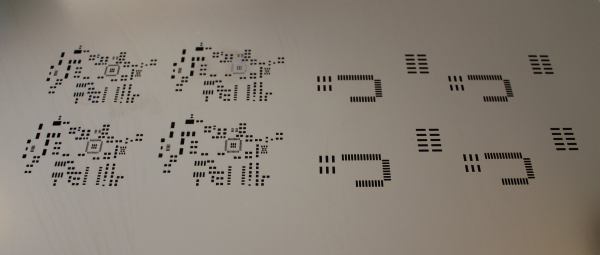
In this new series which we’re calling Tools of the Trade we’ll be covering a variety of tools used for building products, and we’re starting with circuit board assembly. Let’s investigate our tools of the trade: solder paste dispensing. Continue reading “Tools Of The Trade – Solder Paste Dispensing”