Caption CERN Contest – I’ve Got My Eye On You

As week 20 of the Caption CERN Contest comes to a close, we can say that this scientist may have been a bit sleepy from all his hard work, but all our caption writers certainly were not! Thank’s to everyone who stayed up late and entered.

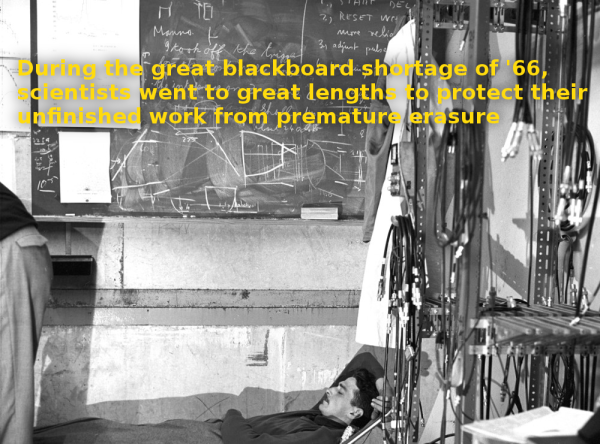
Whiteboards and their associated dry erase markers have become a staple in every office, school, and home. It’s getting hard to remember that everyone used blackboards not so long ago. High energy physics,and flammable dust probably are not a good mix. Let’s hope our sleeping scientist cleaned the erasers outdoors after he woke up.

The Funnies:

  • “A weekend at CERNies”- [Rob]
  • “After bitten by the Schrödinger’s cat, Doc Brown acquired the most useful power of a cat – being able to sleep anywhere, any time.” – [K.C. Lee]
  • “CERN’s infamous “wind tunnel” experiments” – [Rollyn01]

This week’s winner is [MechaTweak] with “During the great blackboard shortage of ’66, scientists went to great lengths to protect their unfinished work from premature erasure”. [MechaTweak] describes himself as a “Mild mannered design engineer by day, father of four crazy kids by night.” With all those kids running around, he’s going to enjoy having a Stickvise from The Hackaday Store. You can bet he’ll be using the Stickvise to solder up some boards for Shower water saver, his entry in the 2015 Hackaday Prize.

Week 21
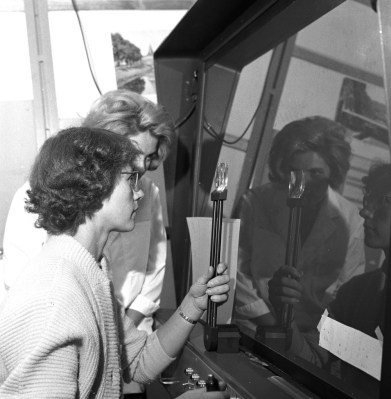
cern-21-smThese two CERN scientists are looking through some kind of optical apparatus. There is a plano-convex lens mounted on an adjustable arm. The scientists appear to be looking through a window while adjusting some controls.

Is this some kind of physics experiment? Could it be research into psychomotor acuity? Maybe the dark-haired scientist is just getting her yearly CERN eye exam? You tell us!

This week’s prize is the ever poular Teensy 3.1 from The Hackaday Store.  Add your humorous caption as a comment to this project log. Make sure you’re commenting on the contest log, not on the contest itself.

As always, if you actually have information about the image or the people in it, let CERN know on theoriginal image discussion page.

Good Luck!
Embed With Elliot: I2C Bus Scanning

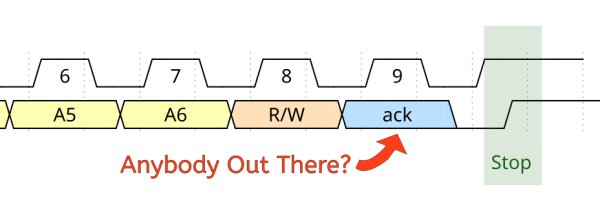
A lot of great ICs use I2C to communicate, but debugging a non-working I2C setup can be opaque, especially if you’re just getting started with the protocol/bus. An I2C bus scanner can be a helpful first step in debugging an I2C system. Are all the devices that I think should be present actually there and responding? Do they all work at the bus speed that I’m trying to run? If you’ve got an Arduino or Bus Pirate sitting around, you’re only seconds away from scanning your I2C bus, and answering these questions.

Continue reading “Embed With Elliot: I2C Bus Scanning”

Inceptionism: Mind Blown By What Neural Nets Think They See

Dr. Robert Hecht-Nielsen, inventor of one of the first neurocomputers, defines a neural network as:

“…a computing system made up of a number of simple, highly interconnected processing elements, which process information by their dynamic state response to external inputs.”

These ‘processing elements’ are generally arranged in layers – where you have an input layer, an output layer and a bunch of layers in between. Google has been doing a lot of research with neural networks for image processing. They start with a network 10 to 30 layers thick. One at a time, millions of training images are fed into the network. After a little tweaking, the output layer spits out what they want – an identification of what’s in a picture.

The layers have a hierarchical structure. The input layer will recognize simple line segments. The next layer might recognize basic shapes. The one after that might recognize simple objects, such as a wheel. The final layer will recognize whole structures, like a car for instance. As you climb the hierarchy, you transition from fast changing low level patterns to slow changing high level patterns. If this sounds familiar, we’ve talked out about it before.

Now, none of this is new and exciting. We all know what neural networks are and do. What is going to blow your knightmind, however, is a simple question Google asked, and the resulting answer. To better understand the process, they wanted to know what was going on in the inner layers. They feed the network a picture of a truck, and out comes the word “truck”. But they didn’t know exactly how the network came to its conclusion. To answer this question, they showed the network an image, and then extracted what the network was seeing at different layers in the hierarchy. Sort of like putting a serial.print in your code to see what it’s doing.

They then took the results and had the network enhance what it thought it detected. Lower levels would enhance low level features, such as lines and basic shapes. The higher levels would enhance actual structures, such as faces and trees. ibisThis technique gives them the level of abstraction for different layers in the hierarchy and reveals its primitive understanding of the image. They call this process inceptionism.

 

Be sure to check out the gallery of images produced by the process. Some have called the images dream like, hallucinogenic and even disturbing. Does this process reveal the inner workings of our mind? After all, our brains are indeed neural networks. Has Google unlocked the mind’s creative process?  Or is this just a neat way to make computer generated abstract art.

So here comes the big question: Is it the computer chosing these end-product photos or a google engineer pawing through thousands (or orders of magnitude more) to find the ones we will all drool over?

Retrotechtacular: Don’t Balk At Pitch-Up In The McDonnell F-101 Voodoo

The McDonnell aircraft corporation’s F-101 Voodoo was a lean, mean, supersonic machine capable of going from tarmac to 40,000 feet in about two minutes. But for all its innovation and engineering, the Voodoo had a common problem of pitch-up. That is, the swept-back wings of the Voodoo created a tendency for the plane to nose upward very sharply, negating the pilot’s control.

McDonnell assures Voodoo pilots that this problem is easily overcome with a cool head and a solid foundation of know-how about the issue. This training film is meant to provide that foundation, exploring the causes of pitch-up and the prescribed methods for recovery with and without deployment of the drag chute.

The drag chute is always the recommended route to help correct the craft. This is especially true for a full-scale pitch-up situation. Recovery is possible without the drag chute, however. The altitude lost in recovery is proportional to the altitude at the time that pitch-up occurs. That is, the lower the altitude of the craft when pitch-up occurs, the less altitude is lost in getting back to straight and level flight.

Continue reading “Retrotechtacular: Don’t Balk At Pitch-Up In The McDonnell F-101 Voodoo”

Hackaday Links Column Banner

Hackaday Links: Summer, 2015

[Elia] was experimenting with LNAs and RTL-SDR dongles. If you’re receiving very weak signals with one of these software defined radio dongles, you generally need an LNA to boost the signal. You can power an LNA though one of these dongles. You’ll need to remove a few diodes, and that means no ESD protection, and you might push the current consumption above the 500mA a USB port provides. It does, however, work.

We’ve seen people open up ICs with nitric acid, and look inside them with x-rays. How about a simpler approach? [steelcityelectronics] opened up a big power transistor with nothing but a file. The die is actually very small – just 1.8×1.8mm, and the emitter bond wire doesn’t even look like it’ll handle 10A.

Gigantic Connect Four. That’s what the Lansing Makers Network built for a Ann Arbor Maker Faire this year. It’s your standard Connect Four game, scaled up to eight feet tall and eight feet wide. The disks are foam insulation with magnets; an extension rod (with a magnet at the end) allows anyone to push the disks down the slots.

[Richard Sloan] of esp8266.com fame has a buddy running a Kickstarter right now. It’s a lanyard with a phone charger cable inside.

Facebook is well-known for the scientific literacy of its members. Here’s a perpetual motion machine. Comment gold here, people.

Here’s some Hackaday Prize business: We’re giving away stuff to people who use Atmel, Freescale, Microchip, and TI parts in their projects. This means we need to know you’re using these parts in your projects. Here’s how you let us know. Also, participate in the community voting rounds. Here are the video instructions on how to do that.

New Part Day: Nordic’s New Bluetooth SoC

You don’t need to look very hard to find Nordic’s nRF51 wireless module; it’s found in hundreds of products and dozens of projects over on hackaday.io. The nRF51 is a SoC that includes an ARM Cortex M0 processor and a variety of radios for Bluetooth and other protocols. Useful, if a bit limited in processing power.

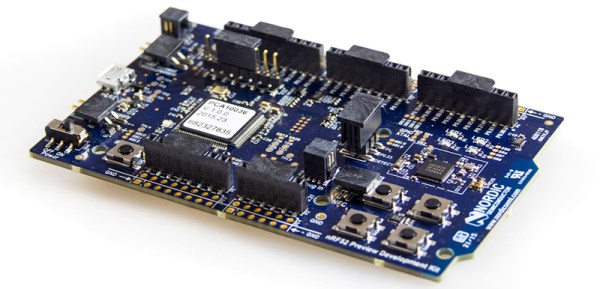
Now, Nordic has a new SoC. It’s the nRF52, a Cortex M4F processor, a Bluetooth radio, NFC, and a bunch of Flash and RAM to make just about anything you can think of possible. Yes, it’s an upgrade to the nRF51 – a better processor and NFC, and all the possibilities that come with that. Currently there’s only one part and two package options: a 6x6mm QFN48, or a wafer chip that will be covered with impregnable goo.

Already there are SDKs for IAR Workbench, Keil4 and 5, and gcc. The SDKs won’t help you quite yet; it’s not available through the usual distributors yet, but the nRF52 Preview develoment kit is. That’s a single board development kit for the nRF52, with Arduino pinouts and Mbed support.

Thanks [Alvin] for sending this in from Trondheim.

Hacklet 52 – Breakout Board Projects

Starting a design with a new part can be hard. What power supply voltage(s) does it need? Are there any support component requirements? What is the footprint? What about the I/O voltage levels? Breakout boards are designed to answer all those questions for you. Breakouts help when you’re designing with a new part – be it a microcontroller, a sensor, a motor driver, or anything else. They also are a huge help when you’re trying to knock out a quick hack, and just need to get something working quick. Fast to integrate, often breadboard friendly, breakouts just make things easier! This week’s Hacklet is about some of the best breakout board projects on Hackaday.io!

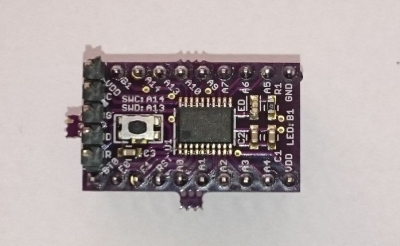
32f4We start with [Christoph] and STM32F030F4P6 breakout board. Inspired by the Teensy 3.0, [Christoph] set out to build a simple, easy to use, and small breakout board for an ARM processor. The STM32F030F4P6 is a great starting point. At only 20 pins, it’s one of the smallest ARM based chips around. He added the basic things needed to bring this chip up: decoupling caps, a reset button, headers for ST’s software debugger, and of course an LED for a blinky hello world program. The resulting board is physically tiny, but this lilliputian ARM board packs Coretex M0 powered punch!

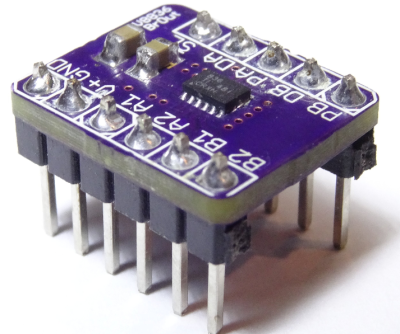
drvNext up is [al1] and DRV8836 Breakout. Sooner or later, everyone wants to drive a motor in one of their projects. It’s a rite of passage, just like blinking an LED. Motors pull a lot of current though, so external transistors or driver chips are almost always necessary. TI’s DRV8836 chip packs two full H-bridges into one package. That’s enough to drive two DC motors or one stepper. Handling 1.5 amps of current per driver in a tiny package means that thermal coupling is important. The DRV8836 has a large thermal pad which has to be soldered to keep the magic smoke in. [al1] dropped the chip, along with the correct thermal footprint and decoupling capacitors onto a simple breakout. The result is easy to use motor drivers for the masses.

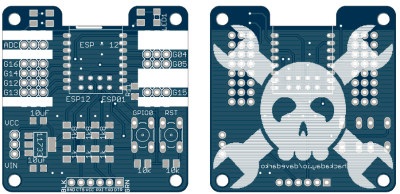
espHackaday.io power user [davedarko] took cues from his favorite designs to create Ignore this ESP8266 board. In [Dave’s] own words, “I stole from every one. The huzza from Adafruit, [Matt’s] breakout board, [Al1s] board, NodeMCUs DevKit.” Hey [Dave] there’s no stealing in open source hardware! There is  only design reuse with attribution, which is exactly what you’re doing. [Dave’s] breakout can use both popular ESP8266 footprints: the ESP-01 and ESP-12. He’s added power, reset/programming buttons, and the all important serial header to talk to the module. Going serial allows dave to keep costs down by not including an expensive serial to USB chip in the BOM. Most of us have FTDI cables (or clones) bouncing hanging around anyway. We definitely like the logo on this one!

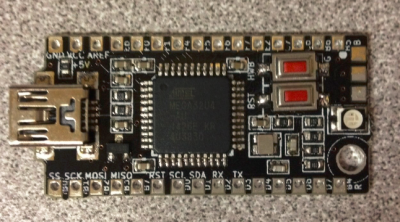
bbbFinally we have [The Big One] with uBBB 32u4. uBBB 32u4 is a bigger brother of µbbb, a Hackaday.io project [Warren] and [The Big One] worked on. µbbb uses an Atmel ATmega32u2 processor. [The Big One] has expanded the faimly to include an ATmega32u4. If you’re wondering, uBBB stands for “Micro Bare Bones Board” At 1.65″ x 0.8″, this is a micro board. It still manages to  include everything you need to get the processor up and running fast. Crystal, buttons, decoupling caps, and LEDs – everything is here. A mini USB connector makes communicating with the ATmega a snap!

If you want to see more breakout boards, check out our new breakout board list! If I’ve forgotten to add you to the list, just drop me a message on Hackaday.io. That’s it for this week’s Hacklet, As always, see you next week. Same hack time, same hack channel, bringing you the best of Hackaday.io!