RTL-SDR Paves Way To Alexa Controlled Blinds

You’d be forgiven for occasionally looking at a project, especially one that involves reverse engineering an unknown communication protocol, and thinking it might be out of your league. We’ve all been there. But as more and more of the devices that we use are becoming wireless black boxes, we’re all going to have to get a bit more comfortable with jumping into the deep end from time to time. Luckily, there are no shortage of success stories out there that we can look at for inspiration.

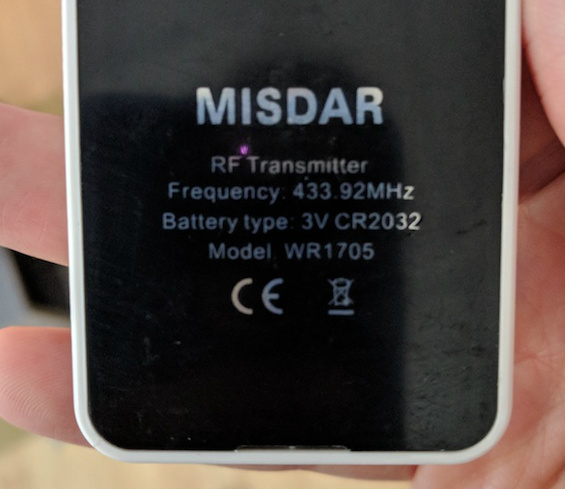
A case in point are the wireless blinds that [Stuart Hinson] decided would be a lot more useful if he could control them with his Amazon Alexa. There’s plenty of documentation on how to get Alexa to do your bidding, so he wasn’t worried about that. The tricky part was commanding the wireless blinds, as all he had to go on was the frequency printed on the back of the remote.

Luckily, in the era of cheap RTL-SDR devices, that’s often all you need. [Stuart] plugged in his receiver and fired up the incredibly handy Universal Radio Hacker. Since he knew the frequency, it was just a matter of tuning in and hitting the button on the remote a couple times to get a good capture. The software then broke it down to the binary sequence the remote was sending out.

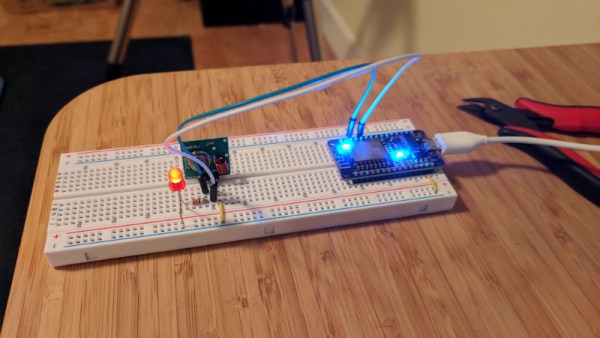
Now here’s where [Stuart] lucked out. The manufacturers took the easy way out and didn’t include any sort of security features, or even bother with acknowledging that the signal had been received. All he needed to do was parrot out the binary sequence with a standard 433MHz transmitter hooked up to an ESP8266, and the blinds took the bait. This does mean that anyone close enough can take control of these particular blinds, but that’s a story for another time.

We took a look at the Universal Radio Hacker a year or so back, and it’s good to see it picking up steam. We’ve also covered the ins and outs of creating your own Alexa skills, if you want to get a jump on that side of the project.

Hack My House: Raspberry Pi As Infrastructure

I finally had my own house. It was a repossession, and I bought it for a song. What was supposed to be a quick remodel quickly turned into the removal of most of the drywall in the house. There was a silver lining on this cloud of drywall dust and loose insulation. Rather than constantly retro-fitting cabling and gadgets in as needed, I could install everything ahead of time. A blank canvas, when the size of a house, can overwhelm a hacker. I’ve spent hours thinking through the infrastructure of my house, and many times I’ve wished for a guide written from a hacker’s perspective. This is that guide, or at least the start of it.

What do you want your smart house to do? And what do you want to be able to do in your smart house? For example, I wanted to be able to upgrade my cheap 120 V welder to a beefier 240 V model, so adding a 240 V plug in the garage was a must. As a bonus, that same 240 V circuit could be used for charging an electric car, if ever one is parked there.

“Ethernet everywhere” was my mantra. Try to imagine everywhere you might want to plug in a desktop, a laptop, an access point, or even a VoIP phone. I decided I wanted at least two Ethernet drops to each room, and tried to imagine the furniture layout in order to put them in convenient places.

Continue reading “Hack My House: Raspberry Pi As Infrastructure”

Photon Door Lock Swaps Keys For A POST Request

At this point we’re all well aware of the fact that there is some inherent danger involved when bringing “things” onto the Internet. Nobody wants to come home to a smoldering pile of ruble because their Internet connected toaster oven decided to get stuck on “Hades.” But even with the risks, occasionally we see projects that prove at least some intrepid hackers are managing to navigate the Internet of Things to solve real-world problems.

[Daniel Andrade] writes in to tell us about the Internet controlled entry system he’s setup at his new apartment, and while we imagine it’s not for everyone, we can’t deny it seems like it has improved his quality of life. Rather than giving all of his friends a copy of his key, he’s setup a system where anyone who has the appropriate link can “buzz” themselves in through the building’s existing intercom system.

Thanks to the old-school intercom setup, the hardware for this project is simple in the extreme. All [Daniel] needed was a relay to close the circuit on the door buzzer, and a way to fire it off. For his controller he chose the Photon from Particle, which is perhaps a bit overkill, but we all tend to work with what we’re personally comfortable with.

Most of the work went into the software, as [Daniel] ended up coming with two distinct ways to control the door lock over the Internet. The first method uses Blynk, which allows you to create slick visual interfaces for mobile devices. His second version is controlled with a POST request to a specific URL, which he likes because it gives him more flexibility as to how he can interact with the lock. Currently he has a simple web page setup that lets friends and family open the door by just clicking a button.

We’ve seen a similar setup using the Photon to open a garage door, and plenty of people have taken to using Blynk to control their home automation setups. All the tools are available for you to roll your own IoT gadgets, you just need to figure out what to do with the things…

Monitoring blinking LED for home power usage

Monitoring Power By Counting Blinks

What do you do when you want to add a new feature to some electronics but you can’t or don’t want to tear into the guts? You look for something external with which you can interface. We like these hacks because they take some thinking outside the box, literally and figuratively, and often involve an Aha! moment.

[Simon Aubury’s] big household load was electric heating and his ancient heaters didn’t provide any way to monitor their usage. His power meters weren’t smart meters and he didn’t want to open them up. But the power meters did have an external LED which blinked each time 1 Wh was consumed. Aha! He could monitor the blinks.

Home power usage graph
Maximum is white, average is orange, and minimum is blue.

Doing so was simple enough. Just point photoresistors at the two meter’s LEDs and connect them and capacitors to a Raspberry Pi’s GPIO pins. Every time a pulse is detected, his Python code increments the LED’s counter and every fifteen minutes he writes the counters to an SQL database. Analysing his data he saw that nothing much happens before 5 AM and that the lowest daytime usage is around noon. The maximum recorded value was due to a heater accidentally being left on and the minimum is due to a mini holiday. Pretty good info given that all he had to go on was a blinking light.

Where else are there LED indicators which you can tap into? Here’s an only slightly more invasive usage where a washing machine’s “end of cycle” LED  was removed and the power going to it was rerouted to an Arduino for remote monitoring.

Speech recognition to control a faucet

Talk To The Faucet

Your hands are filthy from working on your latest project and you need to run the water to wash them. But you don’t want to get the taps filthy too. Wouldn’t it be nice if you could just tell them to turn on hot, or cold? Or if the water’s too cold, you could tell them to make it warmer. [Vije Miller] did just that, he added servo motors to his kitchen tap and enlisted an AI to interpret his voice commands.

Look closely at the photo and you can guess that he started with a single-lever type of tap, the kind which can be worked with an elbow, so this project was probably just for fun and judging by his video below, he does have a sense of humor. But the idea is practical for dual taps with rotating knobs. He did realize, however, that in future versions he should move the servo motor openings from the top plate to the bottom instead, to avoid any water getting in. A NodeMCU ESP8266 ESP-12E board serves for communicating with the speech recognition side but other than the name, JacobAI, he’s keeping the speech part to himself. We secretly suspect that he has a friend named Jacob.

However, we can think of a number of options for it such as DeepSpeech and Wit.ai which we covered when talking about natural language phone bots, and the ubiquitous Alexa as used here with another NodeMCU for turning on Christmas tree lights.

Continue reading “Talk To The Faucet”

Raspberry Pi As 433 MHz To MQTT Gateway

Many low-cost wireless temperature and humidity sensors use a 433 MHz transmitter to send data back to their base stations. This is a great choice for the manufacturer of said devices because it’s simple and the radios are cheap, but it does limit what we as the consumer can do with it a bit. Generally speaking, you won’t be reading data from these sensors on your computer unless you’ve got an SDR device and some experience with GNU Radio and reading the Nexus protocol.

But [Aquaticus] has developed a very comprehensive piece of software that should make integrating these type of sensors into your home automation system much easier, as long as you’ve got a spare Raspberry Pi lying around. Called nexus433, it uses a cheap 433 MHz receiver connected to the Pi’s GPIO pins to receive data from environmental sensors using the popular Nexus communication protocol. A few known compatible sensors are listed in the project documentation, one of which can be had for as little as $5 USD shipped.

In addition to publishing the temperature, humidity, and battery level values from the sensors to MQTT, it even tracks connection quality for each individual sensor and when they go on and offline. To be sure, this is no simple hack. In nexus433, [Aquaticus] has created a mature Linux service with enough flexibility that you shouldn’t have any problems working it into your automation setup, whether it’s Home Assistant or something you’ve put together yourself.

We’ve seen a number of home automation hacks using these ubiquitous 433 MHz radios,  from controlling them with an ESP8266 to hacking a popular TP-LINK router into a low-cost home automation hub.

Air Conditioner Remote Reverse Engineered Despite Esoteric Protocol

Infra-red remote control is something of a Done Deal when it comes to hardware hacking, it has been comprehensively reverse engineered, and there exist libraries and software packages to seamlessly take care of all its quirks. Just occasionally though, along comes an IR remote whose protocol doesn’t follow that well-worn path

[William Dudley] found himself in this position with an air-conditioning unit remote control. He found it sent a stream of data with all settings of the machine rather than the single command codes you might expect from a familiar TV remote. The solution was to reverse engineer and reimplement the IR codes.

His reverse engineering relied on an Arduino and IR receiver which he used to sniff the packets coming out of the remote. Eventually he was able to recognise some of the functions from the remote, and create his own protocol that can recreate most of the remote’s functions. This was pushed over to a Raspberry Pi Zero which uses an IR LED to command the air conditioner, joining the ranks of his growing home automation setup.

The write-up makes for a fascinating primer on analysis of obscure IR protocols, and is well worth a read for anybody with an interest in the topic. Meanwhile if you want more IR reverse engineering stories, try this tale of a bathroom scale.