Build Your Own Class AB Audio Amplifier

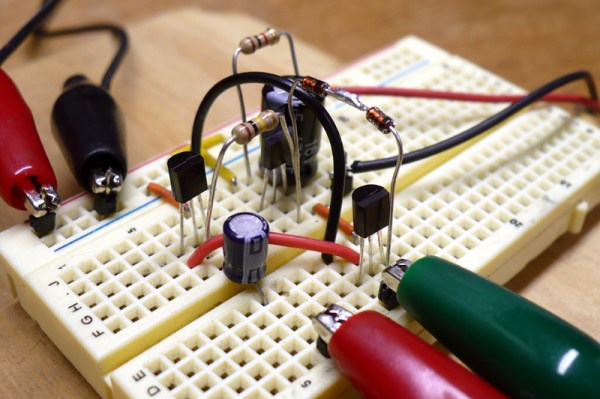
[Dino Segovis] wrote in to tell us about his “hack”, making an AB Audio Amplifier. The advantage of this particular amp is that the transistors never turn off, which would cause distortion. A full schematic is given in the article as well as a parts list. A complete “bill of materials” makes any circuit building project easier, especially for the beginner.

Although this is by no means a new circuit design, (a similar setup is used in car audio equipment) [Dino] does a great job of explaining how things work in the article itself and in the video after the break. He also gives some great tips about transferring your drawn circuit to a breadboard in a neat and organized way at around 5:00 in the video. Continue reading “Build Your Own Class AB Audio Amplifier”
Installing Linux On A 386 Laptop

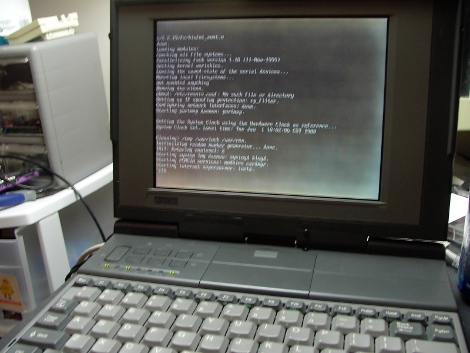
The “cheap” and “easy” way in about an hour! A question that pop’s up from time to time is “I somehow ended up with an archaic old laptop / computer, can it run Linux?” Well of course it can, but that totally depends! On what? Well machine CPU, CPU speed, hard disk space, RAM and most importantly what you are expecting it to do.

Okay, why a Intel 386? Well number one I own a 386, but more importantly its the absolute bottom Intel CPU you can run Linux on. While it wont be able to do much, it will give you a basic system to kick around and “get to know” the insides of Linux without a million things installed and the worry of breaking it.

Unfortunately a 386 requires some special moves as the actual chip was dropped from almost all distributions long ago. All of the modern distributions I have looked at require at least a 486 CPU. This tutorial will be strictly for installing a basic bare bones Linux on a 386. Have a 486? Pentium? Faster? Never fear I will be covering that in a part II later this week.

Linux on a 386 in about an hour? Madness you might think, it probably takes Linux longer to boot on a 386 (and in some cases you are correct)! Want to know the trick? Simple, cheat!

Join me after the break for the parts and steps needed to get you started.

Continue reading “Installing Linux On A 386 Laptop”

Overhaul An Old Mechanical Keyboard

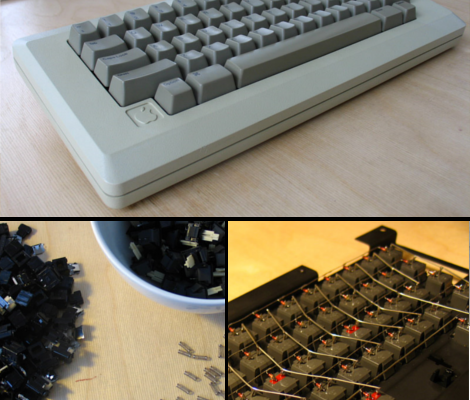
Deskthority forum user [lowpoly] recently posted a writeup on his complete overhaul of an Apple M0110  mechanical keyboard.  Any one familiar with the satisfying clack of a good mechanical key under their fingers can appreciate the effort put into this project.

[lowpoly] removed the keyboard’s PCB, rewired the key matrix adding diodes, built in a teensy USB board, broke apart the mechanical switches and fit replacement springs and finally applied a generous portion of retr0bright to all of the aging plastic. Since the teensy has no mounting holes [lowpoly] had to create a mounting assembly out of some spare plastic. A usb mini cable is even fitted into the original RJ-11 connector.  To compensate for the lack of PCB the key assembly was fitting with some rubber washers. To top off the whole thing some nice new rubber feet were taped to the underside of the M0110.

[lowpoly] reports that with the foam, new springs, and lack of PCB the keyboard is much quieter and easy to use.  The end result is a slick retro looking modern keyboard. If you’ll excuse us we have to go rooting through some old storage bins to find our own ancient keyboards.

We have seen our share of vintage keyboard hacks which can be useful, impressive and sometimes just odd. This build keeps it down to a nice simple, functional, useful retrofit. Nice work!

Video – Turning Good Gnomes Evil

Image of gnomes with glowing eyes

In this video [Jack] will show you how to take a garden gnome and a solar light to create a FrankenGnome that is sure to creep out your friends and neighbors. This Hackaday original video is the first in a new series of videos that we will now be posting on a weekly basis.

You’ll notice a few symbols at the beginning of these videos. These symbols are there to help you understand what the video is all about. In the upper left corner, we have the skill level. These will range from 1 for very basic projects to 4 for highly advanced projects. The upper right corner breaks the video into two categories. The first category is ‘feature adding’. In these videos we will be taking off-the-shelf items and modifying them to do something new. The other category is ‘skill building’. In these, we will be exploring different topics in depth. At first, the skill building videos will be mostly about electronics and software. In the future when we have excavated more room in Hackaday Headquarters, located deep beneath a mountain in remote [REDACTED], we will start doing videos showing you topics with a more mechanical nature. The other icons represent the major skills involved in the project.

Check out the video after the break.

Continue reading “Video – Turning Good Gnomes Evil”

1 Chip USB AVR Development

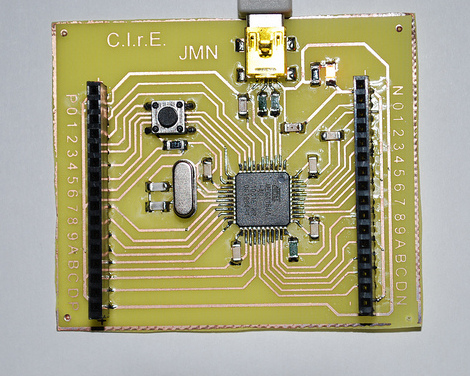
Wouldn’t it be nice if there was an AVR microcontroller with USB device support built in so you would not need a separate programmer or serial link? Well in fact there are quite a few of them, and this awesome tutorial (google translate) is a quick and easy crash course in using the ATMega 16/32U4 micro controllers.

These 8 bit AVR’s (16k and 32k) have the usual list of features you would expect in a Mega AVR. 26 GPIO pins and a pretty easy to solder 44 pin surface mount package, the micro controller also has a USB 2.0 Full-speed/Low Speed Device Module and allows programming though a standard bootloader.

Once you have a pretty standard board assembled you need Atmel’s FLIP RS232, USB, or CAN device programming software (Windows or Linux) and your favorite AVR IDE setup, you’re good to go!

Join us after the break for a quick video.

Continue reading “1 Chip USB AVR Development”

An Arduino Board For Your Tiniest Of Projects

1inch_by_1inch_mini_arduino_board

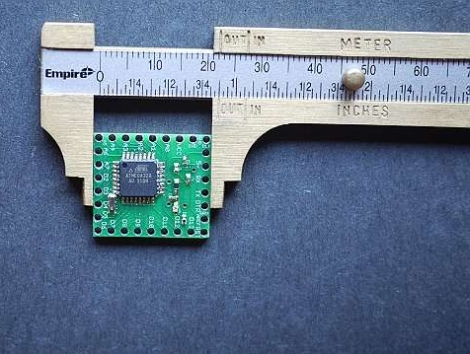
Instructables user [dustinandrews] just took the wraps off his latest creation, a DIY Arduino Pro Mini clone.

Actually, to call it an clone is technically incorrect – while he aimed to produce a tiny Arduino-compatible board, his goal was not to replicate the Mini’s design. Instead, he developed a 1” x 1” board from scratch, covering the construction process in great detail.

When you are working with components this tiny, the only reasonable way to get things done is via solder reflow. He walks through the steps he took to produce the board, which should be enough to guide those doing reflow for the first time through the process without too much trouble.

The end result looks pretty nice, and when he puts it up side by side against the Arduino Pro Mini, his board can definitely hold its own. While his design lacks an on-board power regulator and reset button, he does provide two more analog I/O pins than the Mini, along with several other enhancements.