Ambient Lighting For Baby With The ESP8266

There are plenty of great reasons to have a child. Perhaps you find the idea of being harshly criticized by a tiny person very appealing, or maybe you enjoy somebody screaming nonsense at you while you’re trying to work on something. But for us, we think the best reason for procreation is getting another excuse to build stuff. It’ll be what, at least two years before a baby can solder or program a microcontroller? Somebody’s going to have to do it for them until then.

To try to help his baby daughter get on a better sleep schedule, [Amir Avni] decided to outfit her room with some “smart” lighting to establish when it’s time for her to wake up. Not only can he and his wife control the time the lights come on to “day” mode, but they can also change the colors. For example, they can switch over to a red glow at night. Despite some learning experience setbacks, the both the parents and the baby are very happy with the final product.
An ESP8266 controls a WS2812 LED strip to provide the adjustable lighting, and a DHT22 sensor was added to the mix to detect the temperature and humidity in the baby’s room. [Amir] used Blynk to quickly throw together a slick mobile application that allows for complete control of the brightness and color of light in the room, as well as provides a readout of the environmental data pulled from the DHT22.

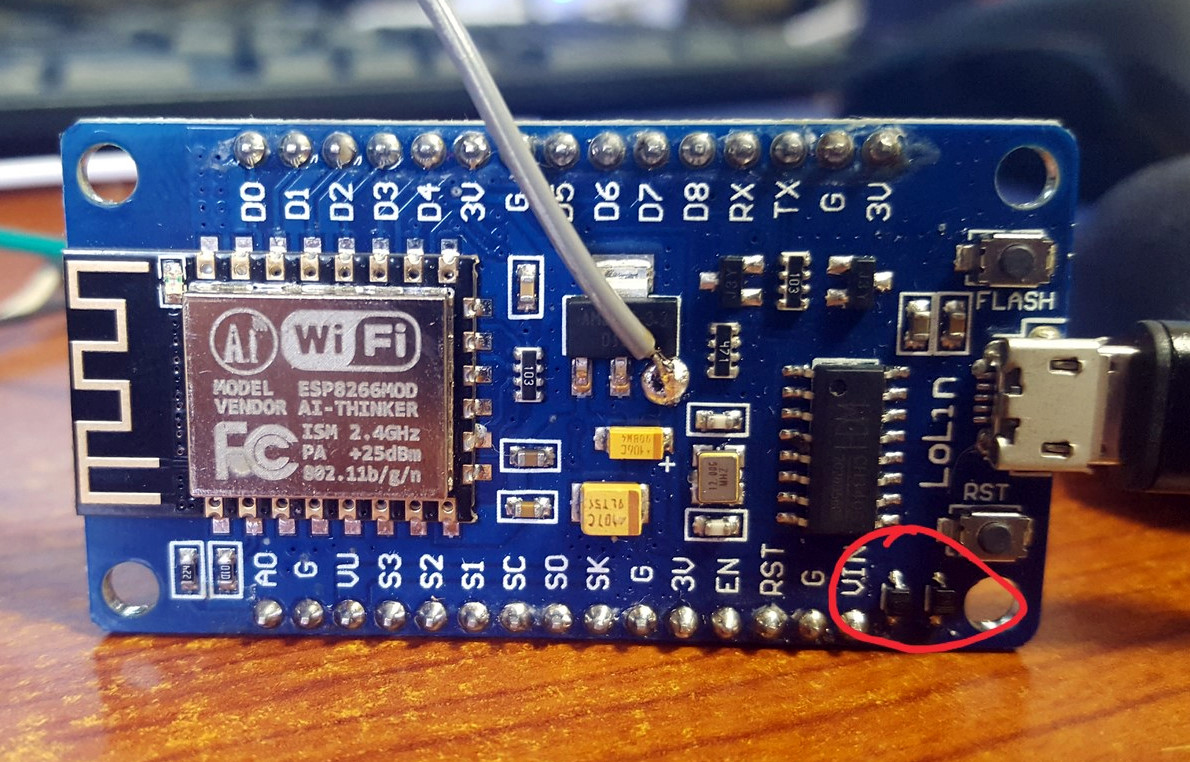
But not everything went according to plan. [Amir] thought he could power the LED strip from the ESP8266 development board by soldering to the 5 V side of its AMS1117 voltage regulator. Which worked fine, until he turned on too many LEDs. Then it pulled too much current through a resistor connected to the regulator, and let all the magic smoke out. An important reminder of what can happen when we ask more of a circuit than what it was designed for.

We’ve covered many awesome projects that were born of a parental need, from feature packed baby monitors to devices seemingly designed to program nostalgia in the little one’s subconscious.

It’s UNIX. On A Microcontroller.

It’s difficult to convey in an era when a UNIX-like operating system sits in your pocket, how there was once a time when the mere word was enough to convey an aura of immense computing power. If you ran UNIX, your computer probably filled a room, and you used it for Serious Stuff rather than just checking your Twitter feed. UNIX machines may still perform high-end tasks, but Moore’s Law has in the intervening years delivered upon its promise, and your phone with its UNIX-like OS is far more powerful than that room-sized minicomputer of the 1970s. A single chip for a few cents can do that job, which begs the question: just how little do we need to run UNIX today? It’s something [Joerg Wolfram] could advise you upon, because he’s got a functional UNIX running on a microcontroller.

Of course, the UNIX in question is not exactly the same as the one you’d find on a supercomputer, either in the 1970s or now. Mini UNIX is a minimalist version of the operating system developed by [Heinz Lycklama] at Bell Labs four decades ago. It gives you a complete UNIX V6 system for the DEC PDP-11, but which needs only 56K of RAM, and no MMU. Emulating a PDP-11 on an STM32 microcontroller allows it to run happily, and while it’s not the most minimalist of microcontrollers it’s still a pretty cheap part upon which to run UNIX.

It’s doubtful whether a 1970s version of an operating system on a commodity microcontroller will take the world by storm, but that’s hardly the point of such a neat hack. It’s certainly not the first time we’ve seen similar work, though this PIC32 offering has a little more in the way of resources to offer.

Header image: Golonlutoj [CC BY-SA 3.0].

$6 Weather Station Goes Where You Do

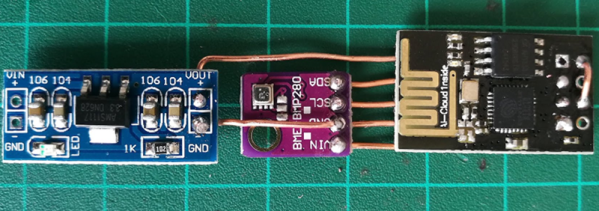
We admit, we see a lot of weather stations. What makes [Mike Diamond’s] take on this old favorite interesting is that it is tiny enough to carry with you, and uses your cell phone as a hotspot to deliver its data. Of course, that assumes you have a phone that can act as a hotspot.

The parts are straightforward, a power supply, an ESP8266, and a weather sensor board. It looks as though you could easily slip the whole affair into a tube or maybe a 3D printed enclosure. We were a little concerned about the bare wire used, but as [Mike] points out you can use insulated wire if you like, and we’d encourage you to do so.

Continue reading “$6 Weather Station Goes Where You Do”

Internet Of Smells: Giving A Machine The Job Of Sniffing Out Spoiled Food

Has the food in your pantry turned? Sometimes it’s the sickening smell of rot that tells you there’s something amiss. But is there a way to catch this before it makes life unpleasant? If only there were machines that could smell spoiled food before it stinks up the whole place.

In early May, I was lucky enough to attend the fourth FabLab Asia Network Conference (Fan4). The theme of their event this year was ‘Co-Create a Better World’. One of the major features of the conference was that there were a number of projects featured, often from rural areas, that were requesting assistance throughout the course of the conference.

Overall there were many bright people tackling difficult problems with limited resources. This is how I met [Yogesh Kulkarni] who runs a FabLab in Pabal, a farming community not far from Pune, India. [Yogesh] has also appeared on TED Talks (video here). He explained to me that in his area, vendors sell milk-based desserts. These are not exactly refrigerated, and sometimes people become ill from eating them. It would be nice if there was a way for the vendors to avoid selling the occasional harmful product.

I’ve had similar concerns with food safety in my area (Vietnam), and while it has been fine nearly all of the time, a few years ago I nearly died from a preventable food-borne illness. I had sufficient motivation to do a little research.

Continue reading “Internet Of Smells: Giving A Machine The Job Of Sniffing Out Spoiled Food”

Put The 3D Printer To Sleep So You Can Rest Easy

At this point you’ve probably already heard the news: cheap Chinese 3D printers sometimes catch fire. Now we can’t say we’re shocked to find out that absolute bottom of the barrel gear wasn’t designed to the highest standards (gotta cut those corners someplace), but that doesn’t change the fact that there are thousands of hackers and makers out there who are in possession of one of these suspect machines. Just tossing them to the curb is hardly the hacker way, so we’ve got to find ways to make the best of the hand dealt to us.

After sleeping with one eye (and maybe one nostril) open during some overnight prints, Hackaday.io user [TheGrim] wanted a way to make sure his Alunar Anet A6 didn’t stay powered on any longer than necessary. So he came up with a way of using the printer’s own endstop switch to detect if the print has completed, and cut the power.

The idea is simple, but of course the real trick is in the implementation. By adding a “Home” command to his ending G-Code in Cura, [TheGrim] reasoned he could use the Y endstop switch to determine if the print had completed. It was just a matter of reading the state of the switch and acting on it.

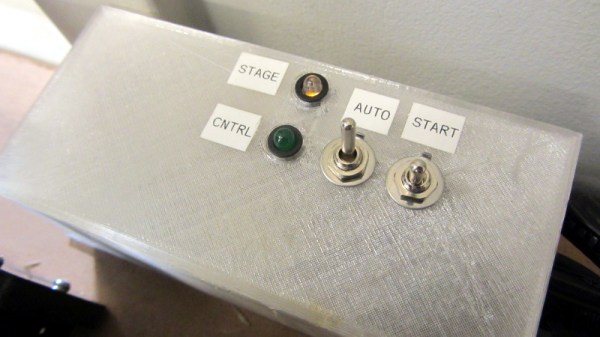
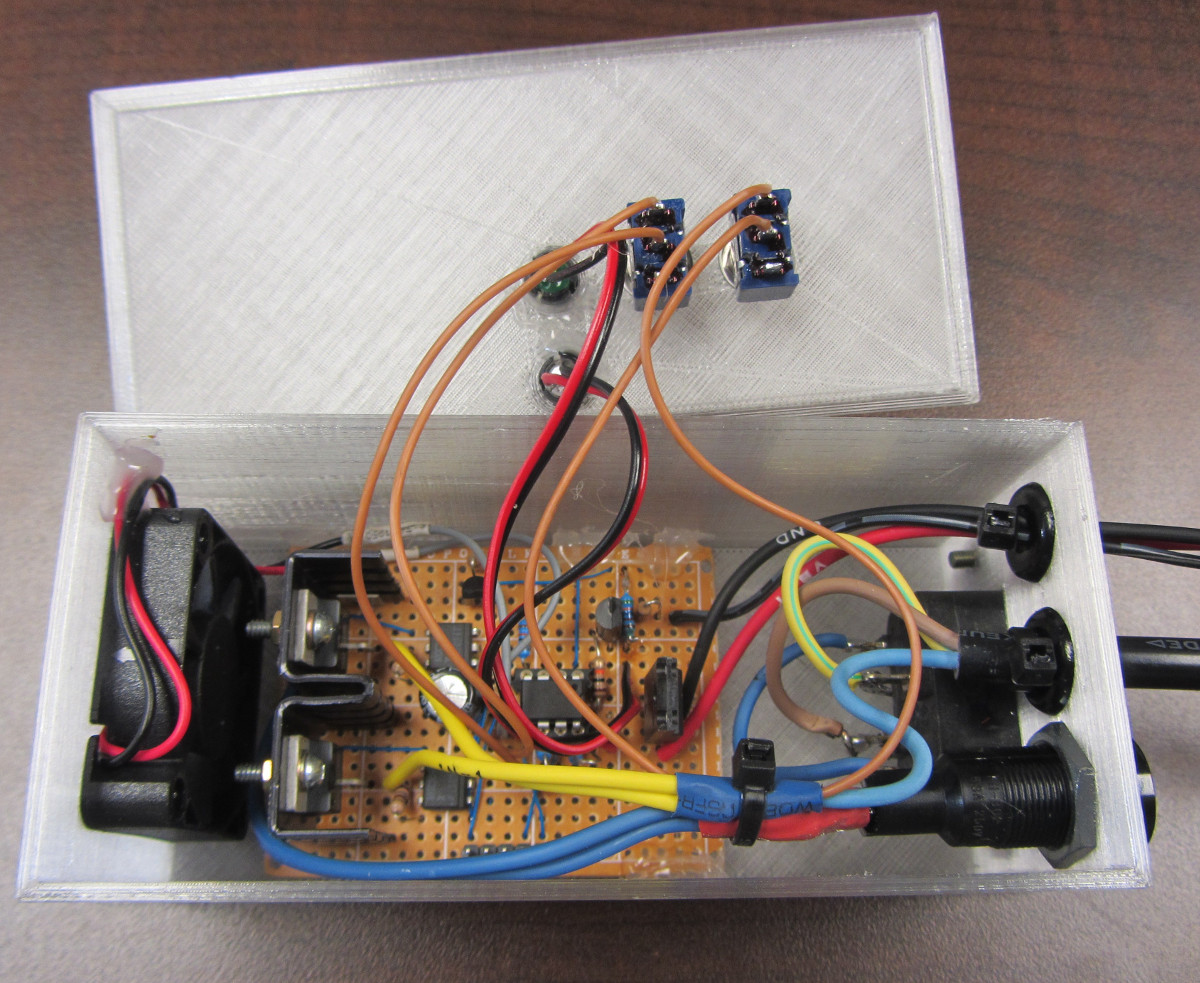
In the most basic implementation, the switch could be used to control a relay on the AC side of the power supply. But [TheGrim] doesn’t trust relays, and he wanted to pack in a couple “smart” features so he ended up using a PIC microcontroller and two 12 amp TRIACs. There’s also a couple of LEDs and toggle switches to serve as the user interface, allowing you to enable and disable the automatic shutdown and get status information about the system.

Will cutting the juice to the PSU prevent another terrible fire? It’s debatable. But it certainly can’t hurt, and if it makes [TheGrim] feel more confident about running his machine, then so be it. We’d still advise anyone with a 3D printer at home to brush up on their fire safety knowledge.

Hacking A Fitness Tracker

When [rbaron] started a new job, he got a goodie bag. The contents included a cheap fitness tracker bracelet that used Bluetooth LE. Since this is Hackaday, you can probably guess what happened next: hacking ensued.

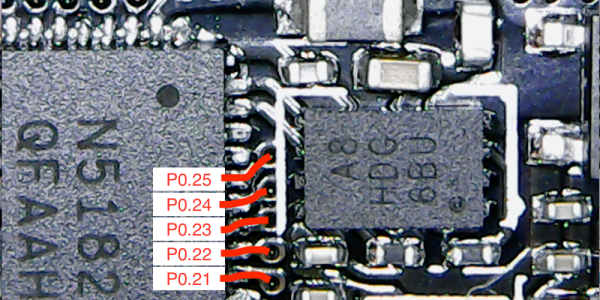
For something cheap enough to give away, [rbaron] claims it cost $10, the device has quite a bit in it. In the very tiny package, there is an OLED display, a battery, a vibration motor, and a Nordic 32-bit ARM with BLE. The FCC ID was key to identifying the device. Opening the case, which was glued down, was pretty difficult, but doable with a hair dryer and a knife.

Continue reading “Hacking A Fitness Tracker”

Talking To Laptop Batteries With The ESP8266

It’s not something you often give a lot of thought to, but the modern consumer laptop battery is a pretty advanced piece of technology. Not only does it pack several dozen watt-hours of energy into a relatively small and lightweight package, but it features integrated diagnostic capability to make sure all those temperamental lithium cells are kept in check. Widely available and extremely cheap thanks to the economies of scale (unless you try to get them from the OEM, anyway), they’re a very compelling option for powering your projects.

Of course, it also helps if, like [teliot] you have a bunch of the things lying around. For reasons we won’t get into, he’s got a whole mess of Acer AL12x32 battery packs which he wanted to use for something other than collecting dust. He had the idea of hooking one up to a solar panel and using it as a power supply for some ESP8266 projects but wanted to be able to talk to the battery for status and diagnostic information. After studying the Smart Battery System (SBS) protocol the batteries use, he was able to come up with some code that lets him pull 37 separate fields of information from the pack’s onboard electronics using his ESP8266.

Battery consumption over time

It took some fiddling with a multimeter to figure out which pin did what on the eight pin interface of the battery. Two of the pins need to be shorted to enable the dual 12 VDC pins to kick in. Technically that’s all you really need to do if you want to utilize the battery in a low-tech sort of way. But to actually get some information from the battery, [teliot] had to identify the two pins which are for the System Management Bus (SMBus) interface where the SBS data lives.

Once he knew which pins to talk to the battery on, the rest was fairly easy. SBS is well documented, and the SMBus interface is very similar to I2C. Like all the cool kids are doing these days, his code publishes the battery info to MQTT where he can plot it and get finely grained info on the performance of his solar power system.

This isn’t the first time we’ve seen a hacker wrangle laptop batteries through SMBus, but it’s always nice to get multiple perspectives on a topic. If you plan on making this kind of thing part of your standard bag of tricks, you might even want to take the time to build a dedicated SMBus scanner.

[via /r/esp8266]