Falling Sand Game On An FPGA

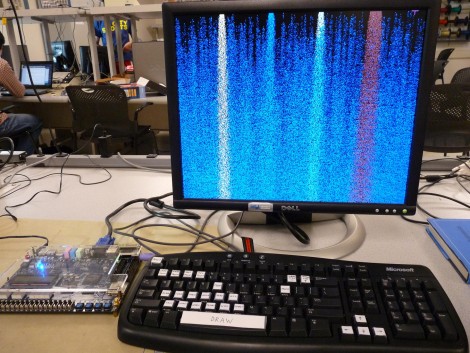
This falling sand game runs on a field-programmable gate array. The Altera Cyclone II resides at the heart of that development board, running the game which was written in Verilog. [Skyler Schneider] modeled his project after a Java version of the game called Pyro Sand Game. He treats each pixel of the 640×480 VGA screen as its own cell, following a set of rules to change the cells around it. This is very similar to Conway’s Game of Life, except that there are different categories of cells that behave uniquely (oil, water, plant, fire, etc.) and gravity is a key factor. Of particular interest to us were the rules for each cell, and the method [Skyler] used to feed and sync the VGA output. After the break you can see his demonstration videos, which walk through all of the features including the Troll button.
Continue reading “Falling Sand Game On An FPGA”

Developing A Sega Game Gear Flash Cartridge

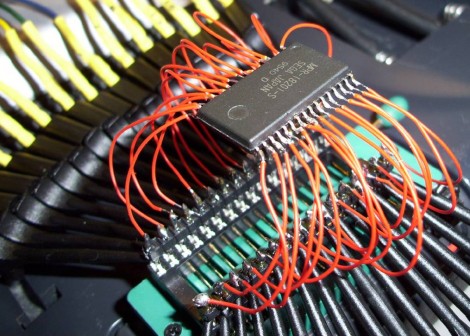
[Gerry O’Brien] tackled his most recent project, designing a flash ROM cartridge for the Sega Game Gear, with great success. Above you can see the test rig he used to reverse engineer the communications between an original ROM chip and the circuit board that it came on. He removed the chip, soldered a ZIF socket to the pads, then used a DIP socket as an adapter for that chip. Connected to each pin is a test lead for a logic analyzer. That’s a heck of a lot of channels to decipher!

It turns out that the cartridges use Integrated Mapping (does anyone have a link explaining this?) so dropping in a flash memory chip is not an option; you need a memory bank controller. [Gerry’s] solution to this issue is twofold: you can etch your own board with a controller chip and ZIF socket for the flash chip, or you can modify a Sega Master System cartridge to use as an adapter board. We’ve got pictures of both methods after the break, as well as his five instructional videos walking us through the fabrication process.

This isn’t [Gerry’s] first time working with flash cartridges. We looked at his work with Game Boy ROMS earlier in the year.

Continue reading “Developing A Sega Game Gear Flash Cartridge”

Make Your Own Minimalist AVR ISP

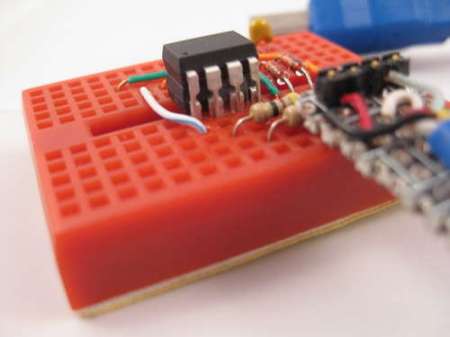
Giving a programmer is a great way to get people started in microcontrollers so If you want a cheap simple AVR programmer this might just be what you’re looking for. It combines the V-USB firmware, USBtiny software, a few resistors, and some zener diodes. An interesting trick using this programmer is if your trying to program another 8 pin ATtiny you can use some tape to isolate the USB data pins and then piggyback the target ATtiny on the programmer.

Unfortunately in order to flash the ATtiny for your programmer you need a working programmer so it’s somewhat of a catch-22.  Make sure your careful when setting the fuse bits because it will use the reset pin making it hard to reprogram without additional programming hardware. AVRs in general are a great way to start using microcontrollers so if your interested give out tutorials a go. You’ll find some tips to get started in addition to information about using an Arduino, or a DAPA cable to flash the firmware to this chip.

AVR HV Rescue Shield 2

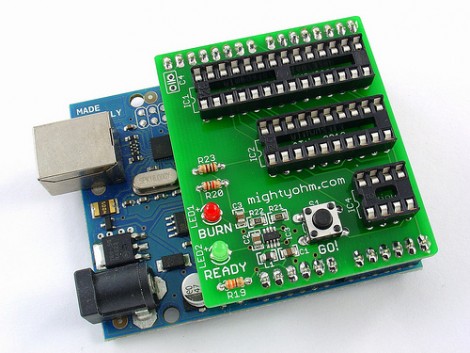
[Jeff Keyzer] has a new version of the HV Rescue Shield available. This tool allows you to use an Arduino to reset the fuse bits on AVR microcontrollers. This is necessary if you make a mistake and disable the reset pin, or choose the incorrect clock settings (this will probably happen to you at some point). In order to bring the chip back to life you’ll need to use High Voltage Programming. The last version of the shield only worked with High Voltage Parallel Programming (HVPP) but this rendition can also use High Voltage Serial Programming (HVSP) for 8-pin chips that don’t have enough inputs for parallel communications.

As we talked about in our AVR Programming Tutorials this is no replacement for a high-end programmer like the STK500 or an AVR Dragon, but if you already have an Arduino a kit will only cost you $20 (or you can etch and build it yourself). We would have liked to see a breakout header for the HVP signals for off-board use. The absence of a breakout header doesn’t preclude this, but since you need the on board boost converter for the 12V signals, and because this shield can’t be used with a breadboard due to pin spacing, it’s hard to patch into signals for non-DIP use. We also think some clever firmware hacking and this could be used for HV programming, like we needed for that LED light bulb.

Using Analog Voltage References With Arduino

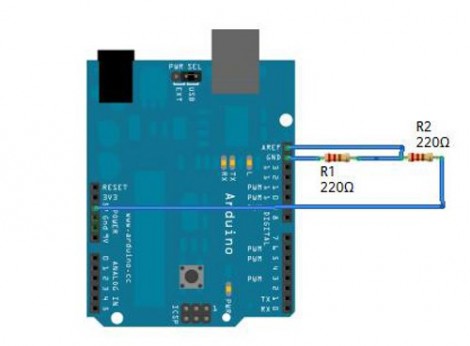
Little Bird Electronics posted an article about using an analog voltage reference with Arduino. This is a tool available when using an analog-to-digital converter. By setting up either an internal or external AREF, you can better use the ADC considering its resolution limitations. For instance, if you are measuring a signal that you know will always be below 2V, an external circuit, such as a voltage divider or an adjustable regulator, can give you a reference voltage just above that upper limit; say 2.5V. This way the 1024 divisions of resolution will be spread across your signal’s range, rather than just the lower half of the ADC readings.

Analog references are common to microcontrollers that have ADCs. Even if you’re not working with an Arduino, read through the article and use what you learn with your uC of choice.

Bluetooth Temperature Module

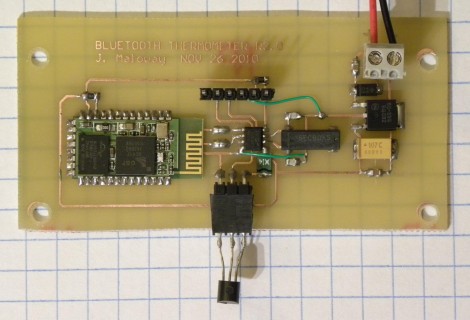
Wanting to know the outside temperature, [Jamie Maloway] built his own temperature sensor that can be read with a Bluetooth device. Let’s take a tour of the hardware above from right to left. There’s a linear voltage regulator with two filtering caps and a terminal block to attach a 9V battery or other power source. Next there’s an 8 MHz crystal and it’s capacitors, followed by a programming header on top and a 1-wire temperature IC, the DS18B20 we’re all familiar with hanging off the bottom. These both connect to the 8-pin PIC 12F675 that drives the system, and transmits using a Bluetooth module from Sure Electronics. Since this is using a serial protocol and transmitting ASCII data, it can be read using an automated script, or simply by using a terminal program.

Now, who’s going to be the first to get rid of the battery and leech off of the mains through inductance?

Ice Tube Clock, Meet The ChronoDot

[Alex] ramped up the precision of his timepiece by adding a ChronoDot to the Ice Tube Clock. These two items are among our favorites; the Ice Tube Clock for its old-style multi-digit display, and the ChronoDot for combining a DS3231, battery, and components into a nice small package.

There is a schematic link at the very bottom left of [Alex’s] writeup. He mentions that he depopulated the clock crystal and its capacitor pair from the board and patched into the clock input on the AVR. A 100K pull-up resistor is included in the wiring as called for in the DS3231 datasheet. Although not specifically referenced, we assume that [Alex] reprogrammed the ATmega168 clock select fuses to use an external clock signal.

Now he can sit back knowing that the clock will be within 10 seconds per year accuracy.