Mods Keep The WaveBird Kicking In The Switch Era

Nintendo made some questionable decisions during the early 2000’s, but developing the WaveBird certainly wasn’t one of them. Years before wireless controllers were the standard on home game consoles, the WaveBird gave GameCube owners a glimpse into the future. It managed to deliver lag-free gaming without resorting to easily-blocked infrared, and had a battery life and range long enough that there was really no downside to cutting the cord aside from the lack of rumble support.

In fact, the WaveBird was such a good controller that some fans just can’t put the thing down even in 2019. [Bill Paxton] loves his so much that he decided to modify it so he could use it on Nintendo’s latest money printing machine, the Switch, without having to fiddle with any adapters. While he was at it, he decided to fix the only serious drawback of the controller and hack in some rumble motors; arguably making his re-imagined WaveBird superior in just about every way to the original.

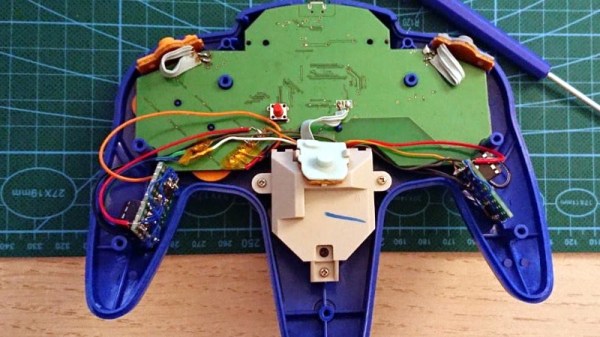
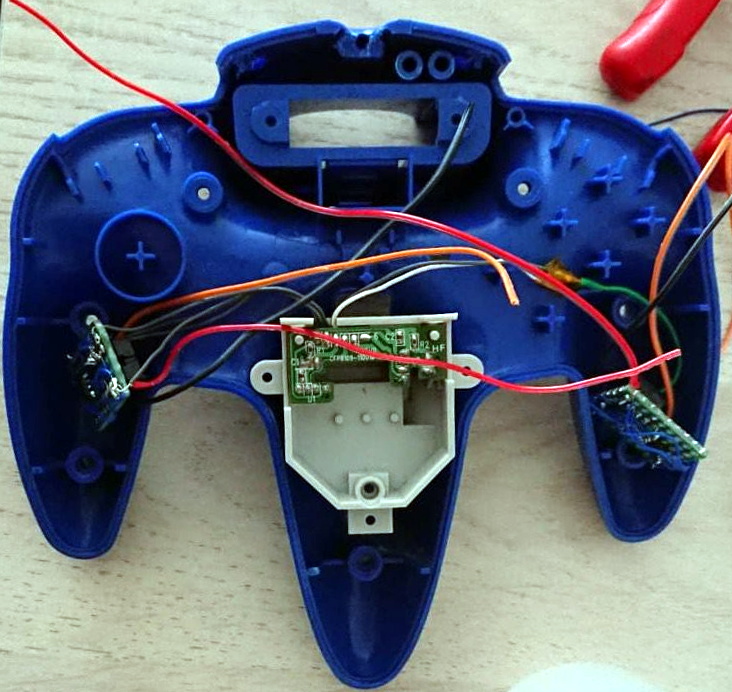
It might be counter-intuitive, but the trick here is that [Bill] actually took the internals from a standard wired GameCube controller and fitted it all into the case for the WaveBird. That’s how he got the rumble support back, but where does the signature wireless capability come from?

For that, he took apart a “GBros. Wireless Adapter” from 8BitDo. This gadget is intended to let you use your existing GameCube controllers on the Switch wirelessly, so all he had to do was shove its PCB inside the controller and wire it directly to the pads on the controller’s board. Thankfully, the WaveBird was rather husky to begin with, so there’s enough space inside to add all the extra hardware without much fuss.

Between modifications like this and efforts to reverse engineer the controller’s wireless protocol, hackers aren’t about to let this revolutionary accessory go gently into that good night. You might see a GameCube slaughtered for a meme, but WaveBirds never die.

Continue reading “Mods Keep The WaveBird Kicking In The Switch Era”

It’s (Almost) Two Keytars In One!

All the best retro-1980s chiptune acts should possess a keytar. It’s the Law, or something. [Theremin Hero] has reminded us of this with a new video we’ve shown below featuring an instrument he had a part in creating alongside [Sam Wray] and [Siddharth Vadgama] a few years ago. The Blade is a 3D-printed keytar featuring two Guitar Hero necks and an integrated pair of Game Boys to provide the sound from the authentic silicon.

To describe it in those terms though is to miss a wealth of other components and featured. The keyboard itself is from a Rock Band keytar which feeds MIDI to a Raspberry Pi running PD Extended that handles all the button press mappings. An Arduino Mega performs the same task for the two Guitar Hero necks. Midi from the various sources is processed by an Arduino Boy which then feeds the Game Boys that make the sounds. Oh – and there’s a Leap Motion 3D motion controller in the mix as well, though that doesn’t seem to be used directly in the chiptune synth functionality.

We’ve had a few keytars here over the years, but this one makes us think of the Commodore 64 instrument created by [Jeri Ellsworth].

Continue reading “It’s (Almost) Two Keytars In One!”

A Zelda Compilation Album On A Cartridge

The Zelda series of games are known for their exciting gameplay, compelling story, but also their soundtracks. From fast-paced boss battles, to scenes of emotional turmoil, these tunes have been pumped out millions of Nintendo consoles over the years. [Tyler Barnes] has been a fan for a long time, and decided to produce a compilation of some of these tracks – delivering it on cartridge, of course.

The music was created using the Music Macro Language, and encoded into the NSF format ready to play on the Nintendo Entertainment System. [Tyler] has coded a menu system that allows the user to pick which tracks they wish to listen to. There’s some pretty parallax animations as well, along with an easter egg for those who know the games well enough to unlock it.

[Tyler] hopes to burn a few EEPROMs and send out some custom carts, either using donor carts or fresh builds. If you’re a fan of NES music but need your C64 fix as well, there’s a solution for that too. Video after the break.

Continue reading “A Zelda Compilation Album On A Cartridge”

Building A Slimline Portable NES

Emulation of classic consoles has long been a solved problem. It’s now possible to run thousands of vintage games on a computer the size of a stick of gum, and to do so with all the benefits emulation brings. [M-Parks] isn’t the biggest fan, however – and decided to build a slimline NES handheld instead. The goal was to produce a portable NES in as compact a package as possible.

Things have come a long way in the handheld console modding scene in the last ten years. 3D printing has largely replaced vacuum forming, and it’s no different here. [M-Parks] modeled up a case and sent it off to be 3D printed in PLA, somewhat mimicking the general layout of the original Game Boy. It’s a little larger, but given that it accepts full-size original NES carts, it can only be so small.

A Retro-bit NES-on-a-chip console was used to provide the motherboard and cartridge connector for the build. Rounding this out is a power supply from Adafruit, an LM386 audio amplifier, as well as a digital volume control which is a nice touch.

While such a build may sound daunting to the absolute beginner, all it takes is a soldering iron, some hot glue, and a willingness to have a go. There’s nothing wild or groundbreaking about this build, but to dwell on that would be missing the point. [M-Parks] now has a portable NES to play on those long train rides, and learned some great skills doing it –  a solid result for any project!

If you’re keen on seeing another take, check out [Dave]’s build from a few years back.


Farming Items With RasPi-Modified Joycons

The Pokémon games have delighted legions of Nintendo gamers over the years, and show no signs of slowing down any time soon. Despite its popularity, there are certain aspects of the games that are unarguably about simply grinding your way to success. For [Mori Bellamy], this simply wouldn’t do – yet their thirst for gold bottlecaps was insatiable. What to do? Automate it, of course.

The first step was to hack the Joycons from the Nintendo Switch. A DG333A analog switch IC was hooked up to the buttons inside, and controlled by the GPIO pins of a Raspberry PI. The joystick was then controlled with an MCP4725 DAC, allowing the system to fully emulate control inputs to the console.

With the console now under control by the Raspberry Pi, the next step was to add intelligence. Google’s Tesseract OCR platform was combined with a helping of Python code. This allows the script to read dialog boxes from the game, and use this data to determine which buttons to press to farm items.

[Mori] has provided the code on GitHub for others to use, noting that it should be generalizable to other games with a little work. Fundamentally, the underlying hardware could readily be repurposed to other controllers, too. There’s plenty of other ways to automate the drudgery of gaming, even if you have to use a touch screen. Video after the break.

Continue reading “Farming Items With RasPi-Modified Joycons”

RetroPie NES Clock Tells You When It’s Game Time

We’ve all seen the 3D printed replicas of classic game consoles which house a Raspberry Pi; in fact, there’s a pretty good chance some of the people reading this post have one of their own. They’re a great way to add some classic gaming emulation to your entertainment center, especially compared to the bare PCB chic of just having a Pi hanging off your TV’s HDMI port.

[Victor Heid] loved the look of these miniature consoles, but wanted to challenge himself to design something that was also multi-functional and unique. So he decided to create an NES-inspired case for the Raspberry Pi 3 A+ that doubles as a LED matrix clock with a decidedly retro feel. Frankly, even if it was just a clock we would have been impressed with the final product; but the fact that it’s also a fully functional RetroPie build really goes above and beyond.

It should be obvious just looking at the completed product that [Victor] put a lot of effort into sanding and finishing the 3D printed case. But we don’t have to imagine the process, since he was kind enough to thoroughly detail the steps and materials he used. As you might have guessed, the short version is a lot of filler and a lot of time; but it’s worth looking at the complete write-up if you’ve ever considered trying to make your own printed parts look less…printed. His method of applying the lettering on the front of case using a laser printer, some Mod Podge, and a healthy dose of patience is also something you might want to file away for a future project.

The electronics for this project are exceptionally simple, as [Victor] used the Pimoroni Scroll pHAT HD rather than trying to roll his own LED matrix in such a limited space. So it was just a matter of connecting up the wires to the Pi’s GPIO header and getting the various bits of software talking to each other, which he also details for anyone who might be interested.

It’s been a few months since the Raspberry Pi 3 A+ was unveiled, and we’re finally starting to see projects that make use of the new board’s reduced footprint. The ability of hardware like the A+, combined with the lackluster attempts by manufactures to produce official “mini” systems, seems to have set the stage for hackers to once again outshine commercial offerings. Not that we’re complaining, of course.

Corn Starch Fixes A Game Boy Screen

Nintendo’s Game Boy was the handheld of the 1990s. Like many of their products, it was famous for its ability to stand up to punishment from angry children and military strikes alike. Its biggest weakness is perhaps its unbacklit LCD screen. Retrogamers and chiptuners alike find themselves modifying and replacing these regularly.

A common problem during these swaps is “Newton rings” – an issue where the polarizer comes into contact with the LCD glass, causing unsightly visual artifacts. Thankfully, there is a simple fix. It’s possible to keep the two separated with the application of microscopic particles, too small to see. [esotericsean] uses cornstarch, while [bogamanz] favors diatomaceous earth. For best results, a makeup brush can be used to apply a fine coating, and compressed air used to clean out the Game Boy and remove any excess.

It’s rare to fix a delicate screen problem with a household staple, but gratifying when it works. The results are hard to see on camera, but many report this fixing the frustrating issue. So, if you’re planning to backlight your Game Boy, keep this in your bag of tricks. It’ll allow you to get the best possible result, and may be useful on other old-school LCDs as well. Video after the break.

Continue reading “Corn Starch Fixes A Game Boy Screen”