Natural Language AI In Your Next Project? It’s Easier Than You Think

Want your next project to trash talk? Dynamically rewrite boring log messages as sci-fi technobabble? Happily (or grudgingly) answer questions? Doing that sort of thing and more can be done with OpenAI’s GPT-3, a natural language prediction model with an API that is probably a lot easier to use than you might think.

In fact, if you have basic Python coding skills, or even just the ability to craft a curl statement, you have just about everything you need to add this ability to your next project. It’s not free in the long run, although initial use is free on signup, but for personal projects the costs will be very small.

Basic Concepts

OpenAI has an API that provides access to GPT-3, a machine learning model with the ability to perform just about any task that involves understanding or generating natural-sounding language.

OpenAI provides some excellent documentation as well as a web tool through which one can experiment interactively. First, however, one must create an account and receive an API key. After that is done, the doors are open.

Creating an account also gives one a number of free credits that can be used to experiment with ideas. Once the free trial is used up or expires, using the API will cost money. How much? Not a lot, frankly. Everything sent to (and received from) the API is broken into tokens, and pricing is from $0.0008 to $0.06 per thousand tokens. A thousand tokens is roughly 750 words, so small projects are really not a big financial commitment. My free trial came with 18 USD of credits, of which I have so far barely managed to spend 5%.

Let’s take a closer look at how it works, and what can be done with it!

Continue reading “Natural Language AI In Your Next Project? It’s Easier Than You Think”

Kindle, EPUB, And Amazon’s Love Of Reinventing Wheels

Last last month, a post from the relatively obscure Good e-Reader claimed that Amazon would finally allow the Kindle to read EPUB files. The story was picked up by all the major tech sites, and for a time, there was much rejoicing. After all, it was a feature that owners have been asking for since the Kindle was first released in 2007. But rather than supporting the open eBook format, Amazon had always insisted in coming up with their own proprietary formats to use on their readers. Accordingly, many users have turned to third party programs which can reliably convert their personal libraries over to whatever Amazon format their particular Kindle is most compatible with.

Native support for EPUB would make using the Kindle a lot less of a hassle for many folks, but alas, it was not to be. It wasn’t long before the original post was updated to clarify that Amazon had simply added support for EPUB to their Send to Kindle service. Granted this is still an improvement, as it represents a relatively low-effort way to get the open format files on your personal device; but in sending the files through the service they would be converted to Amazon’s KF8/AZW3 format, the result of which may not always be what you expected. At the same time the Send to Kindle documentation noted that support for AZW and MOBI files would be removed later on this year, as the older formats weren’t compatible with all the features of the latest Kindle models.

If you think this is a lot of unnecessary confusion just to get plain-text files to display on the world’s most popular ereader, you aren’t alone. Users shouldn’t have to wade through an alphabet soup of oddball file formats when there’s already an accepted industry standard in EPUB. But given that it’s the reality when using one of Amazon’s readers, this seems a good a time as any for a brief rundown of the different ebook formats, and a look at how we got into this mess in the first place.

Continue reading “Kindle, EPUB, And Amazon’s Love Of Reinventing Wheels”

Striping A Disk Drive The 1970 Way

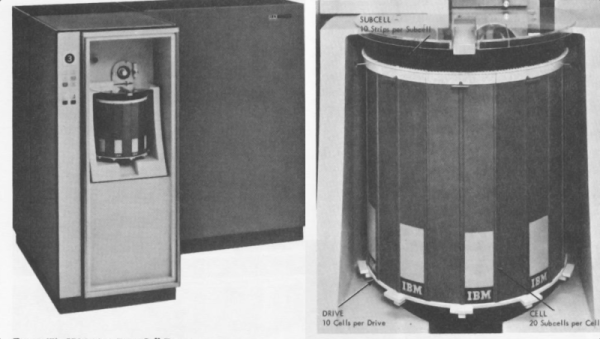
These days, mass storage for computers is pretty simple. It either uses a rotating disk or else it is solid state. There are a few holdouts using tape, too, but compared to how much there used to be, tape is all but dead. But it wasn’t that long ago that there were many kinds of mass storage. Tapes, disks, drums, punched cards, paper tape, and even stranger things. Perhaps none were quite so strange though as the IBM 2321 Data Cell drive — something IBM internally called MARS.

What is a data cell you might ask? A data cell was a mass storage device from IBM in 1964 that could store about 400 megabytes using magnetic strips that looked something like about a foot of photographic film. The strips resided inside a drum that could rotate. When you needed a record, the drum would rotate the strip you needed to the working part and an automated process would remove the strip in question, wrap it around a read/write head and then put it back when it was done.

Continue reading “Striping A Disk Drive The 1970 Way”

Silence Of The IPods: Reflecting On The Ever-Shifting Landscape Of Personal Media Consumption

On October 23rd of 2001, the first Apple iPod was launched. It wasn’t the first Personal Media Player (PMP), but as with many things Apple the iPod would go on to provide the benchmark for what a PMP should do, as well as what they should look like. While few today remember the PMP trailblazers like Diamond’s Rio devices, it’s hard to find anyone who doesn’t know what an ‘iPod’ is.

Even as Microsoft, Sony and others tried to steal the PMP crown, the iPod remained the irrefutable market leader, all the while gaining more and more features such as video playback and a touch display. Yet despite this success, in 2017 Apple discontinued its audio-only iPods (Nano and Shuffle), and as of May 10th, 2022, the Apple iPod Touch was discontinued. This marks the end of Apple’s foray into the PMP market, and makes one wonder whether the PMP market of the late 90s is gone, or maybe just has transformed into something else.

After all, with everyone and their pet hamster having a smartphone nowadays, what need is there for a portable device that can ‘only’ play back audio and perhaps video?

Continue reading “Silence Of The IPods: Reflecting On The Ever-Shifting Landscape Of Personal Media Consumption”

Hackaday Links Column Banner

Hackaday Links: May 15, 2022

It may be blurry and blotchy, but it’s ours. The first images of the supermassive black hole at the center of the Milky Way galaxy were revealed this week, and they caused quite a stir. You may recall the first images of the supermassive black hole at the center of the M87 galaxy from a couple of years ago: spectacular images that captured exactly what all the theories said a black hole should look like, or more precisely, what the accretion disk and event horizon should look like, since black holes themselves aren’t much to look at. That black hole, dubbed M87*, is over 55 million light-years away, but is so huge and so active that it was relatively easy to image. The black hole at the center of our own galaxy, Sagittarius A*, is comparatively tiny — its event horizon would fit inside the orbit of Mercury — a much closer at only 26,000 light-years or so. But, our black hole is much less active and obscured by dust, so imaging it was far more difficult. It’s a stunning technical achievement, and the images are certainly worth checking out.

Another one from the “Why didn’t I think of that?” files — contactless haptic feedback using the mouth is now a thing. This comes from the Future Interfaces Group at Carnegie-Mellon and is intended to provide an alternative to what ends up being about the only practical haptic device for VR and AR applications — vibrations from off-balance motors. Instead, this uses an array of ultrasonic transducers positioned on a VR visor and directed at the user’s mouth. By properly driving the array, pressure waves can be directed at the lips, teeth, and tongue of the wearer, providing feedback for in-world events. The mock game demonstrated in the video below is a little creepy — not sure how many people enjoyed the feeling of cobwebs brushing against the face or the splatter of spider guts in the mouth. Still, it’s a pretty cool idea, and we’d like to see how far it can go.

Continue reading “Hackaday Links: May 15, 2022”

Who Is Thinking About Open Source Firmware?

Yesterday, we ran a post on NVIDIA’s announcement of open-source drivers for some of its most recent video cards. And Hackaday being huge proponents of open-source software and hardware, you’d think we’d be pouring the champagne. But it’s trickier than that.

Part of the reason that they are able to publish a completely new, open-source driver is that the secrets that they’d like to keep have moved into the firmware. So is the system as a whole more or less open? Yeah, maybe both.

With a more open interface between the hardware and the operating system, the jobs of people porting the drivers to different architectures are going to be easier. Bugs that are in what is now the driver layer should get found and fixed faster. All of the usual open-source arguments apply. But at the same time, the system as a whole isn’t all that much more transparent. The irony about the new NVIDIA drivers is that we’ve been pushing them to be more open for decades, and they’ve responded by pushing their secrets off into firmware.

Secrets that move from software to firmware are still secrets, and even those among us who are the most staunch proponents of open source have closed hardware and firmware paths in our computers. Take the Intel Management Engine, a small computer inside your computer that’s running all the time — even while the computer is “off”. You’d like to audit the code for that? Sorry. And it’s not like it hasn’t had its fair share of security relevant bugs.

And the rabbit hole goes deeper, of course. No modern X86 chips actually run the X86 machine language instructions — instead they have a microcode interpreter that reads the machine language and interprets it to what the chip really speaks. This is tremendously handy because it means that chip vendors can work around silicon bugs by simple pushing out a firmware update. But this also means that your CPU is running a secret firmware layer at core. This layer is of course not without bugs, some of which can have security relevant implications.

This goes double for your smartphone, which is chock-full of multiple processors that work more or less together to get the job done. So while Android users live in a more open environment than their iOS brethren, when you start to look down at the firmware layer, everything is the same. The top layer of the OS is open, but it’s swimming on top of an ocean of binary blobs.

How relevant any of this is to you might depend on what you intend to do with the device. If you’re into open source because you like to hack on software, having open drivers is a fantastic resource. If you’re looking toward openness for the security guarantees it offers, well, you’re out of luck because you still have to trust the firmware blindly. And if you’re into open source because the bugs tend to be found quicker, it’s a mix — while the top level drivers are made more inspectable, other parts of the code are pushed deeper into obscurity. Maybe it’s time to start paying attention to open source firmware?

NVIDIA Releases Drivers With Openness Flavor

This year, we’ve already seen sizeable leaks of NVIDIA source code, and a release of open-source drivers for NVIDIA Tegra. It seems NVIDIA decided to amp it up, and just released open-source GPU kernel modules for Linux. The GitHub link named open-gpu-kernel-modules has people rejoicing, and we are already testing the code out, making memes and speculating about the future. This driver is currently claimed to be experimental, only “production-ready” for datacenter cards – but you can already try it out!

The Driver’s Present State

Of course, there’s nuance. This is new code, and unrelated to the well-known proprietary driver. It will only work on cards starting from RTX 2000 and Quadro RTX series (aka Turing and onward). The good news is that performance is comparable to the closed-source driver, even at this point! A peculiarity of this project – a good portion of features that AMD and Intel drivers implement in Linux kernel are, instead, provided by a binary blob from inside the GPU. This blob runs on the GSP, which is a RISC-V core that’s only available on Turing GPUs and younger – hence the series limitation. Now, every GPU loads a piece of firmware, but this one’s hefty!

Barring that, this driver already provides more coherent integration into the Linux kernel, with massive benefits that will only increase going forward. Not everything’s open yet – NVIDIA’s userspace libraries and OpenGL, Vulkan, OpenCL and CUDA drivers remain closed, for now. Same goes for the old NVIDIA proprietary driver that, I’d guess, would be left to rot – fitting, as “leaving to rot” is what that driver has previously done to generations of old but perfectly usable cards. Continue reading “NVIDIA Releases Drivers With Openness Flavor”