Boldport Tribute To Bob Pease

We have lost something in PCB design over the last few decades. If you open up a piece of electronics from the 1960s you’ll see why. A PCB from that era is a thing of beauty, an organic mass of curving traces, an expression of the engineer’s art hand-crafted in black crêpe paper tape on transparent acetate. Now by comparison a PCB is a functional drawing of precise angles and parallel lines created in a CAD package, and though those of us who made PCBs in both eras welcome the ease of software design wholeheartedly we have to admit; PCBs just ain’t pretty any more.

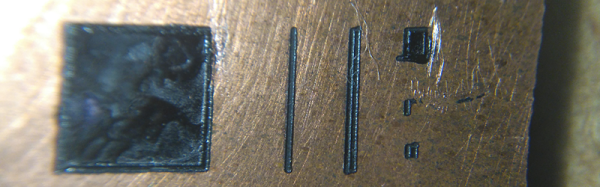
It doesn’t have to be that way though. Notable among the rebels are Boldport, whose latest board, a tribute to the late linear IC design legend [Bob Pease], slipped out this month. They use their own PCBmodE design software to create beautiful boards as works of art with the flowing lines you’d expect from a PCB created the old-fashioned way.

The board itself is an update to an earlier Boldport design, and features Pease’s LM331 voltage to frequency converter IC converting light intensity to frequency and flashing an LED. It’s one of the application circuits from the datasheet with a little extra to drive the LED. Best of all the kit is a piece of open-source hardware, so you can find all its resources on GitHub.

We are fans of Boldport’s work here at Hackaday, and it should come as no surprise that we have featured them before. From one of their other kits through several different pieces of PCB wall art, to their work making an appearance in Marie Claire magazine they have graced these pages several times, and we hope this latest board will be one of many more.

Introducing The Raspberry Pi 3

TL;DR: The Raspberry Pi 3 Model B is out now. This latest model includes 802.11n WiFi, Bluetooth 4.0, and a quad-core 64-bit ARM Cortex A53 running at 1.2 GHz. It’s a usable desktop computer. Available now at the usual Pi retailers for $35.

News of the latest Raspberry Pi swept around the Internet like wildfire this last weekend, thanks to a published FCC docs showing a Pi with on-board WiFi and Bluetooth. While we thank the dozens of Hackaday readers that wrote in to tell us about the leaked FCC documents, our lips have been sealed until now. We’ve been doing a few hands-on tests with the Pi 3 for about two weeks now, and the reality of the Pi 3 is much cooler than a few leaked FCC docs will tell you.

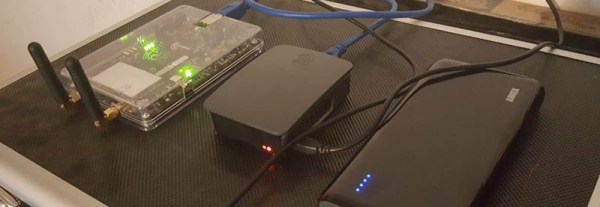
The Raspberry Pi 3 Model B features a quad-core 64-bit ARM Cortex A53 clocked at 1.2 GHz. This puts the Pi 3 roughly 50% faster than the Pi 2. Compared to the Pi 2, the RAM remains the same – 1GB of LPDDR2-900 SDRAM, and the graphics capabilities, provided by the VideoCore IV GPU, are the same as they ever were. As the leaked FCC docs will tell you, the Pi 3 now includes on-board 802.11n WiFi and Bluetooth 4.0. WiFi, wireless keyboards, and wireless mice now work out of the box.

Continue reading “Introducing The Raspberry Pi 3”

Milling PCBs With An Off-The-Shelf CNC

There’s a lot of little things that can go wrong before you get great results out of a process. We like to read build logs to learn from the mistakes made. [Marc Liyanage] bought a Nomad CNC machine from Carbide3d, and after a bit of learning has gotten some very nice PCBs out of it.

The first trip up he encountered was not setting the design rules in EagleCAD to check for gaps too small for his router bit. After he sorted that, and worked around an issue with Carbide not supporting R values for curves; instead opting for IJK, he made a nice TQFP to DIP break out board.

The next board was a more complicated double-sided job. He cleverly had the machine drill two holes all the way through the PCB to give him a space for two alignment pins. Unfortunately this didn’t work out exactly as planned and he had a slight misalignment with some of the via holes. It looked alright and he began assembling. To his dismay, the clearances were off again. It was a bit of deja vu for us.

We’ve made lots of boards on a CNC machine, and can attest to the task’s finicky nature. It’s certainly quicker than the photoresist technique for boards with lots of little holes. It will take someone quite a few tries before they start having more successes than failures, but it’s very rewarding.

Paydar: What It Was Like To Battle Bots In 2002

Most people remember when Battle Bots was a big thing, but few of us got to live it as seen in this gallery. Every now and then, someone posts something more amazing than usual in the comments. When [Wolf] was studying at IUPUI they somehow convinced a professor to let them build a scary dangerous robot maiming device for their final project. It’s a cross-disciplinary project — even the medical students may get to participate.

Spike vs hours and hours of work.
Spike vs. hours and hours of work. Victory: spike.

Their bot, unfortunately, got taken out by some spikes after attempting to get a spinbot before it started spinning and got them. If you look closely at the 2002 Comedy Central Battlebot opening you can see the smoke pour from their robot as they try to escape the fatal spikes.

The robot itself is a three wheeled design. The two wheels across from each other drive the robot, and the third steers. There is a very cool encoder mechanism for the steering wheel that is worth checking out. The main drive motor is a hefty 15HP electric forklift motor current limited to 300amps. The robot never got a weapon thanks to slow mechanical engineers, but a motor like that can turn most chunks of metal into deadly weapons.

Battle Bots is making a comeback in some ways. Word’s still out if it will ever go back to it’s prime, or if something more insane will replace it.

FCC Locks Down Router Firmware

For years, we have been graced with consumer electronics that run some form of Linux, have a serial port on the circuit board somewhere, and are able to be upgraded through official and unofficial means. That digital picture frame you got for Christmas in 2007 and forgot to regift in 2008? That’s a computer, and it would make a wonderful Twitter feed display. Your old Linksys WRT54G router? You can make a robotic lawnmower out of that thing. The ability to modify the firmware of consumer electronics is the cornerstone of Hackaday’s editorial prerogative. Now that right we have all enjoyed is in jeopardy, thanks to regulations from the FCC and laziness from router manufacturers.
Continue reading “FCC Locks Down Router Firmware”

Adding Spice To Your Workbench

Most of us didn’t fight in World War II, drive a race car, or fly the Space Shuttle. But with simulation, you can experience at least some of what it would be like to do those things. Granted, playing Call of Duty isn’t really the same as going to war. No matter what you are simulating, it only goes so far. However, you can get a lot of value from a simulation. I’d bet the average kid who has played Call of Duty knows more about WWII locales and weapons than my high school history teacher.

When it comes to electronics, simulation is an excellent way to get insight into a circuit’s operation. After all, most circuits operate in the abstract–you can’t look at an audio amplifier and see how it works without a tool like a scope. So simulation, when done well, can be very satisfying. You just have to be careful to remember that it isn’t always as good as the real thing.

That’s Spicy

One of the best-known electronics simulators is Spice, which Berkeley created in 1973. In its original form, you had to punch cards that described your circuit and the analysis you wanted to perform. Modern PC versions sometimes replace the deck of cards with a text file. The best modern versions, though, give you a GUI that allows you to draw a schematic and then probe it to see the results.

There are several paid and free versions of Spice (and other simulators) that include a GUI. One of the best for a casual user is the free offering from Linear Technology called LTSpice.

Linear makes LTSpice available and populates it with models for their devices in the hopes you’ll buy components from them. However, the software is entirely usable for anything, and it has a powerful set of features. Linear produces the software for Windows, but I can attest that it runs just fine under Wine on Linux. The Web site will invite you to register, but you don’t have to if you don’t want to.

Continue reading “Adding Spice To Your Workbench”

Dr Noirimetla, Private Failure Investigator And The Mystery Of Galileo’s Pillars

One dark and stormy morning, Dr. Richard Noirimetla, private failure investigator, was sitting at his desk nursing his morning cup of joe. It was an addiction, but life, and engineering was hard. Intense eyes sat in a round dark-skinned face. An engineering degree from the prestigious Indian Institute of Technology hung from the wall in his sparse office. Lightning flashed outside of his window, as the rain began to beat even harder against his corner office windows.

His phone rang.

“Hello, Dr. Noirimetla, Private Failure Investigator here.” He said in deep, polite voice. “How may I help you?”

“Ah, I’m Chief of Manufacturing for Galileo Concrete Pillars Inc. We have a bit of a problem here. We used to see a failure rate above 33% for our concrete pillar operation. As part of our lean manufacturing efforts we tried to reduce that number through various improvements. However, we see a failure rate of almost 50% now. We expect foul play… from one of our suppliers. Can you come right away?” a worried man’s voice sounded over the phone.

“I see, that’s very troubling,” Noirimetla rumbled. “I’ll send over the contract detail. There will be an increased fee, but I’m on my way.”

“Sounds good, we’ll pay anything! Just get our operation up to standards!” The man bid a polite goodbye and hung up.
Continue reading “Dr Noirimetla, Private Failure Investigator And The Mystery Of Galileo’s Pillars”