Overclocking The Raspberry Pi 3 For Tasty Speed Increases

Some people are never happy. [Jackenhack] got hold of a couple of shiny new Raspberry Pi 3s, and the first thing he did is to start overclocking them. Fortunately, he knows what he is doing, so none of the magic smoke escaped, but it seems not all Pis are happy with the process.

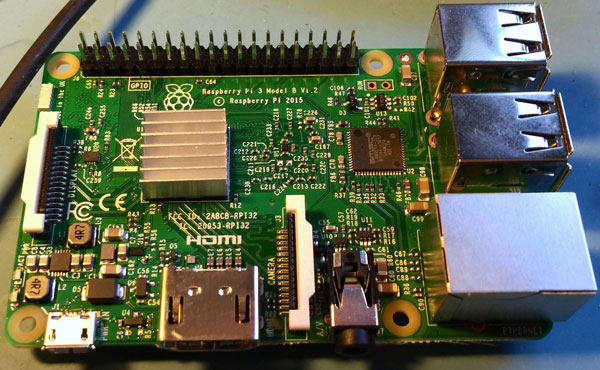
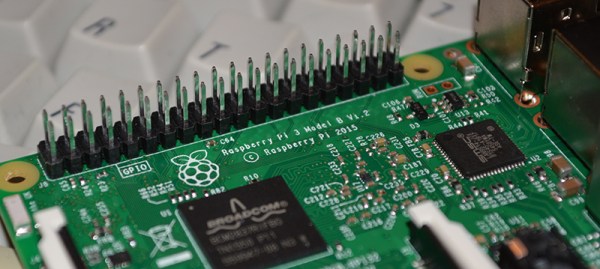
For one of the three seemingly identical Pi 3, adding heat sinks let him push the CPU from the native 1.2GHz up to 1.45GHz. That did involve a bit of overvolting (increasing the voltage to the CPU), but that can be easily done in software. He also experimented with adding heat sinks to the memory, then bumping up the speed of the memory to increase throughput. Again, he was able to make some impressive gains, bumping the speed up from the native 400 Mhz to 500 Mhz. Both of those are stable overclocks: he was able to run the system at 100% CPU load for an extended time, and has incorporated the overclocked Pi into his system that contributes to the NTP pool project.

However, when he tried the same overclock with the second of the Pi 3 victims test subjects, it failed due to the CPU overheating. So, it seems that there is a lot of variation in the individual bits of silicon on the Pi 3. Perhaps some liquid nitrogen would help? It did for an Arduino…

Google Is Building A 100kW Radio Transmitter At A Spaceport And No One Knows Why

You can find the funniest things in public government documents. There’s always ample evidence your local congress critter is working against the interests of their constituency, nation, and industry controlled by the commission they’re chairperson of. Rarely, though, do you find something surprising, and rarer still does it portend some sort of experiments conducted by Google at a spaceport in New Mexico.

In a publication released last week, Google asked the FCC to treat some information relating to radio experiments as confidential. These experiments involve highly directional and therefore high power transmissions at 2.5 GHz, 5.8GHz, 24GHz, 71-76GHz, and 81-86GHz. These experiments will take place at Spaceport America, a 12,000 foot runway in the middle of New Mexico occasionally used by SpaceX, Virgin Galactic, and now Google.

For the most part, this document only tells the FCC that Google won’t be causing harmful interference in their radio experiments. There few other details, save for what bands and transmitters Google will be using and an experimental radio license call sign (WI9XZE) that doesn’t show up in the FCC database.

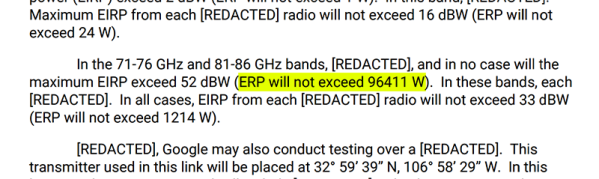
Of the few details listed in the documents, one thing does pop out as exceptionally odd: a 70-80 GHz transmitter with an effective radiated power (ERP) 96,411 W. That’s close enough to 100 kilowatts to call it as such. This is the maximum effective radiated power of the highest power FM stations in the US, but radio stations are omnidirectional, whereas Google is using very high gain antennas with a beam width of less than half a degree. The actual power output of this transmitter is a mere half watt.

The best guess for what Google is doing out in the New Mexico desert is Project Skybender, a project to use millimeter waves to bring faster Internet to everyone. There aren’t many details, but there is a lot of speculation ranging from application in low Earth orbit to something with Google Loon.

Odroid C2 Bests Raspberry Pi 3 In Several Ways

It’s been a big week in the world of inexpensive single board computers, and everyone’s talking about the new Raspberry Pi 3. It blows away the competition they say, nobody can touch it for the price.

Almost nobody, that is.

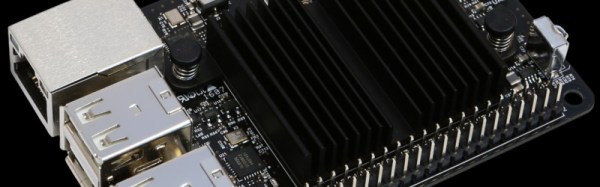
With a lot less fanfare on these shores, another cheap and speedy 64-bit quad-core ARM-based SBC slips onto the market this week, Hardkernel’s Odroid C2. And looking at the specification it seems as though the Pi 3 may be given a run for its money. Like the BCM2837 in the Pi 3 its Amlogic S905 SoC is a quad-core ARM Cortex-A53, but the C2’s 2GHz clock speed gives the raspberry to the 1.2GHz of the Pi 3. There is twice the RAM of the Pi 3 at 2Gbytes, and the onboard Mali-450 GPU can deliver 4K video.

Unlike the Pi 3 there is no wireless or Bluetooth on board, but the C2 has a Gigabit Ethernet port which is wired directly into the SoC. Compared to the Pi 3’s 100 megabit port which suffers through being on a USB interface, that’s likely to be very quick.

Storage can be a choice of either the usual micro SD card or eMMC. Given that the two boards share a very similar form factor it is no surprise that they have very similar GPIO capabilities, however it is worth noting that the C2 has a built-in analog-to-digital converter. As to operating systems, the C2 can run Ubuntu 16.04, or Android Lollipop.

Of course, we’ve seen so many boards touted as Pi-killers, and like all those also-ran tablets touted as iPad killers a few years ago we’ve never heard of most of them again after a brief moment of chatter. They look so good on paper but the price always lets them down.

The C2 could just escape that fate though, its $40 price point is very close to that of the Pi 3. Setting aside for a moment how much shipping and customs might cost for a package from Korea, that sounds interesting to us.

Why might you buy a C2 then, and why might you buy a Pi 3? That the C2 has a much faster processor is beyond doubt. This and its faster wired networking would make it a much more interesting prospect for anyone whose work involves network-attached data processing. But even though a USB wireless network adaptor can be had for only a few dollars the Pi 3’s onboard wi-fi and Bluetooth makes it much more attractive to a home user or someone using a computer on a platform unfettered by wires.

However impressive the C2 may be it is overwhelmingly likely that the Pi 3 will outsell it many times over. This will not just be due to the massive publicity advantage achieved by the Pi Foundation, but the huge ecosystem of hardware and software developers that have made the Pi boards perform to the limit of their abilities in all directions. If you don’t mind forgoing that support though, you could just find that the board from Korea gives you enough extra bang for your buck to make having it on your bench worthwhile.

We’ve followed the Odroid products from the start here at Hackaday. The C2 is just the latest of a procession of boards from Hardkernel, and we’ve featured a few projects that include them. Theirs is always the name at the top of the list when the subject turns to Raspberry Pi competitors, perhaps with the C2 they’ve got a winner.

Our thanks to [Derrick].

Pi 3 Benchmarks: The Marketing Hype Is True

The spec bullet list for the latest Raspberry Pi begins as you’ve already heard: WiFi and Bluetooth, now standard. While this is impressive itself, it doesn’t tell the whole story. The Pi 3, with an ARM Cortex A53, is up to 50% faster than the Pi 2 from last year. That’s an astonishing improvement in just 12 short months.

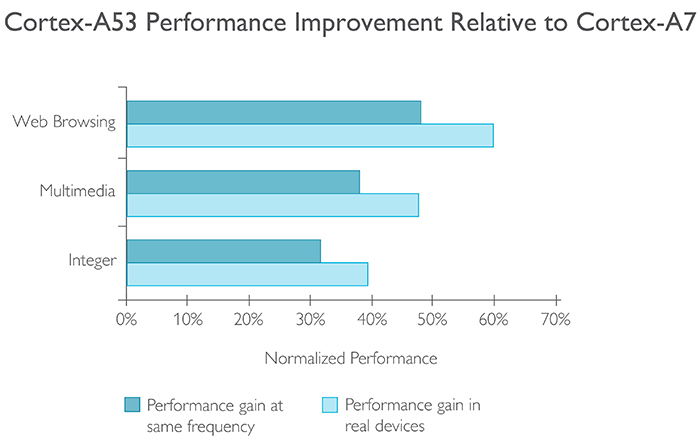
In playing with the Pi 3 for a few hours, it’s apparent the Pi 3 is fast. It passes a threshold of usability. The Raspberry Pi isn’t a computer that just sits on a shelf and runs a few cron jobs and blinks LEDs anymore – this is a computer that’s usable as a computer. But how fast is it? By stroke of luck, the official website for the Cortex A53 gives us a direct comparison between this chip and the CPU in the Raspberry Pi 2:

image credit: arm.com

In real devices, the performance improvement from the Pi 2 to the Pi 3 is somewhere between 40 and 60 percent. At least that’s what ARM and the Raspberry Pi foundation are claiming. Is this true? There are tests we can run, and the marketing speak, for once, isn’t too terribly off the mark.

Continue reading “Pi 3 Benchmarks: The Marketing Hype Is True”

Color TV Broadcasts Are ESP8266’s Newest Trick

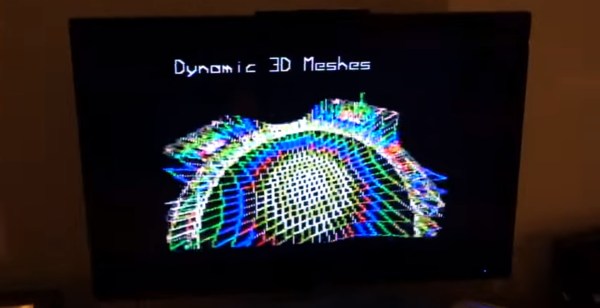
The ESP8266 is well known as an incredibly small and cheap WiFi module. But the silicon behind that functionality is very powerful, far beyond its intended purpose. I’ve been hacking different uses for the board and my most recent adventure involves generating color video from the chip. This generated video may be wired to your TV, or you can broadcast it over the air!

I’ve been tinkering with NTSC, the North American video standard that has fairly recently been superseded by digital standards like ATSC. Originally I explored pumping out NTSC with AVRs, which lead to an entire let’s learn, let’s code series. But for a while, this was on the back-burner, until I decided to see how fast I could run the ESP8266’s I2S bus (a glorified shift register) and the answer was 80 MHz. This is much faster than I expected. Faster than the 1.41 MHz used for audio (its intended purpose), 2.35 MHz used for controlling WS2812B LEDs or 4 MHz used to hopefully operate a reprap. It occasionally glitches at 80 MHz, however, it still works surprisingly well!

The coolest part of using the chip’s I2S bus is the versatile DMA engine connected to it. Data blocks can be chained together to seamlessly shift the data out, and interrupts can be generated upon a block’s completion to fill it in with new data. This allows the creation of a software defined bitstream in an interrupt.

Why NTSC? If I lived in Europe, it would have been PAL. The question you’re probably thinking is: “Why a dead standard?” And there’s really three reasons.

Continue reading “Color TV Broadcasts Are ESP8266’s Newest Trick”

Boldport Tribute To Bob Pease

We have lost something in PCB design over the last few decades. If you open up a piece of electronics from the 1960s you’ll see why. A PCB from that era is a thing of beauty, an organic mass of curving traces, an expression of the engineer’s art hand-crafted in black crêpe paper tape on transparent acetate. Now by comparison a PCB is a functional drawing of precise angles and parallel lines created in a CAD package, and though those of us who made PCBs in both eras welcome the ease of software design wholeheartedly we have to admit; PCBs just ain’t pretty any more.

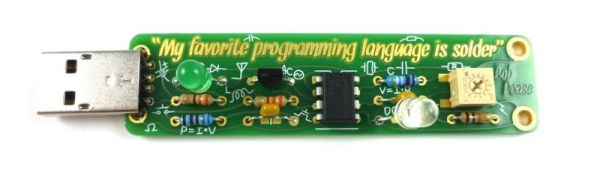
It doesn’t have to be that way though. Notable among the rebels are Boldport, whose latest board, a tribute to the late linear IC design legend [Bob Pease], slipped out this month. They use their own PCBmodE design software to create beautiful boards as works of art with the flowing lines you’d expect from a PCB created the old-fashioned way.

The board itself is an update to an earlier Boldport design, and features Pease’s LM331 voltage to frequency converter IC converting light intensity to frequency and flashing an LED. It’s one of the application circuits from the datasheet with a little extra to drive the LED. Best of all the kit is a piece of open-source hardware, so you can find all its resources on GitHub.

We are fans of Boldport’s work here at Hackaday, and it should come as no surprise that we have featured them before. From one of their other kits through several different pieces of PCB wall art, to their work making an appearance in Marie Claire magazine they have graced these pages several times, and we hope this latest board will be one of many more.

Introducing The Raspberry Pi 3

TL;DR: The Raspberry Pi 3 Model B is out now. This latest model includes 802.11n WiFi, Bluetooth 4.0, and a quad-core 64-bit ARM Cortex A53 running at 1.2 GHz. It’s a usable desktop computer. Available now at the usual Pi retailers for $35.

News of the latest Raspberry Pi swept around the Internet like wildfire this last weekend, thanks to a published FCC docs showing a Pi with on-board WiFi and Bluetooth. While we thank the dozens of Hackaday readers that wrote in to tell us about the leaked FCC documents, our lips have been sealed until now. We’ve been doing a few hands-on tests with the Pi 3 for about two weeks now, and the reality of the Pi 3 is much cooler than a few leaked FCC docs will tell you.

The Raspberry Pi 3 Model B features a quad-core 64-bit ARM Cortex A53 clocked at 1.2 GHz. This puts the Pi 3 roughly 50% faster than the Pi 2. Compared to the Pi 2, the RAM remains the same – 1GB of LPDDR2-900 SDRAM, and the graphics capabilities, provided by the VideoCore IV GPU, are the same as they ever were. As the leaked FCC docs will tell you, the Pi 3 now includes on-board 802.11n WiFi and Bluetooth 4.0. WiFi, wireless keyboards, and wireless mice now work out of the box.

Continue reading “Introducing The Raspberry Pi 3”