Ultrasonic Power Transfer: UBeam’s Curious Engineering

The future is wireless power, or so say a thousand press releases in my spam folder, and with very few exceptions every single system of wireless power delivery has fallen flat on its face. Except for a few niche cases – RFID tags, Wacom tablets and the S Pen, and the Qi inductive power mats for cell phones – the future of wireless power hardly looks bright, and in some cases seems downright dangerous. No one seems to grasp that wireless power transfer is much more inefficient than using a wire, and the inverse square law only makes everything worse.

Now there’s a new wireless power technology that’s a strange mix of running in stealth mode and sending press releases to every tech outlet on the planet. It’s called uBeam. This company says it will deliver wireless power to the world, but it’s not doing it with giant Tesla-inspired towers of power, radios beamed directly at devices, induction, magnetic resonance, or even light. uBeam transmits power via sound, specifically high intensity ultrasound. uBeam has never demonstrated a prototype, has never released any technical specs, and even some high-profile investors that include [Mark Cuban] have not seen the uBeam working. Despite running in a ‘stealth mode’, it has garnered a lot of press, and has been featured on TechCrunch dozens of times. This may just be a consequence of CrunchFunds’s investment in uBeam, but there’s still more Google News results for a technology that hasn’t even been demonstrated than a reasonable person would expect.

In what is perhaps the greatest breakdown ever posted on the EEVForums, [georgesmith] goes over what uBeam is, how the technology doesn’t make sense, and how far you can take a business before engineers start to say, ‘put up or shut up.’ [georgesmith]’s research goes over just some of what makes uBeam impractical, but digging even further reveals how insane uBeam actually is.

Continue reading “Ultrasonic Power Transfer: UBeam’s Curious Engineering”

DIY Computer — 1968 Style

What does it mean to “build your own computer?” Today, it is likely to mean you bought a motherboard, a power supply, and a case and put it all together. You might even have made an embedded computer using a few chips, including an off the shelf CPU. However, there are those guys (like me) who have built entire computers using FPGAs and some (not like me) who have built computers out of TTL chips, discrete components, and even relays and we have covered quite a few of them.

It hasn’t always been that easy. Components are readily available now and relatively cheap (especially considering inflation). In the 1960’s, simple components cost more than you pay for them today and back then your hypothetical self was making less money. In just about every way imaginable, the cost was prohibitive.

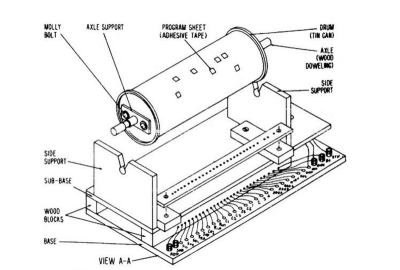
clipSo what did you do if you were a kid saving money from a paper route in 1968 and you wanted to build a computer? Maybe you turned to How to Build a Working Digital Computer a book published in 1968 by [Edward Alcosser], [James Phillips], and [Allen Wolk]. This book did as the title promised: you could build a working digital computer. The components, though, were paper clips, tin cans, thread spools, and other household items. The only real electronic components you had to use were light bulbs and a battery, although you might also use store-bought switches in some places instead of the homemade versions shown in the book.

Continue reading “DIY Computer — 1968 Style”

Breaking: Drone Registration Will Be Required Says US DoT

Today, the US Department of Transportation announced that unmanned aerial systems (UAS) will require registration in the future.

The announcement is not that UAS, quadcopters, or drones would be required to be registered immediately. This announcement is merely that a task force of representatives from the UAS industry, drone manufacturers, and manned aviation industries would provide recommendations to the Department of Transportation for what types of aircraft would require registration. The task force is expected to develop these recommendations and deliver a report by November 20.

A Short History of FAA Model Aircraft Regulation

Introduced in 1981, AC 91-57 was the model aircraft operating standards for more than 30 years. This standard suggested that model pilots not fly higher than 400 feet, and to notify a flight service station or control tower when flying within three miles of an airport.

The FAA Modernization And Reform Act Of 2012 (PDF) required the FAA to create a set of rules for unmanned aerial systems, however the FAA is expressly forbidden from, ‘promulgating any rule or regulation regarding model aircraft.’ The key term being, ‘model aircraft’. This term was defined by the FAA as being, “an unmanned aircraft that is capable of sustained flight in the atmosphere; flown within visual line of sight of the person operating the aircraft; and flown for hobby or recreational purposes.” Anything outside of this definition was an unmanned aerial system, and subject to FAA regulations.

While this definition of model aircraft would have been fine for the 1980s, technology has advanced since then. FPV flying, or putting a camera and video transmitter on a quadcopter, is an extraordinarily popular hobby now, and because it is not ‘line of sight’, it is outside the definition of ‘model aircraft’.

This interpretation has not seen a great deal of countenance from the model aircraft community; FPV flying is seen as a legitimate hobby and even a sport. The entire domain of model aircraft aviation is expanding, and the hobby has never been as popular as it is now.

The Safety of Model Aviation

The issue of drone regulation focuses nearly entirely on the safety of airways in the United States; model aviators flying within five miles of an airport must ask the airport or control tower for permission to fly. To that end, the FAA created the B4UFLY app that takes the trouble out of reading sectional charts and checking up on the latest NOTAMs and TFRs.

However, the FAA is increasingly concerned with drones, multicopters, and model aircraft. In a report issued last summer, the FAA cited a marked increase in the number of ‘close calls’ between manned aircraft and model aircraft. The Academy of Model Aeronautics went over this data and found a different story: only 3.5% of sightings were ‘close calls’ or ‘near misses’. The FAA data is questionable – the reports cited include a drone flying at 51,000 feet over Washington DC. Not only is this higher than any civilian passenger aircraft capable of flying, the ability for any civilian remote-controlled aircraft to operate at this altitude is questionable at best.

Nevertheless, the requirement for registration has been greatly influenced by the perceived concerns of regulators for mid-air collisions.

What exactly will require registration?

The group of industry representatives responsible for delivering the recommendations to the Department of Transportation will take into account what aircraft should be exempt from registration due to a low safety risk. Most likely, small toy quadcopters will be exempt from registration; it’s difficult to fly a small Cheerson quadcopter outside anyway. Whether this will affect larger quadcopters and drones such as the DJI Phantom, or 250 class FPV racing quadcopters remains to be seen.

TEMPEST: A Tin Foil Hat For Your Electronics And Their Secrets

Electronics leak waves and if you know what you’re doing you can steal people’s data using this phenomenon. How thick is your tinfoil hat? And you sure it’s thick enough? Well, it turns out that there’s a (secret) government standard for all of this: TEMPEST. Yes, all-caps. No, it’s not an acronym. It’s a secret codename, and codenames are more fun WHEN SHOUTED OUT LOUD!

The TEMPEST idea in a nutshell is that electronic devices leak electromagnetic waves when they do things like switch bits from ones to zeros or move electron beams around to make images on CRT screens. If an adversary can remotely listen in to these unintentional broadcasts, they can potentially figure out what’s going on inside your computer. Read on and find out about the history of TEMPEST, modern research, and finally how you can try it out yourself at home!

Continue reading “TEMPEST: A Tin Foil Hat For Your Electronics And Their Secrets”

An Intel Atom CPU In The Raspi Form Factor

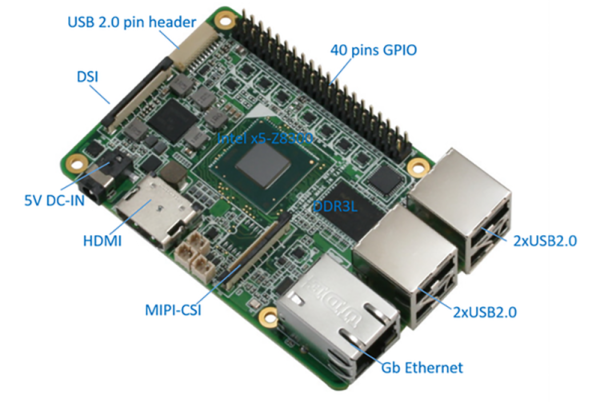
For years now, people have been trying to stuff an Intel processor on a credit card sized board. An x86 board that can fit in your pocket is an intriguing device – after all, that’s what Gumstix, the forerunner of the Raspberry Pi, were. Efforts to put x86 on a dev board have included the Minnowboard, the Intel Galileo and Edison, and even the Intel Compute Stick. These have not seen the uptake you would expect from a small x86-powered board, but that tide may soon turn. The UP board is exactly what you would expect from a Raspberry Pi-inspired board with a real Intel processor.

The feature set for the UP board is impressive for a credit card sized board; it’s powered by a quad-core Intel Atom x5-Z8300 CPU running at 1.84 GHz. The board comes equipped with 1GB of RAM, 16GB of eMMC Flash, Gigabit Ethernet, five USB 2.0 ports (one on a pin header) and one USB 3.0 port. Up also includes a real-time clock, HDMI, the same 40-pin GPIO pin connector found in the Raspberry Pi Model B Plus, and DSI and CSI connectors for the Raspberry Pi camera and touch screen.

To be fair to all the previous attempts at making a board built around an x86 chip that borrows heavily from the Raspberry Pi, there haven’t been many chips out there that have been suitable for credit card-sized applications. Only in the last year or so has Intel released chips suitable for an x86 single board computer, and the growing market of Windows 10 tablets bears this out. While it remains to be seen if the UP board will be a success, more than a few people will pick one of these up for a miniature Skype box.

Retrotechtacular: New York City’s Secret Computer

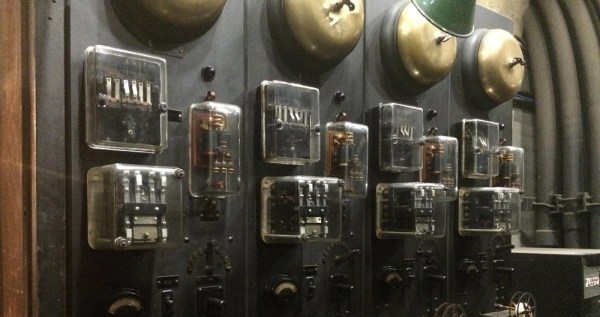
Over 750,000 people pass through New York City’s Grand Central Terminal each day. Located in the heart of the city, it’s one of the largest train stations in the world. Its historic significance dates back to 1913, when it opened its doors to the public. At the time, few were aware of the secret computer that sat deep in a sub basement below the hustle and bustle of the city’s busy travelers. Its existence was kept secret all the way into the 1980’s.

Westinghouse had designed a system that would allow authorities to locate a stuck train in a tunnel. There were cords stretched the length of the tunnels. If a train stalled, the operator could reach out and yank on the cord. This would set off an alarm that would alert everyone of the stuck train. The problem being that even though they knew a train was down, they did not know exactly where. And that’s where the computer come in. Westinghouse designed it to calculate where the train was, and write its location on some ticker tape.

So this is the part of the post where we tell you how the computer established where exactly the train breakdown occurred. Although the storyteller in the video is admirably enthusiastic about telling the story, our depth of detail on the engineering that went into this seems nowhere to be found. Let us know in the comments below if you have a source of more information. Or just post your own conjecture on how you would have done it with the early 20th century tech.

The invention of the two way radio made the whole thing obsolete not long after is was built. Never-the-less, it remains intact to this day.

Thanks to [Greg] for the tip!

SuperCon Presenters Revealed

When we announced the Hackaday SuperConference earlier this week we weren’t able to mention any presenters; the call for proposals to this epic hardware conference was still open. Now that the proposals are in we have been poring over them and starting to send acceptance notifications. Just a few of the notable presenters who have already confirmed are listed below. This is more than enough to get the excitement started but we will of course announce more in the coming days.

Check out the amazing space we’ve booked at Dogpatch Studios. It is perfect for the non-stop, high-throughput schedule that has been assembled. There will be one speaking track for talks that spans the entire weekend, while multiple concurrent workshops are held on the other floor of the venue. The evening party will kick off with the announcement of the 2015 Hackaday Prize winner, and the winner of Best Product.

Head over and apply now to attend the two-day SuperCon in San Francisco on November 14th and 15th. This list of amazing people and topics is just a taste of over thirty talks and workshops going on at the hardware conference you’ve been waiting for.

Shanni R. Prutchi  | Construction of an Entangled Photon Source for Experimenting with Quantum Technologies

Sprite_TM | Implementing the Tamagotchi Singularity

Michael Ossmann | Simple RF Circuit Design Workshop

Fran Blanche | Fun and Relevance of Antiquated Technology

Paul Stoffregen | Advanced Microcontroller-Based Audio Workshop

Noah Feehan | Making in Public

Sarah Petkus | NoodleFeet: Building a Robot as Art

Minas Liarokapis | OpenBionics

Luke Iseman | Starting a Hardware Startup

Dozens more to come.


Download the SuperCon poster and hang it everywhere. Share the @hackaday #SuperCon.  Do it now.