Towards The Perfect Coin Flip: The NIST Randomness Beacon

Since early evening on September 5th, 2013 the US National Institute of Standards and Technology (NIST) has been publishing a 512-bit, full-entropy random number every minute of every day. What’s more, each number is cryptographically signed so that you can easily verify that it was generated by the NIST. A date stamp is included in the process, so that you can tell when the random values were created. And finally, all of the values are linked to the previous value in a chain so that you can detect if any of the past numbers in the series have been altered after the next number is published. This is quite an extensive list of features for a list of random values, and we’ll get into the rationale, methods, and uses behind this scheme in the next section, so stick around.

Continue reading “Towards The Perfect Coin Flip: The NIST Randomness Beacon”

Home Computers Behind The Iron Curtain

I was born in 1973 in Czechoslovakia. It was a small country in the middle of Europe, unfortunately on the dark side of the Iron Curtain. We had never been a part of Soviet Union (as many think), but we were so-called “Soviet Satellite”, side by side with Poland, Hungary, and East Germany.

My hobbies were electronics and – in the middle of 80s – computers. The history of computers behind the Iron Curtain is very interesting, with a lot of unusual moments. For example – communists at first called cybernetics as “bourgeois’ pseudoscience” (as well as sociology or semiotics), “used to enslave a mankind by machines”. But later on they understood the importance of computers, primarily for science and army. So in 50s the Eastern Bloc started to build its own computers, separately and “in its own way.”

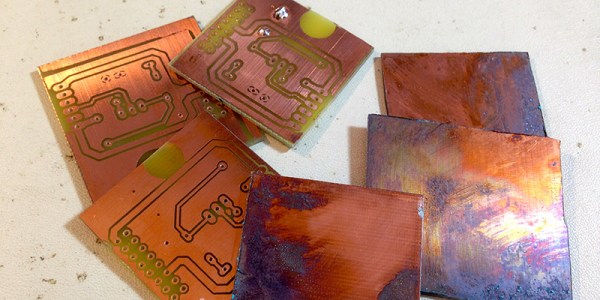
The biggest problem was a lack of modern technologies. There were a lot of skilled and clever people in eastern countries, but they had a lot of problems with the elementary technical things. Manufacturing of electronics parts was divided into diverse countries of Comecon – The Council for Mutual Economic Assistance. In reality, it led to an absurd situation: You could buy the eastern copy of Z80 (made in Eastern Germany as U880D), but you couldn’t buy 74LS00 at the same time. Yes, a lot of manufacturers made it, but “it is out of stock now; try to ask next year”. So “make a computer” meant 50 percent of electronics skills and 50 percent of unofficial social network and knowledge like “I know a guy who knows a guy and his neighbor works in a factory, where they maybe have a material for PCBs” at those times.

Continue reading “Home Computers Behind The Iron Curtain”

Downloading Data Through The Display

HIPAA – the US standard for electronic health care documentation – spends a lot of verbiage and bureaucratese on the security of electronic records, making a clear distinction between the use of records by health care worker and the disclosure of records by health care workers. Likewise, the Federal Information Security Management Act of 2002 makes the same distinction; records that should never be disclosed or transmitted should be used on systems that are disconnected from networks.

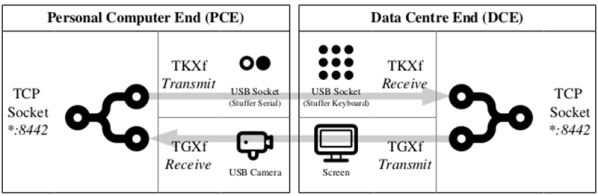
This distinction between use and disclosure or transmission is of course a farce; if you can display something on a screen, it can be transmitted. [Ian Latter] just gave a talk at Kiwicon that provides the tools to do just that. He calls it ThruGlassXfer (TGXf), and it does exactly what it says on the tin: anything that can be displayed on a screen can be transmitted. All you need are the right tools.

Continue reading “Downloading Data Through The Display”

Reverse Engineering Capcom’s Crypto CPU

There are a few old Capcom arcade titles – Pang, Cadillacs and Dinosaurs, and Block Block – that are unlike anything else ever seen in the world of coin-ops. They’re old, yes, but what makes these titles exceptional is the CPU they run on. The brains in the hardware of these games is a Kabuki, a Z80 CPU that had a few extra security features. why would Capcom produce such a thing? To combat bootleggers that would copy and reproduce arcade games without royalties going to the original publisher. It’s an interesting part of arcade history, but also a problem for curators: this security has killed a number of arcade machines, leading [Eduardo] to reverse engineering and document the Kabuki in full detail.

While the normal Z80 CPU had a pin specifically dedicated to refreshing DRAM, the Kabuki repurposed this pin for the security functions on the chip. With this pin low, the Kabuki was a standard Z80. When the pin was pulled high, it served as a power supply input for the security features. The security – just a few bits saved in memory – was battery backed, and once this battery was disconnected, the chip would fail, killing the game.

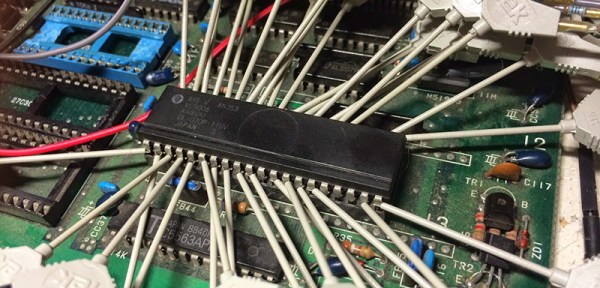
Plugging Kabuki into an old Amstrad CPC 6128 without the security pin pulled high allowed [Eduardo] to test all the Z80 instructions, and with that no surprises were found; the Kabuki is fully compatible with every other Z80 on the planet. Determining how Kabuki works with that special security pin pulled high is a more difficult task, but the Mame team has it nailed down.

The security system inside Kabuki works through a series of bitswaps, circular shifts, XORs, each translation different if the byte is an opcode or data. The process of encoding and decoding the security in Kabuki is well understood, but [Eduardo] had a few unanswered questions. What happens after Kabuki lost power and the memory contents – especially the bitswap, address, and XOR keys – vanished? How was the Kabuki programmed in the factory? Is it possible to reprogram these security keys, allowing one Kabuki to play games it wasn’t manufactured for?

[Eduardo] figured being able to encrypt new, valid code was the first step to running code encrypted with different keys. To test this theory, he wrote a simple ‘Hello World’ for the Capcom hardware that worked perfectly under Mame. While the demo worked perfectly under Mame, it didn’t work when burned onto a EPROM and put into real Capcom hardware.

That’s where this story ends, at least for the time being. The new, encrypted code is valid, Mame runs the encrypted code, but until [Eduardo] or someone else can figure out any additional configuration settings inside the Kabuki, this project is dead in the track. [Eduardo] will be back some time next week tearing the Kabuki apart again, trying to unravel the mysteries of what makes this processor work.

Fail Of The Week: Teddy Top And Fourteen Fails

Last summer, [Quinn] made the trip out to KansasFest, the annual Apple II convention in Kansas City, MO. There, she picked up the most modern Apple II system that wasn’t an architecturally weird IIGS: she lugged home an Apple IIc+, a weird little machine that looks like an old-school laptop without a screen.

Not content with letting an old computer just sit on a shelf looking pretty, [Quinn] is working on a project called the Teddy Top. ‘Teddy’ was one of the code names for the Apple IIc, and although add-ons to turn this book-sized computer into something like a laptop existed in the 80s, these solutions have not withstood the test of time. [Quinn] is building her own clamshell addition to her IIc+, and somehow failing at something she’s done hundreds of times before.

While the IIc+ has an NTSC composite output, the super-special video add-ons for the IIc+ used a DB15 expansion connector. Here, any add-on could access video sync signals, the a sound signal from the audio circuit, and even a +12V line that could drive loads up to 300 mA. It just so happened the display [Quinn] is using for this project runs at 12V, 200 mA. Everything was great, but as a worthy trustee of this computer’s Earthly existence, [Quinn] thought a bit of current limiting should be included in her addon. She designed a circuit around an NPN power transistor, that would allow the display to draw power until the load was around 250mA. After that, the transistor would start dumping excess power as heat. Yes, a fuse would be better. [Quinn] calls this Fail #1. There are thirteen more to go.

Continue reading “Fail Of The Week: Teddy Top And Fourteen Fails”

A Calculator With Free Software And Open Hardware

We’re fond of open source things here. Whether it’s 3D printers, circuit modeling software, or a global network of satellite base stations, the more open it is the more it improves the world around us. [Pierre Parent] and [Ael Gain] have certainly taken these values to heart with their open handheld graphing calculator.

While the duo isn’t giving away the calculators themselves, they are releasing all of the hardware designs so that anyone can build this calculator. It’s based on a imx233 processor because this chip (and most everything else about this calculator) is easy to source and easy to use. That, and there is a lot of documentation on it that is in the public domain. All of the designs, including the circuit board and CAD files for the case, are available to anyone who is curious, or wants to build their own.

The software on the calculator (and the software that was used to design the calculator) is all free software too. The calculator runs Linux (of course) and a free TI simulator environment in the hopes of easing the transition of anyone who grew up using TI’s graphing calculators. The project is still in a prototype phase, but it looks very promising. Even though the calculator can already run Pokemon, maybe one day it will even be able to run Super Smash Bros as well!

Compiling Your Own Programs For The ESP8266

When the ESP8266 was first announced to the world, we were shocked that someone was able to make a cheap, accessible UART to WiFi bridge. Until we get some spectrum opened up and better hardware, this is the part you need to build an Internet of Things thing.

It didn’t stop there, though. Some extremely clever people figured out the ESP8266 had a reasonably high-power microcontroller on board, a lot of Flash, and a good amount of RAM. It looked like you could just use the ESP8266 as a controller unto itself; with this chip, all you need to do is write some code for the ESP, and you have a complete solution for your Internet connected blinking lights or WiFi enabled toaster. Whatever the hip things the cool kids are doing these days, I guess.

But how do you set up your toolchain for the ESP8266? How do you build projects? How do you even upload the thing? Yes, it’s complicated, but never fear; [CNLohr] is here to make things easy for you. He’s put together a video that goes through all the steps to getting the toolchain running, setting up the build environment, and putting some code on the ESP8266. It’s all in a git, with some video annotations.

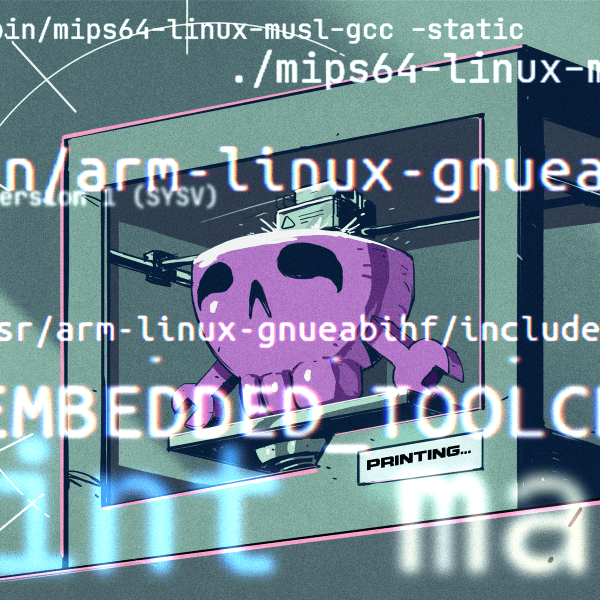
The tutorial covers setting up the Xtensa toolchain and a patched version of GCC, GDB, and binutils. This will take a long, long time to build, but once it’s done you have a build environment for the ESP8266.

With the build environment put together, [CNLohr] then grabs the Espressif SDK from the official site, and puts together the example image. Uploading to the module requires pulling some of the pins high and some low, plugging in a USB to serial module to send the code to the module, standing well back, and pressing upload.

For his example image, [CNLohr] has a few WS2812 RGB LEDs connected to the ESP8266 WiFi module. Uploading the image turns the LEDs into something controllable with UDP packets on port 7777. It’s exactly what you want in a programmable, WiFi chip, and just the beginning of what can be done with this very cool module.

If you’re looking around for some sort of dev board with an ESP8266 on it, [Mathieu] has been playing around with some cool boards, and we’ve been looking into making a Hackaday version to sell in the store. The Hackaday version probably won’t happen because FCC.

Continue reading “Compiling Your Own Programs For The ESP8266”