Yes We Have Random Bananas

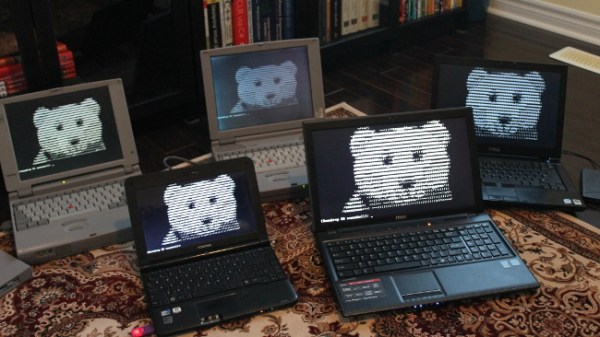
If you ask a normal person to pick a random number, they’ll usually just blurt out a number. But if you ask a math-savvy person for a random number, you’ll probably get a lecture about how hard it is to pick a truly random number. But if you ask [Valerio Nappi], you might just get a banana.

His post, which is in two parts, details how what computers generate are actually pseudo-random numbers. You can easily make sure that every number has the same probability of selection as any other number. The problem is that you have to start with something — usually called a seed. For the purposes of playing games, for example, you can grab some source of entropy like how many microseconds since a hardware timer last rolled over, the number of input pulses you’ve received from a mouse lately, or how long you had to wait for the enter key to depress after asking the user to press it. But if you know that seed and the algorithm you can perfectly predict what number the computer will generate next so it isn’t truly random.

Continue reading “Yes We Have Random Bananas”

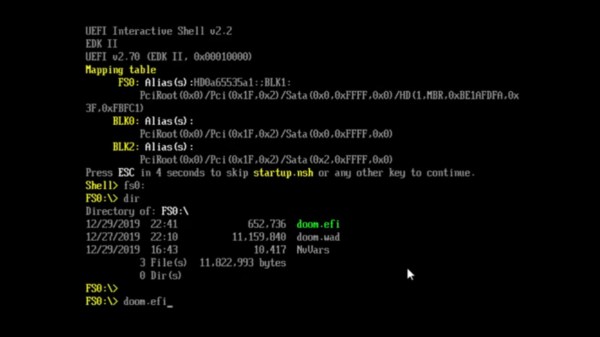
Screenshot of the EFI shell, showing doom.wad and doom.efi in 'ls' command output, and then doom.efi being loaded

DOOM? In Your BIOS? More Likely Than You Think!

We’ve seen hackers run DOOM on a variety of appliances, from desk phones to pregnancy tests. Now, the final frontier has been conquered – we got DOOM to run on an x86 machine. Of course, making sure we utilize your PC hardware to its fullest, we have to forego an OS. Here are two ways you can run the classic shooter without the burden of gigabytes of bloated code in the background.

[nic3-14159] implemented this first version as a payload for coreboot, which is an open-source BIOS/UEFI replacement for x86 machines. Some might say it’s imperfect — it has no sound support, only works with PS/2 keyboards, and exiting the game makes your computer freeze. However, it’s playable, and it fits into your BIOS flash chip.

But what if your computer hasn’t yet been blessed with a free BIOS replacement? You might like this UEFI module DOOM port instead, originally made by [Warfish] and then built upon by [Cacodemon345]. To play this, you only need to compile the binary and an UEFI shell, then use the “Load EFI Shell” option in your UEFI menu – something that’s widely encountered nowadays. This version also lacks sound, but is a bit more fully featured due to all the facilities that UEFI provides for its payloads.

Of course there’s far more efficient ways to slay demons on your computer, but even if they aren’t necessarily practical from a gaming standpoint, these two projects serve as decent examples of Coreboot and UEFI payloads. BIOS replacements like coreboot take up so little space, we’ve even seen Windows 3.1 fit alongside coreboot in the BIOS chip. Wondering what UEFI is, even? Here’s a primer for you. And, if you don’t mind the exceptional bloat of a stripped-down Linux install, here’s a Linux image built from the ground up to run DOOM specifically.

Continue reading DOOM? In Your BIOS? More Likely Than You Think!”

Homebrew An OS From Scratch? Snowdrop Shows How It’s Done

Ever wondered what it would take to roll your own OS? [Sebastian]’s Snowdrop OS might just provide you with some insight into that process, and maybe even some inspiration.

[Sebastian] created Snowdrop completely from scratch, using only x86 assembly language. It’s more than just bare-bones, and boasts a number of useful utilities and programs including a BASIC interpreter and linker (for creating standalone BASIC executables.) That’s not even touching on the useful essentials, like multitasking and a GUI framework. There are even a number of resources specifically for making game development easier. Because as [Sebastian] puts it, what’s a operating system without games?

Interested in giving Snowdrop a try, or peek at the source code? The binaries and sources section has all you need, and the other headings at the top of the page will send you to the various related goodies. If you have a few minutes, we recommend you watch a walkthrough of the various elements and features of Snowdrop in this video tour (embedded after the page break.)

Snowdrop is an ambitious project, but we’re not surprised that [Sebastian] has made it work; we’ve seen his low-level software skills before, with his fantastic efforts around the classic stand-up arcade game, Knights of the Round.

Continue reading “Homebrew An OS From Scratch? Snowdrop Shows How It’s Done”

PyScript: Python In The Web Browser

A chainsaw can make short work of clearing out the back forty. It can also make a good horror movie. So while some people will say we don’t need another tool to allow more malicious scripting in the browser, we also know that, like any tool, you can use it or abuse it. That tool? PyScript, which is, of course, Python in the browser.

The tool is in the early experimental phase, so the project doesn’t suggest using it in a production environment yet. However, if it works well, the promise is not just that you can write browser-based applications in Python — you’ll have a handy way to reuse existing Python code and even be able to run the same code on the browser that currently runs on the server. This has a lot of implications for improved client/server applications, or cases where you want to be able to run against a local backend when disconnected and a remote backend when you do have a connection. Of course, you can interoperate with JavaScript, too.

Continue reading “PyScript: Python In The Web Browser”

Quantum Computing: The First Taste Is Free

There are a few ways to access real quantum computers — often for free — over the Internet. However, most of these are previous-generation machines that have limited capabilities. Great for learning, perhaps, but not something you could do anything practical with.  Xanadu, however, has announced what they claim to be a computer capable of reaching quantum advantage that is free for anyone to use, within limits. Borealis — the computer in question — uses photonic states and has the capability of working with over 216 squeezed-state qubits.

The company is selling time on the computer, but the free tier includes 5 million free shots on Borealis and 10 million shots on an earlier series of quantum computers. You can also buy pay-as-you go service for about $100 per million shots on Borealis.

While a few million shots may sound like a lot, we noticed that the quickstart demo consumes 10,000 shots and that’s presumably something simple. That’s still about 500 runs of that on Borealis — not bad for free on a state-of-the-art quantum computer. You will be wanting to debug with a simulator, though.

We presume the developers are Beatles fans given that you use software called Penny Lane and Strawberry Fields to access the machines. Your job is controlled by Python and there is a cloud simulator to save your shots.

We won’t pretend to understand all there is about squeezed light qubits and the Borealis architecture. But you can get some general practice in our series on quantum computing. Or there are a few lectures around including one that aims at different levels of experience.

Continue reading “Quantum Computing: The First Taste Is Free”

Optimizing Linux Pipes

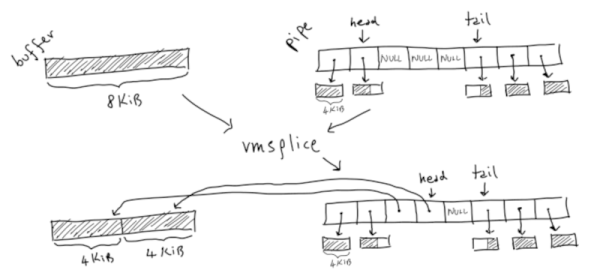
In CPU design, there is Ahmdal’s law. Simply put, it means that if some process is contributing to 10% of your execution, optimizing it can’t improve things by more than 10%. Common sense, really, but it illustrates the importance of knowing how fast or slow various parts of your system are. So how fast are Linux pipes? That’s a good question and one that [Mazzo] sets out to answer.

The inspiration was a highly-optimized fizzbuzz program that clocked in at over 36GB/s on his laptop. Is that a common speed? Nope. A simple program using pipes on the same machine turned in not quite 4 GB/s. What accounts for the difference?

Continue reading “Optimizing Linux Pipes”

Building Faster Rsync From Scratch In Go

For a quick file transfer between two computers, SCP is a fine program to use. For more complex, large, or regular backups, however, the go-to tool is rsync. It’s faster, more efficient, and usable in a wider range of circumstances. For all its perks, [Michael Stapelberg] felt that it had one major weakness: it is a tool written in C. [Michael] is philosophically opposed to programs written in C, so he set out to implement rsync from scratch in Go instead.

[Michael]’s path to deciding to tackle this project is a complicated one. His ISP upgraded his internet connection to 25 Gbit/s recently, which means that his custom router was the bottleneck in his network. To solve that problem he migrated his router to a PC with several 25 Gbit/s network cards. To take full advantage of the speed now theoretically available, he began using a tool called gokrazy, which turns applications written in Go into their own appliance. That means that instead of installing a full Linux distribution to handle specific tasks (like a router, for example), the only thing loaded on the computer is essentially the Linux kernel, the Go compiler and libraries, and then the Go application itself.

With a new router with hardware capable of supporting these fast speeds and only running software written in Go, the last step was finally to build rsync to support his tasks on his network. This meant that rsync itself needed to be built from scratch in Go. Once [Michael] completed this final task, he found that his implementation of rsync is actually much faster than the version built in C, thanks to the modernization found in the Go language and the fact that his router isn’t running all of the cruft associated with a standard Linux distribution.

For a software project of this scope, we find [Michael]’s step-by-step process worth taking note of for any problem any of us attempt to tackle. Not only that, refactoring a foundational tool like rsync is an involved task on its own, let alone its creation simply to increase network speeds beyond what most of us would already consider blazingly fast. We’re leaving out a ton of details on this build so we definitely recommend checking out his talk in the video below.

Thanks to [sarinkhan] for the tip!

Continue reading “Building Faster Rsync From Scratch In Go”