Starlink Satellite Dish X-Rayed To Unlock RF Magic Inside

When [Kenneth Keiter] took apart his Starlink dish back in November, he did his best to explain the high-level functionality of the incredibly complex device in a video posted to his YouTube channel. It was a fascinating look at the equipment, but by his own admission, he wasn’t the right person to try and explain the nuances of how the phased array actually functioned. But he knew who could do the technology justice, which is why he shipped the dismembered dish over to [Shahriar Shahramian] of The Signal Path.

Don’t be surprised if you can’t quite wrap your head around his detailed analysis after your first viewing. You’ll probably have a few lingering questions after the second re-watch as well. But that’s OK, as [Shahriar] still has a few of his own. Even after cutting out a section of the dish and putting it under an X-ray, it’s still not completely clear how the SpaceX engineers managed to cram everything into such a tidy package. Though there seems to be no question that the $500 price for the early-access hardware is an absolute steal, all things considered.

The layered antenna works on multiple frequencies.

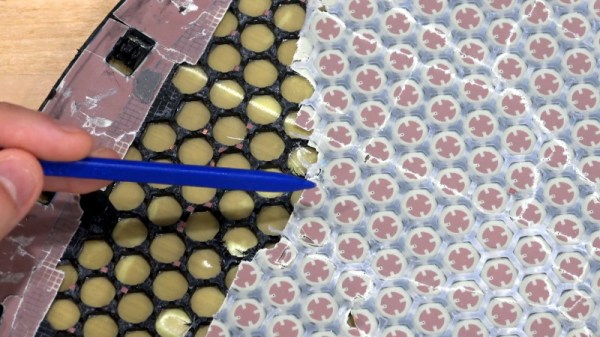
Most of the video is spent examining the stacked honeycomb construction of the phased antenna array, which as expected, holds a number of RF secrets if you know what to look for. Put simply, there’s no such thing as an insignificant detail to the trained eye. From the carefully sized injection molded spacer sheet that keeps the upper array a specific distance from the RF4-like radome, to the almost microscopic holes that have been bored through each floating patch to maintain equalized air pressure through the stack up, [Shahriar] picks up on fascinating details which might otherwise seem like arbitrary design decisions.

But a visual inspection will only get you so far. Eventually [Shahriar] has to cut out a slice of the PCB so he can fit it into the X-ray machine, but don’t feel too bad, the dish was long dead before he got his hands on it. While he hasn’t yet completed his full analysis, an initial examination indicates that each large IC and the eight chips surrounding it make up a 16 channel beam forming module. Each channel is further split into two RX and TX pairs, which provides the necessary right and left hand polarization. That said, he admits there’s some room for interpretation and that further work would be necessary before any hard conclusions could be made.

Between this RF analysis and the initial overview provided by [Kenneth], we’ve already learned a lot more about this device than many might have expected considering how rare and expensive the hardware is. While we admit it’s not immediately clear what kind of hijinks hardware hackers could get into once this device is fully understood, we’re certainly eager to find out.

Continue reading “Starlink Satellite Dish X-Rayed To Unlock RF Magic Inside”

Amazon Halo Teardown Is Supremely Thorough

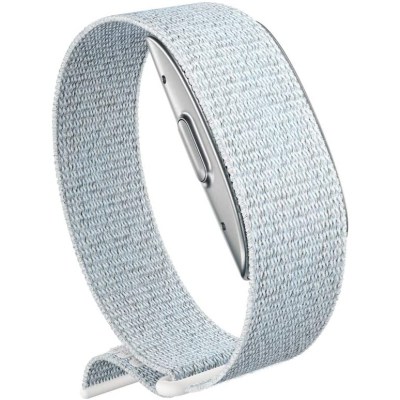
We rarely see teardowns this detailed. [txyzinfo] wanted to know what hardware was under the hood, and did an amazing Amazon Halo Teardown.

Sometime around the middle of 2020, Amazon jumped on to the health and fitness tracker space with the introduction of the Halo — a $100 device with an add on $4 monthly subscription service if you wanted additional features, which Amazon calls “labs”, many of which are third-party services. The device does not have any display at all, and any metrics that need to be displayed (heart rate, steps, calories, etc.) show up on the Halo phone app. Halo’s focus is more on health, rather than fitness. It helps monitor your active and sleep states, keeps track of body fat, and reports your emotional state.
We won’t delve much in to the pros and cons of the device, other than mention two features which have the potential to creep out most folks. The device has a pair of microphones, which listen to the “tone” of your voice and report on your emotional state. The other is its use of your phone via the companion app, to take photos of you, preferably dressed in your undergarments. Your front, back and side photos get uploaded to Amazon servers, get converted to a 3D model, and then downloaded back to your phone. Amazon mentions that the photos are never retained and deleted from their servers once your 3D model is transferred back to the phone. Amazon’s ML algorithms then calculate your body fat percentage. More worryingly, the app offers a slider which you can move to see how you will “look” if you have higher or lower body fat percentages.

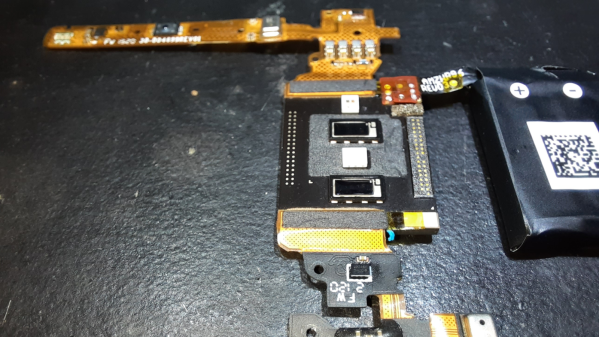
Fortunately for us hardware hacker types, [txyzinfo] wanted to unlock all the secrets Amazon poured into this design. Even if the device in particular does not interest you, the techniques he uses are very educational and will prove a useful addition to your skills. The device does not have any external fasteners, with the back cover being held together with glue. [txyzinfo] starts off by applying a solvent around the back cover to soften the glue, then works with his spudger to pry it open. The back cover appears to have an antenna with touch-contact terminations without a connector. The main body holds the rest of the electronics, and can be easily removed by unscrewing the four corner screws. Using a combination of solvent to soften the glue at various points, and snips to cut off retaining plastic tabs, he manages to untangle the hybrid rigid-flex PCB assembly from its plastic-metal clam-shell.
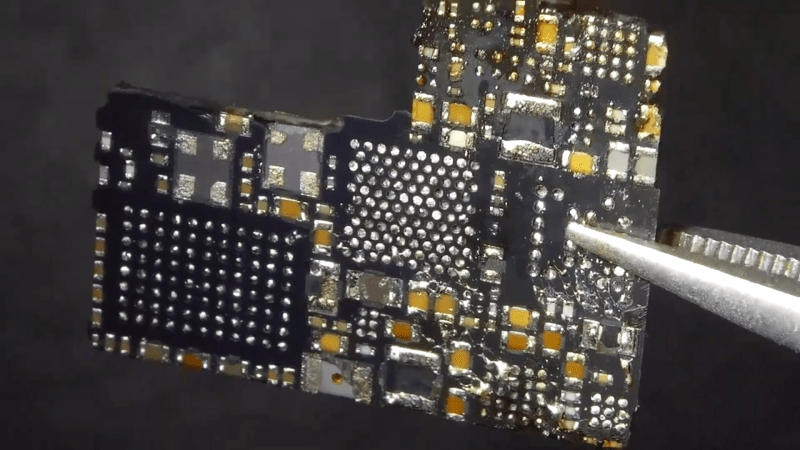
He uses a hot-air blower to cleanly separate the flex PCB parts attached to the rigid PCB. With all the flex pieces removed, he is left with the main part of the device — the rigid PCB with most parts potted under a metal shield filled with what appears to be a soft, grey compound. At this point, we are not sure if the potting compound is for heat dissipation, or just to obfuscate reverse engineering. His next action gives us a severe case of the heebie jeebies, as he clamps the PCB to a milling machine, and mills away the sides of the metal shield. Next, he heats the whole assembly with the hot air gun to melt all the solder, applying some generous amounts of flux, using the spudger to pull apart the PCB from the components embedded in the potting compound. Check out the video after the break to see his tear down techniques in action.
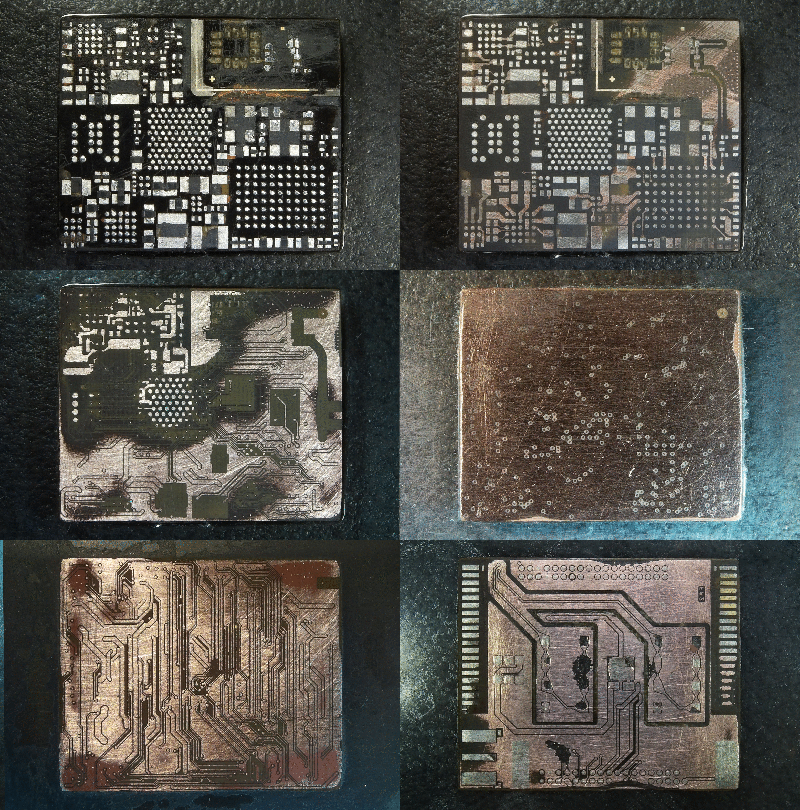
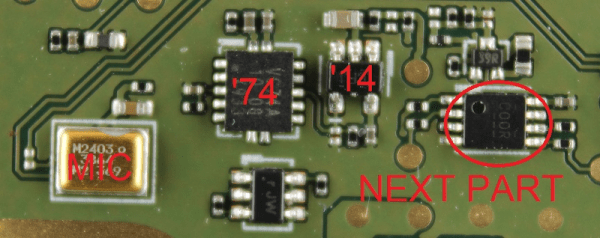
His plan was to identify as many parts as he could, but he wasn’t very successful, and managed to identify just a few — the two MEMS microphones, two temperature sensors and the LED driver on the flex PCB, and the photo-diodes, 6-axis IMU, battery charger and flash memory on the main board. The board has an uncommon 5-layer stack up, with the centre layer being ground. PCB de-layering is a time consuming process and requires a lot of patience, but in the end, he was able to get a pretty good result. He found some oddities in the track layout and was able to identify some of the more common connections to the I2C bus and between the micro-controller and its memory. He also located several test points which seem promising for a second round of investigations. Sometime in the future, he plans to get another Halo and have a go at it using the JTAGulator and GoodFET.

Tear downs are a favourite for all hackers, as is evident by the regularity with which we keep seeing them. If this one hasn’t whetted your appetite, then check out this other Fitness Tracker Teardown which is a lesson in Design for Manufacture.

Continue reading “Amazon Halo Teardown Is Supremely Thorough”

Think Your Laptop Is Anemic? Try An MSDOS One

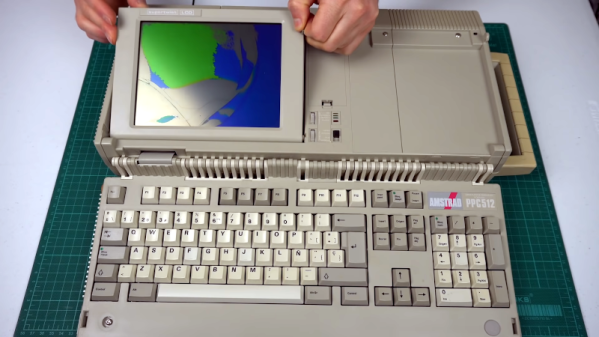
If someone gifted you a cheap laptop this holiday season, you might be a little put out by the 2GB of RAM and the 400 MHz CPU. However, you might appreciate it more once you look at [Noel’s Retro Lab’s] 4.8 Kg Amstrad PPC512 He shows it off inside and out in the video below.

Unlike a modern laptop, this oldie but goodie has a full keyboard that swings out of the main body. The space below the keyboard contains the LCD screen, which [Noel] is going to have to replace with an LCD from another unit that was in worse shape but had a good-looking screen. In this video, he gets as far as getting video output to an external monitor, but neither LCD shows any sign of life. But he’s planning more videos soon.

Continue reading “Think Your Laptop Is Anemic? Try An MSDOS One”

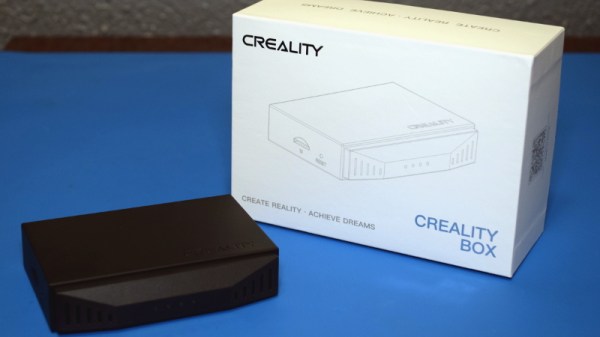
Teardown: Creality Wi-Fi Box

Creality, makers of the Ender series of 3D printers, have released a product called Wi-Fi Box meant to cheaply add network control to your printer. Naturally I had to order one so we could take a peek, but this is certainly not a product review. If you’re looking to control your 3D printer over the network, get yourself a Raspberry Pi and install Gina Häußge’s phenomenal OctoPrint on it. Despite what Creality might want you to believe, their product is little more than a poor imitation of this incredible open source project.

Even if you manage to get it working with your printer, which judging by early indications is a pretty big if, it won’t give you anywhere near the same experience. At best it’ll save you a few dollars compared to going the DIY route, but at the cost of missing out on the vibrant community of plugin developers that have helped establish OctoPrint as the defacto remote 3D printing solution.

That being said, the hardware itself seems pretty interesting. For just $20 USD you get a palm-sized Linux computer with WiFi, Ethernet, a micro SD slot, and a pair of USB ports; all wrapped up in a fairly rugged enclosure. There’s no video output, but that will hardly scare off the veteran penguin wrangler. Tucked in a corner and sipping down only a few watts, one can imagine plenty of tasks this little gadget would be well suited to. Perhaps it could act as a small MQTT broker for all your smart home devices, or a low-power remote weather station. The possibilities are nearly limitless, assuming we can get into the thing anyway.

So what’s inside the Creality Wi-Fi Box, and how hard will it be to bend it to our will? Let’s take one apart and find out.

Continue reading “Teardown: Creality Wi-Fi Box”

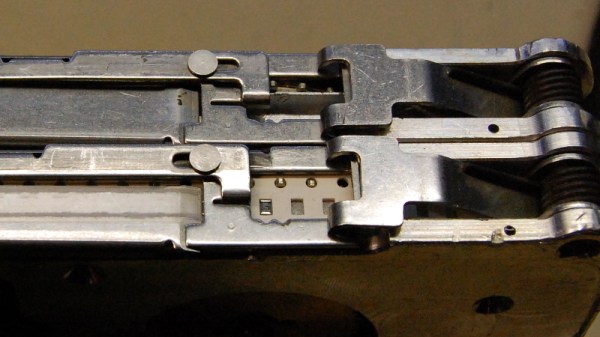
Teardown: Siemens 8mm SMD Parts Feeder

Many of Hackaday’s readers will be no stranger to surface mount electronic components, to the extent that you’ll likely be quite comfortable building your own surface-mount projects. If you have ever built a very large surface-mount project, or had to do a number of the same board though, you’ll have wished that you had access to a pick-and-place machine. These essential components of an electronics assembly line are CNC robots that pick up components from the reels of tape in which they are supplied, and place them in the appropriate orientation in their allotted places on the PCB. They are an object of desire in the hardware hacker community and over the years we’ve seen quite a few home-made examples. Their workings are easy enough to understand, but there is still much to gain by studying them, thus it was very interesting indeed to see a friend acquiring a quantity of surplus Siemens component feeders from an older industrial pick-and-place machine. A perfect opportunity for a teardown then, to see what makes them tick.

Continue reading “Teardown: Siemens 8mm SMD Parts Feeder”

A Lambda 8300 Lives Again

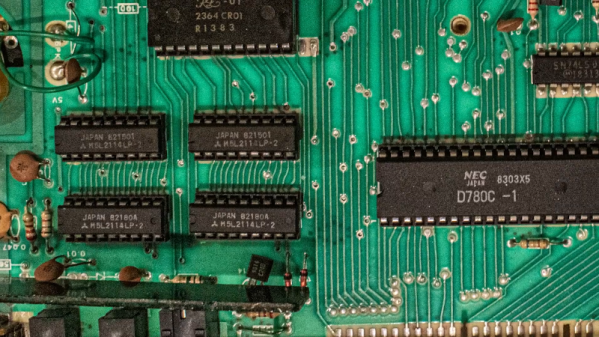
If you follow retrocomputing — or you are simply old enough to remember those days — you hear the same names over and over. Commodore, Apple, Radio Shack, and Sinclair, for example. But what about the Lambda 8300? Most people haven’t heard of these but [Mike] has and he has quite a few of them. The computer is similar to a Sinclair ZX81, but not an exact clone. All of his machines need some repairs (he’s promised repair videos are on their way), but for the video below he wired a monitor directly to the PCB to get steady output, so apparently the RF modulator is the failing subsystem in this case.

Once the video cleared up, you can see a walkthrough of running a simple BASIC program. As was common in those days, the computer used an audio cassette recorder for data storage. [Mike] picked up some dedicated recorders meant for computer use, but neither were in working shape. However, a consumer player works fine.

Continue reading “A Lambda 8300 Lives Again”

Clone Console Cribs Ben Heck’s Classic SNES Caché

“I don’t get mad when people rip me off. I actually think its kinda cool, because imitation is the sincerest form of flattery.” — Ben Heckendorn

For some “hacking things together” can mean heavily borrowing from other’s work in order to make a new, derivative work. Though longtime hardware hacker, Ben Heckendorn, didn’t expect one of his early SNES handheld projects to become the inspiration for a Famicom-style clone console. There have been a number of clone consoles available online for years, and all have been made to varying levels of build quality. The subject clone console in question is called the Easegmer 12-bit Retro Console, so [Ben] decided to record his teardown of the handheld borrowing from his original design. (Video, embedded below.)

The Easegmer handheld has a “surprising” list of features according to its packaging including: sports games, logic games, memoyr games, USB charger management, double power supply option, and dirunal double backlight option. All big (and slightly misspelled) promises though the most egregious claim has to be that, “No violent games, your child’s body and mind get full exercise.”. The statement may have a modicum of truth to it, except for the fact that game 84 of 220 is literally named “Violent”. Dunking aside, the handheld does feature a standard size rechargeable battery in addition to the option of powering the device with three AAA batteries. There’s even a “fun size” screwdriver and a few replacement screws included which is more than you can say for most modern electronics.

It has been almost twenty years after [Ben] originally published his SNES portable project on his website. So as a long awaited follow-up, [Ben] plans to make a “meta-portable”. This meta portable will start with the Adobe Illustrator files he kept from that SNES portable in 2001 and incorporate pieces of the Easegmer clone console. Thus spawning a new clone of the clone of his clone…or whatever that project ends up being its sure to be worth repeating.

Continue reading “Clone Console Cribs Ben Heck’s Classic SNES Caché”