Espressif Introduces The ESP32-E22 Wi-Fi 6E And Bluetooth Co-Processor

Espressif has unveiled its latest major chip in the form of the ESP32-E22. Officially referred to as a Radio Co-Processor (RCP), it’s intended to be used via its PCIe 2.1 or SDIO 3.0 host interface to provide wireless communications to an SoC or similar.

This wireless functionality includes full WiFi 6E functionality across all three bands, 160 MHz channel bandwidth and 2×2 MU-MIMO, making it quite a leap from the basic WiFi provided by e.g. the ESP32-S* and -C* series. There is also Bluetooth Classic and BLE 5.4 support, which is a relief for those who were missing Bluetooth Classic in all but the original ESP32 for e.g. A2DP sinks and sources.

The ESP32-E22 processing grunt is provided by two proprietary Espressif RISC-V CPU cores that can run at 500 MHz. At this point no details appear to be available about whether a low-power core is also present, nor any additional peripherals. Since the graphics on the Espressif PR article appear to be generic, machine-generated images – that switch the chip’s appearance from a BGA to an LQFP package at random – there’s little more that we can gather from there either.

Currently Espressif is making engineering samples available to interested parties after presumed vetting, which would indicate that any kind of public release will still be a while off. Whether this chip would make for an interesting stand-alone MCU or SoC along the lines of the -S3 or -P4 will remain a bit of a mystery for a bit longer.

Thanks to [Rogan] for the tip.

RAM Prices Got You Down? Try DDR3. Seriously!

DDR3 seemed plenty fast when it first showed up 19 years ago. Who could say no to 6400 Mb/s transfer speeds? Of course compared to the modern DDR5 that’s glacially slow, but given that RAM is worth its weight in gold these days– with even DDR4 spiking in price– some people, like [Gheeotine], are asking “can you game on DDR3“? The answer is a shocking yes.

[Gheeotine] builds two budget-friendly PCs for this video, using some of the newest DD3-supporting motherboards available. That’s not exactly new: we’re talking 12 to 15 years old, but hey, not old enough to drive. We certainly didn’t expect to hear about an x79 motherboard hosting an Ivy Bridge processor in 2026, but needs must when the devil dances. The only concession to modernity is the graphics cards: the x79 mobo got an RX6600XT 8GB, and the other build, using a z97 motherboard got an NVIDIA RTX 4060. The z97 motherboard allowed a slightly newer processor, as well, an i7 4790, with the new and exciting Haswell architecture you may have heard of. Both boards are maxed out on RAM, because at less than one USD/GB, why not?

[Gheeotine] puts a few new titles through their paces on these boxen, and while the results aren’t amazing, everything he tries comes out playable, which is amazing in and of itself. Well, playable unless you’re one of those people who can’t stand playing at resolutions under 4K or FPS under 100. Those of who spent their formative years with 29.7 FPS or 25 FPS in NTSC or PAL regions aren’t going to complain too loudly if frame rates dip down into the 30s playing at 1080p for some of the more demanding titles. Ironically, one of those was the five-year-old Crysis Remastered. Given the age of some of this hardware “Can it Run Crysis” is a perfectly reasonable question, and the answer is still yes.

If you want modern games, you’re much better off with a z97 chipset motherboard if you chose to go the DDR3 route, since you won’t run into issues related to the AVX2 instruction, which first appeared with the Haswell microarchitecture. Here at Hackaday our preferred solution to the rampocalypse is software optimization, Since holding your breath for that would probably be fatal, cost-optimizing PC builds is probably a good plan, even if some might balk at going all the way back to DDR3.

Of course if you’re going to use nearly-retro hardware like DDR3, you might as well go all-out on retro vibes with a nostalgic 80s-style, or even 50s-style case. 

Continue reading “RAM Prices Got You Down? Try DDR3. Seriously!”

DIY Magnetic Markers Help 3D Scan Tricky Objects

3D scanners rely on being able to identify physical features of an object, and line up what it saw a moment ago with what it sees now in order to build a 3D model. However, not every object is as distinct and visible as others at all angles, particularly in IR. One solution is reflective scanning markers, which are either pre-printed on a mat, or available as stickers that can be applied to objects to give the scanner a bit more to latch onto, visually speaking.

[firstgizmo] shows a slightly different approach: that of surrounding the object to be scanned with 3D printed reflective markers instead of covering the target object itself with reflectors, or relying on a flat scanning mat.

Magnetic mounts allow mixing and matching, as well as attaching directly to some objects to be scanned.

The main advantage (besides not having to remove stickers from the object afterwards) is that these printed markers present the reflective dots at a variety of angles during the scanning process. This makes the scene less sensitive to scanner angle in general, which is good because the angle at which to scan an important feature of an object is not always the angle that responds best.

By giving the scene more structure, the scanner can have a better shot at scanning reliably even if the reflectors aren’t on the target object itself. It also helps by making it easier to combine multiple scans. The more physical features scans have in common, the easier it is to align them.

Just to be clear, using these means one will, in effect, be 3D scanning the markers along with the target object. But once all the post-processing is done, one simply edits the model to remove everything except the target object.

[firstgizmo]’s DIY magnetic 3D scanning markers are an expanded take on an idea first presented by [Payo], who demonstrates the whole concept wonderfully in the video below.

3D scanning can be tremendously handy but it does have its quirks and limitations, and a tool like this can be the difference between a terrible scan and a serviceable one. For a quick catch-up on 3D scanning and its strengths and limitations, read our hands-on tour of using an all-in-one 3D scanner.

Continue reading “DIY Magnetic Markers Help 3D Scan Tricky Objects”

Washington State Bill Seeks To Add Firearms Detection To 3D Printers

Washington State’s House Bill 2321 is currently causing a bit of an uproar, as it seeks to add blocking technologies to 3D printers, in order to prevent them from printing “a firearm or illegal firearm parts”, as per the full text. Sponsored by a sizeable number of House members, it’s currently in committee, so the likelihood of it being put to a floor vote in the House is still remote, never mind it passing the Senate. Regardless, it is another chapter in the story of homemade firearms, which increasingly focuses on private 3D printers.

Also called ‘ghost guns‘ in the US, these can be assembled from spare parts, from kits, from home-made components, or a combination of these. While the most important parts of a firearm, like the barrel, have to be made out of something like metal, the rest can feature significant amounts of plastic parts, though the exact amount varies wildly among current 3D-printed weapons.

Since legally the receiver and frame are considered to be ‘firearms’, these are the focus of this proposed bill, which covers both additive and subtractive technology. The proposal is that a special firearms detection algorithm has to give the okay for the design files to be passed on to the machine.

Continue reading “Washington State Bill Seeks To Add Firearms Detection To 3D Printers”

What To Do With A Flash-less ESP32-C3 Super Mini Board?

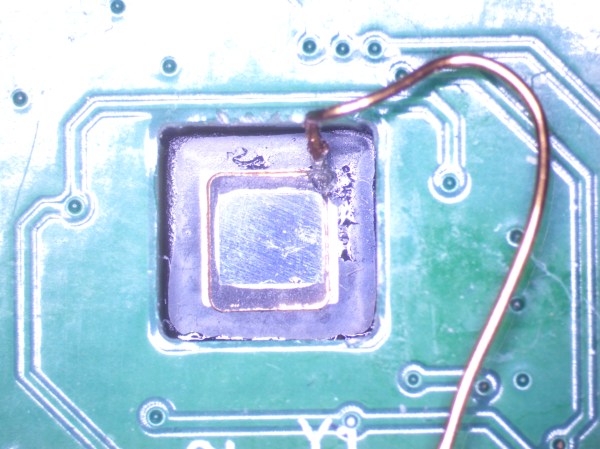
In an update video by [Hacker University] to an earlier video on ESP32-C3 Super Mini development boards that feature a Flash-less version of this MCU, the question of adding your own Flash IC to these boards is addressed. The short version is that while it is possible, it’s definitely not going to be easy, as pins including SPIHD (19) and SPICLK (22) and SPIQ (24) are not broken out on the board and thus require one to directly solder wires to the QFN pads.

Considering how sketchy it would be to have multiple wires running off to an external Flash IC, this raises many questions about the feasibility, as well as cost-effectiveness. Some in the comments to the video remark that instead you may as well swap the MCU with a version that does contain built-in Flash, but this is countered with the argument that a new ESP32-C3 Super Mini board with the right MCU costs as much as a loose MCU from your favorite purveyor of ICs.

Ultimately this lends some credence to calling these zero Flash Super Mini boards a ‘scam’, as their use cases would seem to be extremely limited and their Flash-less nature very poorly advertised.

Continue reading “What To Do With A Flash-less ESP32-C3 Super Mini Board?”

A photo of the cats and the generated image

The Cutest Weather Forecast On E-Ink And ESP32

There’s a famous book that starts: “It is a truth universally acknowledged that a man in possession of a good e-ink display, must be in want of a weather station.” — or something like that, anyway. We’re not English majors. We are, however, major fans of this feline-based e-ink weather display by [Jesse Ward-Bond]. It’s got everything: e-ink, cats, and AI.

The generated image needs a little massaging to look nice on the Spectra6 e-ink display.

AI? Well, it might seem a bit gratuitous for a simple weather display, but [Jesse] wanted something a little more personalized and dynamic than just icons. With that in the design brief, he turned to Google’s Nano Banana API, feeding it the forecast and a description of his cats to automatically generate a cute scene to match the day’s weather.

That turned out to not be enough variety for the old monkey brain, so the superiority of silicon — specifically Gemini–was called upon to write unique daily prompts for Nano Banana using a random style from a list presumably generated by TinyLlama running on a C64. Okay, no, [Jesse] wrote the prompt for Gemini himself. It can’t be LLM’s all the way down, after all. Gemini is also picking the foreground, background, and activity the cats will be doing for maximum neophilia.

Aside from the parts that are obviously on Google servers, this is all integrated in [Jesse]’s Home Assistant server. That server stores the generated image until the ESP32 fetches it. He’s using a reTerminal board from SeedStudio that includes an ESP32-S3 and a Spectra6 colour e-ink display. That display leaves something to be desired in coloration, so on top of dithering the image to match the palette of the display, he’s also got a bit of color-correction in place to make it really pop.

If you’re interested in replicating this feline forecast, [Jesse] has shared the code on GitHub, but it comes with a warning: cuteness isn’t free. That is to say, the tokens for the API calls to generate these images aren’t free; [Jesse] estimates that when the sign-up bonus is used up, it should cost about fourteen cents a pop at current rates. Worth it? That’s a personal choice. Some might prefer saving their pennies and checking the forecast on something more physical, while others might prefer the retro touch only a CRT can provide. 

Hackaday Podcast Episode 353: Fantastic Peripherals, Fake Or Not Fake Picos, And Everything On The Steam Deck

Join Hackaday Editors Elliot Williams and Tom Nardi as they swap their favorite hacks and stories from the week. In this episode, they’ll start off by marveling over the evolution of the “smart knob” and other open hardware input devices, then discuss a futuristic propulsion technology you can demo in your own kitchen sink, and a cheap handheld game system that get’s a new lease on life thanks to the latest version of the ESP32 microcontroller.

From there they’ll cover spinning CRTs, creating custom GUIs on Android, and yet another thing you can build of out that old Ender 3 collecting dust in the basement. The episode wraps up with a discussion about putting Valve’s Steam Deck to work and a look at the history-making medical evacuation of the International Space Station.

Check out the links below if you want to follow along, and as always, tell us what you think about this episode in the comments!

As always, this episode is available in DRM-free MP3.

Continue reading “Hackaday Podcast Episode 353: Fantastic Peripherals, Fake Or Not Fake Picos, And Everything On The Steam Deck”