The TAK Ecosystem: Military Coordination Goes Open Source

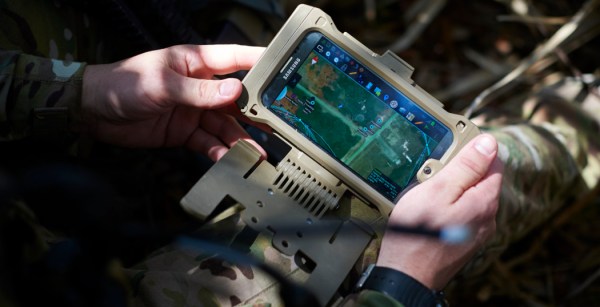
In recent years you’ve probably seen a couple of photos of tablets and smartphones strapped to the armor of soldiers, especially US Special Forces. The primary app loaded on most of those devices is ATAK or Android Tactical Assault Kit. It allows the soldier to view and share geospatial information, like friendly and enemy positions, danger areas, casualties, etc. As a way of working with geospatial information, its civilian applications became apparent, such as firefighting and law-enforcement, so CivTAK/ATAK-Civ was created and open sourced in 2020. Since ATAK-Civ was intended for those not carrying military-issued weapons, the acronym magically become the Android Team Awareness Kit. This caught the attention of the open source community, so today we’ll dive into the growing TAK ecosystem, its quirks, and potential use cases.

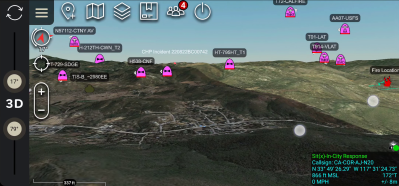
Tracking firefighting aircraft in 3D space using ADS-B (Credit: The TAK Syndicate)

Continue reading “The TAK Ecosystem: Military Coordination Goes Open Source”

Nokia 5110 Gets Android Stowaway And A Keyboard

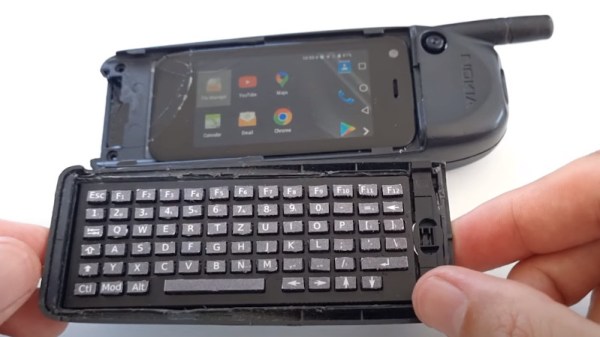
Even though Nokia is largely an afterthought in the phone market now, there was a time when their products represented the state-of-the-art in mobile devices. Some of the their handsets even featured slide-out keyboards and the ability to sent emails; largely unheard of for a device from the late 90s. [befinitiv] was a kid back then and couldn’t afford one of these revolutionary devices, so he built his own modern version that still looks and feels like the original.

To do this he borrowed the case and structure of a Nokia 5110 phone, but modified it to hold a small Android device in the old battery compartment along with a tiny Bluetooth keyboard (which was also built from scratch by [befinitiv]) that connects to the Android phone to mimic the old slide-out style. This isn’t just a case mod, though. He also reverse-engineered the original PCB of the phone and included a Bluetooth module there as well, which allows the phone’s screen and keypad to work mostly as originally intended.

This project goes pretty far to scratch the 90s phone nostalgia itch while still being largely usable as a real phone in the modern world. Assuming you aren’t too hung up on the literal phone aspect, the Notkia project is also an impressive effort to bring new life to these old handsets.

Continue reading “Nokia 5110 Gets Android Stowaway And A Keyboard”

Quick Hack: The Phone To Stream Deck Conversion

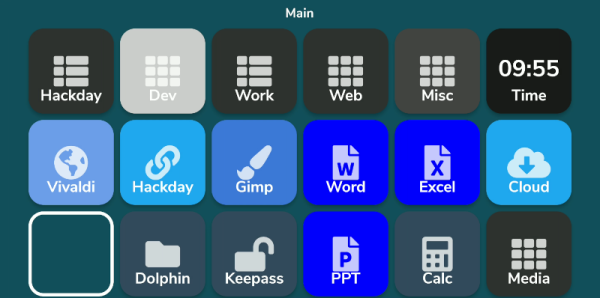
What do you do with those old Android or iPhone phones and tablets? You have plenty of options, but it is pretty easy to build your own stream deck with a little off-the-shelf software. What’s a stream deck, you ask? The name comes from its use as a controller for a live-streaming setup, but essentially, it’s an LCD touchscreen that can trigger things on your computer.

The software I’m using, Deckboard, is a server for Windows or Linux and, of course, an Android app. The app is free with some limitations, but for under $4 you can buy the full version. However, even the free version is pretty capable. You can use an Android phone or tablet and you can connect to the PC with a USB cable or WiFi. I’ve found that even with WiFi, it is handy to keep the phone charged, so realistically you are going to have a cable, but it doesn’t necessarily have to connect to the host computer.

Linux Setup

Setup is very easy. The biggest hurdle is you might need to set up your firewall to allow the server to listen on port 8500 with TCP.  There are a few small issues when installing with Linux that you might want to watch out for.  There are 32-bit and 64-bit versions in deb, tar.gz, and appimage format. There’s also a snap. The problem with the snap is it is sandboxed, so without effort you can’t easily launch programs, which is kinda the entire point. I finally removed it and installed the deb file which was fine.

There were still two other wrinkles. First, while Deckboard offers a way to launch programs, it must be a program from a list it reads from your system. That would be acceptable, but the list wasn’t complete. I never did figure out why some things show up on the list and others don’t. For example, GIMP which shows up on my application menu was absent. Yet other things that were fairly obscure did show up.

I thought this might be a dealbreaker until I found that Deckboard has a well-developed plugin system and one of those plugins lets you run an arbitrary command line. I guess it is a little less convenient, but it is much more flexible since you can launch any program you want and provide options to it as well.

The only other complaint I had is that when you run the program, it shows its configuration interface and puts itself in the system tray. That’s great the first time you run it, but on system startup, it would be nice to just have it quietly start. If there’s an option for that I haven’t found it. I’ll tell you how I solved that later, but, for now, just live with it.

Continue reading “Quick Hack: The Phone To Stream Deck Conversion”

Robot Arm Has The Touch

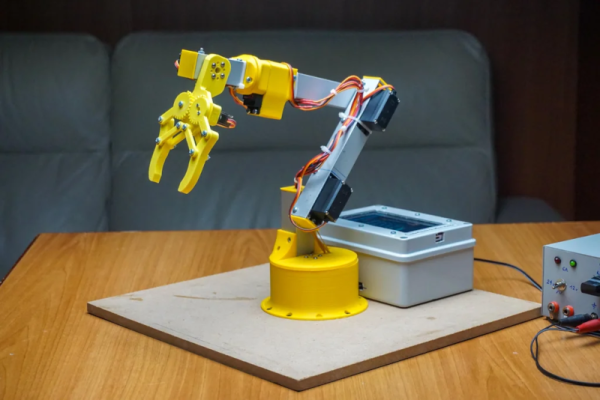
[Maurizio] built a robot arm, which is always a great accomplishment. But his project includes a very cool touch interface for an Android device that sets it apart from many other similar projects.You can see a very fast summary of the construction in the video below.

The design uses Fusion 360 and there are good explanations of each step in the process. The gripper is adapted from an existing design. Various 3D printed parts make up the wrist, shoulder, elbow, and rotating base.

Continue reading “Robot Arm Has The Touch”

Metal Detector Gets Help From Smartphone

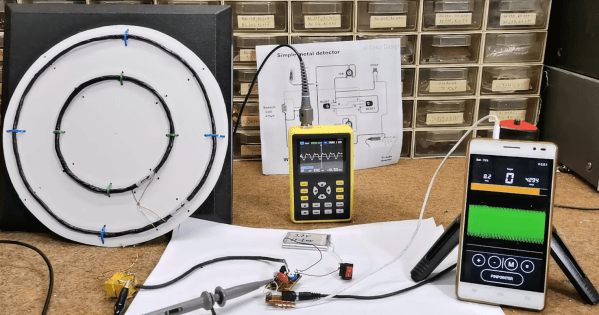
[mircemk] is quite a wizard when it comes to using coils of wires in projects, especially when their application is within easy-to-build metal detectors. There are all kinds of ways to send signals through coiled wire to detect metal objects in the ground, and today [mircemk] is demonstrating a new method he is experimenting with which uses a smartphone to detect the frequency changes generated by the metal detector.

Like other metal detectors, this one uses two coils of wire with an oscillator circuit and some transistors. The unique part of this build, though, is how the detector alerts the user to a piece of metal. Normally there would be an audible alert as the frequencies of the circuit change when in the presence of metal, but this one uses a smartphone to analyze the frequency information instead. The circuit is fed directly into the headphone jack on the smartphone and can be calibrated and used from within an Android app.

Not only can this build detect metal, but it can discriminate between different types of metal. [mircemk] notes that since this was just for experimentation, it needs to be calibrated often and isn’t as sensitive as others he’s built in the past. Of course this build also presumes that your phone still has a headphone jack, but we won’t dig up that can of worms for this feature. Instead, we’ll point out that [mircemk] has shown off other builds that don’t require any external hardware to uncover buried treasure.

Continue reading “Metal Detector Gets Help From Smartphone”

An Off-Grid Makeshift Cell Network

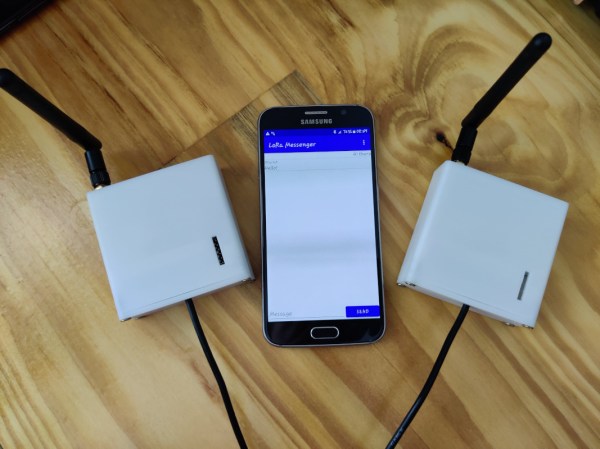
When traveling into the wilderness with a group of people, it’s good to have a method of communications set up both for safety and practicality. In the past people often relied on radios like FRS, CB, or ham bands if they had licenses, but nowadays almost everyone has a built-in communications device in their pocket that’s ready to use. Rather than have all of his friends grab a CB to put in their vehicle for their adventures together, [Keegan] built an off-grid network which allows any Android phone to communicate with text even if a cell network isn’t available.

The communications system is built on the LoRa communications standard for increased range over other methods like WiFi using a SX1278 chip and an ESP8266. The hardware claims a 10 km radius using this method which is more than enough for [Keegan]’s needs. Actually connecting to the network is only half of the solution though; the devices will still need a method of communication. For that, a custom Android app was created which allows up to 8 devices to connect to the network and exchange text messages with each other similar to a group text message.

For off-grid adventures a solution like this is an elegant solution to a communications problem. It uses mostly existing hardware since everyone carries their own phones already, plus the LoRa standard means that even the ESP8266 base station and transmitter are using only a tiny bit of what is likely battery power. If you’re new to this wireless communications method, we recently featured a LoRa tutorial as well.