Bringing The Best Laptop Ever Made Back To Life

Eight or nine years ago, Apple was on top of the world. The iPhone just revolutionized phones, Apple was still making computers, and these computers were actually repairable. Of the late 2008/early 2009 MacBook Pro, iFixit said, “What an incredible machine. We are very impressed by the ease with which the new MacBook Pro came apart. This machine should be a joy to work on”. Apple has come a long way since then.

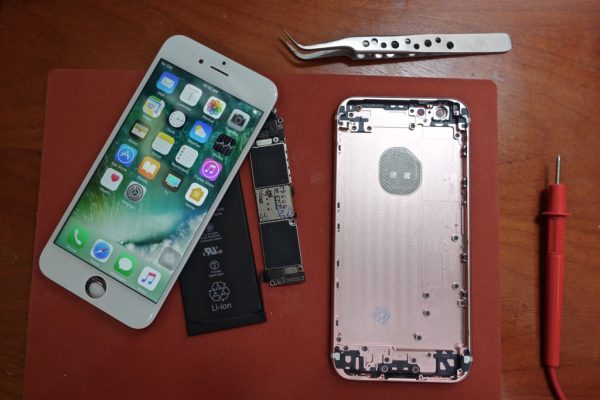
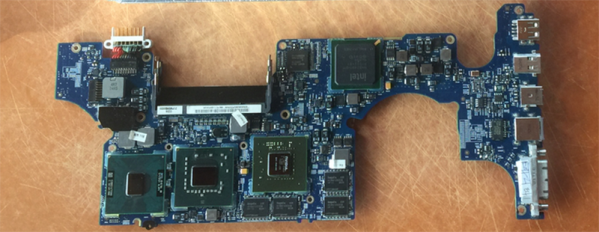
macbook-reflow-shield[DocDawning] has a bit of a Mac hoarding problem, and frequently pays $20 for broken laptops of this vintage. Most of the time, the fix is simple: the RAM needs to be reseated, or something like that. Rarely, he comes across a machine that isn’t fixed so easily. The solution, in this case, is a deep dive into heat guns and thermal management. How do you bring a laptop back from the dead? [Dawning] shows you how.
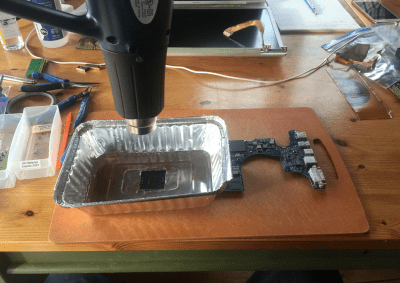
Like the old XBox towel hack, the first thing to look for in dead electronics is broken solder balls. Of course, actually looking at broken solder balls is pretty hard, so you might as well just get out a heat gun and go at it. That’s exactly what [Dawning] did. With the clever application of an aluminum takeout tray to direct the heat flow, he blasted each of these chips with enough heat to hopefully melt all the balls.

With that, a working MacBook Pro was just a liberal application of thermal paste away. From $20 at the scrap heap to a working computer, [Dawning] did it. He successfully resuscitated a broken computer.

Fixing Bugs In A 37 Year Old Apple II Game

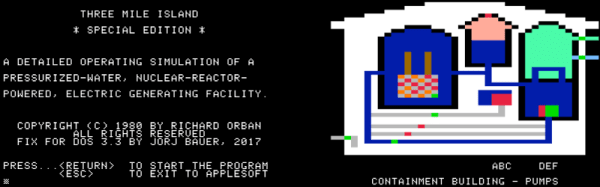
Emulators are a great way to reminisce about games and software from yesteryear. [Jorj Bauer] found himself doing just that back in 2002, when they decided to boot up Three Mile Island for the Apple II. It played well enough, but for some reason, crashed instantly if you happened to press the ‘7’ key. This was a problem — the game takes hours to play, and ‘7’ is the key for saving and restoring your progress. In 2002, [Jorj] was content to put up with this. But finally, enough was enough – [Jorj] set out to fix the bug in Three Mile Island once and for all.

The project is written up in three parts — the history of how [Jorj] came to play Three Mile Island and learn about Apple IIs in the first place, the problem with the game, and finally the approach to finding a solution. After first discovering the problem, [Jorj] searched online to see if it was just a bad disk image causing the problem. But every copy they found was the same. There was nothing left for it to be but problem in the binary.

Continue reading “Fixing Bugs In A 37 Year Old Apple II Game”

Apple II Web Server Written In BASIC

The Apple II was the machine that many say launched Apple as a company. As with many popular computers of the 1980s, the Apple II maintains a steady following to this day who continue to develop new hardware and software to keep the platform alive.

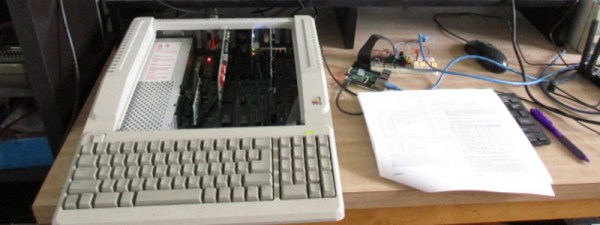
[deater] had scored an Uthernet II Ethernet interface for his Apple IIe, based off the venerable W5100 chipset. He decided to have some fun and wrote a webserver for the Apple II in BASIC. The program sets up the Ethernet card with a series of PEEKs and POKEs, and then listens out for incoming packets before responding with the requisite data loaded from floppy disk.

The server can deal with HTML, text, and even JPEG and PNG images. It’s even compliant with RFC 2324. It does suffer from some limitations however — the disk format used can only hold 140 kB, it can only serve an 8kB file at a time, and due to using a lot of string manipulation in the code, is painstakingly slow.

Before you get too excited, the machine is running on a local network only, so you can’t check it out from here. However, [deater] has kindly released the source code if you wish to run it for yourself.

If you’re thirsty for more 8-bit action, check out this Apple II playing animated GIFs.

Apple Sucks Now, Here’s A ThinkPad Buyer’s Guide

For the last decade, Macs have been running a UNIX-ish operating system on x86 processors. They’ve been fantastic developer’s machines, and the MacBook Pro is the de facto standard laptop issued to all developers, all hackathon attendees, and arguably, anyone who does real work with a computer.

This week, Apple unveiled the latest MacBook Pro and provided more evidence Steve Jobs actually knew what he was doing. Fifteen hundred bones will get you a MacBook Pro with a last-gen processor, an Escape key, a headphone jack, and two Thunderbolt 3 ports (with one port required for charging). The next model up costs $1800, ditches the Escape key for a dedicated emoji bar, and includes four Thunderbolt 3 ports.

In the past, I have defended people who choose MacBooks as their laptop of choice. A MacBook is a business-class laptop, and of course carries a higher price tag. However, Apple’s latest hardware release was underwhelming and overpriced. If you’re looking for a new laptop, you would do well to consider other brands. To that end, here’s a buyer’s guide to ThinkPads, currently the second most popular laptop I’ve seen with the dev/hacker/code cracker crowd.

Continue reading “Apple Sucks Now, Here’s A ThinkPad Buyer’s Guide”

Death To The 3.5mm Audio Jack, Long Live Wireless

There’s been a lot of fuss over Apple’s move to ditch the traditional audio jack. As for me, I hope I never have to plug in another headphone cable. This may come off as gleeful dancing on the gravesite of my enemy before the hole has even been dug; it kind of is. The jack has always been a pain point in my devices. Maybe I’ve just been unlucky. Money was tight growing up. I would save up for a nice set of headphones or an mp3 player only to have the jack go out. It was a clear betrayal and ever since I’ve regarded them with suspicion. Is this the best we could do?

I can’t think of a single good reason not to immediately start dumping the headphone jack. Sure it’s one of the few global standards. Sure it’s simple, but I’m willing to take bets that very few people will miss the era of the 3.5mm audio jack once it’s over. It’s a global episode of the sunk cost fallacy.

In the usual way hindsight is 20/20, the 3.5mm audio jack can be looked at as a workaround, a stop over until we didn’t need it.  It appears to be an historic kludge of hack upon hack until something better comes along. When was the last time it was common to hook an Ethernet cable into a laptop? Who would do this when we can get all the bandwidth we want reliably over a wireless connection. Plus, it’s not like most Ethernet cables even meet a spec well enough to meet the speeds they promise. How could anyone reasonably expect the infinitely more subjective and variable headphone and amplifier set to do better?

But rather than just idly trash it, I’d like to make a case against it and paint a possible painless and aurally better future.

Continue reading “Death To The 3.5mm Audio Jack, Long Live Wireless”

Smart Watch Hack Lets You Use Your 3.5mm Headphones With An IPhone 7

As you may have heard, the iPhone 7 is ditching the 3.5 mm headphone jack in the name of progress and courage. Whatever your take on that, it leaves the end user out in the cold if — for instance — their preferred headphones still use the old format. Here to save you from an untimely upgrade is YouTuber [Kedar Nimbalkar], who has modified a Bluetooth Smartwatch to incorporate a 3.5 mm jack to allow continued use your current headphones.

After opening up the smartwatch [Nimbalkar] removes the speaker, solders in a 3.5 mm headphone jack and clips out an opening in the watch’s case that maintains the watch’s sleek exterior.

Continue reading “Smart Watch Hack Lets You Use Your 3.5mm Headphones With An IPhone 7”

A New OS For Apple II Computers

Although this sort of work is usually reserved for KansasFest and other forums for highly technical and very skilled Apple enthusiasts, [John Brooks]’s release of a new version of the ProDOS operating system is no less important. It is, without a doubt, the greatest release the Apple II platform will see for the next few years. This swan song of the Apple II platform is simply ProDOS 2.4, an update to the last version of Apple’s ProDOS, last released in 1993.

For a bit of historical context, ProDOS was not the operating system that shipped with the Apple ][ in 1977. That OS was simply called DOS. ProDOS, released in 1983, included support for the new 3.5″ floppy drives, allowed for hierarchical directories, supported hardware interrupts, and kept the Apple ][ line going well into the 90s. Despite these improvements, not all Apple ][ systems were supported. The original ][ and ][+ were out in the cold. Now, with the ability to add Compact Flash and USB devices to an Apple ][, even the latest version of ProDOS is horribly out of date.

[John]’s release of ProDOS 2.4 fixes all of this. This release is the most important development in the Apple ][ ecosystem in recent memory, and will remain so for at least a decade. The only person who still uses an Apple ][ as a daily driver agrees, and ProDOS 2.4 is now enshrined in The Archive for all eternity.

prodos-2-4-bitsy-bye-768x543New features abound, although most of them are geared toward the now thirty-year-old Apple IIGS. These features include enhanced utility in GS/OS – the Apple equivalent of the Commodore GEOS – slot remapping, and an OS that is both smaller and loads faster. Older machines aren’t left out, and ProDOS includes the usual features and improvements found in ProDOS 2.x that weren’t available in the Apple ][, Apple ][+ and un-enhanced Apple //e.

The killer feature and one more thing of this release is the BitsyBye utility, a small ($300!) system program that allows you to boot various Apple II devices and programs. Think of this as the Norton Commander of the Apple II ecosystem, allowing slots to be selected, booting the most recently used ProDOS device, and basic file system exploration. BitsyBye also includes an easter egg. A few utilities are also included on the ProDOS 2.4 disk image including ADTPro, Shrinkit archive expander, and disk utilities.

A 140k ProDOS 2.4 disk image is available on [John]’s site and on Archive.org. Since you’re probably not downloading directly to an Apple II disk, grab ADTPro and load it over audio.