Robot Does The Worm To Get Around

Walking, jumping, rolling, flying, swimming – robotic locomotion is limited only by the imagination of the inventor. [Roger Rabbit] apparently has a pretty vivid imagination, because he’s building robots that move like worms.

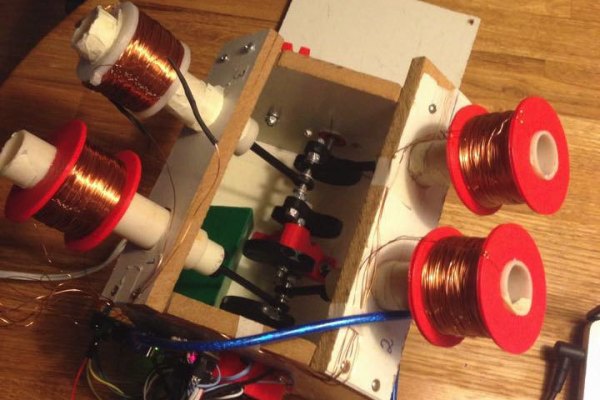
2823251454881775155inchworm-robot-thumbnailVersion 1 of [Roger]’s robot is only semi-vermiform and is more of tube climber. It has a pair of 3D-printed pantographs that expand and contract with servos and move along the robot’s axis on a stepper-driven lead screw. An Arduino reads sensors and coordinates the expansion of the pantographs to grip the internal diameter of a pipe and push the worm-bot along. It’s a slow but effective way to get around in the limited confines of a pipe.

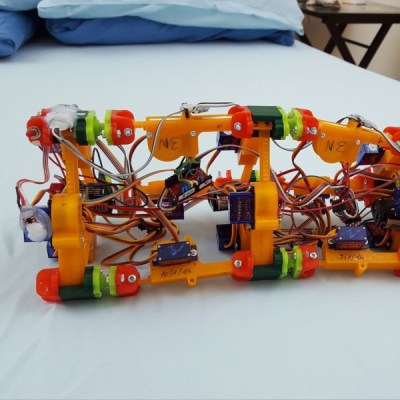
The next iteration, dubbed [Wolly],  is much more worm-like and not restricted to pipe-running. It has four expandable triangular frames connected to each other with rack-and-pinion backbones. The first frame contracts, the racks push it forward, it expands, the next contracts, and soon it’s doing the worm across the floor. Still slow, but pretty neat to watch, and you can see how it can be steered. It might even be able to roll around its long axis, and it’d make a decent tube climber as well.

This creepy autonomous worm-bot seems very similar to [Wolly], but aside from that we haven’t covered too many robots like these. There’s a lot of thought and effort in these worm-bots, and we’re keen to see where [Roger] takes this unique robot body plan.

Continue reading “Robot Does The Worm To Get Around”

Constant Innovation And Useless Ducks

[Mike]’s hacks aren’t breathtaking in their complexity, but they got a good chuckle out of us. [Mike], the CEO of The Useless Duck Company, lives in a hub of innovation somewhere in Canada, where he comes up with useful gadgets such as a Fedora that tips itself, or a door that locks when you’re shopping for gifts for your wife and you’re in incognito mode.

It all started when he was trying to learn the Arduino, and he put quite a few hours into making a device that could wirelessly squeak a rubber bath duck from the bathroom. The whole project reminded us of our first clumsy forays into the world of electronics, with entirely too many parts to complete a simple function. The Arduino being the gateway drug it is, it wasn’t long before he was building a bartending robot.

We hope he continues to construct more entertaining gadgets.

Continue reading “Constant Innovation And Useless Ducks”

This Car Lets You Fistbump To Unlock

In the dark ages, you had to use a key to lock and unlock your car doors. Just about every car now has a remote control on the key that lets you unlock or lock with the push of a button. But many modern cars don’t even need that. They sense the key on your person and usually use a button to do the lock or unlock function. That button does nothing if the key isn’t nearby.

[Pierre Charlier] wanted that easy locking and unlocking, so he refitted his car with a Keyduino to allow entry with an NFC ring. What results is a very cool fistbump which convinces your car to unlock the door.

Keyduinio is [Pierre’s] NFC-enabled project, but you can also use a more conventional Arduino with an NFC and relay shield. The demo also works with a smartphone if you’re not one for wearing an NFC ring. Going this round, he even shows how to make it work with Bluetooth Low Energy (BLE).

Continue reading “This Car Lets You Fistbump To Unlock”

The Flowing Pixels Of Time Wait For No Man

The hourglass dramatically depicts the flow of time; gravity pulling grains of sand inevitably downward. So it is with the Bits of Time project by [Frank Andre]. The pixels drop, stopping only when the battery dies. Or, when your eggs are ready. (Pssst, it’s also on Hackaday.io.)

317661453832865647
Look, Ma! No GIF!

The project starts with a couple of [Frank’s] PixBlocks. A processor is added to one PixBlock to serve as the controller for both after they are connected via the serial bus. A tilt switch, with a debouncing circuit, is connected to an IO pin. This tells the processor the orientation of the box and therefore which way the pixels should flow.

Two  switches set the duration of the timer in 15 second increments. A third starts the timer. When the box is rotated the pixels start flowing in the opposite direction. With code available on GitHub the system can be programmed for other effects such as changing colors, flickering, or even text display.

You’ll agree this is a bit less intimidating than the MacGyver-ish kitchen timer we covered last year.

Continue reading “The Flowing Pixels Of Time Wait For No Man”

The Newest Graphing Calculator Game

Certainly everyone remembers passing time in a boring high school class playing games on a graphing calculator. Whether it was a Mario-esque game, Tetris, or BlockDude, there are plenty of games out there for pretty much all of the graphing calculators that exist. [Christopher], [Tim], and their colleagues from Cemetech took their calculator game a little bit farther than we did, and built something that’ll almost surely disrupt whatever class you’re attempting to pay attention in: They built a graphing calculator whac-a-mole game.

This game isn’t the standard whac-a-mole game, though, and it isn’t played on the calculator’s screen. Instead of phyiscal “moles” the game uses LEDs and light sensors enclosed in a box to emulate the function of the moles. In order to whack a mole, the player only needs to interrupt the light beam which can be done with any physical object. The team made extensive use of the ArTICL library which allows graphing calculators to interface with microcontrollers like the MSP432 that they used, and drove the whole thing with a classic TI-84.

This project is a fun way to show what can be done with a graphing calculator and embedded electronics, and it was a big hit at this past year’s World Maker Faire. Calculators are versatile in other ways as well. We’ve seen them built with open hardware and free software, And we’ve even seen them get their own Wi-Fi.

Continue reading “The Newest Graphing Calculator Game”

Lego Technic Of The Past Eliminates Apple ][ With Arduino And Touchscreen

[JAC_101], the Director of Legal Evil Emeritus for LVL1 Hackerspace (don’t ask me, it’s their title system), was challenged to a hacking duel. It all started years ago. The person who is now president of LVL1, visited the space for the first time and brought with her a discarded Apple II controller for Lego bricks which had previously belonged to her father. Excited to test it, the space found that, unfortunately, LVL1’s Apple II wouldn’t boot. An argument ensued, probably some trash talking, and [JAC_101] left with the challenge: Could he build an Arduino interface for the Apple II Lego controller quicker than the hackerspace could fix its Apple II?”

Other things that belonged to people's fathers.
Other things that belonged to people’s fathers.

In the end, a concentrated force by one hacker over two years overcame the collective ADHD of many. He began by opening the interface to look inside, a completely unnecessary step since he found it was already thoroughly documented. Next he forgot about the project for a year. Then he remembered it, and built an interface for an Arduino Uno to hook to the controller and wrote a library for the interface. Realizing that sending serial commands was not in line with the original friendly intention of the device, he added a graphical display to the project; which allowed the user to control the panel with touch. In the end he won the challenge and LVL1 still doesn’t have a working Apple II. We assume some gloating occurred. Some videos of it in action after the break.

Continue reading “Lego Technic Of The Past Eliminates Apple ][ With Arduino And Touchscreen”

There Is No Spoon; Automatic Self Stirring Mug

Sometimes it’s helpful to realize the truth that there is no spoon. At least, not with [Ronaldo]’s automatic self-stirring mug. At first it was just a small propeller in the bottom of the mug that turned on by pushing a button in the handle, but this wasn’t as feature-rich as [Ronaldo] hoped it could be, so he decided to see just how deep the automatic beverage-mixing rabbit hole goes.

The first thing to do was to get a microcontroller installed to handle the operation of the motor. The ATtiny13a was perfect for the job since it’s only using one output pin to control the motor, and can be configured to only draw 0.5 microamps in power-saving mode. This ensures a long life for the two AAA batteries that power the microcontroller and the motor.

As far as operation goes, the motor operates in different modes depending on how many times the button in the handle is pushed. It can be on continuously or it can operate at pre-determined intervals for a certain amount of time, making sure to keep the beverage thoroughly mixed for as long as the power lasts. Be sure to check out the video below for a detailed explanation of all of the operating modes. We could certainly see some other possible uses for more interesting beverages as well.

Continue reading “There Is No Spoon; Automatic Self Stirring Mug”