NES Reborn As Nexus Player And NES

Anyone who has a Raspberry Pi and an old Nintendo has had the same thought. “Maybe I could shove the Pi in here?” This ran through [Adam’s] head, but instead of doing the same old Raspberry Pi build he decided to put a Nexus Player inside of this old video game console, with great success. Not only does it bring the power of a modern media player, it still works as an NES.

If you haven’t seen the Nexus Player yet, it’s Google’s venture into the low-cost home media center craze. It has some of the same features of the original Chromecast, but runs Android and is generally much more powerful. Knowing this, [Adam] realized it would surpass the capabilities of the Pi and would even be able to run NES emulators.

[Adam] went a little beyond a simple case mod. He used a custom PCB and an Arduino Pro Micro to interface the original controllers to the Nexus Player. 3D printed brackets make sure everything fits inside the NES case perfectly, rather than using zip ties and hot glue. He then details how to install all of the peripherals and how to set up the Player to run your favorite game ROMs. The end result is exceptionally professional, and brings to mind some other classic case mods we’ve seen before.

Embed With Elliot: There Is No Arduino “Language”

This installment of Embed with Elliot begins with a crazy rant. If you want to read the next couple of paragraphs out loud to yourself with something like an American-accented Dave-Jones-of-EEVBlog whine, it probably won’t hurt. Because, for all the good Arduino has done for the Hackaday audience, there’s two aspects that really get our goat.

(Rant-mode on!)

First off is the “sketch” thing. Listen up, Arduino people, you’re not writing “sketches”! It’s code. You’re not sketching, you’re coding, even if you’re an artist. If you continue to call C++ code a “sketch”, we get to refer to our next watercolor sloppings as “writing buggy COBOL”.

And you’re not writing “in Arduino”. You’re writing in C/C++, using a library of functions with a fairly consistent API. There is no “Arduino language” and your “.ino” files are three lines away from being standard C++. And this obfuscation hurts you as an Arduino user and artificially blocks your progress into a “real” programmer.

(End of rant.)

Let’s take that second rant a little bit seriously and dig into the Arduino libraries to see if it’s Arduinos all the way down, or if there’s terra firma just beneath. If you started out with Arduino and you’re looking for the next steps to take to push your programming chops forward, this is a gentle way to break out of the Arduino confines. Or maybe just to peek inside the black box.

Continue reading “Embed With Elliot: There Is No Arduino “Language””

Pinball Table Gets New Lease Of Life With Arduino

Forget all of this video game nonsense: pinball is the real king of gaming. After all, it involves large pieces of metal flying around at high speed. [retronics] agrees: he has resurrected an old Briarwood Aspen pinball table using an Arduino.

pinball-table-repairWhen he bought the table, he found that the electronics had been fried: many of the discrete components on the board had been burnt out. So, rather than replace the individual parts, he gutted the table and replaced the logic board with an Arduino Mega that drives the flippers, display and chimes that make pinball the delightful experience it is. Fortunately, this home pinball table is well documented, so he was able to figure out how to rewire the remaining parts fairly easily, and how to recreate the scoring system in software.

His total cost for the refurb was about $300 and the junker was just $50 to start with. Now for $350 you can probably find a working pinball table. But that’s not really the point here: he did it for the experience of working with electromechanical components like flippers and tilt switches. We would expect nothing less from the dude who previously built an Android oscilloscope from spare parts.

Continue reading “Pinball Table Gets New Lease Of Life With Arduino”

It Keeps On Going And… Arduino Edition

How long can you keep an Arduino circuit running on three AA batteries? With careful design, [educ8s] built a temperature sensor that lasts well over a year on a single charge of three 2250 mAH rechargeable cells (or, at least, should last that long).

Like most long-life designs, this temperature sensor spends most of its time sleeping. The design uses a DS18B20 temperature sensor and a Nokia 5110 LCD display. It also uses a photoresistor to shut off the LCD display in the dark for further power savings.

During sleep, the device only draws 260 microamps with the display on and 70 microamps with the display off. Every two minutes, the processor wakes up and reads the temperature, drawing about 12 milliamps for a very short time.

Along with the code, [educ8s] has a spreadsheet that computes the battery life based on the different measured parameters and the battery vendor’s claimed self discharge rate.

Of course, with a bigger battery pack, you could get even more service from a charge. If you need a refresher on battery selection, we covered that not long ago. Or you can check out a ridiculously complete battery comparison site if you want to improve your battery selection.

Continue reading “It Keeps On Going And… Arduino Edition”

Arduino (PCI) Express

It is almost impossible these days to find a PC with old ISA card slots. Full size PCI card slots are in danger of going the same way. Many PCs today feature PCI Express connectors. PCI Express offers a lot of advantages including a small size, lower pin count, and a point-to-point serial bus topology that allows multiple simultaneous transfers between different pairs of end points. You’ll find PC Express connectors in things other than PCs too, including a lot of larger embedded systems.

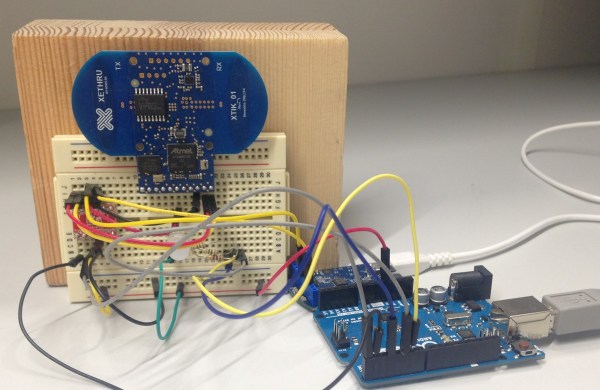
If you ever wanted to prototype something on PCI Express, you’d usually turn to an FPGA. However, [moonpunchorg] posted a workable design for an Arduino on a mini PCI Express board. (As [imroy264] points out in the comments, the board is using the USB port present on the PCI-E connector.) The design files use KiCAD so it should be fairly easy to replicate or change. Naturally, there are pins on the edges to access I/O ports and power. You do need to use ISP to program the Arduino bootloader on the chip.

The board appears to a host computer as a SparkFun as a Pro Micro 3.3V board, and from there you could easily add function to a computer with a PCI Express slot using nothing more than the Arduino IDE. The board is known to work with the VIA VAB-600 Springboard and VIA VAB-820 boards, although it is likely to work with other PCI Express hosts, too.

[Federico Musto] Of Arduino SRL Discusses Arduino Legal Situation

Recently we had the opportunity to sit down and interview Arduino SRL’s CEO, [Federico Musto], over a nice dinner. His company is one half of the Arduino vs Arduino debacle which has pitted Arduino.cc against Arduino.org in a battle over the trademark on “Arduino”.

Given the tremendous amount of press coverage of [Massimo Banzi] and the Arduino LLC side of the story (Arduino.cc), we were very interested in hearing how the whole situation looks where [Frederico Musto] sit (Arduino.org). In the end, we came away with what we feel is a more balanced and complete picture of the situation, as well as interesting news about future products from the Arduino SRL camp. [Musto’s] take on the legal proceedings, both past and present, is nothing short of fascinating.

Continue reading “[Federico Musto] Of Arduino SRL Discusses Arduino Legal Situation”

Hardware Store CNC Machine Is Remarkably Precise

A vise, a hacksaw and file, some wrenches – the fanciest tools [HomoFaciens] uses while building his DIY hardware store CNC machine (YouTube link) are a drill press and some taps. And the bill of materials for this surprisingly precise build is similarly modest: the X- and Y-axes ride on cheap bearings that roll on steel tube stock and aluminum angles; drives are threaded rods with homemade encoders and powered by small brushed DC gear motors; and the base plate appears to be a scrap of ping-pong table. The whole thing is controlled by an Arduino and four H-bridges.

The first accuracy tests using a ball point pen for tooling are quite impressive. [HomoFaciens] was able to draw concentric circles eyeball-accurate to within a few tenths of a millimeter, and was able to show good repeatability in returning to a point from both directions on both the X- and Y-axis. After the pen tests, he shows off a couple of other hardware store tooling options for the Z-axis – a Proxxon rotary tool with a burr for engraving glass; a soldering iron for cutting styrofoam; and a mini-router that works well enough to cut some acrylic gears.

We’re impressed by this build, which demonstrates that you don’t need a fancy shop to build a CNC machine. If you’re getting the itch to jump into the shallow end of the CNC pool, check out some of the builds we’ve featured before, like this PVC CNC machine, or this $250 build.

[Thanks, ThunderSqueak]