Monitoring Software Builds With A Traffic Light

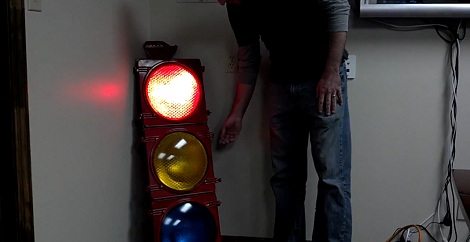
[JD] at isotope11 was looking for a way to get instant feedback whenever a developer broke a piece of software they were working on. After finding a 48 inch tall traffic light, he knew what he had to do. Now, the entire development team knows the status of their code from a traffic light hanging in the corner.

isotope11 runs a continuous integration server to do the quality assurance on their software projects. It’s a lot more flexible than the ‘compile and pray’ setup we’re used to, but then again C isn’t very well suited to test-driven development. When one of [JD]’s developers breaks a piece of code, the CI server will send a warning to an Arduino where all the electronic magic happens.

To light the traffic light, [JD] used a few relays to drive the 120 volt bulbs in the traffic light. The traffic light is very easy to read – red means something is broken, green means everything is alright, and yellow means a test suite is being run.

Check out the video of [JD]’s TDD visualization after the break.

Continue reading “Monitoring Software Builds With A Traffic Light”
POV Clock Spins Light Filter Instead Of LEDs

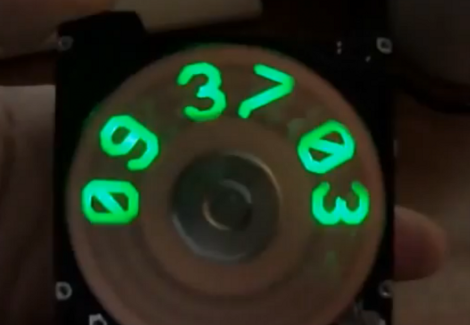
This hard-drive based POV clock is a treasure trove of great design choices. Now, we’ve seen a bunch of spinning clock builds. Several of the hard drive versions use slits cut in the platters to create a display by illuminating an LED behind those slits at just the right moment. This is a similar idea but [Jason Hotchkiss] ditched the platters all together and replaced them with a light filter. The filter disc has digits 0-9 as well as a colon (not seen above because the colons blink each second). As this disc spins, the Arduino compatible controller lights up LEDs in the eight digital positions to illuminate the correct number.

The filter is made from an etched copper-clad disc. This is a great choice because the fiberglass substrate is strong, light weight, translucent, and available. The filter idea also means you don’t need to get power or data to a spinning platform. [Jason] has also designed a very impressive controller board that is the same size as the footprint of the laptop hard drive he’s using. Check out the video after the break to see his description of what went into the hardware choices he arrived upon. Continue reading “POV Clock Spins Light Filter Instead Of LEDs”

ultimate-breadboard

The Ultimate Breadboard – A Prototyping Station That Has It All

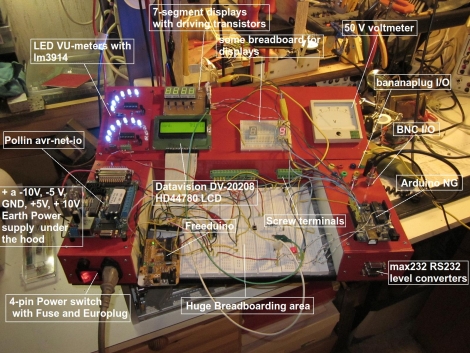
[Claudio] was working on a homebrew oscilloscope project when he started thinking about how unsuitable a standard breadboard is for a large-scale project. Rather than adding components on top of components until they became what he lovingly calls a “fragile, unforgiving crapstack”, he decided to build himself the Ultimate Breadboard.

He packed so much into his design, that it’s honestly hard to know where to begin describing it. Aside from an appropriately large breadboarding surface embedded in the center of the console, he added a power supply to the left hand side, which sits just below an Avr-Net-IO board. The right side of the console features an Arduino NG, and a pair of level converters. He also added some LED-based VU meters, a couple of 7-segment displays, an LCD display, an analog voltmeter, along with plenty of I/O connectors.

The Ultimate Breadboard might look a bit daunting at first, but it seems like an awesome setup on which to do any sort of prototyping. Be sure to check out the video below for more details and to see [Claudio] give a tour of the device.

Continue reading “The Ultimate Breadboard – A Prototyping Station That Has It All”

Dice Gauntlet Joins Cosplay With D&D Gaming

If you needed a reason to dress up for your next Dungeons & Dragons adventure this is surely it. Not only will this attractive wrist adornment go right along with your medieval theme, but the gauntlet doubles as a multi-sided digital die.

Sparkfun whipped up this tutorial which details the build. Yep, they’re hawking their own goods but we must say this is one of the few projects using sewable electronics which we thoroughly enjoy. It calls for several Lilypad modules, including an Arduino board, accelerometer, and slide switches. The switches let you select the number of sides for the die you are about to roll. The accelerometer starts the fun when you shake your wrist back and forth (that’s what she said). The project is powered by a rechargeable battery, which we always like to see, and uses a four-digit seven segment display located where the face of a wristwatch is normally found.

Of course, you could get the shaking action and use no batteries at all if you wish.

MIDI Controlled Speak-and-Spell

We all love the Arduino, but does the Arduino love us back? There used to be a time when the Arduino couldn’t express it’s deepest emotions, but now that [Nick] hooked up a speech synthesis chip from a Speak & Spell, it can finally whisper sweet robotic nothings to us.

The original 1980s Speak & Spell contained a fabulously high-tech speech synthesizer from Texas Instruments. This innovative chip predated [Stephen Hawking]’s voice and went on to be featured in the numerous speech add-ons for 80s microcomputers like the Apple II, BBC Micro, and a number of Atari arcade games.

[Nick] has been working on his Speak & Spell project for several months now, and he’s getting around to testing the PCBs he made. By his own admission, connecting an Arduino to a Speak & Spell is a little difficult, but he’s got a few tricks up his sleeve to get around the limitations of the hardware. The final goal of [Nick]’s project is a MIDI-controllable Speak & Sound speech synth for the Arduino. This has been done before, but never from a reverse-engineered Speak & Spell.

You can check out [Nick]’s progress in interfacing the Speak & Spell speech chip after the break. There’s still work to do, but it’s still very impressive.

Continue reading “MIDI Controlled Speak-and-Spell”

WiFi Experiments With ATtiny Microcontrollers

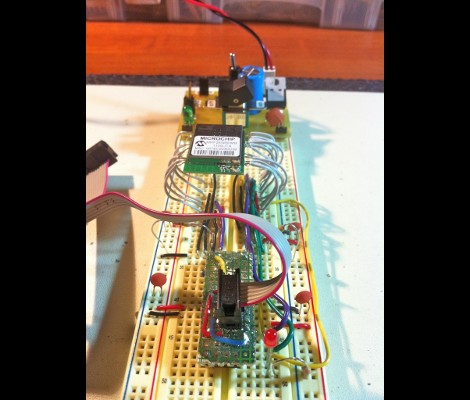
[Quinn Dunki] got some free stuff from Element14 to evaluate, including this Mircrochip WiFi module. It’s been used as the centerpiece of an Arduino shield in the past, and she grabbed a copy of that library to see if it would play nicely with an ATtiny chip. What follows is a struggle to de-Arduino the code so that it’s portable for all AVR controllers.

This module is one of the least expensive ways to add WiFi to a project, coming in at around $23. But it’s not really an all-in-one solution as there’s still a huge software hurdle to cross. The hardware provides access to to radio functions needed to communicate with the network, but you need to supply the TCP/IP stack and everything that supports it. Hence the re-use of the Arduino library.

Battling adversity [Quinn] fought the good fight with this one. Switching from an ATtiny to the ATmega168, compiling more code, and troubleshooting the process. She used a single LED as feedback, and can get some connectivity with her hotspot. But to this point she hasn’t gotten everything up and running.

We’re hot for an AVR WiFi solution that is cheap and easy to use. But as we see here, the software is complex and perhaps best left up to beefier hardware like the ARM controllers. What do you think?

Play Hide-and-go-seek With Infrared LEDs

Although we’re sure they exist, we wouldn’t want to meet anybody that can’t look back fondly on the halcyon days of youth that included playing hide-and-go-seek. Some kids never grow up and continue the tradition with geocaching or orienteering, but that sense of limitless discovery wanes over time. [Kurt] came up with a small scavenger hunt beacon that brings back the unending wonder that accompanies the unknown.

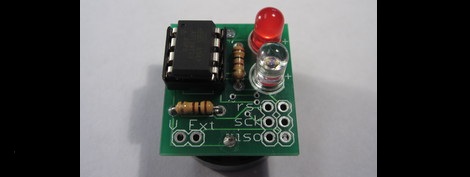
The beacon is just a simple ATtiny13 that flashes a message with an invisible IR LED. To receive the messages, [Kurt] made a scavenger decoder shield for an Arduino. The decoder includes a phototransistor and a 20×4 LCD display. All [Kurt] needs to do is hold the decoder up to the beacon for the text in the firmware of the ATtiny to be displayed. The beacon is only one inch square and powered by a watch battery, so it can be hidden anywhere.

[Kurt] suggests that the text of one beacon should provide the clue to the next. We’re thinking this is just a great excuse for a walk in the park. You can check out [Kurt]’s IR decoder getting data from a beacon after the break.

Continue reading “Play Hide-and-go-seek With Infrared LEDs”