Two-way Bluetooth Communication Made Easy

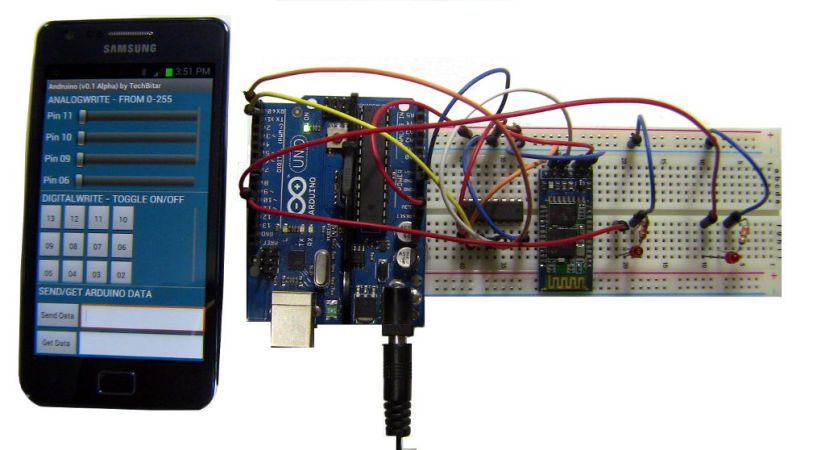
It’s hard to imagine an easier way to set up communications between an Android device and an Arduino using Bluetooth than by following this guide. In the center of the breadboard you can see the cheap and ubiquitous HC-05 Bluetooth module. Having picked up one of these ourselves we can attest that after opening the package and holding one in your hand you may be struck with a “where do I start?” conundrum. If you’ve got an Android handset and an Arduino you start right here, then methodically replace one side of the equation at a time until your own project has a Bluetooth component and you actually understand how it works.

Hardware for the project comes in a couple of parts. The Bluetooth module wants 3.3v logic levels so that is taken into account. The image above shows a buffer chip doing the conversion, but the Fritzing schematic on the post uses a voltage divider. The software end of things consists of an Arduino sketch and an Android app. Check out all the controls on that screen. With bi-directional communications and a slew of already-configured commands this should get you up and running quickly on pretty much any possible project.

One thing to note is that there are different firmwares for these HC-05 units. For more on that see this project.

Continue reading “Two-way Bluetooth Communication Made Easy”
Giving Digital Calipers Bluetooth

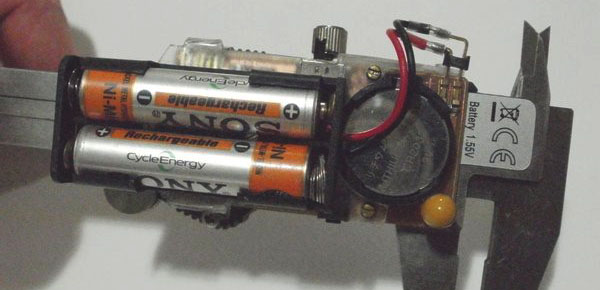
[Fede]’s wife uses a pair of digital calipers to take measurements of fruits, leaves, and stems as part of her field research. Usually this means taking a measurement and writing it down in a log book. All things must be digitized, so [Fede] came up with a way to wirelessly log data off a pair of cheap Chinese calipers with a custom-made Bluetooth circuit.

Most of these cheap Chinese digital calipers already have a serial output, so [Fede] only needed to build a circuit to take the serial output and dump it in to an off-the-shelf Bluetooth module. He fabbed a custom circuit board for this, and after seeing the increased battery drain from the Bluetooth module, decided to add an external battery pack.

In addition to etching his own board for sending the serial output of the calipers to a Bluetooth module, [Fede] also put together a custom flex circuit to connect the two boards. It’s just a small bit of brass glued to a transparency sheet etched with ferric chloride, but the end result looks amazingly professional for something whipped up in a home lab.

Letting Bluetooth Take The Wires Out Of Your Headphones

bt-wireless-headphones

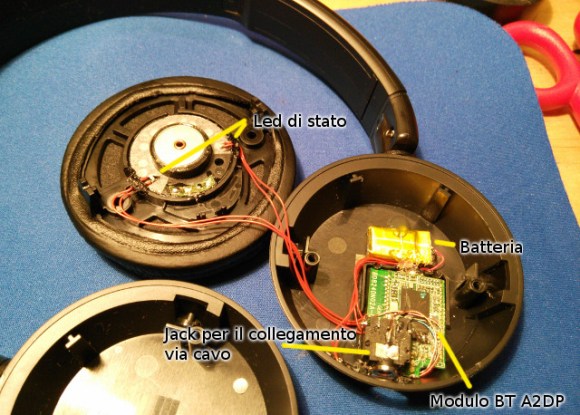
This picture shows the gist of [Alan’s] hack to transition his wired headphone to internalize a Bluetooth audio receiver (translated).

He starts with a pair of wired “ear muff” style headphones and an aftermarket Bluetooth audio adapter that he’s been using with them. But if you’re not going to plug them into the audio source why have six feet of extra wire hanging about? [Alan] ditched the plastic case surrounding the Bluetooth hardware and cracked open the earpieces to find room for it. It’s a tight fit but there was just enough room.

It is unfortunate that the headphone design doesn’t already have a wired crossover hidden in the arc connecting the earpieces. Alan strung some of that red wire himself to connect the two speakers. The board is mounted so that the USB port is located where the wires used to enter the plastic body. This makes it a snap to plug them in when they need a recharge.

You can play a little “Where’s Waldo” with this one by trying to spot the Raspberry Pi in his build log.


Learning Letters, Particularly R, F, I, & D

8993376562_55ff3846b3

After [yohanes] picked up a toy at a yard sale – a Leap Frog Letter Factory Phonics – he thought he could do better. The toy originally asked a child to find a letter, and after digging one of 26 plastic characters out of a plastic tub and placing them on the Letter Factory’s sensor, would play a short musical ditty. [yohanes]’ version does the same, but because he made it himself it is infinitely more expandable.

The letters for [yohanes]’ version are RFID tagged. This, combined with a cheap RFID module and a bluetooth module means a Raspberry Pi can read RFID cards from across the room. From there, it’s a simple matter of writing up some Python to ask his toddler for a letter, reading the bits coming from a bluetooth, and keeping score.

The build isn’t over by a long shot. [yohanes] still needs to make his build multilingual by adding Indonesian and Thai. There’s also a possibility of adding a spelling game to make it more interesting.

Wireless Rover With Android Control

android-rover

[Radu] spend the first portion of this year building and improving upon this wireless rover project. It’s actually the second generation of an autonomous follower project he started a few years back. If you browse through his old postings you’ll find that this version is leaps and bounds ahead of the last.

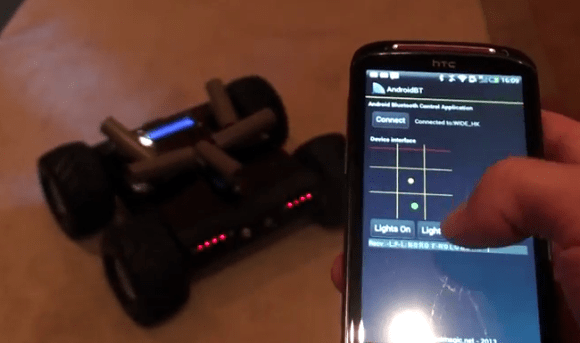
He purchased the chassis which also came with the gear-head motors and tires. Why reinvent the wheel (har har) when you’ve got bigger things on your plate? To make enough room inside for his own goodies he started out by ditching the control board which came with the Lynxmotion chassis in favor of an AVR ATmega128 development board. He also chose to use his own motor controller board. Next he added a metal bracket system to hold the battery pack. Things start to get pretty crowded in there when he installed his own Bluetooth and GPS modules. Rounding out his hardware additions were a set of five ultrasonic sensors (the grey tubes on top), a character display, as well as head and tail lights. The demo video shows off the control app he uses. We like that tic-tac-toe design for motion control, and that he added in buttons to control the lights.

Continue reading “Wireless Rover With Android Control”

Pebble Watch Hack Makes It A Home Automation Controller

[Enrico] loves his Pebble watch, and recently had a chance to explore the code package used to customize its function. It turned out to be really easy to work with so he set out to make the Pebble watch into a home automation controller (dead link; Internet Archive).

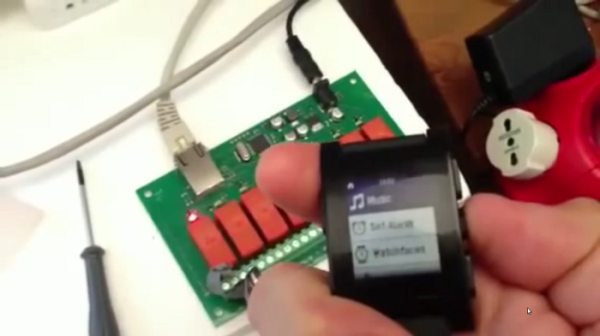
So far the two bits of hardware used in his experiments are shown in the image above. The watch itself serves as the controller, interacting with the Ethernet relay board seen in the background. The watch communicates via Bluetooth but you don’t have to know much about that thanks to the example files available from the repository. With communications taken care of he needed a menu system to access commands on the watch. Instead of coding his own he hacked a playlist into the built-in music menu. This allows him to switch the relays on and off again as if he were playing or pausing audio tracks. See it in action after the break.

Continue reading “Pebble Watch Hack Makes It A Home Automation Controller”

Bluetooth Stepper Motor Driver

bluetooth-stepper-motor-driver

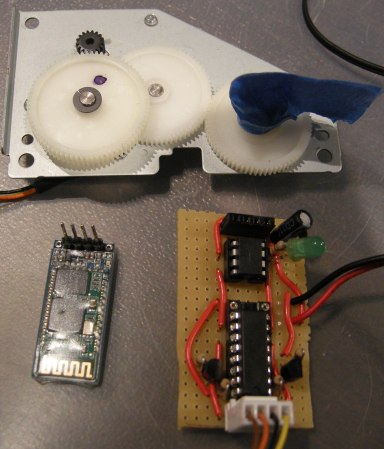
[Dan] salvaged some parts from an old printer a while back and finally found some time to play with them. One of the things he was most interested in is the geared stepper motor seen above. He was able to get it running with an Arduino in no time so he decided to take the project a little bit further. What he ended up with is a stepper motor driver which can be controlled over Bluetooth.

The motor can’t be driven directly, but with a simple motor driver like the L293 chip [Dan] used it’s not hard to interface them with your control hardware of choice. From there he added an ATtiny85 which will take care of the stepping protocol necessary to move the motor. The Bluetooth module he’s using functions as a serial device, making it really simple to interface with the uC. [Dan] uses a pin header to connect the module, so switching to a different type of serial device in the future will be quick and painless.

After the break you can see him sending step commands to the driver board.

Continue reading “Bluetooth Stepper Motor Driver”