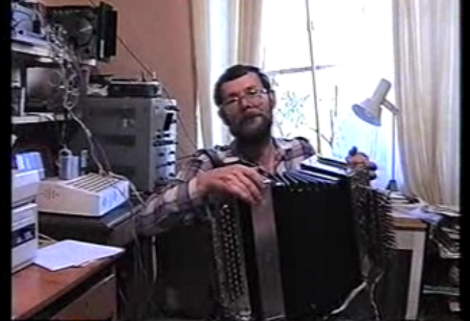
Self Playing Bayan Built Nearly 22 Years Ago

The year is 1988, where a Russian engineer [Vladimir Demin] has combined a Bayan, or button accordion, with several (we lost count at about 96) solenoids. If that alone doesn’t blow your mind the computer, also hand built by [Vladimir], controls the whole process leaving the operator to only work the bellows. Putting truth to the fact in Soviet Russia, accordion plays you. We wish we could find some more information about the instrument, but curse our inability to read Russian. Alas check after the break for a shorter version of the video in the link above.

Related: Electronic accordion doesn’t compare.

Continue reading “Self Playing Bayan Built Nearly 22 Years Ago”

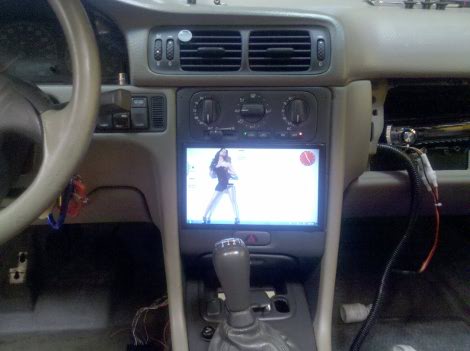
Car Computer Requires PIN For Ignition

[Ben’s] added some nice goodies to his Volvo in the form of an in-dash computer. The system monitors two pressure sensors for boost and vacuum, as well as reading RPM, O2, and exhaust directly. All of this is tied into the touch interface running on an eeePC 900A. But our favorite feature is that the system requires you to enter a PIN to start the ignition. The forum post linked above is short on details so we asked [Ben] if he could tell us more. Join us after the break for a demonstration video as well as [Ben’s] rundown on the system.

Continue reading “Car Computer Requires PIN For Ignition”

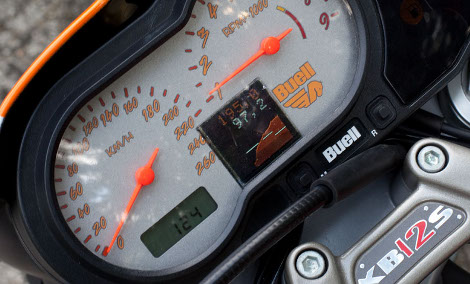
In-dash Motorcycle Display

[Muth] added an auxiliary display to his motorcycle instrument panel. He started out prototyping with a PIC 16F877A which he used to access information through the ECM diagnostic connection. Once he had that working he found this tiny display which fits perfectly between the speedometer and tachometer. There’s a short demo after the break where you can see a past-30-minute history of the Adaptive Fuel Value and the engine temperature as well as a secondary information screen.

This is another nice addition to our collection of vehicle displays, scooter controllers, gear indicators, and motorcycle computers.

Continue reading “In-dash Motorcycle Display”

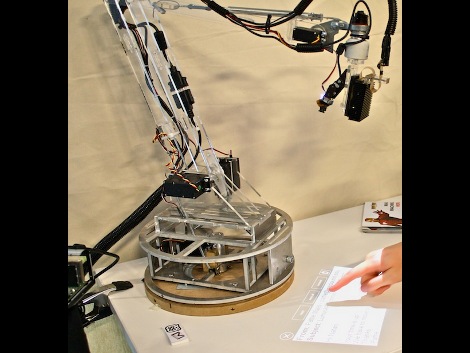
Light Bulb Form-factor Computer

This computer can be mounted in any standard light bulb socket. It uses a pico projector combined with a camera to generate a touch display wherever you shine it. The photo above and the video after the break show the bulb in a motorized lamp arm but that’s just smoke and mirrors, the bulb itself is the core concept. We think there’s real potential for home-built versions. We’ve seen touch displays similar to this that mount on the side of a laptop, but why have the computer around at all? Ditch the USB connection for wireless and have it connect to your home server for processing power. It becomes a perfect solution for places that aren’t traditionally computer friendly. For instance, that kitchen computer you don’t want to touch with dough-encrusted hands becomes washable when the display is projected on a cutting board. Continue reading “Light Bulb Form-factor Computer”

Elegant Wearable Computer

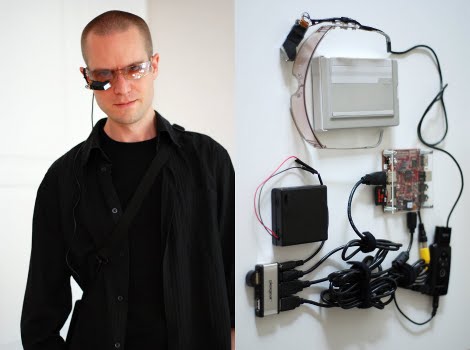
[Jason Statham] [Martin Magnusson] wrote in to tell us about his adventure in building a wearable computer. The device in its current state is a Beagleboard running Angstrom Linux tethered to an iPhone for internet. A bluetooth keyboard allows for input, while output is displayed on monocle-ized Myvu. And last but not least, the entire setup is powered by 4 AA batteries for 3 hours of life.

Its not as small as some of the wearable computers we’ve seen before, but if you wanted to whip out your own it sure takes a lot less soldering.

DIY Picture Frame Better Than Store Bought

[Daniel’s] homemade digital picture frame looks great, it’s well-built, and it has a nice set of features. It’s not made from a broken laptop and he didn’t build it around a microcontroller. Instead, he saved a 19″ LCD monitor with a burnt out back light caused by the extremely common blown capacitor problem. Twenty dollars on eBay landed him a small industrial single board computer to drive the system.

The software end of things is a curious conglomeration but considering the hardware constraints [Daniel] made some great choices. He’s using MS-DOS along with LxPic for slide shows and Mplayer for video. The rest of the software gets him up on the home network and enables IR remote control via LIRC. All o this makes for a beautiful product (video after the break includes some Doom footage) and the package is pulling just 40W when in use.

Touchscreen Scooter Computer

[Kurt’s] scooter computer started off as a way to use a couple of LEDs to show the battery charge on his hog. It was based on a Arduino and used a voltage divider to judge how much juice was left. But then he ran across a touch-screen OLED shield for the Arduino and the project started to take off. Now he’s got battery, temperature, real-time clock, and GPS running through the slick-looking display. It may not be a full-blown motorcycle but it gives the computer interfaces we’ve seen for other bikes a run for their money.

[Thanks Mowcius]