ESP32-S2 Hack Chat With Adafruit

Join us on Wednesday, May 6 at noon Pacific for the ESP32-S2 Hack Chat with Limor “Ladyada” Fried and Scott Shawcroft!

When Espressif released the ESP8266 microcontroller back in 2014, nobody could have predicted how successful the chip was to become. While it was aimed squarely at the nascent IoT market and found its way into hundreds of consumer devices like smart light bulbs, hackers latched onto the chip and the development boards it begat with gusto, thanks to its powerful microcontroller, WiFi, and lots of GPIO.

The ESP8266 was not without its problems, though, and security was always one of them. The ESP32, released in 2016, addressed some of these concerns. The new chip added another CPU core, a co-processor, Bluetooth support, more GPIO, Ethernet, CAN, more and better ADCs, a pair of DACs, and a host of other features that made it the darling of the hacker world.

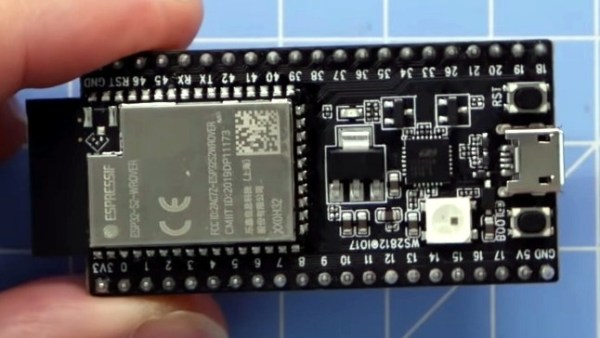
Now, after being announced in September of 2019, the ESP32-S2 is finally making it into hobbyist’s hands. On the face of it, the S2 seems less capable, with a single core and neither Bluetooth nor Ethernet. But with a much faster CPU, scads more GPIO, more ADCs, a RISC-V co-processor, native USB, and the promise of very low current draw, it could be that the ESP32-S2 proves to be even more popular with hobbyists as it becomes established.

To talk us through the new chip’s potential, Limor “Ladyada” Fried and Scott Shawcroft, both of Adafruit Industries, will join us on the Hack Chat. Come along and learn everything you need to know about the ESP32-S2, and how to put it to work for you.

join-hack-chatOur Hack Chats are live community events in the Hackaday.io Hack Chat group messaging. This week we’ll be sitting down on Wednesday, May 6 at 12:00 PM Pacific time. If time zones have got you down, we have a handy time zone converter.

Click that speech bubble to the right, and you’ll be taken directly to the Hack Chat group on Hackaday.io. You don’t have to wait until Wednesday; join whenever you want and you can see what the community is talking about.
Continue reading “ESP32-S2 Hack Chat With Adafruit”
Chat Cat Waves On Slack @

Isolated as we are by national lockdowns and statewide stay-at-home orders, many coworkers are more connected than ever before through oddly-named productivity/chat programs such as Slack. But those notifications flying in from the sidebar all the time are are oh-so-annoying and anti-productive. Ignoring requests for your attention will only make them multiply. So how do you make the notifications bearable?

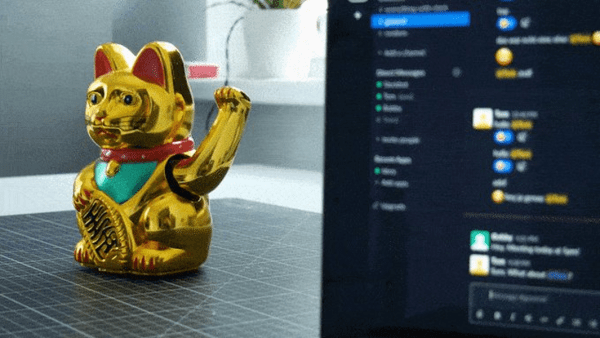
[Mr. Tom] wrote in to tell us about his solution, which involves a maneki-neko — one of those good luck cats that wave slowly and constantly thanks to a solar-powered electromagnetic pendulum. Now whenever [Mr. Tom] has an incoming message, the cat starts waving gently over on the corner of his desk. It’s enough movement to be noticeable, but not annoying.

An ESP32 inside the kitty looks at incoming messages and watches for [Mr. Tom]’s user ID, prioritizing messages where he has been mentioned directly. This kitty is smart, too. As soon as the message is dealt with, the data pin goes low again, and the cat can take a nap for a while.

The natural state of the maneki-neko is pretty interesting, as we saw in this teardown a few years back.

Get Your Microcontroller Online At The Speed Of Light

When developing a network-enabled project with the ESP8266 or ESP32, the easiest way to handle WiFi credentials is to just hardcode the access point and encryption key into the program. But that means recompiling the firmware if you ever want to use it on a different network, which isn’t really an option if you’re trying to make something that other people can easily use. If you’re expecting grandma to bust out the UART cable, we’ve got bad news for you.

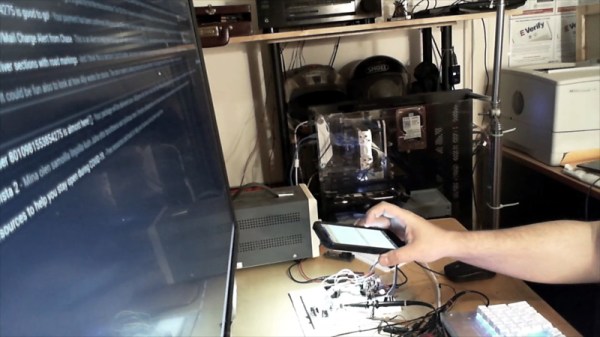
There are various ways around this problem, but we think the one developed by [Pekka Lehtikoski] is particularly clever. With a simple application, network credentials can be literally “flashed” to the waiting microcontroller by rapidly blinking the flash LED on an Android device. This allows the information to be transferred quickly and easily regardless of the user’s technical proficiency. One could even make the argument that it’s more secure than some of the other methods of doing initial setup, since an eavesdropper would literally need to see you do it if they wanted to steal your encryption key.

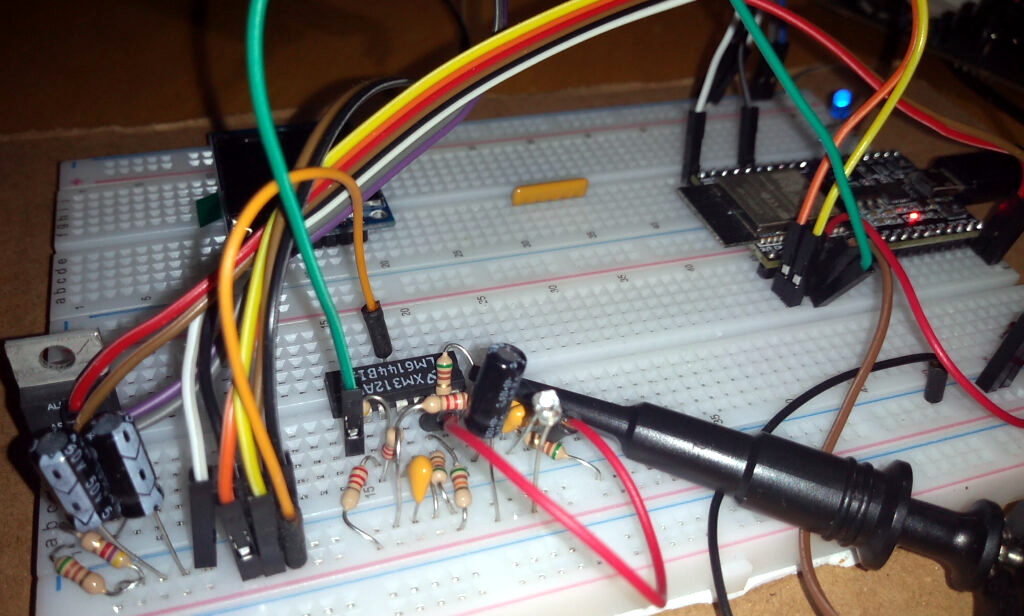
[Pekka] has made the source code for the Android application and the “Gazerbeam” library open for anyone who wants to include the capability in their own projects. To pick up the blinking light you just need to add a phototransistor, an opamp, and a handful of passives to your circuit; making this solution cheap enough that you could even use it in a small-scale production run. The concept isn’t limited to network credentials either. Whenever we can hold conferences again, it could be an interesting way to let attendees customize their badge.

Of course, [Pekka] isn’t the first person to use this trick. Hackers well versed in the history of WiFi MCUs may recall that the Electric Imp used a very similar method of configuration called BlinkUp. If you ever come across a device that asks you to put your phone’s screen down on a little window to perform the initial setup, there’s a good chance it has an Imp inside.

Tired Of Fruit Ninja? Try Vegetable Assassin Using An ESP32 Sword

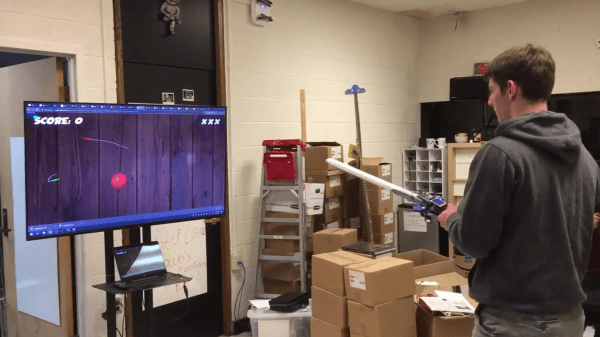
In a world where ninjas no longer rule the social hierarchy, where can a ninja-wannabe practice their sword fighting skills? In the popular Introduction to Embedded Systems class at the Massachusetts Institute of Technology, a team of students made their own version of the popular mobile game Fruit Ninja with a twist – you’re fighting your true nemesis, vegetables.

Vegetable Assassin allows single or multi-player mode, with players slicing vegetables on a screen using fake swords with sensors to detect the players’ motion. The web-based game allows swords to communicate their orientation to the game session with a WebSocket connection to a server, with the game generated and rendered using a 3D client JavaScript library. Rather than using MQTT, which also uses a persistent TCP connection as well as lower overhead, WebSocket provided maximum browser support.

An onboard ESP32 microcontroller and IMU track the sword movements. The game begins by calibrating the sword movements within the play area. Information is generated using the Madgwick algorithm, a 9-degrees-of-freedom algorithm that uses 3-axis data from the sword’s gyroscope, accelerometer, and magnetometer and outputs the absolute orientation of the sword.

The sword and browser both connect to the same channel on the server through a WebSocket connection, identified by a session ID similar to how web chat rooms are implemented. A statistics server manages the allocation of session IDs and other persistent game data to track high scores.

As for the graphics, a Three.js WebGL library creates the scene and camera, loading the game into the browser’s animation frame. Other scripts load the 3D models for the fruits and vegetables in the game, update their positions based on the physics engine provided by Cannon.js, and render UI elements within the game.

Curious? The project site has the microcontroller code to build your own sword that you can use to play the demo. If you don’t have an ESP32 and accelerometer handy you can play Vegetable Assassin in your browser instead.

ESP32 Refines Game Boy Bluetooth Adapter

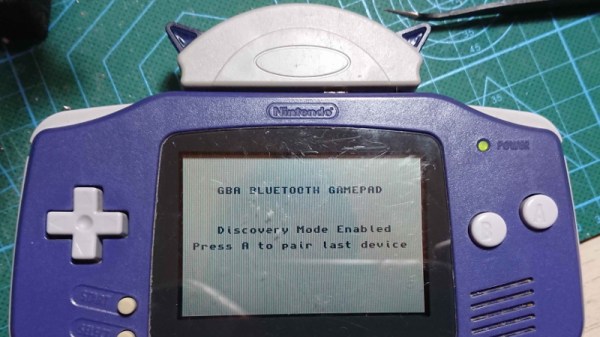
Last year we brought word of a project from [Shyri Villar] that turned a stock Game Boy Advance into a Bluetooth controller by exploiting the system’s “multiboot” capability. The prototype hardware was a bit ungainly, but the concept was certainly promising. We’re now happy to report that the code has been ported over to the ESP32, making the project far more approachable.

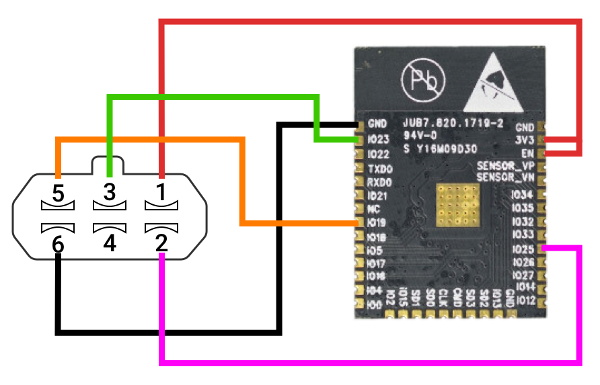
To clarify, the ESP32 is now the only component required for those who want to play along at home. Just five wires connect the microcontroller to the GBA’s Link Cable connector, which is enough to transfer a small ROM over to the system and ferry user input to the Bluetooth hardware. Even if you aren’t interested in using it as a game controller, this project is an excellent example of how you can get your own code running on a completely stock GBA.

While the original version of the hardware was a scrap of perfboard dangling from the handheld’s expansion connector, reducing the part count to one meant [Shyri] was able to pack everything into a tidy enclosure. Specifically, a third party GBA to GameCube link cable. This not only provides a sleek case for the microcontroller that locks onto the handheld with spring loaded tabs, but also includes a male Link Cable connector you can salvage. It looks as though there’s a bit of plastic trimming involved to get the ESP32 to fit, but otherwise its a very clean installation.

The GBA will be 20 years old soon, but that doesn’t mean the hardware and software exploration is over. The original Game Boy is over 30, and people are still giving talks about it.

LIDAR Built On Familiar Platform

Moore’s law may have reached its physical limit for transistor density, but plenty of other technologies are still on that familiar path of getting smaller and smaller as time passes. It looks like LIDAR is no exception to this trend either. This project from [Owen] shows a fully-functional LIDAR system for about $20 and built almost entirely on top of an ESP32.

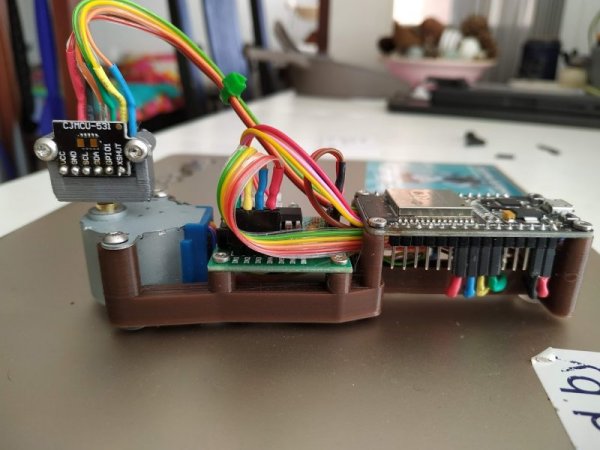
The build uses a Time-Of-Flight IR laser range sensor controlled by the ESP32, and the sensor is much smaller than even the ESP32’s footprint so it takes up very little extra space. To get it to function as a LIDAR system instead of just a simple rangefinder it does need a motor in order to rotate itself to see its entire space. Besides its small form factor and low cost, it also has a handy user interface that can run anywhere an HTML5 browser can run, making the use of the system easy and straightforward as well. All of the code is available on the project’s GitHub page.

We wouldn’t expect a system like this to be driving an autonomous car anytime soon, it’s update rate is far too slow, but its intent for small robots and even as an educational demo for learning LIDAR is second to none. If you do need a little more power in a LIDAR system but still don’t want to break the bank, we featured this impressive setup a few weeks ago.

Global Status Board Keeps Eye On COVID-19 Situation

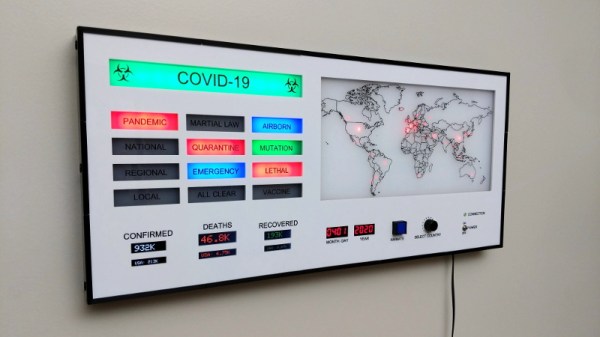
When it comes to keeping abreast of the COVID-19 pandemic, there are basically two schools of thought. Some people would rather not hear the number of confirmed cases or deaths, and just want to focus on those who recovered. That’s fair enough. But others want to have all of the available data at their disposal so they can form their own conclusions about what’s happening with this virus on a global scale. Looking at this incredible COVID-19 status board, we’ll give you one guess which category [Reuben] falls into.

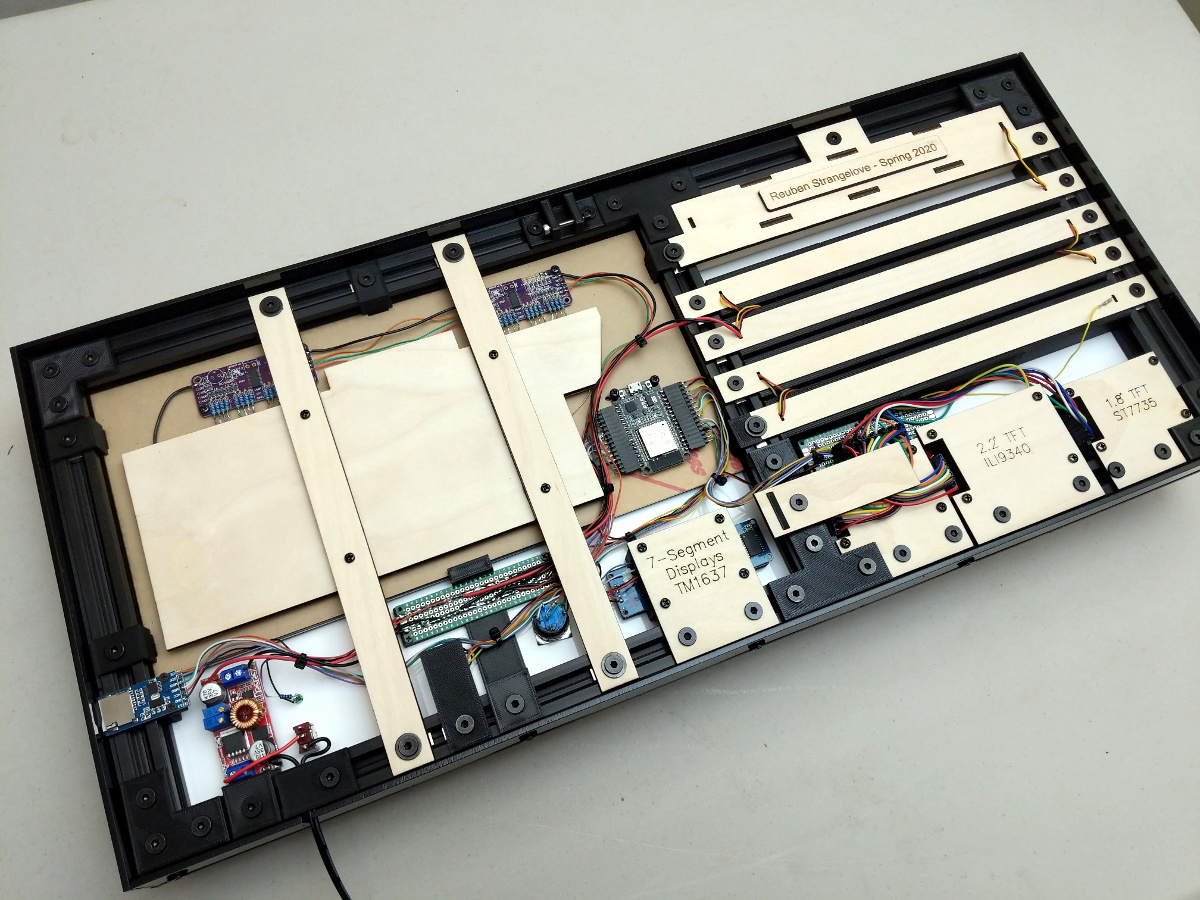
Note the laser engraved component labels

Constructed out of 2020 extrusion with both 3D printed and laser cut parts, this wall-mounted display is built to last. Clearly [Reuben] believes we’re in this one for the long haul, and taking a peek at the plethora of data points this device can show at once, it’s not hard to see why.

Stats are pulled down every hour from a JSON API by an ESP32 and stored on an SD card. A running total of confirmed cases, deaths, and recoveries are shown on several TFT displays located behind the face of the display. On the right, the relative severity of the infection in 32 different countries is visualized with LEDs of varying brightness.

Perhaps the most visually striking element of the display is the large annunciator panel on the left side, which lights up to show various conditions all over the world. We appreciate that [Reuben] has thought ahead and added a light that can be used once a vaccine is deployed for COVID-19, but the inclusion of a “MARTIAL LAW” indicator certainly doesn’t help us shake the feeling we’ve all found ourselves in a proper dystopia.

For those who’d would rather get their information from the source rather than have it filtered through the media, we’ve recently covered a few APIs that will allow you to pull your own up-to-date COVID-19 stats. Whether you’re looking to build something as elaborate as this display, or just want to echo it out to the terminal, making sure you’re seeing accurate data is key to identifying the turning point.

Continue reading “Global Status Board Keeps Eye On COVID-19 Situation”