A Different Kind Of IKEA Hack: Javascript Price Comparison By Location

When looking for the best deal, it pays to shop around. When it comes to chain stores, of course, one expects the price to be the same across their retail network. However, where international companies are concerned, occasionally a better deal is just a border crossing away. To investigate the best possible price on IKEA’s flatpacked goods, [Sn0w5t0rm] whipped up a scirpt to make comparisons easy.

The hack consists of a small piece of Javascript that runs in a browser extension like Greasemonkey (Firefox) or Tampermonkey (Chrome). When visiting an IKEA product page, it shows the price of the same item in the alternative country of your choice. Often, significant savings can be had – the SKOGSTA table is €176 cheaper in the Netherlands compared to Belgium.

While the script does require some customization to suit your location, it could nonetheless save you a bundle on some home furnishings if your live near enough to a border. We’d love to see the concept taken further to tease out best prices in a given region for goods from all stores. Similar techniques can net you cheap airfares, too!

DIY Regular Expressions

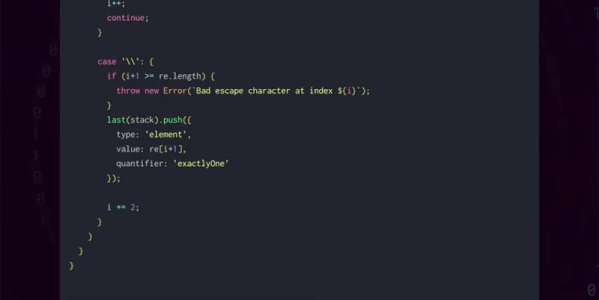
In the Star Wars universe, not everyone uses a lightsaber, and those who do wield them had to build them themselves. There’s something to be said about that strategy. Building a car or a radio is a great way to learn how those things work. That’s what [Low Level JavaScript] points out about regular expressions. Sure, a lot of people think they are scary. So why not write your own regular expression parser and engine? Get that under your belt and you’ll probably never fear another regular expression.

Of course, most of us probably won’t do it ourselves, but you can still watch the process in the video below. The code is surprisingly short, but don’t expect all the bells and whistles you might find in Python or even Perl.

Continue reading “DIY Regular Expressions”

The Game Boy Camera, Or: How I Learned To Stop Worrying And Love The Pixels

Never underestimate the power of nostalgia. In an age when there are more megapixels stuffed in the sensor of a smartphone camera than the average computer display can even represent, why would jagged images from a 20-year-old grayscale camera with pixels numbering in the thousands still grab attention? Maybe what’s old is new again, and the coolness factor of novelty is something that can’t be quantified.

The surprise I had last Monday when I saw my Twitter notifications is maybe only second to the feeling I had when I was invited to become a Hackaday contributor. I’d made a very simple web app which mimics a Game Boy Camera using the camera from your phone or desktop, and it got picked up by people so much that I’m amazed my web host is still holding. Let’s look at why something seemingly so simple gained so much traction.

Continue reading “The Game Boy Camera, Or: How I Learned To Stop Worrying And Love The Pixels”

Browser Makes Tiny Office Suite

There’s a recent craze of people living in tiny houses of 400 square feet down to as little as 80 square feet. Maybe [zserge] was thinking about that and created a very tiny office suite in which each tool weighs in at less than 1K. If you are guessing you couldn’t squeeze much functionality in C or C++ code or even assembly, you’d be right. The language of choice? HTML and JavaScript. So while the code is small, it relies on a pretty big piece of software. On the other hand, you have a browser open right now, so the incremental cost of using these tools is very small.

We get the idea that there’s not much chance this is going to sweep the shelves of Microsoft Office, Libre Office, and all the many competitors. However, it is a pretty stunning example of what you can do with modern HTML. There’s even a GitHub repo and a subreddit.

Continue reading “Browser Makes Tiny Office Suite”

Sudden Death Rainbow Sorting Game Reveals Your True Colors

When [marzsman]’s eight-year-old daughter thought up a game they could play together involving rainbows, he was all ears. She is a certified rainbow expert, after all. They had a few R&D sessions and came up with a rainbow sorting speed trial game that looks fun to play and fairly easy to build.

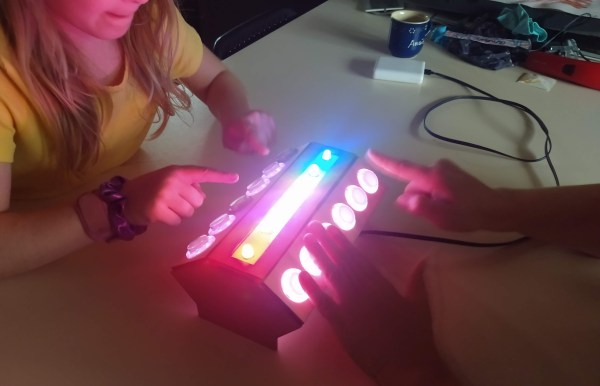
Press that blue button on the side, and the RGB LEDs along the top are put in randomized order. The object of this game is simple — just sort the rainbow before the other player by pressing each LED’s corresponding arcade button. Whoever sorts faster is rewarded with a rainbow animation behind their set of way-cool clear buttons.

Inside the laser-cut box is an Espruino, which is a handy little microcontroller that speaks JavaScript. All of the arcade buttons are wired up as a key matrix. The astute among you have noticed there is six of everything, and that’s because indigo light is too hard to distinguish from blue. Check out the intense gameplay after the break.

If [marzsman]’s daughter wants to learn computer science, rainbows are good for that, too.

Continue reading “Sudden Death Rainbow Sorting Game Reveals Your True Colors”

GridSound – An Audio Workstation In Your Browser

If you’re into creating music, you’ll have a surprisingly large variety of open source options at your disposal, ranging from Audacity as rather simple audio editor to Ardour as a full-blown, studio-worthy DAW — and LMMS, Rosegarden, MusE etc. for anything in between. With [Thomas Tortorini]’s GridSound project, you’ll have one additional choice on your list now, except this one runs in your browser. So if you find yourself in a sudden moment of inspiration, all you’ll need is a browser and off you go.

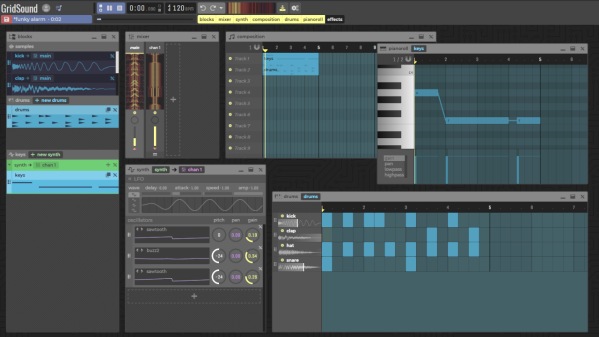
From the feature set’s point of view, GridSound leans towards LMMS and offers a drum kit, piano roll, and synthesizer. It appears that you won’t be able to record real world instruments at this point, but it’s also a work in progress, so who knows what the future will bring. The code is available on GitHub and you can explore GridSound itself here — no login required, unless you want to save your work. Running in a browser, GridSound is naturally written in JavaScript and uses the Web Audio API to perform the actual audio tasks.

What’s impressive is that [Thomas] opted against any UI framework-of-the-week, but instead implemented everything from scratch in pure vanilla JavaScript. In fact, the entire code base seems to be self-contained without any third party dependencies, and that alone deserves some respect. Sure, JavaScript isn’t everybody’s cup of tea — “real developers use assembly” — so if you prefer something more physical, how about some cardboard music?

Six New HackadayU Courses Announced For Fall 2020

The fall lineup of HackadayU courses was just announced, get your tickets now!

Each course is led by expert instructors who have refined their topics into a set of four live, interactive classes plus one Q&A session we like to call Office Hours. Topics range from leveling up your Linux skills and learning about serial buses to building interactive art and getting into first-person view (FPV) drone flight.

Checkout the course titles, instructors, and details listed below. If you’d like to hear about each class from the instructors themselves, their teaser videos are embedded after the break.

  • Interactive Media Art with Light and Sensors
    • Instructor: Mirabelle Jones
    • Course overview: This course will cover how to develop interactive artworks, installations, and experiences based on sensor input.
  • Introduction to FPV Drones
    • Instructor: Ayan Pahwa
    • Course overview: We’ll get familiar with the multi-rotor category of Unmanned Aerial Vehicles (UAVs) including physics, aerodynamics, electronics, digital signal processing (DSP), and writing software that is involved.
  • Intro to LEDs Using Arduino and FastLED
    • Instructors: Cathy Laughlin & Mirabelle Jones
    • Course overview: Students will learn all about how LEDs work as well as how to program LED patterns using the Arduino IDE.
  • Linux + Electronics: A Raspberry Pi Course
    • Instructor: Pablo Oyarzo
    • Course overview: This course is for those who had wanted to go from Arduino to a Linux computer small enough to fit the project but greatly more powerful to full fill the project’s needs and don’t know where to start.
  • Embedded Serial Buses (Part 1)
    • Instructor: Alexander Rowsell
    • Course overview: This course will cover the I2C and 1-Wire serial buses. We will look at the hardware layer, the protocol layer, and the software/application layer for both bus types.
  • Art + Code
    • Instructor: Casey Hunt
    • Course overview: Students will grow their technical skills through mastery of the P5.js JavaScript library, and will also learn about aesthetics and art history in the digital space.

HackadayU courses are “pay-as-you-wish”. To help ensure the live seats don’t go to waste, the minimum donation for each class is $1. Proceeds go to charity and we’re happy to report a donation of $4,200 going to Steam Coders from the summer session of HackadayU. A new charity will be chosen for the fall classes, details to follow.

Each class will be recorded and made available once they’ve been edited. You can take a look at the excellent Reverse Engineering with Ghidra series right now. Videos of the Quantum Computing and KiCad + FreeCAD courses are coming soon.

Continue reading “Six New HackadayU Courses Announced For Fall 2020”