A Weighted Companion Cube Worth Saving From The Incinerator

companion_cube

It’s honestly sad that Valve has not released any official Portal-related items to the masses, as a market for them clearly exists. As the saying goes, “necessity is the mother of invention”, and [Jamie] needed a Weighted Companion Cube in the worst way.

Actually he constructed his Companion Cube in order to test out some modifications and upgrades he performed on his homebrew CNC Mill. Judging by how the cube turned out, and the fact that he was able to keep tolerances within .005”, we would say that his mill is working just fine.

The cube was designed in Solidworks, and passed through the BobCAD plugin to generate the GCode for the mill. The base of the cube was machined out of a 3” solid block of aluminum, hollowed out on one side to give him access to the cube’s innards. He milled out heart shaped openings on each side, covering them with frosted Lexan.

He added a BlinkM to the mix, mounting it on the cover plate he milled for the open side of the cube. Once lit it cycles through several colors, including the pinkish tone anyone who has played Portal is quite familiar with.

We would say that it’s a great job, but it doesn’t do his work justice – it’s absolutely stunning. We’re not just saying that because we want one, though we do want one…badly.
Large Remote-controlled Game Of Life Display

game_of_life

Sometimes it’s just plain fun to over-engineer. [Stephanie] gets a warm fuzzy feeling when she successfully adds way more electronics components to a project than she really needs – just because she can. We can’t really argue with her if that is the intended goal, nor can we find fault with the sweet Game of Life display she put together.

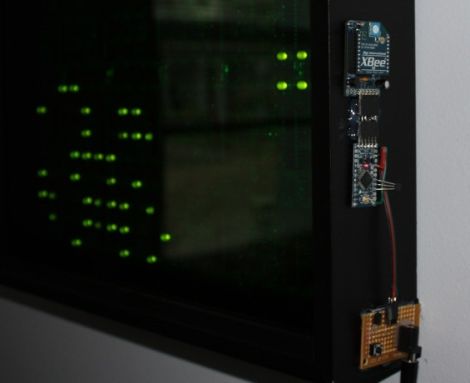
She started off with six Game of Life kits from Adafruit, but she quickly caught the LED bug and her collection grew until she had 20 kits (that’s 320 LEDs for those of you keeping count). After piecing them all together, they were mounted in a wooden frame and placed behind a dark piece of acrylic. It looked great and worked just fine, but it wasn’t overdone enough for her tastes.

In the end, she added a small Arduino and Xbee module to the Game of Life display, which enables it to be controlled by her network-enabled thermostat we featured a few weeks back. The thermostat was fitted with an Xbee unit as well, which allows it to turn the Game of Life on and off at whatever times [Stephanie] specifies.

We’ll take two please.

[via Adafruit Blog]

Diagnosing Diseases Like MacGyver

pancratitis_test

If you ever watched MacGyver as a kid, you know that given any number of random objects, he could craft the exact tool he would need to get out of a sticky situation. If he ever made his way into the medical research field, you could be sure that this test for Acute Pancreatitis would be among his list of accomplishments.

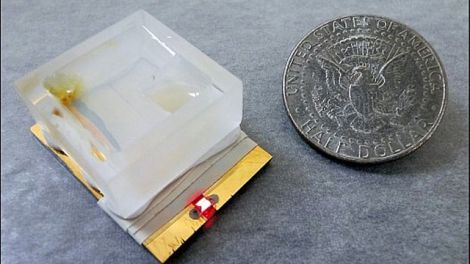
Designed by University of Texas grad student [Brian Zaccheo], the Acute Pancreatitis test seen in the image above looks as unassuming as it is effective. Crafted out of little more than foil, jello, and milk, the test takes under an hour to diagnose patients while costing less than a dollar.

The test works by checking the patient’s blood for trypsin, an enzyme present in high concentrations if they are suffering from pancreatitis. Once a few drops of the patient’s blood is placed on the gelatin layer of the test, it is left to sit for a bit, after which sodium hydroxide is added. If elevated trypsin levels are present, it will have eaten through the gelatin and milk protein, creating a pathway for the sodium hydroxide to reach the foil layer. If the foil is dissolved within an hour, a circuit is formed and a small LED lights up, indicating that the patient has acute pancreatitis.

The test really is ingenious when you think about it, and will be a huge help to doctors practicing in developing countries, under less than ideal working conditions.

[via PopSci via Gizmodo]

A Beginner’s Guide To LED Matrices

led_tutorial

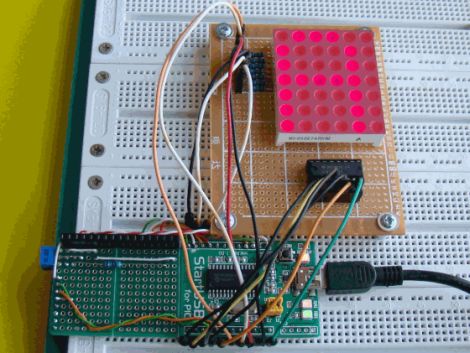
[Rajendra Bhatt] wrote in to share a tutorial he put together demonstrating the basics of using LED dot matrix displays. While this subject might be old hat to many out there, his helpful walkthroughs are geared more towards beginners who are exploring various electronics concepts for the first time.

He explains the theory behind LED displays using a PIC-driven 5×7 matrix as an example. He discusses persistence of vision and how tricking the human eye can save you quite a bit of time and a whole lot of pins. Multiplexing is broken down into its most basic steps, which [Rajendra] illustrates by showing how a letter would be drawn on the LED display one column at a time. The use of a ULN2803A Darlington Array is also discussed, and he details why it is used when pulling the five columns of LEDs to ground.

The only portion of the tutorial we thought could be expanded upon was the programming section. While he does show how each letter of the alphabet can be displayed via a series of five hex values, he does not cover the “why” part of the process. Obviously while anyone familiar with binary and hex can figure it out in pretty short order, we think that it would be a great place to pause and expand the readers’ knowledge even more.

Overall it’s a useful tutorial, and most beginners would likely find it quite helpful.

BlinkM Smart Garage Door Opener

garage_indicator

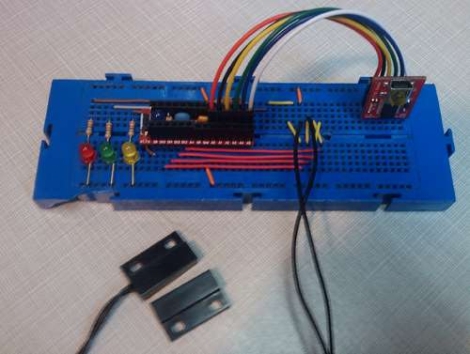
Calling Canada home, Hackaday reader [TheRafMan] has seen his share of bitterly cold winters. He also knows all too well how hard it is to get his cars started in the morning if somebody happens to leave the garage open. After the door was left open overnight for the second time this last winter, he decided that it was time to add an indicator inside the house that would alert him when the garage had not been closed .

Inspired by our BlinkM Arduino coverage a short while back, his circuit incorporates a BlinkM as well as several other components he already had on hand. He disassembled the garage door switch situated in the house and fit the BlinkM into the switch box once he had finished programming it. A set of wires was run to the BlinkM, connecting it to both a power supply located in the garage as well as the magnetic switch he mounted on the door.

The end result is a simple and elegant indicator that leaves plenty of room for expansion. In the near future, he plans on adding an additional indicator strobe to let him know when the mail has arrived, not unlike this system we covered a few months ago.

Stick around to see a quick video demonstration of his garage door indicator in action.

Continue reading “BlinkM Smart Garage Door Opener”

Motion Controlled Reddit Vote Sign.


A little while back I attended the largest east coast gathering of folks from the ever popular social news site, Reddit.com. Those of you familiar with Reddit already know that it is all about link aggregation. Users post links to interesting websites and material, and can then vote up or vote down content based on interest or relevance. Through the magical site algorithms original and interesting content is, as implied, aggregated up to the front page.  The whimsical nature of this big DC event lead many people to furnish signs of all types based on the culture of the site, internet memes, etc… The signs that really caught my attention were based primarily on the stylistic site layout, blowing up mail icons and other Reddit specific graphics.

The concept of using site graphics gave me the idea of being able to personally vote up or down other peoples’ signs. It was far too easy to just make a cardboard arrow, and I don’t have a color printer. I happened to have a shelved coffee table project involving orange and blue LEDs. Same colors as the arrows! Sweet. To make this project work I would have to work entirely from my project pile, there simply was no time to order anything from the internet. I managed to crank out a functional up/down voting sign in 3 days leading up to the gathering (and the morning of), here is what I did:

Continue reading “Motion Controlled Reddit Vote Sign.”

Mini LED Message Board Built From Retro Displays

personal_electronic_retro_telegram

[Iain] is getting to the point in his life where he finds himself waxing nostalgic about various different technologies from his youth. One item he has always been fond of is first generation 7 segment consumer LED displays, like those found in old calculators.

He was excited to find one of these displays at the bottom of a box full of electronics odds and ends he received from a friend. After identifying the display and tracking down a data sheet online, he decided that he wanted to build some sort of little gadget out of it.

His first inclination was to build a tiny text scrolling gadget from the display, and thus his “Personal Electronic Retro Telegram” (P.E.R.T) was born. With Arduino in hand, he prototyped the circuit on a breadboard, then sent away to have some PCBs built. Once he received the boards, alll of his prototyping components were swapped out with SMD versions, including a TQFP ATMega168 chip in place of the full-sized Arduino board.

The final result is a nice melding old and new technology which he decided to give to his girlfriend as a gift. Continue reading to see a quick video of the P.E.R.T in action.

Continue reading “Mini LED Message Board Built From Retro Displays”