Variometer Build For Gliding Aircraft

If you’re flying through the air in a non-powered vehicle your rate of descent is something that you want to keep any eye one. With that in mind, [Adrian] decided to design his own Variometer (translated) what will have a place in the cockpit next to the other instrumentation. It emits a pitch whose frequency is dictated by the rate at which altitude is being lost or gained.

He went with a PIC 24FJ64 microcontroller to drive the device. It’s reading data from an MS5611 barometric pressure sensor. This measures changes in air pressure associated with a change in altitude. As a user interface he chose one of SparkFun’s Nokia 5110 LCD screen breakout boards. He also went with one of their boost converts which lets him power the device from just one battery cell. The case itself is cut from several layers of plastic using a CNC mill.

In the video after the break you can see how sensitive the device is. Moving it just a few feet up or down has an immediate effect on the sound and the displayed data.
Continue reading “Variometer Build For Gliding Aircraft”

SquareWear Sewable Microcontroller Board

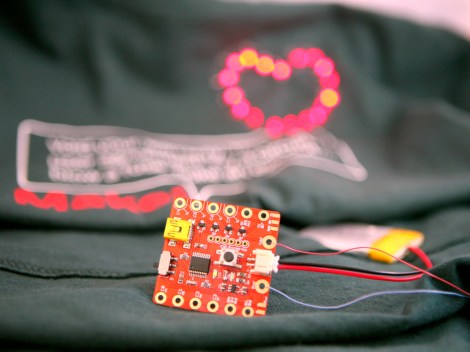
If you’re into adding electronics to your wearable items this little board will be of interest. The 1.6″x1.6″ board is called SquareWear and comes in several different flavors.

It may be a bit of a surprise that this is not an Arduino compatible board. [Ray] tried a few projects with PIC microcontrollers and ended up really liking them. He chose to go with the PIC 18F14K50 for this project. The chip has USB functionality and is running a bootloader. He thinks this makes it easier to work with over a wide range of computers than the Lilypad (a sewable Arduino compatible board which sometimes runs into FTDI driver issues the first time you try to program it).

We like the fact that it is open source. As we mentioned earlier, it comes in a few different flavors. There is a red or white version that uses a LiPo battery, and one that is driven from a CR2032 coin cell. If you’re working on a small project to which you would like to add a rechargeable battery this will serve as a cheap and easy reference design.

[via Adafruit]

A PIC Powered Pair Of Electronic Dice

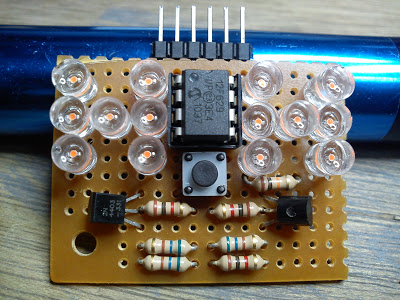
[Timothy] is honing his microcontroller skills with this electronic dice project. In addition to giving him an opportunity to work on some code, the use of an 8-pin chip provides a design challenge for driving the twelve pips and providing a user input.

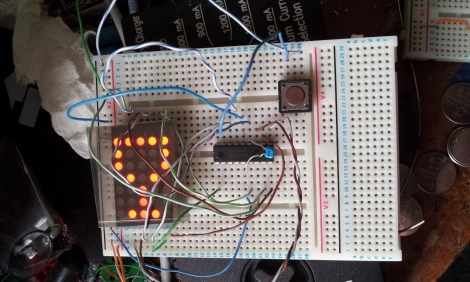
The project started off with some $4 strings of LED Christmas lights. He promptly disassembled the strands, each yielding 100 LEDs. The microcontroller he chose to work with is a PIC 12F629. It’s DIP8 package provides six I/O pins to work with. When examined closely you will find that the pips on a die are always present in pairs with the exception of the center pip. This means that only four pins are needed to drive one die. You can see a pair of transistors above; one is a PNP, the other an NPN. These are both driven from the same uC line, which toggles between the pair of die. This accounts for 5 of the available pins, with the sixth monitoring the push button.

Driving An LCD Character Display Using Custom HID Codes

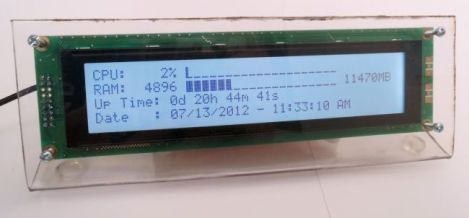
Here’s an external display meant to help you keep track of your computer’s status. It connects via USB and is driven by a PIC microcontroller. It listens for a small set of commands, using those to implement a simple control protocol to drive the screen.

[Andrew Gehringer] designed the device around a PIC 18F2550, which offers native USB control. He’s using Microchip’s USB stack to enumerate the module as an HID device. It listens for commands 0x10 through 0x23. These clear the display, write strings to each of the four lines of the display, and switch the LCD backlight. Of course the project includes a program [Andrew] wrote to feed the display. It  has a GUI which let’s him decide what information is displayed and how it is formatted. This helper app hangs out in the system tray for easy access.

TinyMatrix Derivative Uses PIC Instead Of AVR

[Stu] has a teenage niece whose birthday is coming up and he wanted to give her something unique as a gift. He’s working on an LED matrix pendant that can display pixel graphics, play animations, and scroll messages.

He began the work after drawing inspiration from the TinyMatrix project. That clever design uses a DIP AVR chip soldered directly to the legs of a 5×7 LED matrix. It was powered by a coin cell with the power and ground wires acting as the necklace for the pendant. [Stu] is more comfortable developing using PIC chips, so he based his project on a 16F88. It will not run from a 3V source so he’s got a few issued to work out before the final design is finished.

One thing that’s quite interesting is his side project. After growing weary of hand coding the arrays for each frame of an animation he wrote a GUI in C# that let him design the image and output the code with a few clicks of the mouse.

Motivating Engineering Students With Microcontrollers

We see a lot of microcontroller based hacks around here, and it’s not hard to see why learning how to use microcontrollers is valuable to prospective engineeer. Unfortunately, microcontroller courses are dreaded by students since they focus on theory instead of application. In The First Lecure, [Colin] talks to a class of engineering students about how to get practical with microcontrollers.

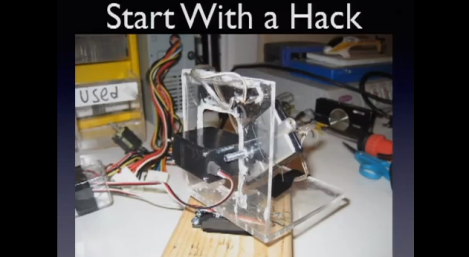
He starts with an overview of a bomb countdown project that he used to learn the basics of microcontrollers. This started as a 555 based timer, but he ended up using a PIC18 after having issues with timing and reliability. Next, he discusses a paintball sentry gun inspired by a Hackaday post.  He finishes off some advice and gives the students some hardware: a Pickit2 programmer and a Saleae Logic Analyzer.

It’s easy to lose motivation due to the heavy focus on theory in engineering. [Colin]’s advice to start building stuff will hopefully motivate these students to take an interest in microcontrollers. We also like how he advises students to read Hackaday. Check out the full video of the lecture after the break.

Continue reading “Motivating Engineering Students With Microcontrollers”

PIC Programming Adapter For The Raspberry Pi

Here’s another offering when it comes to PIC programming from the Raspberry Pi. The design seeks to adapt the GPIO header so that it may be used for programming PIC microcontrollers, but this does involve a bit more than just physically connecting pins to the target chip. Most of the PIC family require a 12V programming level, and this setup makes that possible.

The sets of NPN transistors shown in the schematic fragment above are arranged in darlington pairs. They’re actually switching voltage from the 6V linear regulator built into the system using the Pi’s 3.3V pins. There’s also a 12V regulator, so you’re going to need a power supply that is capable of sourcing more than that.

We’ve seen a similar concept before but this design carries it a step further. There are several status LEDs built into the programmer, and it includes support for detecting which chip is being programmed. So far this covers just four different chips, but we’re sure that it could be adapted to fit your own needs.

[via Reddit]