Twitter Notifier Lets Us Know How Awesome We Are

twitter_notifier

Let’s admit it, you’re just a little bit vain. Heck, we’re all just a little bit vain when you really think about it. Instructables user [pdxnat] was self-absorbed enough that he constructed an LED “mood light” that alerts him each time someone mentions his user name on Twitter.

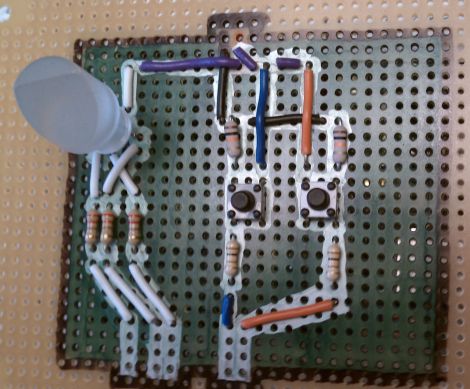
The build is pretty simple, with most of the work being done on his PC. His Arduino is wired to a simple RGB LED that calmly cycles through various colors until someone mentions his name on Twitter. At that point, the client software running on his PC passes a message to the Arduino over a serial interface, causing it to wildly pulse the LED. Once it catches his eye, he stops the alert cycle with the press of the reset button, returning the LED to its previous state. As a bonus, he decided to write the Twitter-polling application in both Processing and Python, enabling fans of either language to easily replicate his work.

It’s a pretty cool idea, and it would be great to see someone expand it to include other online services to provide a greater overall feel for how awesome they really are.

Keep reading to see a quick video of the notifier in action.

Continue reading “Twitter Notifier Lets Us Know How Awesome We Are”

Facebook Notifier Uses Some Papercraft And Simple Electronics

This weekend project will tell you when you’ve got something new to look at on your Facebook page (translated). The yellow flag on the side of the mini-mailbox automatically goes up, alerting you to your recent online popularity.

[Rocco’s] craftwork on this project is fantastic. We love the scale, the colors, and especially the artificial grass that adorns the base. Inside the mailbox an Arduino controls a small servo motor attached to the new mail flag. As with other Arduino-based notifiers (be it the Internet Furby, or our own troll sniffing rat) the USB connection makes it incredibly easy to convert online information to real-world signals. The client side of this is a Python script. It uses a package that we were previously unfamiliar with called mechanize. We’ve just made a cursory examination of how that package is used, but we’re going to keep it in mind as an alternative to our usual go-to package, BeautifulSoup, which tends to be a bit hairy when you’re just looking for some basic data.

Automate Repetitive PC Actions With A Foot Pedal

foot_pedal

Instructables user [bkovac] was sick of clicking the terminal icon on his desktop whenever he wanted to launch a terminal window. Keyboard shortcuts aside, he figured the easiest way to take the tedium out of the process would be to launch terminal windows with a foot pedal.

He grabbed a pedal that he had sitting around in his workshop and took it apart to ensure the switch contacts were configured for his particular use. The wires were run to an Arduino which talks to the computer over serial using a Python script.

While the setup works just fine, it’s definitely not the most efficient or simplest way of getting the job done. In fact, we have seen other methods that are quite a bit simpler, though they lack the potential versatility of this particular modification.

Rather than simply loading a terminal window on his computer, we would love to see this pedal enhanced to perform multiple functions – at which point the Arduino would be a pretty decent choice. We would probably start out by swapping out the full-sized Arduino for a Teensy, mounting it inside the pedal. Multiple foot presses could be used to trigger different events, based upon the number of presses that occur within a given time period. It could be made even more useful by using it to trigger gesture-based events, similar to those seen in plug-ins for Chrome and Firefox.

How would you enhance [bkovac’s] pedal interface? Let us know in the comments.

Real-time Robotic Arm Control With Blender

robotic_arm

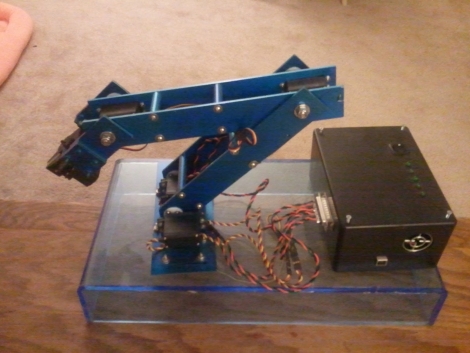
Last year, [Justin Dailey] was coming down the home stretch of his senior year as a Computer Engineering student and needed to build a final design project. He always wanted to construct a robotic arm, and figured that there was no better way to legitimize such a project, than to claim that it was “homework”.

While he originally wanted to control the arm with a joystick, he had been messing with Blender quite a bit leading up to his final project, and thought it would be pretty cool to let Blender do the work. He started out by testing his ability to control a single servo with Blender, then slowly increased the complexity of the project. He prototyped the arm using cardboard, and satisfied with his progress thus far, began constructing the arm out of aluminum.

Once he had all six of his servos attached to the arm’s joints and wired to his Roboduino, he got busy constructing a 3D model in Blender. Using a few Python scripts, the movements inside Blender are translated to serial data in real-time, which is relayed to the Roboduino in order to control the arm.

Check out his site if you get a chance – there’s plenty of code to be had, as well as several videos of the arm in various stages of construction and testing.

SMS Gateway Lets You Twitter By Text Message

[GuySoft] threw together a cellphone-based SMS gateway that allows him to push text messages to Twitter. Once up and running, it can be used by multiple people, either with shared or individual Twitter accounts. At its core, this setup uses the cellphone as a tethered modem on a Linux box. The open source software package, Gammu SMSD, provides hardware hooks for phones running in modem mode. The package is already in the Ubuntu repositories but it runs cross-platform and can be downloaded from the project site. This gave [GuySoft] the ability to script a framework that checks for received SMS messages, compares the incoming phone number for a match on a saved list, then pushes the message from a confirmed number to Twitter via their API.

A web interface is used to register new numbers and associate them with Twitter accounts. On the back-end, [GuySoft’s] own Python script handles the translation of the message. You can download all of the code, and get more insight on setup from the readme file, over at the GitHub repository.

Smartphone Operated Garage Door Is Beginning Of Arduino Home Automation System

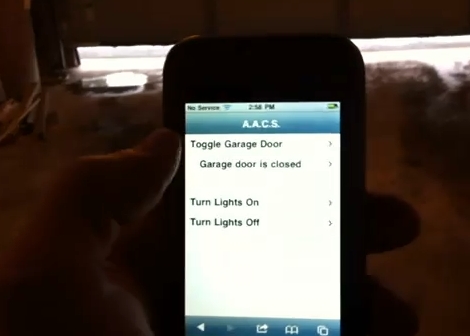
[Tim] is showing off the first step in his home automation projected with this smart-phone garage door interface. In the video after the break you can see him open and close the garage door with the touch of a button. There’s also an open or closed indicator that he can check when away from home.

An Arduino takes care of a portion of the control for this project. Like the post we saw yesterday, he’s using PHP code on a webpage to manipulate the Arduino via its USB connection in order to open and close the door using a relay. The door status is also monitored by the Arduino and sent to the PC over the serial connection. The computer uses a Python script to monitor the incoming data and update a text file which is merged into the web interface using a PHP include. Future plans for the system include adding control for heating and air conditioning systems.

If you’re looking to do something like this but wirelessly here’s some advice on ditching the Arduino and using an XBee module instead.

Continue reading “Smartphone Operated Garage Door Is Beginning Of Arduino Home Automation System”

Writing Python Drivers For Input Devices

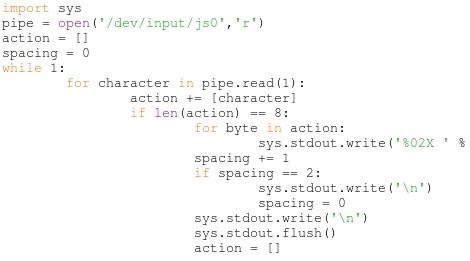
[Stealth] put together a post explaining how he writes drivers for input peripherals. He’s using Python which makes the process fairly painless (we’ll get to that in a minute) but the value of his post is in the explanation surrounding how to interpret the data. Once you know how the communications are coming in from a device you can write the driver using any language you want. [Stealth] wrote in to let us know about this post after reading the PlayStation 3 Sixaxis controller sniffing hack. He’s pretty much doing the same thing but the background information is much more bountiful.

There are a couple of prerequisites to the process. First, [Stealth] is working in a Linux environment. That’s not to say you couldn’t do this on another OS, but you’re going to need to do some research to find out how to tap into the data stream from the device. Secondly, the input you are working with must already be set up and working on the machine. That means if there isn’t any support at all for the peripheral (in this case a USB joystick) you’re not going to be able to sniff the commands. That being said, a short Python snippet is all you need to dump the raw data coming in from the device. With data in hand it’s time to do some pattern hunting. As you start to figure out the size and scope of the incoming packets you can try out your own code to make sure you’ve got it right. Check out the demo video after the break which features a joystick button mapper written in Python.

Continue reading “Writing Python Drivers For Input Devices”