2011 CCC R0ket Badge

[Geekabit] wrote in asking if we’d seen the 2011 CCC badges yet. The answer is NO, we haven’t seen them because the image above is the only sneek peek we can find on their broken-certificate website. But we are glad that he shared the link with us, because it does tell the tale of what hardware and firmware features will be on this year’s badge.

Right off the bat we need to applaud them for several things. Most notably, the 3.7 volt 600 mAh LiPo battery which can be recharged via the USB port. It boasts an ARM Cortex M3 processor which is running what they call and ‘unbrickable’ bootloader that is programmed via the USB port. You can see there is an LCD screen which we’d guess is about 128×128 pixels (correct us if you know otherwise). You’ll be able to interact using a 5-way button, via the RF transceiver, and possibly using an optical interface but we’re not sure that feature made it into the final design. They’ve also rolled in a shield system for extra harware so that you can design your own add-ons before you get there.

As always, if you get your hands on one of these, we want to hear all about your project as well as get an overview of the stock badge and its features so don’t forget to drop us a line.

Update: [Never_gonna] left a comment with a link to a series of posts about r0cket development including a video which we’ve embedded after the break. Thanks!
Continue reading “2011 CCC R0ket Badge”

Crafting A Hexapod With An RC Controller

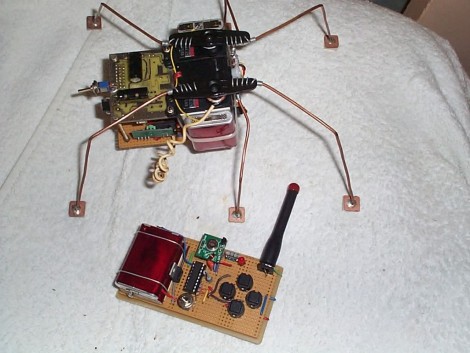
Here’s a fantastic project that lets to drive a hexapod around the room using an RC controller. [YT2095] built the bot after replacing the servo motors on his robot arm during an upgrade. The three cheapies he had left over were just begging for a new project, and he says he got the first proof-of-concept module put together in about an hour. Of course what you see above has gone through much improvement since then.

The three motors are epoxied together, with the one in the middle mounted perpendicular to the motors on either side of it. Those two are responsible for the front and rear leg on each side, with the third motor actuating the two middle legs. It’s a design we’re already familiar with having seen the smaller Pololu version. You might want to check that one out as there’s some slow motion video that shows how this works.

[YT2095] added control circuitry that includes an RF receiver. This lets him drive the little bot around using a transmitter with four momentary push switches on it. We love the idea of using copper clad for the foot pads.

Experimenting With A Permeability Tuned Oscillator

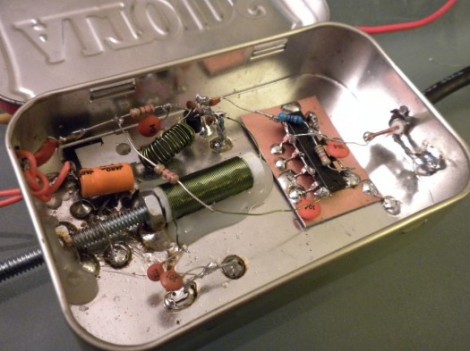
[Scott Harden] has been working through a design for a variable inductor to use as a PTO, or permeability tuned oscillator. What you see above is the most recent fruit of these efforts. The variable inductor is made up of the green coil of wire with a threaded bolt in the core. Turning that bolt moves the tip in or out of the coil, affecting its inductance.

Traditionally, tuning RF oscillator circuits has been a function of an adjustable capacitor. But capacitance is only part of the circuit, with inductance being the other important portion. Since variable capacitors that are capable of affecting a large change on the frequency of a circuit can be quite expensive he set out to find another way. This is what prompted the development of his first PTO project.

[Scott] produced a demo video of the hardware seen above which we’ve embedded after the break.

Continue reading “Experimenting With A Permeability Tuned Oscillator”

Long-range Canon DSLR Remote Video Trigger

canon_60D_remote_video_trigger

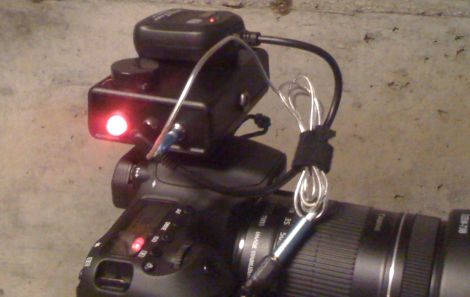
Instructables user [Justin] generally enjoyed shooting video with his Canon 60D DSLR, though there was one small problem. The only way that the camera could be remotely triggered to shoot video was via a small IR remote with a paltry 10 foot range. Even worse, the remote had to be pointed directly at the front of the camera to work at all. To remedy the situation, he decided to rig up his own long-range trigger mechanism.

He cobbled together an Arduino with components he had sitting around, mounting it in a project box on top of the camera. A commercially available RF remote shutter release is also mounted on the top of the camera, and wired to the Arduino using a small 2.5mm plug. When he activates the RF remote, it sends a pulse to the Arduino, which in turn sends the appropriate signal to his camera via a small IR LED.

While he readily admits that he could have likely used a much simpler configuration, the Arduino does its job, and he’s quite happy with his solution. We agree with him about the Arduino, but it’s hard to argue with saving money by using components you already have on-hand.

RF Robot Controlled From A Terminal Window

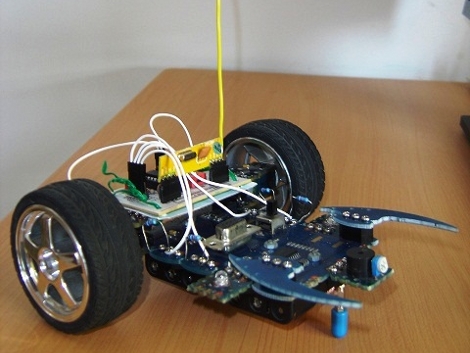
This robot can be controlled from the terminal window of your computer. You can see a manilla-colored board mounted between the wheels. This is the RF receiver which has quite a long antenna that we’ve cropped out to get a better look at the bot itself. [Ashish] picked up an RF transmitter/receiver pair for about $4 and after the break you can watch him walk us through the method he’s using for control.

First off, he had to find a way to interface the transmitter with his computer. He decided to use an Arduino because sending data to it from the computer is as simple as writing to /dev/ttyUSB0. The Arduino sketch just listens for incoming characters on the serial connection and pushes them over the RF transmitter.

We like his development methods. In the video he shows the command syntax used to drive and stop the robot. Once he figured that out he wrote a shell script to send the bot on a preprogrammed square path. From there a bit more coding would give him real-time control which could be extended to something like a web-based interface for smartphone control.

Oh, and if you’re wondering about the bot itself it’s a kit robot which normally uses IR control. [Ashish] upgraded to RF since it doesn’t require line-of-sight to work.

Continue reading “RF Robot Controlled From A Terminal Window”

Adding Ethernet Control For A 5.1 Speaker Set

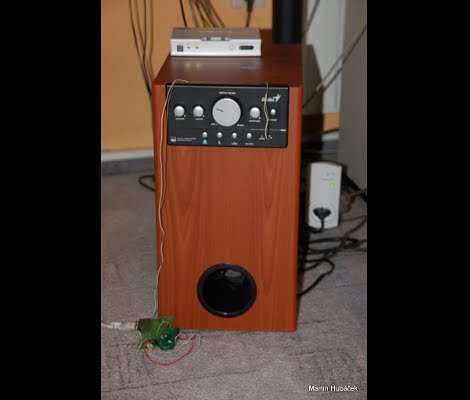
[HuB’s] set of 5.1 surround sound speakers was gobbling up a bunch of electricity when in standby as evidenced by the 50 Hz hum coming from the sub-woofer and the burning hot heat sink on the power supply. He wanted to add a way to automatically control the systems and offer the new feature of disconnecting the power from the mains.

The first part was not too hard, although he used a roundabout method of prototyping. He planned to use the IR receiver on the speakers to control them. At the time, [HuB] didn’t have an oscilloscope on hand that he could use to capture the IR protocol so he ended up using Audacity (the open source audio editing suite) to capture signals connected to the input of a sound card. He used this to establish the timing and encoding that he needed for all eight buttons on the original remote control.

Next, he grabbed a board that he built using an ATmega168 and an ENC28J60 Ethernet chip. This allows you to send commands via the Internet which are then translated into the appropriate IR signals to control the speakers and a few other devices in the room. The last piece of the puzzle was to wrap an RF controlled outlet into the project with lets him cut mains power to the speakers when not in use. You can see the video demonstration embedded after the break.

Continue reading “Adding Ethernet Control For A 5.1 Speaker Set”

Bringing The Game Of Tag Into The Digital Age

tagurit

How long has it been since you’ve played a game of tag?

[Sylvia Cheng, Kibum Kim, and Roel Vertegaal] from Queen’s University’s human media lab have concocted a fun twist on the classic game that just might compel you to start playing again.

Their game, called TagURIt, arms two players with Lumalive LED t-shirts which sport embedded touch sensors. A third player, known as the “chaser” attempts to touch either of the other players in order to capture the token displayed on the player’s chest-based LED matrix. The game is score-based, awarding points to the chaser for capturing tokens, while giving the other players points for avoiding capture.

If both players wearing the LED shirts are near to one another, the token will jump to the other player in an attempt to thwart the chaser. In this game, each player is a location-tagged URI, and proximity is determined by either tracking the users with cameras indoors, or via RF sensors if the game is played outside.

It is definitely an interesting way of playing tag, and we imagine it could be quite fun in large groups.

Continue reading to see a video demonstration of the TagURIt game being played.

[via Adafruit blog]

Continue reading “Bringing The Game Of Tag Into The Digital Age”