Bringing A Child’s Play Kitchen To Life

Given how many adults will go out of their way to avoid spending any extended amount of time in the kitchen, it’s pretty amazing how much children love playing in their miniature versions. Especially since they tend to be pretty simple: usually they’re little more than different sized boxes made out of MDF to represent the refrigerator, oven, and microwave. Of course, some kids are fortunate enough to have hackers and makers for parents.

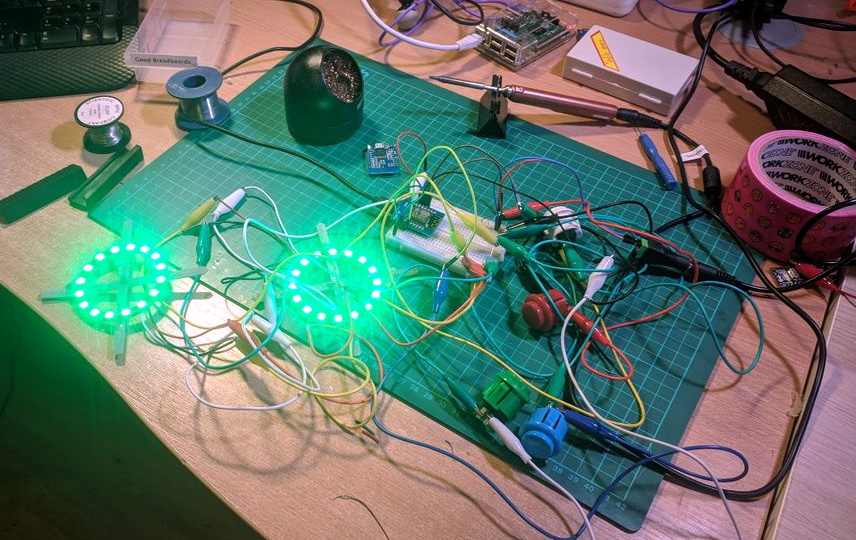
[Brian Lough] wanted to get his two year old daughter her own play kitchen, but wasn’t terribly impressed with anything on the market. So he decided to start with the IKEA Duktig and add in his own personal touches to turn the stark white playset into something that would really get his daughter’s imagination going. With the liberal application of RGB LEDs and microcontrollers, her kitchen is sure to be envy of the sandbox.

Being the class act that he is, [Brian] starts his write-up acknowledging the various IKEA Duktig hacks and modifications that served as inspiration for his own build. Most of the prior art out there relates to making the microwave and oven a bit more exciting with the addition of lights and sounds, which ultimately ended up being the way he approached his daughter’s version as well.

For the oven, [Brian] decided to add some big arcade buttons over the door which would change the color of the RGB LEDs inside. He thought this association would be a good way to help his daughter learn her colors, since she’ll be able to see the oven change color when she presses the corresponding button. He also added a knob to control the intensity of the light, meant to be analogous to the temperature control in a real oven.

The modifications to the microwave are a bit more extensive, including a “timer” made out of a TM1637 LED display in a 3D printed panel complete with a buzzer to indicate when the plastic food has been thoroughly illuminated. [Brian] even made it so the LEDs in the NeoPixel ring light up in a spinning pattern to cast some shadows and simulate movement. He notes that the microwave was actually a bit overwhelming to his daughter at first, but after a couple months of getting used to the functions, she enjoys it as much as the oven.

While hacking a play kitchen might be new territory for him, [Brian] is no stranger to building awesome stuff. We’ve previously seen him put together a YouTube subscriber counter in the style of Tetris, and he even managed to create a gorgeous looking display out of shoelaces of all things.

A Bolt-On I2C Navigation Key For Your Next Project

We often talk about the advantages of modular hardware here at Hackaday; the ability to just order a few parts online, hook them up with some jumper wires, and move onto the software side of things is a monumental time saver when it comes to prototyping. So anytime we see a new module that’s going to save us time and aggravation down the road, we get a bit excited.

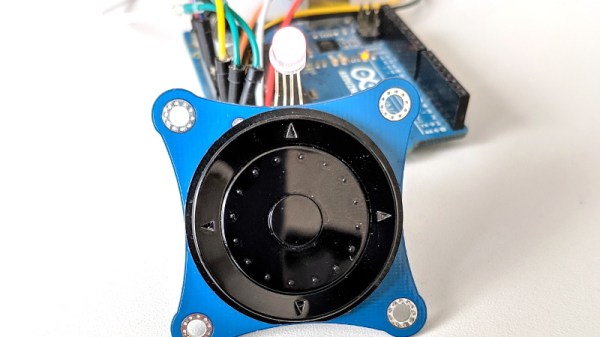
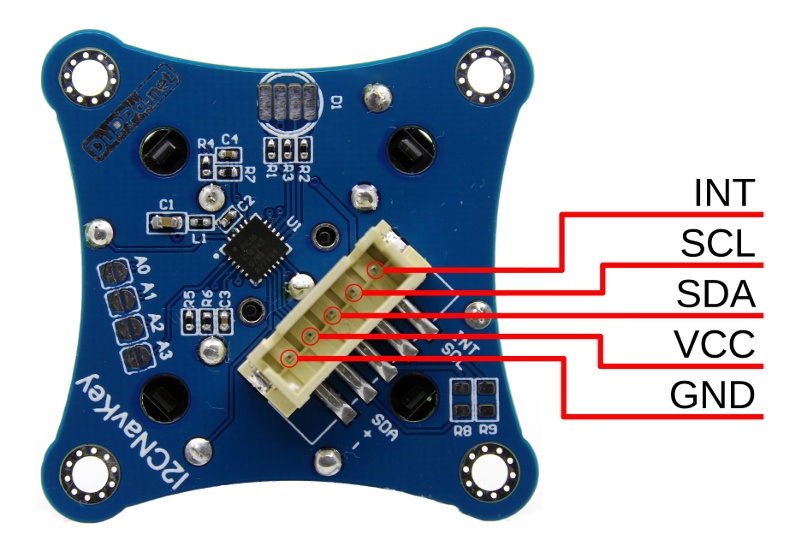
Today we present the very slick I2CNavKey developed by [Saimon], a turn-key interface solution for your builds that can’t quite get away with a couple toggle switches. It not only gives you a four-way directional pad with center button, but a rotary “wheel” like on the old iPods. All of which you can access easily and with a minimum of wiring thanks to the wonders of I2C.

But even that might be selling the module short. This isn’t just a couple of buttons on a breakout board, the I2CNavKey is powered by its own PIC16F18345 microcontroller and features three configurable GPIOs with PWM support (perfect for an RGB LED) plus 256 bytes of onboard EEPROM storage.

[Saimon] has released the entire project as open source hardware for your hacking pleasure, but you can also get them as ready-to-use modules on Tindie for $18 USD [Editor’s Note: Because of a typo we originally we left the 1 out of the price]. Whether you’re a paying customer or not, you get access to the project’s absolutely phenomenal documentation, including a nearly 30 page manual that contains everything you’d ever want to know about the I2CNavKey and how to integrate it into your project. If all hardware was documented with this level of dedication, the world would be a much nicer place for folks like us.

If you recognize the name, or perhaps the affinity for neat I2C-connected input devices, it’s probably because you’ve seen his very similar I2C rotary encoder on these pages previously, which was a finalist in our Open Hardware Design Challenge during the 2018 Hackaday Prize.

Can You Live Without The WS2812?

As near as we can tell, the popular WS2812 individually addressable RGB LED was released to the world sometime around the last half of 2013. This wasn’t long ago, or maybe it was an eternity; the ESP8266, the WiFi microcontroller we all know and love was only released a year or so later. If you call these things “Neopixels”, there’s a good reason: Adafruit introduced the WS28212 to the maker community, with no small effort expended on software support, and branding.

The WS2812 is produced by WorldSemi, who made a name for themselves earlier with LED driver solutions, especially the WS2811, an SOIC chip that would turn a common anode RGB LED into one that’s serially controllable. When they stuffed the brains from the WS2811 into a small package with a few LEDs, they created what is probably the most common programmable LED lighting solution available today.

A lot has changed in the six years that the WS2812 has been on the market. The computer modding scene hasn’t heard the words ‘cold cathode’ in years. Christmas lights are much cooler, and anyone who wants to add blinky to their bling has an easy way to do that.

But in the years since the WS2812 came on the market, there are a lot of follow-up products that do the same thing better. You now have serially addressable LEDs that won’t bring down the rest of the string when they fail. You have RGBW LEDs. There are LEDs with a wider color gamut and more. This is a look at the current state of serially addressable RGB LEDs, and what the future might have in store.

Continue reading “Can You Live Without The WS2812?”

An ESP8266 Sundial For Your Wall

Hackers absolutely love building clocks. Seriously, there are few other devices for which we’ve seen such an incredible number of variations. But while the clocks that hackers build might blink out the time in binary, or write it out in words, they generally don’t feature hands. Apparently in 2019 it’s more reasonable to read binary than know which way the “little hand” is supposed to be pointing.

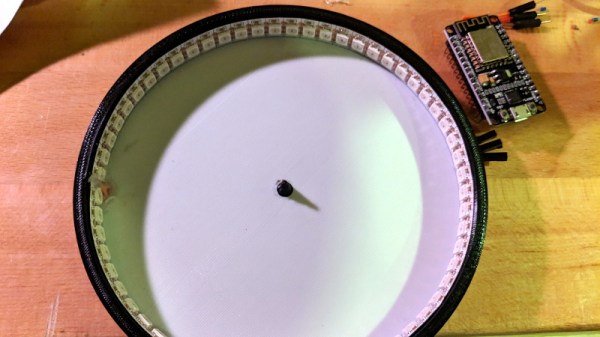
This ESP8266 powered “shadow clock” from [Dheera Venkatraman] technically keeps that tradition intact, but only just. His clock doesn’t feature physical hands, but it does use a strip of RGB LEDs to cast multi-colored shadows which serve the same function. With his clock, you don’t even have to try and figure out which hand is the big one, since they’re all the same length. Now that’s what we call progress.

Probably the biggest surprise about this clock, beyond how legitimately good it looks hanging on the wall, is how little work it takes to build your own version. That’s because [Dheera] specifically set out to design something that was cheaper and easier to build than what he’d seen previously, and we think he delivered on that goal in a big way. All you need are the 3D printed components, an ESP8266 board, and a strip of 144 WS2812B LEDs.

The software side of the project is similarly simplistic, and all you need to do is plug in your WiFi network credentials to have the ESP pull the current time from NTP. If you were so inclined, his source code would be an excellent base on which to implement additional features such as animations at the top of the hour.

Compared to something like the Bulbdial clock from 2009, it’s incredible how simple some of these projects have become in the last decade. With the tools and components available to hackers and makers today, there’s truly never been a better time to build something amazing.

Fueled By Jealousy, This Smart Lamp Really Shines

As a lover of lava lamps, [Julian Butler] knew when he saw a coworker’s modern LED incarnation of the classic piece of illuminated decor that he had to have one for himself. The only problem was that the Kickstarter for it had long since ended, and they were no longer available. So he did what any good hacker would do: he studied it closely, took a bunch of notes, and built his own version that ended up being even better than the original.

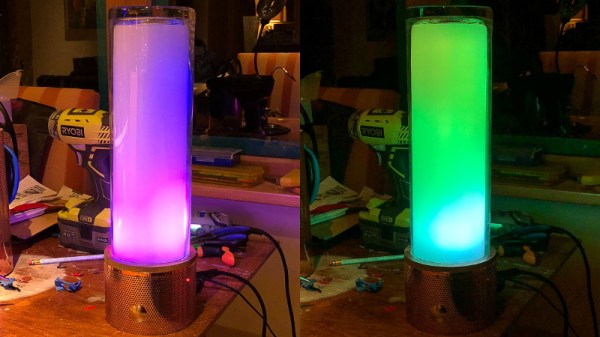
In the three part series on his blog, [Julian] takes us through the design and construction of his take on the Ion Mood Light, which raised over $72,000 back in 2014. The details in the Kickstarter campaign plus his own first-hand observations of the device were enough to give him the high-level summary: the device has a core of RGB LEDs behind a diffuser, and uses some software trickery to pulse out some pleasing effects and patterns. He wasn’t concerned about the Bluetooth or the smartphone application, so all he really needed to do was put some NeoPixel LEDs inside a glass cylinder and he’d be done. Of course, it always sounds easy…

The actual journey to get there, as you might have guessed from the three part series, took awhile. Sourcing the LEDs was easy enough, and using a Fadecandy controller made getting the LEDs to blink out some cool patterns fairly straightforward. But it took [Julian] a bit of experimentation and a few trips to the crafts store before he found a material which would diffuse the LEDs enough for his tastes. Though in the end, he thinks the multiple layers of acrylic he ended up going with actually do a better job of blending the light from the individual LEDs than in the original Ion.

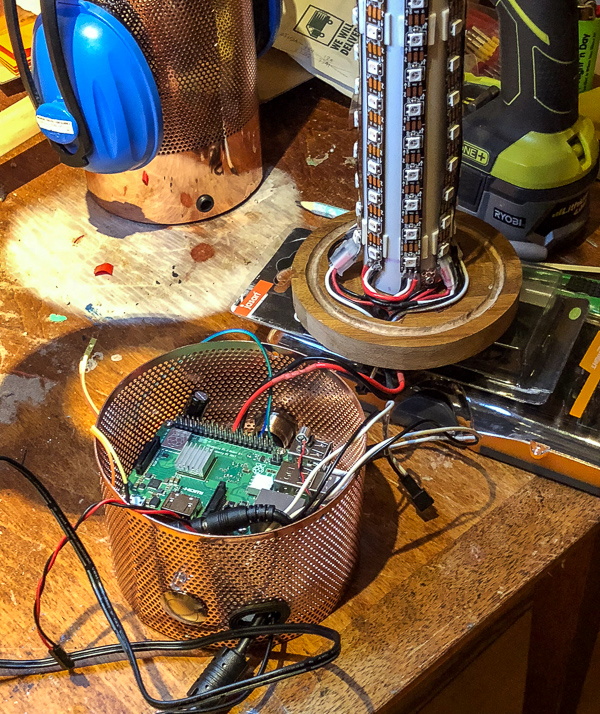
Using the Fadecandy made it easy to drive the LEDs, but he still needed something to provide it with the commands. To that end, he added a decorative base to his LED column that hides a Raspberry Pi and all the lamp’s associated electronics. This includes a microphone which gives his lamp the same sort of sound reactive features that made the Ion so popular. The base does make his lamp a bit bulkier than the original version, but the metallic mesh construction is attractive enough the overall look works.

Of course, you might be wondering how [Julian] got the LEDs to react to sound, or do any of the other gorgeous effects shown off in the video after the break. The software which makes this possible makes up the third and final post in the series, and is really a whole project in itself. The short version of the story is that he used Python and Processing to do real-time computational fluid dynamics, but not before making the necessary adjustments to speed up the simulation on ARM hardware. You know, normal lamp stuff.

This isn’t the first time we’ve seen projects using the Fadecandy board. From creating a Tron inspired desk to building the 5,760 LED “Space Tunnel”, it looks like a great choice if you’ve got a problem that can be solved by the application of a ridiculous number of LEDS.

Continue reading “Fueled By Jealousy, This Smart Lamp Really Shines”

Cylindrical LED Display Comes Full Circle

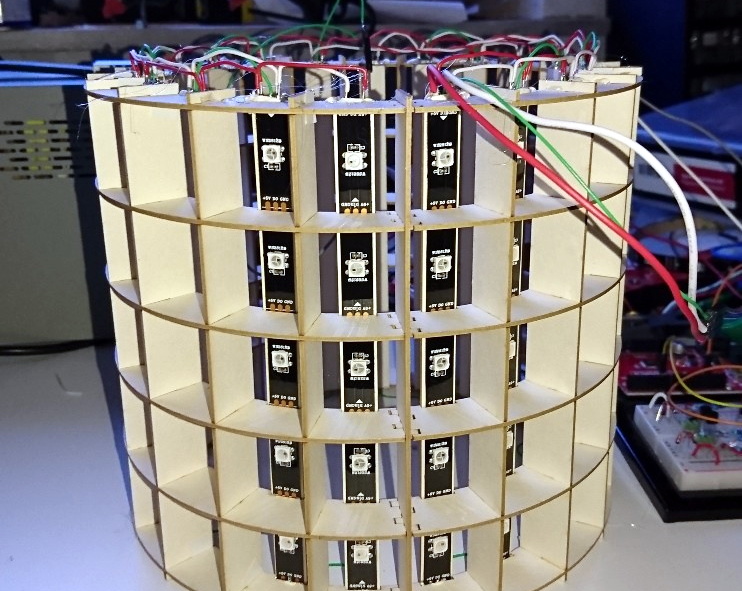
According to [makeTVee], his latest project started out as an experiment to see how well the LED matrix techniques he’s worked with in the past would translate to a cylindrical form factor. We’re going to go ahead and say that not only was the test a success, but that the concept definitely holds promise for displays that are both functional and aesthetically pleasing. This build stops a bit short of being a complete implementation, but what he has so far is very promising and we hope he continues fleshing it out.

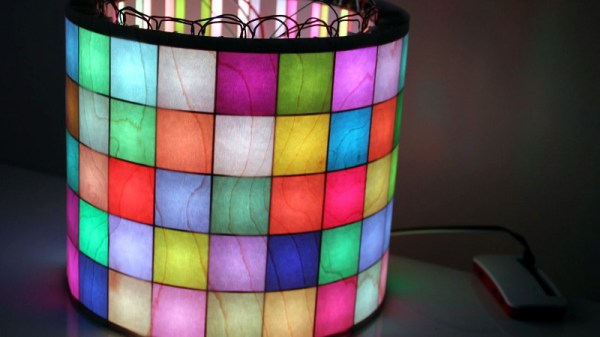
A laser cutter was used to create the interlocking segments that make up the display’s frame, but we imagine you could pull off a similar design using 3D printed parts if you don’t have access to a laser. Strips of WS2812 LEDs are mounted along the inside of the cylinder so that each individual LED lines up with the center of a cell. To finish off the outside of the cylinder [makeTVee] used a thin wood veneer called MicroWOOD, which gives the LEDs a nice diffused glow. The wood grain in the veneer also provides an organic touch that keeps the whole thing from looking too sterile.

Of course, a display like this only works if you’ve got software to drive it. To that end, [makeTVee] has used pygame to create a simulator on his computer that shows what the display would look like if it were unrolled and flattened it out. This makes it a lot easier to create content, as you can see the whole display at once. He says the source for the new tool will be coming to GitHub soon, and we’re very interested in taking a look.

If this display looks familiar, it’s probably because a distinctly flatter version of it took the top spot in our “Visualize it with Pi” contest last year.

Continue reading “Cylindrical LED Display Comes Full Circle”

Ask Hackaday: Can We Get Someone To Buy And Destroy RAM?

We like blinky things. We’re moths drawn to the flame of serially-addressable RGB LEDs. If the LEDs are smaller, we want to know. If you can drive more of them, we want to know. That said, the most interesting news out of CES last January was both right up our alley, and immensely disappointing. Corsair, makers of RGB computer fans, RGB CPU coolers, and RGB keyboards and mice, have a new product out: RGB RAM, because professional gamers and streamers have a higher win percentage when their RAM is illuminated.

The key innovation of the new Corsair Dominator Platinum RGB DDR4 DRAM is called, ‘Capellix LEDs’. The press surrounding these LEDs gives a clear advantage: right now, the RGB LEDs in your gaming system are mounted in a large SMD package, like a WS2812 or APA101. These large packages reduce LED density, and making LEDs smaller means moar RGB — more colors, or brighter colors, or better efficiency. The key advancement in Capellix LEDs is taking the guts of a serially addressable RGB LED and putting it in a smaller package. Instead of a package that’s 2.8mm³ in volume, the Capellix LED is ‘just 0.2mm³ in size’. The few pictures available of these LEDs give the impression they’re about the size of an 0805 package. It’s small, and we’d like to get our hands on some.

Where these LEDs come from is anyone’s guess, but Corsair did partner with Primax, a Taiwanese manufacturer of computer peripherals, to pull this off. There is no mention of Capellix LEDs in Primax’s press releases, and we don’t actually know if these are the smallest serially addressable RGB LEDs available; we don’t even know if they’re serially addressable. There could easily be a small microcontroller in the Corsair Dominator Platinum RGB DDR4 DRAM, as each stick is only driving twelve individually controllable RGB LEDs.

The bottom line is, someone needs to spend $160 for 16GB of RAM, then tear the whole thing apart, preferably with close-up pics of the fancy new RGB LEDs.

A cynical reader would say that Capellix LEDs are simply existing LEDs, the name ‘Capellix’ was trademarked by Corsair, and these LEDs were shoved into a stick of RAM with a significant markup. This, surprisingly, is demonstrably wrong because there is no entry for ‘Capellix’ in the United States Patent and Trademark Office Trademark Electronic Search System. That doesn’t mean the spirit of the cynic is wrong, though; ROHM semiconductors just released a new side-view RGB LED that might be smaller than Corsair’s Capellix LEDs. There are, of course, RGB LEDs available in similar sizes, but none of these are serially-addressable like a WS2812 or APA101. We don’t know what’s in these fancy sticks of RAM, but we’re waiting for someone to do a tear down so we can find out.