We Got Your Sega Chiptunes Right Here

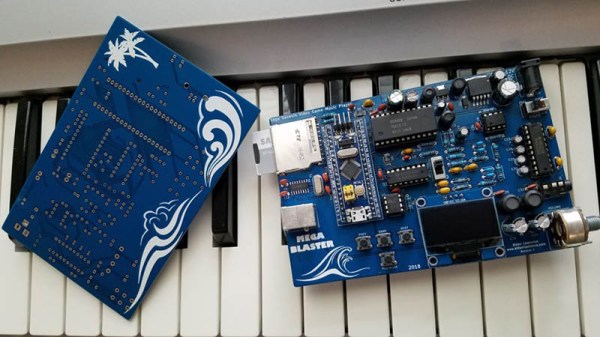
Chiptunes are cool, but when you get into it, you realize you’re mostly dealing with Commodore SID tunes, Atari POKEY tracks for the cool kids, bleeps and bloops from a Game Boy, and maybe some NES tracks thrown in for good measure. There’s another option out there – the sound chip in the Sega Genesis. This thing could do drums, man, and [Aidan Lawrence] built the perfect player for the tuneful silicon tucked inside the classic 16-bit console.

[Aidan] had previously built a tiny little music player based on the YM3812 chip, the Yamaha chip found in SoundBlaster and Adlib sound cards. The chip inside the Sega Genesis, the Yamaha YM2612, is a bit different. The killer feature of this chip, PCM waveforms, aren’t stored as simple, small bits of code. These are massive blobs of binary data sent to the chip’s DAC. The SEGGGGAAAA intro of Sonic the Hedgehog, for example, used an eighth of the the cartridge space. You’re not going to build a Sega chiptune player with a tiny little microcontroller and 20kB of RAM.

The solution came in the form of an external SPI RAM device. The 23LC1024 is a full 1 Megabit in size, and since it’s SPI, it’s more than fast enough to keep up with the sample speed. The rest of the circuit including the mixer, preamp and power amp are based on the Genesis’ actual schematics, with an SD card and OLED thrown in for good measure. How does it sound? There’s a great video below the break and yes, the soundtrack from Sonic 3 sounds just as good as it did twenty years ago.

Continue reading “We Got Your Sega Chiptunes Right Here”

Can You Visualise A Sega Cart From 2017?

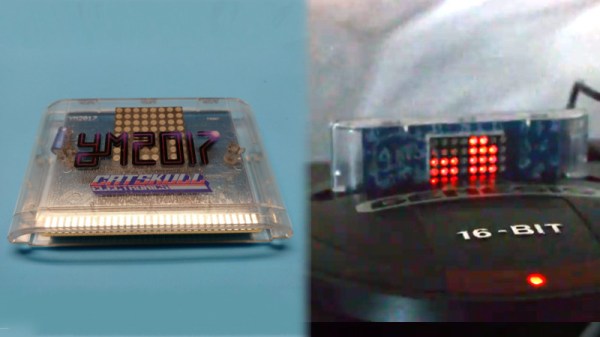
The Sega Genesis, or Mega Drive if you’re not from North America, isn’t exactly this summer’s hottest new console, but it still has a huge following 29 years after launch. Fans range from retro Sonic enthusiasts to hardcore chiptune composers, and this year, Catskull Electronics is releasing a Genesis compilation album on a cartridge with a rather special feature.

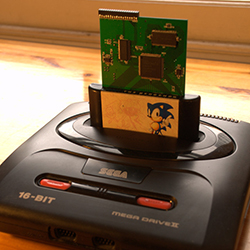
The cartridge sports an 8×8 LED matrix, which acts as a visualiser for the audio coming out of the console. They’re controlled with a combination of data and address lines with some buffers and 74-series glue logic to make it all work together. Special attention was paid to make sure the LED matrix doesn’t just respond to all activity on the bus, though it would perhaps be cool to see some blinkenlights on a 90s console one day.

Each row of LEDs is attached to an address line, and each column to a data line. It’s a fairly basic multiplexing setup which sees each LED only actually lit for a fraction of a second, but sweeping the display at speed creates a lasting display. The image data is stored as an 8×8 sprite in the system RAM, and updated with the sound level of each channel from the Genesis’s audio subsystem.

The team are looking to release the ROM code in future to inspire copycat designs, which has the potential to spawn even more Genesis cart releases in future. We look forward to seeing what else the community comes up with. And if you’re a die-hard Genesis fan, there are other ways to listen to those classic tunes too.

Sega Genesis Chiptunes Player Uses Original Chips

If you were a child of the late 1980s or early 1990s, the chances are you’ll be in either the Super Nintendo or the Sega Genesis/Mega Drive camp. Other 16-bit games consoles existed, but these were the ones that mattered! The extra power of the Nintendo’s souped-up 16-bit 6502 derivative or the Sega’s 68000 delivered a gaming experience that, while it might not have been quite what you’d have found in arcades of the day, was at least close enough that you could pretend it was.

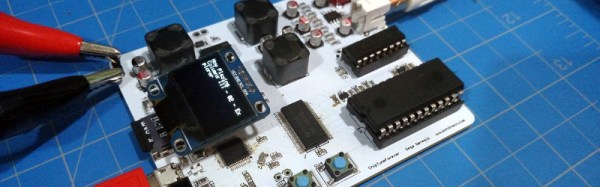
The distinctive sound of consoles from that era has gained a significant following in the chiptunes community, with an active scene composing fresh pieces, and creating projects working with them. One such project is [jarek319]’s Sega Genesis native hardware chiptune synthesiser, in which music stored as VGM files on a MicroSD card are parsed by an ATSAMD21G18 processor and sent to a YM2612 and an SN76489 as you’d have found in the original console. The audio output matches the original circuit to replicate the classic sound as closely as possible, and there is even some talk about adding MIDI functionality for this hardware.

The software is provided, though he admits there is still a little way to go on some functions. The MIDI support is not yet present, though he’s prepared to work on it if there was enough interest. You really should hare this in action, there is a video which we’ve placed below the break. Continue reading “Sega Genesis Chiptunes Player Uses Original Chips”

3 Billion Devices And A Sega Genesis Run Java

A few years ago, [Mike]’s friend gave him an old Sega Genesis with the very cool and somewhat rare SegaCD drive attached. The SegaCD gave him an idea – while it’s not easy to burn a cartridge and play homebrew games on a real Genesis console, everyone has a CD burner somewhere. [Mike] began writing his demo and then realized adding Java would be easy on the 68000. The result is Java on three billion devices and a Sega Genesis.

This project is built around Java Grinder a Java byte code compiler that will compile classes, factories, and all the horrible Java design.design.pattern.pattern.patterns() into assembly language. Already, there are a lot of platforms supported by Java Grinder, including the Commodore 64, the TI99, and thanks to some work from [Joe Davisson], the Apple IIgs

With a byte code compiler, an assembler, and an API for the Sega-specific hardware, [Mike] set about building his demo. Since this was a Sega, it needed the ‘SEGA’ sound at the start. [Mike] ended up recording his voice saying ‘JAVA!’ This plays through the Z80 on the Genesis.

The complete demo – viewable in its emulated format below – has everything you would expect from a proper demo. Starfields, dancing sprites, and even a Mandelbrot pattern make it into the three-minute long demo.

Continue reading “3 Billion Devices And A Sega Genesis Run Java”

[lovablechevy] Transforms A Nomad Into The HandyGen

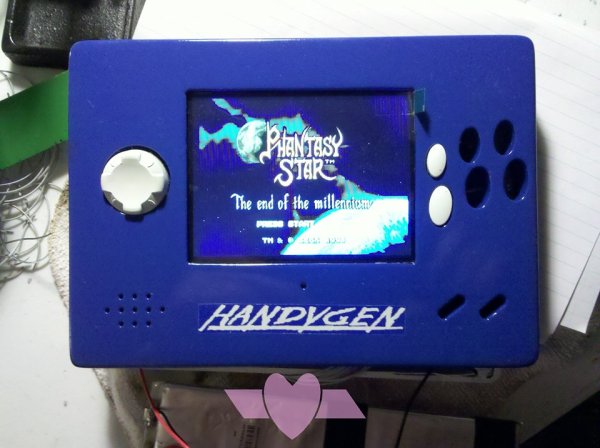
[lovablechevy], aka the Queen of Bondo, has added another member to her Mushroom family of custom portable consoles.  This time, it’s the HandyGen, an improved Sega Nomad.  As an owner of the latter, we can attest that the Nomad had limitations, including its unwieldy size and shape, and its godawful battery life. As part of a build-off contest over at the Bacman forums , [lovablechevy] took apart a half-working Nomad and trimmed its board to fit into a smaller case of her own design, while retaining features such as the A/V out, headphone jack, and Player 2 controller port.  She also bumped up the size of the screen, swapping in a new 4″ LCD and its corresponding controller board. The best improvement was increasing the battery life considerably; HandyGen uses 2 LiPo batteries lasting 7 hours instead of the Nomad needing 6AA’s that barely lasted two. HandyGen’s battery life is roughly double that of the GeneBoy, an earlier portable Genesis mod we’ve featured before.

[lovablechevy] always does a great job with her portables, from the Nintenduo to the HandyNES. Being avid PS fans, we also award her bonus points for testing out the HandyGen with Phantasy Star 4. Check out her video of the HandyGen after the break.

Continue reading “[lovablechevy] Transforms A Nomad Into The HandyGen”

The Sega Mega Drive Dev Kit

segaWhile most homebrew video game development has focused on the original NES, Atari consoles, and has produced a few SNES games, there is another console out there that hasn’t seen much love. Sega’s classic console, the Genesis or Mega Drive, depending on where you’re from, was an extremely capable machine with amazing capabilities for its time. [Chris] figured the Mega Drive would make a good target for an all-in-one development kit, and with a lot of work he managed to put one together.

The standard cartridge for the Genesis or Mega Drive is just a simple ROM chip wired directly into the console’s address space. [Chris] took a cheap FPGA and some dual port ram to create a seamless interface between the modern world and the inside of this ancient console, allowing him to load every Mega Drive game off an SD card, as well as use modern tools to modify old games, or even create new ones.

To demonstrate his dev kit, [Chris] took a copy of Sonic 1, and using the debugger and GDB, gave himself infinite lives. It’s a very cool demonstration, searching through all the commands executed by the Megadrive CPU with the standard Linux debugging tools.Going through the trace, [Chris] found the instruction that decremented that value representing Sonics lives, replaced it with NOPs, in effect giving himself infinite lives. This is a lot like how the Game Genie works, only using much, much better tools.

Of course a USB dev kit wouldn’t be much use if it could only modify existing games. The real power of [Chris]’ work comes from being able to develop your own demos, games, and homebrew apps.

[Chris] needed to write a small homebrew Mega Drive app for the ROM loader portion of his dev kit using SGDK. Disassembling his own code with the dev kit, he was able to take a look at the instructions, and potentially even modify his loader.

It’s a really impressive technical accomplishment, and something that could be a boon to the extremely small homebrew scene for the Mega Drive. All the boards, code, and everything else are available over on [Chris]’ github, with the entire project written up on hackaday.io. Videos below.

Continue reading “The Sega Mega Drive Dev Kit”

Hackaday Links: August 15, 2012

An Octopart for RC equipment

When [Zach] started building a quadcopter he found it very difficult to source the required parts. Thus was born CompareRC, an aggregation of several online RC retailers. There’s over 150,000 parts in the database, all searchable and sortable by lowest price.

Segway iPad Skype teleconferencing robot

It’ll be a while until robots completely eliminate the need for any human interaction, but until then there’s Double. It’s a two-wheeled balancing robot with an iPad dock, controllable via a remote iPad.

Free electronic design

In case you weren’t aware, Fedora has an electronic design distro that includes just about everything needed to build electronic circuits called Fedora Electronic Lab. FEL has PCB designers, circuit simulators, editors for just about everything, and support for PICs, AVRs, and 8051 micros. Thanks for sending this in, [Simon].

Make your own Megadrive ROMs

Last month, [Lee] sent in a build where he connected an Arduino Mega to an old Sega Genesis/Megadrive cartridge. He’s figured out how to read the contents of the cartridge now, allowing you to preserve your 100% complete Sonic & Knuckles / Sonic 3 save for time immemorial.

A surprising amount of graphics tutorials

Khan Academy, every autodidacts best friend, is now teaching computer science. Right now, there is a heavy focus on drawing graphics, and everything is coded in the browser (using Javascript…), but at least it’s a start. The fundamentals of programming are platform and language agnostic, so this looks to be a great way to learn programming.

Here’s a blog post from the lead dev of the Khan CS project.