
SSH Can Handle Spaces In Command-line Arguments Strangely

One of the things ssh can do is execute a command on a remote server. Most of us expect it to work transparently when doing so, simply passing the command and its arguments on without any surprises in the process. But after 23 years of using OpenSSH on a nearly daily basis, [Martin Kjellstrand] got surprised.

It turns out that the usual rules around how things are parsed can have some troublesome edge cases when spaces are involved. [Martin] kicks off an example in the following way:

One would reasonably expect the commands figlet foobar bar\ baz and ssh localhost figlet foobar bar\ baz to be functionally equivalent, right? The former ultimately runs the command “figlet” with arguments “foobar” and “bar baz” on the local machine. The second does the same, except with ssh being involved in the middle. As mentioned, one would expect both commands to be functionally identical, but that’s not what happens. What happens is that ssh turns bar\ baz into two distinctly separate command-line arguments in the process of sending it for remote execution: “bar” and “baz”. The result is mystification as the command fails to run the way the user expects, if it runs at all.

What exactly is going on, here? [Martin] goes into considerable detail tracking down this odd behavior and how it happens, but he’s unable to ultimately explain why ssh does things this way. He suspects that it is the result of some design decision taken long ago. Or perhaps a bug that has, over time, been promoted to entrenched quirk.

Do you have any insights or knowledge about this behavior? If so, [Martin] wants to hear about it and so do we, so don’t keep it to yourself! Let us know in the comments, below.

SSH Is Magic, But Tunnels Are Even Better

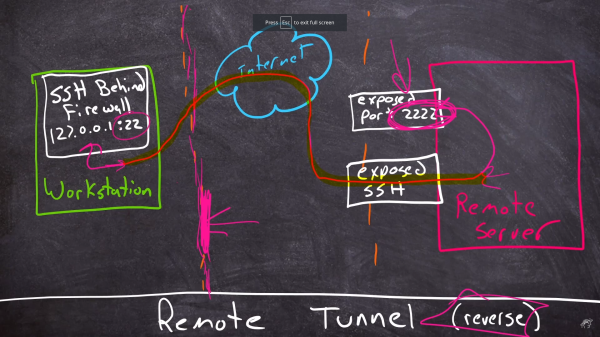
Once upon a time, I was doing on-site support for a hardware install at a hotel a few years ago. The remote tech’s remote desktop software didn’t want to play with my Linux laptop, so he couldn’t get into the switch he needed to configure, to make the install work. I asked if it had an SSH port he could use, were he were in the room with me. Of course it did, but that didn’t do him much good. I ran a reverse SSH tunnel out to my public server, and pointed it at the switch on the local side. I convinced him to SSH to my server on the given port, and he was magically connected to his switch. He was literally in awe of that trick, and demanded to know how it could be done. SSH is magical, but tunneling traffic over SSH is straight-up wizardry. [Shawn Powers] agrees, and decided to help the rest of us understand the process.
Continue reading “SSH Is Magic, But Tunnels Are Even Better”

This Horrifying Robot Is Here To Teach You A Lesson

No, despite what it might look like, this isn’t some early Halloween project. The creepy creation before you is actually a tongue-in-cheek “robot” created by the prolific [Nick Bild], a topical statement about companies asking their remote workers to come back into the office now that COVID-19 restrictions are being lifted. Why commute every day when this ultra realistic avatar can sit in for you?

OK, so maybe it’s not the most impressive humanoid creation to ever grace the pages of Hackaday. But if you’re looking to spin up a simple telepresence system, you could do worse than browsing through the Python source code [Nick] has provided. Using a Raspberry Pi 4, a webcam, and a microphone, his client-server architecture combines everything the bot sees and hears into a simple page that can be remotely accessed with a web browser.

Naturally this work from home (WFH) bot wouldn’t be much good if it was just a one-way street, so [Nick] has also added a loudspeaker that replays whatever he says on the client side. To prevent a feedback loop, his software includes a function that toggles which direction the audio stream goes in by passing the appropriate commands to the bot over SSH; a neat trick to keep in mind for your own, less nightmarish, creations.

If you’re looking for something a bit more capable and have some cardboard laying around, this DIY telepresence mount for your phone might be a good place to start.

Continue reading “This Horrifying Robot Is Here To Teach You A Lesson”

Linux Fu: VPN For Free With SSH

If you see a lot of banner ads on certain websites, you know that without a Virtual Private Network (VPN), hackers will quickly ravage your computer and burn down your house. Well, that seems to be what they imply. In reality, though, there are two main reasons you might want a VPN connection. You can pay for a service, of course, but if you have ssh access to a computer somewhere on the public Internet, you can set up your own VPN service for no additional cost.

The basic idea is that you connect to a remote computer on another network and it makes it look like all your network traffic is local to that network. The first case for this is to sidestep or enhance security. For example, you might want to print to a network printer without exposing that printer to the public Internet. While you are at the coffee shop you can VPN to your network and print just like you were a meter away from the printer at your desk. Your traffic on the shop’s WiFi will also be encrypted.

The second reason is to hide your location from snooping. For example, if you like watching the BBC videos but you live in Ecuador, you might want to VPN to a network in the UK so the videos are not blocked. If your local authorities monitor and censor your Internet, you might also want your traffic coming from somewhere else.

Continue reading “Linux Fu: VPN For Free With SSH”

Displaying Incoming Server Attacks By Giving Server Logs A Scoreboard

In the server world, it’s a foregone conclusion that ports shouldn’t be exposed to the greater Internet if they don’t need to be. There are malicious bots everywhere that will try and randomly access anything connected to a network, and it’s best just to shut them off completely. If you have to have a port open, like 22 for SSH, it’ll need to be secured properly and monitored so that the administrator can keep track of it. Usually this is done in a system log and put to the side, but [Nick] wanted a more up-front reminder of just how many attempts were being made to log into his systems.

This build actively monitors attempts to log into his server on port 22 and notifies him via a numerical display and series of LEDs. It’s based on a Raspberry Pi Zero W housed in a 3D-printed case, and works by interfacing with a program called fail2ban running on the server. fail2ban‘s primary job is to block IP addresses that fail a certain number of login attempts on a server, but being FOSS it can be modified for situations like this. With some Python code running on the Pi, it is able to gather data fed to it from fail2ban and display it.

[Nick] was able to see immediate results too. Within 24 hours he saw 1633 login attempts on a server with normal login enabled, which was promptly shown on the display. A video of the counter in action is linked below. You don’t always need a secondary display if you need real-time information on your server, though. This Pi server has its own display built right in to its case.

Continue reading “Displaying Incoming Server Attacks By Giving Server Logs A Scoreboard”

Linux Fu: Simple SSH File Sharing

If you have more than one Linux computer, you probably use ssh all the time. It is a great tool, but I’ve always found one thing about it strange. Despite having file transfer capabilities in the form of scp and sftp, there is no way to move a file back or forth between the local and remote hosts without starting a new program on the local machine or logging in from the remote machine back to the local machine.

That last bit is a real problem since you often access a server from behind a firewall or a NAT router with an ephemeral IP address, so it can’t reconnect to you anyway. It would be nice to hit the escape character, select a local or remote file, and teleport it across theĀ  interface, all from inside a single ssh session.

I didn’t quite get to that goal, but I did get pretty close. I’ll show you a script that can automatically mount a remote directory on the local machine. You’ll need sshfs on the local machine, but no changes on the remote machine where you may not be able to install software. With a little more work, and if your client has an ssh server running, you can mount a local directory on the remote machine, too. You won’t need to worry about your IP address or port blocking. If you can log into the remote machine, you are good.

Combined, this got me me very close to my goal. I can be working in a shell on either side and have access to read or write files on the other side. I just have to set it up carefully. Continue reading “Linux Fu: Simple SSH File Sharing”

GitHub’s Move Away From Passwords: A Sign Of Things To Come?

Later this month, people who use GitHub may find themselves suddenly getting an error message while trying to authenticate against the GitHub API or perform actions on a GitHub repository with a username and password. The reason for this is the removal of this authentication option by GitHub, with a few ‘brown-out’ periods involving the rejection of passwords to give people warning of this fact.

This change was originally announced by GitHub in November of 2019, had a deprecation timeline assigned in February of 2020 and another blog update in July repeating the information. As noted there, only GitHub Enterprise Server remains unaffected for now. For everyone else, as of November 13th, 2020, in order to use GitHub services, the use of an OAuth token, personal token or SSH key is required.

While this is likely to affect a fair number of people who are using GitHub’s REST API and repositories, perhaps the more interesting question here is whether this is merely the beginning of a larger transformation away from username and password logins in services.

Continue reading “GitHub’s Move Away From Passwords: A Sign Of Things To Come?”