C Sharp Development 101 – Part 1: Hello World

In this tutorial we are going to get up close with the Visual Studio 2010 environment. We will learn how to make a console application as well as a form to display our hello world applications.  This will give us an opportunity to view 2 types of solutions of the many available in Visual Studio.  We will start making the console application first then progress to the forms application.

First we must  understand the development environment we are going to use.  On the far left side is the toolbox panel.  This panel gives us access to a lot of controls  that can be used by the Windows Forms.  Next is the Solution Explorer that will allow us to navigate the projects and files we are going to create in this Solution.  The Properties panel is directly under my Solution Explorer and will allow us to change properties of controls and of the form we will create later on.  If any of these are not being displayed they can be retrieved from the View menu at the top under Other Windows.  For more information on the Visual Studio IDE visit MSDN and search for the specific questions you are having.

Continue reading “C Sharp Development 101 – Part 1: Hello World”
Solder Paste How-to Tutorial

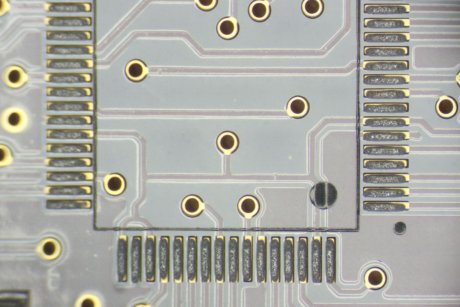
The application of Solder Paste is an essential part of short run manufacturing and prototyping. After getting back bare boards from a PCB shop, its time to get down to business and populate those boards. This new tutorial set assumes you have access to things such as stencils for your boards, but does mention a couple of resources on commercially available ways to purchase stencils. Of course, if you have a laser cutter, we can help you out. After getting your solder paste chops down, make sure you check out our guide to toaster oven reflowing.

[Thanks to P. Torrone]

Android Development 101 – Part 6:Getting Ready For Market!

In this tutorial we are going to cover packaging one of our applications into an .apk file and getting it ready for the Android Market.  After we have completed this tutorial you should be able to use the tools provided in the AndroidSDK to sign your application, put the application on your phone and install it or send it to the Android Market.  These will be great assets to have if you decide to develop applications that you may want to charge for.  This tutorial will also be a change from the normal ones because it will include little, if any, code.

Learn console hacking

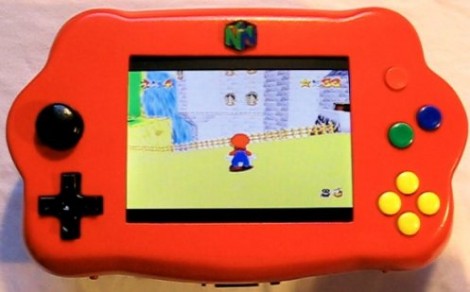
This bright red handheld is [Bacteria’s] portable N64 console. We’re beginning to feel a bit saturated with N64 portable hacks, having seen one that looks like a Game Boy, another in a shiny black case, and yet another in a white case. This time around it’s not just the end product, but [Bacteria] has posted a saga discussing the build progress. Check out the 20 videos on his worklog page. If you’re looking to take existing hardware and put it into a different enclosure you should pour over this resource for ideas you can use.

PCB Toner Transfer With Dowel

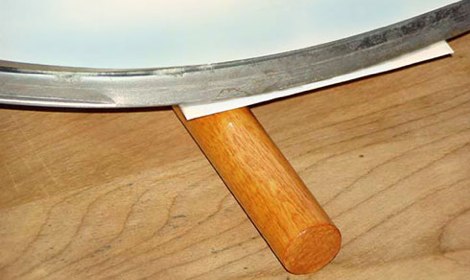
Pulsar Professional FX has a neat tip on their site for getting a really even toner transfer when making your own PCBs. First, the PCB is cut to size, and the paper is tacked to the board. Then, the PCB is placed paper up onto a dowel and rolled back and forth with the iron. Since the board bends slightly over the dowel the toner sticks evenly to the copper. After that, just remove the paper as usual and etch with your preferred method.

Etch PCBs With Ferric Chloride And A Sponge

F7Z9JTTFX23V5VV

Etching a printed circuit board generally takes a bit of time and uses a lot of etchant. [TechShopJim] posted a method that uses a sponge to reduce the amount of etchant used while speeding up the entire process. First, a resist is applied using either a sharpie or the toner transfer method. Using gloves to handle everything, he soaked a sponge in ferric chloride and continually wiped a copper-clad board until all the exposed copper was removed. This technique moves the etchant around more, keeping “fresh” etchant closer to the copper. If you can’t procure ferric chloride, you can also use our method that uses 2 household chemicals: hydrogen peroxide and hydrochloric acid.

Arduino Experimentation Kit

ARDX

[Oomlout] has created an Arduino Experimentation Kit that uses basic sensors, buttons, and LEDs to teach electronics and programming. Printed overlays are secured on a breadboard, indicating components and connections. The Arduino is then used to drive the circuit. Examples include driving motors, using shift registers, and making beeps with a piezo element. These are backed up by explanations and code. The breadboarding kit is very similar to the classic 300-in-1 project kits marketed to beginners. In addition, all of the materials are released as open source. Kits are also available that include everything needed to create the circuits.

Related: Opensource Robotic Arm

[via Hack a Day flickr pool]