SNES Emulator Has It’s Slot Sealed Shut

If you look closely you’ll notice there’s nowhere to put the game cartridge on this Super Nintendo system. That’s because this is a Rasberry Pi based SNES emulator that plays ROMs, not cartridges. Since the RPi board is used the only limit to what you can play is the board’s RAM and which ROMs you have on the SD card.

The case has basically been gutted and the unused cartridge slot was sealed with some Bondo before painting. In addition to the Rasberry Pi you’ll find a 7-port powered USB hub and a Teensy microcontroller board. The hub allows for the controllers to be connected via USB. The Teensy is recognized as a USB HID device and is used to connect the reset button to a functions on the emulator program. The power switch still works too. To make this happen [MIDItheKID] spliced a USB connector and a microB USB connector to the power switch. We think this draws power from the hub but we’re not 100% sure.

[MIDItheKID] mentions in the Reddit comments that he’s thinking of grabbing that new RPi that has more memory and doing some similar work on his dead PSX.

Exploiting DFU Mode To Snag A Copy Of Firmware Upgrades

[Travis Goodspeed] continues his work at educating the masses on how to reverse engineer closed hardware devices. This time around he’s showing us how to exploit the Device Firmware Updates protocol in order to get your hands on firmware images. It’s a relatively easy technique that uses a man-in-the-middle attack to dump the firmware image directly to a terminal window. This way you can get down to the nitty-gritty of decompiling and hex editing as quickly as possible.

For this hack he used his Facedancer board. We first saw the hardware used to emulate a USB device, allowing the user to send USB commands via software. Now it’s being used to emulate your victim hardware’s DFU mode. This is done by supplying the vendorID and productID of the victim, then pushing the firmware update as supplied by the manufacturer. In most cases this shouldn’t even require you to have the victim hardware on hand.

Bootloader Brings USB, Firmware Updating To The ATtiny85

[Jenna] sent in a very cool bootloader she thought people might like. It’s called Micronucleus and it turns the lowly ATtiny 85 into a chip with a USB interface capable of being upgraded via a ‘viral’ uploader program. Micronucleus weighs in at just over 2 kB, making it one of the smallest USB-compatible bootloaders currently available.

The USB support comes from V-USB, a project that puts a virtual USB port on a suite of AVR microcontrollers. With V-USB, it’s easy to turn a Tiny85 into a keyboard, custom joystick, data logger, or computer-attached LED display.

One very interesting feature of Micronucleus is the ‘viral updater’ feature. This feature takes a new piece of firmware, and writes it to a Tiny85, disabling the current bootloader. If you’re designing a project that should have a means of updating the firmware via USB instead of the usual AVR programmer, this might be the bootloader for you.

Not bad for a bootloader that emphasizes small code size. At just over 2 kB, it’s possible to use this bootloader on the similar, smaller, and somewhat cheaper ATtiny45.

USB To RS-232 Adapter Hacked To Use RS485 Instead

[André Sarmento] needed to connect a computer to an RS-485 bus. A simple converter can be sourced online, but the only thing he could find locally that was even close was a USB to RS-232 converter. He used that component to craft his own USB to RS-485 bridge.

RS-485 is often used for remote sensors as it provides a method of connecting electronics over long distances. The converter which he started with seems to be encased in a hot-glue-like substance. A bit of time with a torch and he was able to get to the components on the board. There are two stages, one which converts RS-232 to TTL, and the other converts TTL to USB. [André] removed the RS-232 chip and patched his own board (shown on the left) into its TTL lines. He was also able to add a few more configuration options, like using an external power source, and having a few jumper-selected resistor options.

Disassembling And Reprogramming Webkeys

Webkeys are small, inexpensive USB devices which launch a web browser when plugged into a computer. They’re given out as a promotional item, but they can be fun to hack as well. [Brad Antoniewicz] recently got his hands on one and decided to crack it open to see what he could accomplish.

The majority of the device was packaging but it didn’t take him long to get down to the guts seen here. There are two units shown in the image above so that we can get a look at both sides of the circuit board. As you can see, there’s a chip-on-board processor (that black blob) that handles the USB connectivity. But the data which is pushed to a computer is stored in that EEPROM chip at the top. It’s got legs which are just begging to be probed. [Brad] wasn’t able to find the exact datasheet but he got some clues as to the pinout. Using his Bus Pirate he was able to establish communications and sniff the i2c traffic. With that success he went on to overwrite that data. You can see a quick demonstration of it after the break.

[Brad] hopes to do a bit more with the hardware. He thinks those four pads can be used to reprogram the MCU. We’ll keep our eyes out for updates as he moves along on that mission.

Continue reading “Disassembling And Reprogramming Webkeys”

Hands On The Stellaris Launchpad

We just got our hands on a Stellaris Launchpad. We had placed an order when the preorder was originally announced, but the marketing folks at TI reached out an offered to send us one a bit sooner and took them up on it. We’ve embedded a quick unboxing video after the break but read on for some info that didn’t make it into that clip.

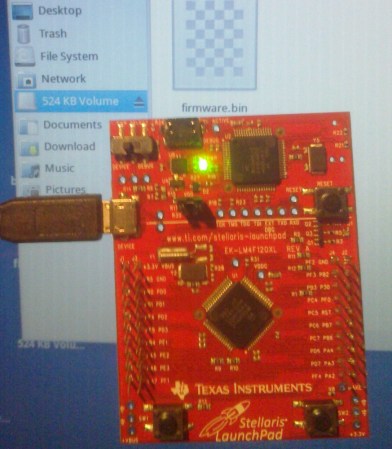
The look and feel of the board and its packaging are almost exactly the same as the MSP430 version of the Launchpad. But why not? After all it worked so well the first time. This board hosts an ARM Cortex-M4 processor. The two buttons on the bottom are user buttons, the one on the upper right is a reset button. The top of the board is the programmer, with a micro USB port for connectivity. The kit also includes about a 2′ cable for this connection. Next to that jack is a switch that selects a power source. You’ll also notice a USB port to the left, this because the processor includes USB functionality, with a free library available from TI. Power can come from the programmer/debugger USB port, or from this device USB port. There are dual pin headers to either side on the face of the board, and pin sockets on the back which break out pins of the processor. Just below the reset button is a RGB LED, and a clock crystal has also been populated just above the chip.

When plugged in via the programmer’s USB port the PWR LED lights up as does the RGB LED. The firmware that ships on the device fades through a range of colors and the user buttons scroll through a set of predefined colors. The device enumerates as: “Bus 002 Device 005: ID 1cbe:00fd Luminary Micro Inc.” on our machine. But if you connect it via the device USB jack it enumerates as: “Bus 001 Device 015: ID 04e8:689e Samsung Electronics Co., Ltd GT-S5670 [Galaxy Fit]”. Interesting.

We have no idea if there are programming tools for flashing the board using a Linux box, but we’ll be trying to figure it out. If you have some info please share it in the comments.

Continue reading “Hands On The Stellaris Launchpad”

Video Preview: New IOIO Prototype

We got our hands on this prototype of the new IOIO design. It’s a breakout board that makes adding hardware to an Android device pretty easy.  [Ytai Ben-Tsvi] sent it our way, and took a bit of time to explain some of the differences between this board and the original version. You can see our video preview embedded after the break.

The size and form factor of the board remain the same, but the choice and layout of parts has changed. Most obviously, the USB-A connector is gone, replaced by a USB mini-B micro-B connector. This makes it possible to use the board as a USB-on-the-go device, or as a USB host device with the help of an adapter that will ship with the board. The JST connector is for external power. The previous revision included a footprint for it but it was never populated. There has also been an upgrade to the voltage regulation circuit, using a newer part as the switch-mode regulator.

There was a last-minute bug discovered in the layout. [Ytai] wants iron-clad 5V to ground short protection and is re-spinning the board to ensure he achieves that goal. He can’t say for sure, but as we mentioned in our previous post about the prototype, a price cut is planned. It could cut the current price of $50 down to just $30, but that won’t be decided until all of the choices have been made for the first production run.

Continue reading “Video Preview: New IOIO Prototype”