C64 Joystick Adapter

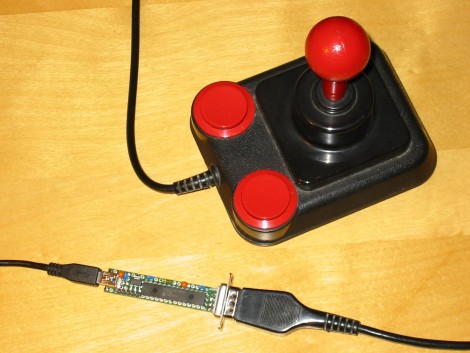
[Marcus Gritsch] wanted to do his retro gaming using retro hardware… or at least using some retro hardware. Although he was playing his Commodore 64 games in an emulator, he figured that using an original controller would boost the nostalgia quite a bit. This is a vintage Competition Pro joystick that has buttons and a joystick of a similar quality to arcade hardware and a DE-9 connector. He managed to connect new to old by building his own USB to C64 joystick adapter.

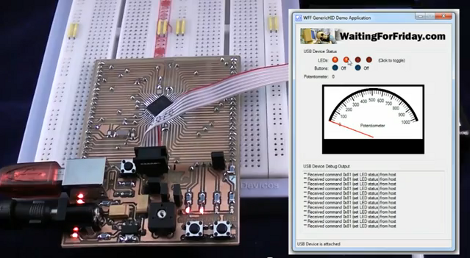
His project started out by breadboarding a circuit based on a PIC 24FJ64GB002 microcontroller. This does all of the work, having native USB support, and no problem reading and translating the signals from the old hardware which are simply conductors for each internal switch that pull to ground when actuated. Once working, he soldered everything to some protoboard; a connector at each end, the chip itself, a voltage regulator, and some passive components. It’s a, robust build that should give him years of emulated fun.

Throw Together A Temperature Logger In Minutes

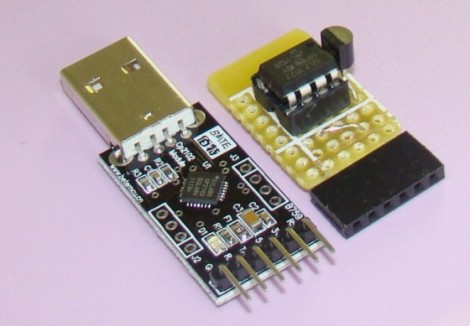
[Rajendra] found an easy way to make a USB temperature logger. He already had a USB to UART adapter that takes care of the heavy lifting. On one end it’s got the USB plug, on the other a set of pins provide a ground connection, 3.3V and 5V feed, as well as RX/TX lines.

To get the hardware up and running all he needed was something to read a temperature sensor and push that data over the serial connection. An 8-pin microcontroller in the form of a PIC 12F1822 does the trick. It runs off of the 5V pin on the USB-UART, and uses the ADC to get temperature data from an MCP9701A sensor.

The sample rate is hard-coded into to the PIC’s firmware, but adding a button, or coding some serial monitoring could easily make that configurable. [Rajendra] used Processing to write an app which displays the incoming temperature info and uses the computer to time-stamp and log the inputs. We could see this as a quick solution to tracking wort temperature during fermentation to make sure your beer comes out just right.

USB Killswitch Turns Off Your Home Entertainment Bling Automatically

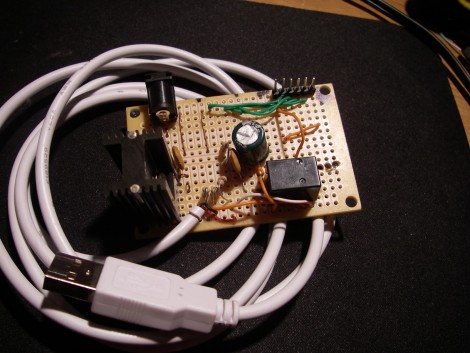
Finally, the USB port on the back of your television can be tapped for something useful. [Don] is using this add-on device to automatically cut the power to his Ambilight clone. Initially, he got tired of unplugging the power adapter each time he shut off the television, so he added a switch. But laziness overcame him and he decided he needed an automatic method. After probing around on the connections available, he established that the serial interface (normally used for servicing the device) was not of any use, but the USB port is. He measured the voltage of the power bus to be 5V when the TV is on, and 0.15V when it is off. He whipped up the circuit you see above which uses the USB connection to trigger a relay, connecting power to his Ambilight clone when the television comes on, and disconnecting it when the set is switched off.

Our dream has always been an XBMC capable device that can Velcro to the back of a TV, and be powered from that USB port. Unfortunately the Beagle Board hasn’t yet made it to a stable level when running XBMC. Our next hope is the AppleTV 2, which can run XBMC but would require some hacking to get it working off of the USB port, raising concerns about how much current it would draw at 5V.

PlayStation 3 Controller Made Fully Remappable

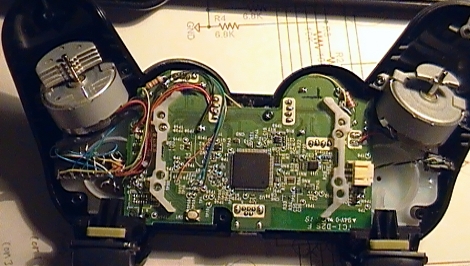
[Hazer] managed to take a PlayStation 3 SixAxis controller and modify it so that all of the buttons can be remapped in hardware. Aside from this being really cool, he had a good reason for doing it. Regular readers should remember the feature regarding [Chuck Bittner’s] internet petition calling for button mapping as a feature in all games. As the industry still hasn’t taken up the torch in this area, [Hazer] developed this mod for [Chuck] to use and has released it for any others out there who wish to give it a try.

The hardware alterations are pretty hardcore. On the left of the image, just below the rumble motor, a DIP microcontroller is nestled dead-bug style. This is a PIC 18F14K50. It’s running a bootloader, and has its own USB port on the opposite side of the controller. By cutting traces and soldering to vias, this chip intercepts button presses and shoots them off to the controller’s processor based on alternative mapping stored in EEPROM. There’s a helper app that lets you plug the controller into a computer to specify what each button does, including features like toggle for the buttons. Check out [Chuck’s] thoughts on the hardware in the video after the break.

Continue reading “PlayStation 3 Controller Made Fully Remappable”

Open Source Makes This USB Arcade Controller Build A Breeze

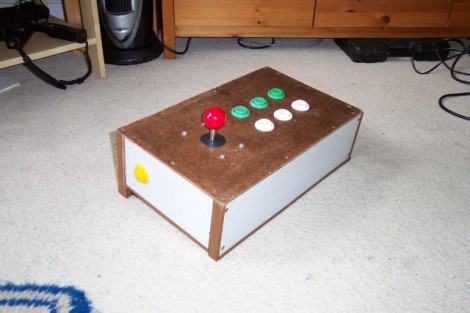
[Jamie] built his own USB connected arcade controller. We’ve been seeing a lot of these lately, and they usually involve soldering buttons to a keyboard PCB. But [Jamie] decided to go a different route and use his own microcontroller. This method always gets a bit hairy when it comes to deciding how to connect it to a computer. Dealing with the USB stack used to be quite tricky, but the LUFA project is slowly taking the pain out of the process.

The Lightweight USB Framework for AVRs is an open source project that handles the hard work associated with USB capable AVR microcontrollers. [Jamie] knew that they already had a sample implementation of a hardware joystick. He’s not using one of the supported boards and so wasn’t able to just compile and go. But porting the code to work with his minimus board was simple enough. With the code in place, the physical build was quite simple. The buttons and joystick were mounted on the surface of an overturned drawer. Each is connected to one pin of the controller board and to ground. LUFA makes sure that the device enumerates as a joystick, and [Jamie] was gaming in no time.

Makita Jobsite Radio Gets A Few Extra Bells And Whistles

[Jose] added several features to a Makita AM/FM jobsite radio, and did such a good job that you can’t tell they weren’t originally part of the design. The original radio has a compartment for a battery pack used with Makita’s line of rechargeable tools, and offers AM/FM radio, as well as auxiliary audio playback via a pair of speakers. [Jose] augmented those speakers by adding a pair of tweeters as well.

Next on his list of features were a couple of power bus add-ons. In the image on the right you can see the results of adding an automotive cigarette lighter to the side of the unit. Opposite this you’ll find a pair of USB ports that are activated by a lighted toggle switch. The ports are part of a USB car charger that is patched into the battery with a flip of that switch.

Finally, there’s a built-in Bluetooth audio receiver that connects to the auxiliary input. As shown in the image on the left, he can now play tunes from his cellphone without the need for a cord. See him showing off the device in the video after the break.

Continue reading “Makita Jobsite Radio Gets A Few Extra Bells And Whistles”

Remote-controlled USB Switch

When [beerninja] wanted to swap his USB keyboard from one game console to another without mucking about with wires, he asked the Hack A Day forums for some help. [Meseta] (AKA [UAirLtd]) came to the rescue and built [beerninja] a remote-controlled USB switch.

After opening up a no-name USB switch, [Meseta] discovered that the switching is done with simple relays and switches. A hugely overpowered Forebrain ARM dev board was used to pull each switch low for a few hundred milliseconds to switch the output USB port.

For the infrared remote control, [Meseta] dug into Lady Ada’s IR sensor tutorial and decoded buttons 1 through 4 on a Sky TV remote. Each button from one to four corresponds to the buttons on the USB sharing switch. The ‘0’ button was also decoded as a convenience to put the Forebrain into its reprogramming mode. After drilling a small hole for the IR receiver, the finished project was stuffed back into the original steel enclosure.

Check out the video of the switch in action after the break.

Continue reading “Remote-controlled USB Switch”