LUFA Open Source USB Stack Now For NXP ARM Processors

Looks like the Lightweight USB Framework for AVRs (LUFA) has just been ported for ARM microcontrollers. NXP recently released a package for their LPC Cortex M3 family of ARM controllers. You won’t find a reference to LUFA on their nxpUSBlib description page (which we think is kind of sad), but if you grab a copy of the beta code the Version.h header file shows that it is indeed a port of the project. This is further backed up by the LUFA creator, [Dean Camera], who consulted with the NXP team doing the work.

The package provides an open-source USB stack that you can use in your projects as a USB host or USB device. We’re advocates of open source packages like this one as it makes it much easier for hobbyists to get help using the tools, and it allows the community to give back through bug fixes and feature additions.

We’ve highlighted a few LUFA projects, like this keyboard remapper and this AVR programmer. We’re looking to seeing the first set of NXP LUFA projects roll through!

[Thanks Johnny]

USB And PS/2 Key Loggers And Mess With Your Grammar

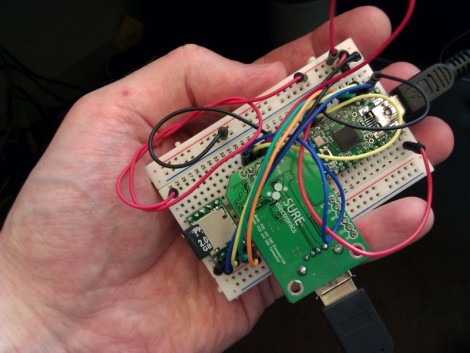
[Irongeek] is up to his old tricks once again with this new key logger prototype. It’s in the early stages, as attested by the breadboard built circuit, but [Adrian] still gives us a demo video after the break showing where he’s at right now. It comes in two flavors, the USB pass through seen above, or another that still connects to the computer via USB but functions with a PS/2 keyboard.

Aside from the obvious issue of a key logger stealing everything you type, there’s some prank value in this device too. The Teensy has more than enough processing power to watch what you typing and make changes as it goes. He shows off blatant rewrites, like changing “has” to “haz” or “you” to “U”. We think it would be better to change things like “they’re” to “their” or “it’s” to “its”. These would be very difficult to see happening and if you added randomness to how often the replacements occur, your victim would sooner come to the conclusion that they’re going crazy than that they’re the target of a little hazing. In fact, that’s probably the reason for our own grammar errors though the years; blast!

Continue reading “USB And PS/2 Key Loggers And Mess With Your Grammar”

Do You Know What You’re Doing When Integrating PC-side Apps With USB Microcontrollers?

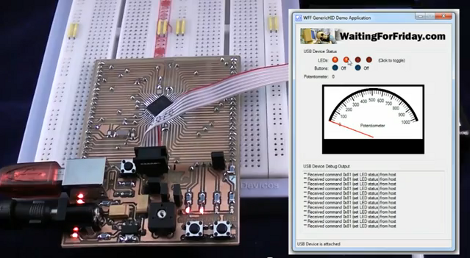
The advent of integrated USB peripherals in microprocessors (PIC, AVR, etc.) has certainly taken a lot of the work out of developing USB devices, not to mention reducing the silicon parts in these designs. But do you know what you’re doing when it comes to controlling them with user-friendly applications? [Simon Inns] is lending a hand with this in his recent tutorial. He shows how to use USB capable AVR chips along with your own Windows applications.

After the break you can see the video from which the above screenshot was captured. That’s a development board of his own making which hosts an ATmega32U4, as well as a USB-B port, LEDs, potentiometer, and a few switches. Taking a closer look, we love the breadboard friendly headers he used on the bottom of the board to break out all of the pins.

His demo shows the Windows app turning LEDs on the board on and off, as well as ADC data displaying the current potentiometer position with the onscreen dial. His code package includes the hardware design, firmware, and app software needed to follow along with what he’s doing.

Continue reading “Do You Know What You’re Doing When Integrating PC-side Apps With USB Microcontrollers?”

Custom Flat Cables To Suit Your Needs

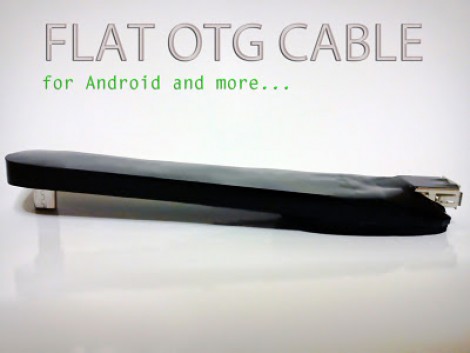
[Cosimo Orlando] has a Motorola Xoom tablet. It’s an Android device that works great as a tablet, but can double as a Laptop when you need it to by adding a keyboard. The problem he was having is that the USB On-The-Go cables that he tried were never the right size or orientation. So he scavenged them for parts and built his own flat cable for a custom fit.

The final product pictured here actually uses protoboard to give the body some strength. [Cosimo] first laid out the dimensions on the substrate using a felt-tipped pen. He then took connectors from his mis-sized commercial cables and affixed them to the board with a combination of hot glue and solder. From there, just connect the five data lines and ground with some jumper wire and test for continuity. He finished this off with what he calls ‘adhesive plastic glossy black’ shaped to make a decent looking case. If you have any idea what product was used here, let us know by leaving a comment.

C64 Joystick Adapter

[Marcus Gritsch] wanted to do his retro gaming using retro hardware… or at least using some retro hardware. Although he was playing his Commodore 64 games in an emulator, he figured that using an original controller would boost the nostalgia quite a bit. This is a vintage Competition Pro joystick that has buttons and a joystick of a similar quality to arcade hardware and a DE-9 connector. He managed to connect new to old by building his own USB to C64 joystick adapter.

His project started out by breadboarding a circuit based on a PIC 24FJ64GB002 microcontroller. This does all of the work, having native USB support, and no problem reading and translating the signals from the old hardware which are simply conductors for each internal switch that pull to ground when actuated. Once working, he soldered everything to some protoboard; a connector at each end, the chip itself, a voltage regulator, and some passive components. It’s a, robust build that should give him years of emulated fun.

Throw Together A Temperature Logger In Minutes

[Rajendra] found an easy way to make a USB temperature logger. He already had a USB to UART adapter that takes care of the heavy lifting. On one end it’s got the USB plug, on the other a set of pins provide a ground connection, 3.3V and 5V feed, as well as RX/TX lines.

To get the hardware up and running all he needed was something to read a temperature sensor and push that data over the serial connection. An 8-pin microcontroller in the form of a PIC 12F1822 does the trick. It runs off of the 5V pin on the USB-UART, and uses the ADC to get temperature data from an MCP9701A sensor.

The sample rate is hard-coded into to the PIC’s firmware, but adding a button, or coding some serial monitoring could easily make that configurable. [Rajendra] used Processing to write an app which displays the incoming temperature info and uses the computer to time-stamp and log the inputs. We could see this as a quick solution to tracking wort temperature during fermentation to make sure your beer comes out just right.

USB Killswitch Turns Off Your Home Entertainment Bling Automatically

Finally, the USB port on the back of your television can be tapped for something useful. [Don] is using this add-on device to automatically cut the power to his Ambilight clone. Initially, he got tired of unplugging the power adapter each time he shut off the television, so he added a switch. But laziness overcame him and he decided he needed an automatic method. After probing around on the connections available, he established that the serial interface (normally used for servicing the device) was not of any use, but the USB port is. He measured the voltage of the power bus to be 5V when the TV is on, and 0.15V when it is off. He whipped up the circuit you see above which uses the USB connection to trigger a relay, connecting power to his Ambilight clone when the television comes on, and disconnecting it when the set is switched off.

Our dream has always been an XBMC capable device that can Velcro to the back of a TV, and be powered from that USB port. Unfortunately the Beagle Board hasn’t yet made it to a stable level when running XBMC. Our next hope is the AppleTV 2, which can run XBMC but would require some hacking to get it working off of the USB port, raising concerns about how much current it would draw at 5V.