PlayStation 3 Controller Made Fully Remappable

[Hazer] managed to take a PlayStation 3 SixAxis controller and modify it so that all of the buttons can be remapped in hardware. Aside from this being really cool, he had a good reason for doing it. Regular readers should remember the feature regarding [Chuck Bittner’s] internet petition calling for button mapping as a feature in all games. As the industry still hasn’t taken up the torch in this area, [Hazer] developed this mod for [Chuck] to use and has released it for any others out there who wish to give it a try.

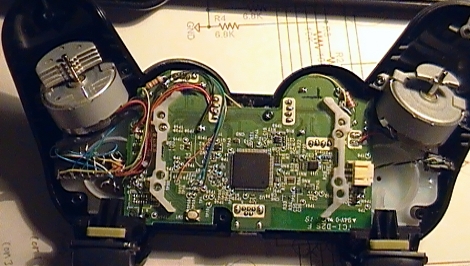
The hardware alterations are pretty hardcore. On the left of the image, just below the rumble motor, a DIP microcontroller is nestled dead-bug style. This is a PIC 18F14K50. It’s running a bootloader, and has its own USB port on the opposite side of the controller. By cutting traces and soldering to vias, this chip intercepts button presses and shoots them off to the controller’s processor based on alternative mapping stored in EEPROM. There’s a helper app that lets you plug the controller into a computer to specify what each button does, including features like toggle for the buttons. Check out [Chuck’s] thoughts on the hardware in the video after the break.

Continue reading “PlayStation 3 Controller Made Fully Remappable”

Open Source Makes This USB Arcade Controller Build A Breeze

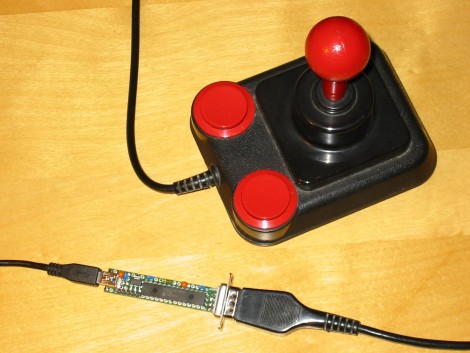
[Jamie] built his own USB connected arcade controller. We’ve been seeing a lot of these lately, and they usually involve soldering buttons to a keyboard PCB. But [Jamie] decided to go a different route and use his own microcontroller. This method always gets a bit hairy when it comes to deciding how to connect it to a computer. Dealing with the USB stack used to be quite tricky, but the LUFA project is slowly taking the pain out of the process.

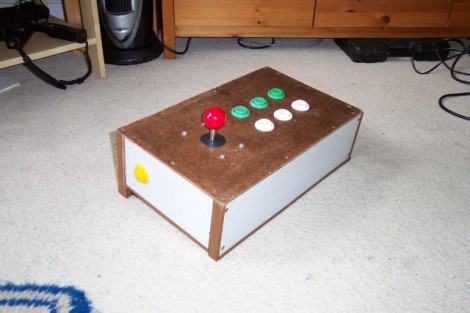
The Lightweight USB Framework for AVRs is an open source project that handles the hard work associated with USB capable AVR microcontrollers. [Jamie] knew that they already had a sample implementation of a hardware joystick. He’s not using one of the supported boards and so wasn’t able to just compile and go. But porting the code to work with his minimus board was simple enough. With the code in place, the physical build was quite simple. The buttons and joystick were mounted on the surface of an overturned drawer. Each is connected to one pin of the controller board and to ground. LUFA makes sure that the device enumerates as a joystick, and [Jamie] was gaming in no time.

Makita Jobsite Radio Gets A Few Extra Bells And Whistles

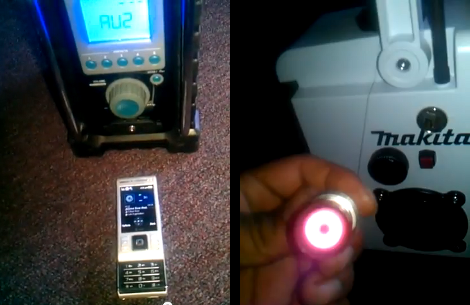
[Jose] added several features to a Makita AM/FM jobsite radio, and did such a good job that you can’t tell they weren’t originally part of the design. The original radio has a compartment for a battery pack used with Makita’s line of rechargeable tools, and offers AM/FM radio, as well as auxiliary audio playback via a pair of speakers. [Jose] augmented those speakers by adding a pair of tweeters as well.

Next on his list of features were a couple of power bus add-ons. In the image on the right you can see the results of adding an automotive cigarette lighter to the side of the unit. Opposite this you’ll find a pair of USB ports that are activated by a lighted toggle switch. The ports are part of a USB car charger that is patched into the battery with a flip of that switch.

Finally, there’s a built-in Bluetooth audio receiver that connects to the auxiliary input. As shown in the image on the left, he can now play tunes from his cellphone without the need for a cord. See him showing off the device in the video after the break.

Continue reading “Makita Jobsite Radio Gets A Few Extra Bells And Whistles”

Remote-controlled USB Switch

When [beerninja] wanted to swap his USB keyboard from one game console to another without mucking about with wires, he asked the Hack A Day forums for some help. [Meseta] (AKA [UAirLtd]) came to the rescue and built [beerninja] a remote-controlled USB switch.

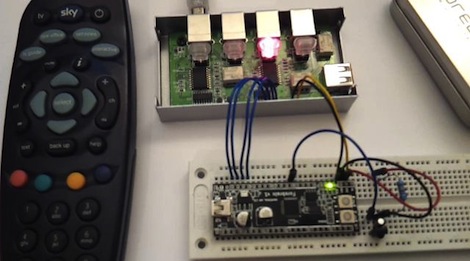
After opening up a no-name USB switch, [Meseta] discovered that the switching is done with simple relays and switches. A hugely overpowered Forebrain ARM dev board was used to pull each switch low for a few hundred milliseconds to switch the output USB port.

For the infrared remote control, [Meseta] dug into Lady Ada’s IR sensor tutorial and decoded buttons 1 through 4 on a Sky TV remote. Each button from one to four corresponds to the buttons on the USB sharing switch. The ‘0’ button was also decoded as a convenience to put the Forebrain into its reprogramming mode. After drilling a small hole for the IR receiver, the finished project was stuffed back into the original steel enclosure.

Check out the video of the switch in action after the break.

Continue reading “Remote-controlled USB Switch”

Sustainability Hacks: Solar Battery/smartphone Charger

[Michael] took a battery charger meant to be connected to mains power and converted it to work with a solar panel. This was a traditional 4 cell charger which charges the batteries in pairs. He kept that functionality, but added USB charging with a special over-current feature. That’s because his Android phone has a fast and slow USB charging mode. The slow mode makes sure that it draws 500 mA or less to stay within USB specifications. But the fast mode draws more current when the phone detects that the USB connection is attached to a wall charger. [Michael] added a switch that patches a pull-up resistor to the data line, signaling to the phone that it’s okay to switch to fast charging mode.

As for the power supply itself, you can see that [Michael] snapped off the part of the circuit board that housed the original regulator. He’s added his own 5V switching regulator which offers a wide input voltage range. This is connected to two banana plug sockets which can be connected to the solar panel.

SNES Gamepad Coversion To USB

[Kekszumquadrat] wanted to use a classic controller to play emulator games on his Android tablet so he set out to convert an SNES gamepad to connect via USB. He found an old USB keyboard at a yard sale for about 3 Euros. He knew that the emulator he prefers has the option of remapping all the inputs to keyboard keys which means a USB keyboard has all of the electronics he would need to pull this off.

Once he had separated the keyboard circuitry from the case [Kekszumquadrat] plugged it into his Linux box and used Xev to establish how the keyboard matrix is set up. Xev is a common package that opens up an active window on the X desktop. When run from command line, any events that happen to the window will be echoed along with verbose data about that event. When it comes to keypresses, you’ll get the keycode you need. He simply shorted columns and rows until he found the desired mapping, then it was on to soldering.

The SNES controllers are very simple devices. As we’ve seen with previous projects, they use a serial-to-parallel shift register to gather button data and send it to the console. [Kekszumquadrat] simply soldered between button traces and keyboard matrix contacts. Once he finished, the keyboard parts were tucked inside of the controller case and he’s left with a USB controller that appears to be unaltered.

Arduino Releases New Products; Help Them Develop ARM-based Arduino

The Arduino folks took advantage of Maker Faire New York to announce their new line of products. There’s several interesting new additions to their product line.

They’ve got a WiFi shield in the works that utilizes a module from H&D Wireless in conjunction with an AVR32 processor to take the workload off of the ATmega chip on the Arduino board. It even has room for you to run your own code on the shield’s processor.

Notable (but of less interest to us) is the 1.0 release of the IDE and the development of a new low-cost board. That hardware is intended to make USB device development easier for those already familiar with the Arduino platform.

But the big news that caught our eye is the announcement of an ARM Cortex-M3 Arduino called the Due (we already wish that had been named something different just for search term contrast to the Duemilanova). The hardware hasn’t been finalized yet, although you can see a prototype in the picture above. They want community input on the final touches, so get in there and give them a hand!

[Thanks Insapio and Tom]