R/C PPM Hacked

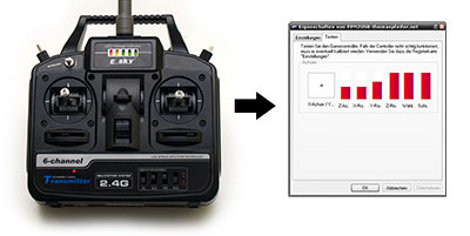
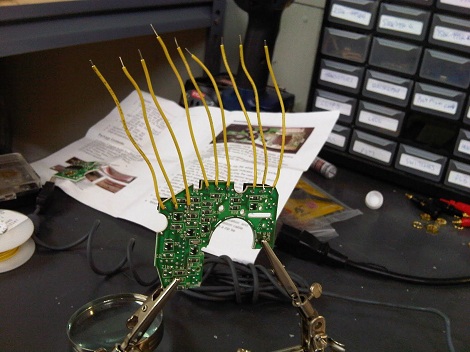
[Thomas Pfeifer] has taken the PPM signal produced by model aircraft wireless controllers, and with an ATMega8, converted the signal to act as a USB joystick. Which means you can now use a standard R/C remote control to fly model aircrafts on your computer. Of course now with PPM decoded you could also use the signal to control any electronic device. Like your mower, iPod, and we’ve even seen remote controlled pellet guns. Catch a video of [Thomas] flying a simulated quadrotor helicopter after the jump.

[Thanks Max]

Continue reading “R/C PPM Hacked”

USB Ports Hidden Inside Gaming Mouse

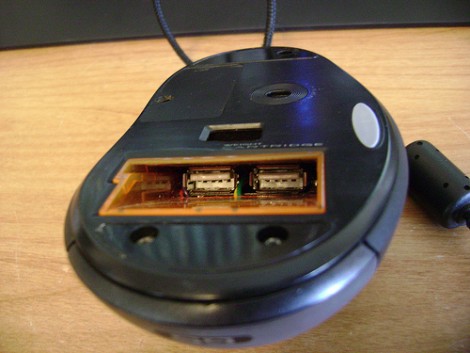
[Gigawatts] built a pair of USB ports into his mouse and there’s enough room to plug-in small USB drives and dongles. After seeing Thursday’s storage mouse hack he decided to tip us off about the post.

He started with a Logitech G5 gaming mouse. The wireless version of this mouse has a battery pack, but on the corded version this space is used for a weight cartridge. Since he didn’t really care about that feature he ditched the weights, added a USB hub inside, and positioned the dual ports as seen in the photo. The void is deep enough for the mouse to function normally while hosting medium to small-sized devices. This is a fantastic solution that’s at least as impressive as Apple adding USB ports to a keyboard. We’d love to see it as a factory option.

Update: Video after the break

Continue reading “USB Ports Hidden Inside Gaming Mouse”

USB Mouse With Storage Added

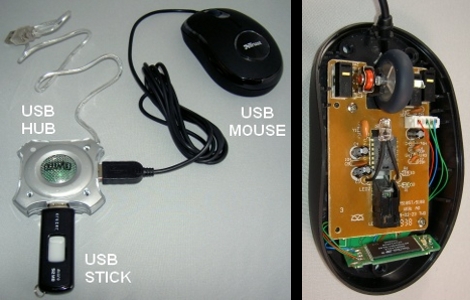
[Thice] wanted to try his hand at incorporating a USB driving into other devices. He chose to add storage to his USB mouse but didn’t want to alter the factory look provided by a color-changing LED inside. To make things fit he ended up cutting a good portion of a USB hub’s circuit board off and placing it beneath the mouse circuitry. You can see the board from the thumb drive wedged into one end of the case in the image above.

He sees this as a way of hiding data in plain sight. This is true, and it’s along the same lines we’ve seen before with a WiFi dongle in a mouse, or the thumbdrive in a controller hacks. To be truly hidden we’d like to see someone incorporate a microcontroller that monitors the mouse buttons for a certain code, and then toggles the voltage to the USB storage. This would simulate plugging and unplugging the drive, hiding it virtually as well as physically.

Woot Lights And Mice Transplants

[Nathan Long] sent in two fairly simple mods he’s been working on. The first is the control of Woot-off Lights via LPT port. A computer checks Woot for the Woot-off logo, and if the logo is spotted, on go the lights. It’s really just a twist on the LED/Arduino email message system, but the creativity is nice.

His other modification is the stuffing of a Microsoft Intellimouse inside of a Logitech Wingman. With the goal of giving the old PS/2 mouse USB capabilities and removing the terrible ball. For those that are asking themselves “why bother? Terrible ergonomics, no scroll wheel, etc.” [Nathan] claims it’s for Quake 2 nostalgia, to each their own we suppose.

Input Device Using LED And Four Photoresistors

[Julien] built an input device that uses reflected light detected by some photoresistors. Placing your hand above the device will reflect light from the LED back down onto the cadmium-sulfide sensors. The resistance of those sensors is read by four ADC pins on a Teensy microcontroller and translated to mouse movements. In the video after the break you can see that this works rather well in controlling the cursor. The source code is available on pastebin but we’re also going to host the code for posterity.

Continue reading “Input Device Using LED And Four Photoresistors”

USB Host Comes To Zipit

This USB to Zipit Dock adapter and a special kernel makes USB host mode for the Zipit possible. Previously, the cheap and hackable wireless client needed a hardware modification to enable USB support. The new kernel bootloader, called U-Boot, makes the internal alterations unnecessary (see the demo after the break). Now the only caveat is one of voltage. Zipit only supplies 3.3V when running on battery so your choices are to only use USB when the Zipit is plugged into a charger, or use a powered USB hub. But if you’re already building a hub adapter it shouldn’t be too much trouble to add in the option for a battery-powered hub.

So can we play our NES games using a USB controller now?

Continue reading “USB Host Comes To Zipit”

USB Adapter Options

[Ladyada] takes some time out of her day to explain the common options available for connecting projects through USB. You may be thinking that you already do this with an Arduino. Well, yes and no. The Arduino uses one of these options, an FTDI chip that handles the USB on one side and spits out microcontroller-friendly voltage signals on the other. This chip can be used with your projects, a topic that [Phil Burgess] covered in great detail.

In the video after the break you’ll also hear about USB to serial converters which connect to the Universal Serial Bus and output the traditional 12-20V serial signals (with the exception of cheap knockoff cables like the one from last week). These need to be stepped down to 5 volts or less using a MAX232 chip to work with your project.

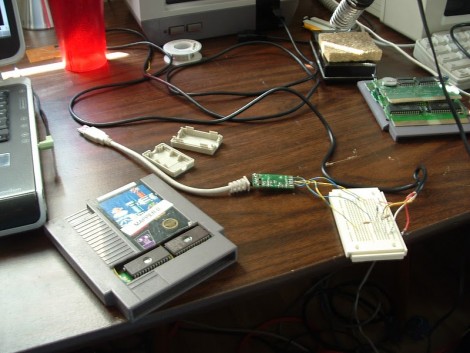
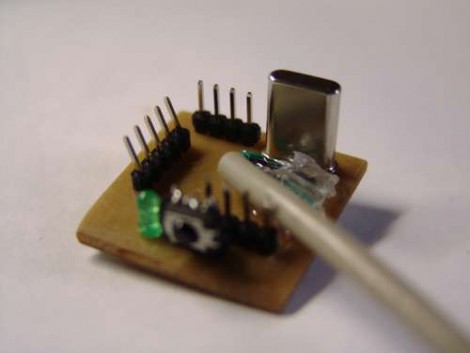
Finally there’s the option of using a microcontroller running the V-USB firmware package. This is how the USBtinyISP works and I’ve used it in my own projects to build a LIRC compatible IR receiver.

Continue reading “USB Adapter Options”