Mac SE Reborn As A Server And Mac Emulator

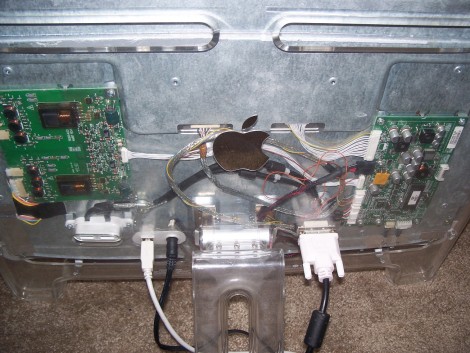
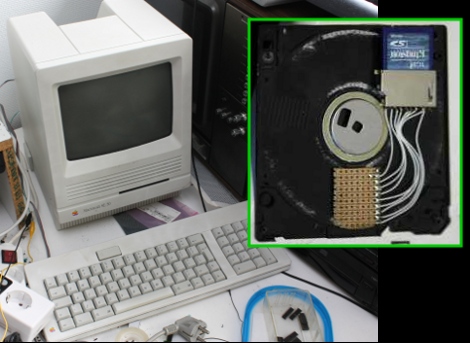
[Sprite_TM] cooked up an amazing hack by resurrecting a Mac SE using a Dockstar and ARM processor. The retro hardware had a bad mainboard thanks to the corrosive properties of a failed backup-battery. He had been wanting to do something with the Seagate Dockstar and decided it would find a nice home in the Mac. But what fun is a dead machine housing a headless server? To add to the fun he included an ARM processor running a Mac emulator, along with all the bits to make the screen, keyboard, and peripherals work. When the Mac is off the Dockstar still runs as a server.

But one of the best parts is the floppy drive. It still takes floppies, but there’s no magnetic media inside of them anymore. Instead, he’s added an SD card slot and some protoboard in the space for the read head. The drive itself has had the read head transplanted for some pogo pins (hey, we saw those earlier today). When you insert the floppy, the pogo-pins raise up and contact the protoboard, connecting the SD card to a Teensy microcontroller.

There’s so much going on with this project we just can’t cover it all here. Things like a chemical cleaning to return the original color of the classic case, and building a converter so that the peripherals are USB compatible are just some of the pleasures awaiting you in [Sprite_TM’s] post. He’s also filmed a demo video that we’ve embedded after the break.

Continue reading “Mac SE Reborn As A Server And Mac Emulator”

This Is A Peer-to-peer Filesharing Network

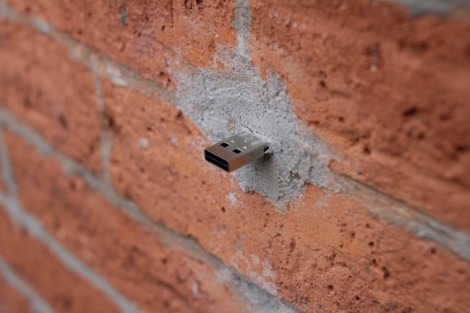
[Aram Bartholl] is building his own filesharing network that screws those fat cats who want to control your freedom. He’s added file cache devices throughout NYC (five so far but more to come) that are anonymous and free to use. Upload what you want, download what you want. They’re completely offline which means monitoring who’s doing what gets a lot harder and quite possibly requires a warrant from a Judge (we’re obviously not legal experts, your mileage may vary).

As for the slew of comments that are sure to point out the dangers of malicious USB device; We think everyone knows they’re taking on some risk when connecting to a USB plug protruding from a brick wall.

[Thanks Neckbeard]

IM-ME USB Dongle Hacking

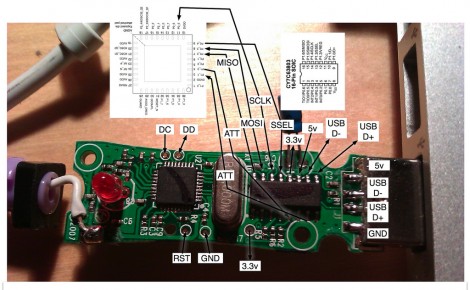
This circuit board is from the USB dongle of a Girl Tech IM-ME. [Joby Taffey] took it apart and poked around to learn its secrets. These dongles come along with the pink pager that has become a popular low-cost hacking platform. But we haven’t seen much done with the dongle itself up until now.

[Joby] used the OpenBench Logic Sniffer to gain some insight on what’s going on here. The board has two chips on it, a Cypress CY7C63803 USB microcontroller which talks to the computer over USB and also communicates over SPI with a Chipcon CC1110 SoC radio. It looks like reprogramming the Cypress chip is a no-go, so he went to work on the CC1110. The inter-chip communications data that he acquired by sniffing the SPI lines gave him all he needed to reimplement the protocol using his own firmware. As a proof of concept he to reflashed the CC1110 and can now send and receive arbitrary commands from the dongle. There’s a tiny video after the break showing a script on the computer turning the dongle’s LED on and off.

Continue reading “IM-ME USB Dongle Hacking”

Using An Arduino Or Seeeduino For Its FTDI Chip

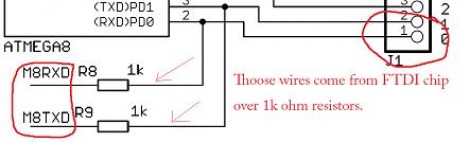
We think of the Arduino as a rapid prototyping tool but we never thought of it as an FTDI breakout board before. [Ihsan Kehribar] wrote a quick post to show how it’s done. You’ll find an FTDI chip on Arduino boards that have a USB connector. It’s used to handle the USB communications on one side, and TTL serial communications on the other. The serial pins from the chip are mapped to the UART on the AVR chip, and in turn they appear on the pin headers for easy connections. Just load up a really simple sketch(available from Ihsan’s post) to make sure the processor doesn’t get in the way and you’ve got yourself an FTDI breakout board. If you happen to have a Seeeduino there’s even more functionality as the board has a selector switch that allows you to choose between 5V and 3.3V levels.

This doesn’t hold true to the newest generation of Arduino, as those board have replaced the FTDI chip with an ATmega8U2. That’s basically and ATmega8 with native USB handling… fancy.

[Thanks Marcus]

Game Boy Printer USB Cable And Software

[Furrtek] hooked up his Game Boy printer for use with a PC (translated). The two-part hack started with a cable to attach the device via USB. A Nokia interface cable was used as a base to translate the USB signals into serial, and an ATtiny45 microcontroller added to talk to the printer. He did a great job of free-forming the circuit alterations and fitting it back into the plastic USB plug housing.The next step was to write some software. Using VB6 he coded an application that loads in an image, scales it to fit, and allows you to adjust the contrast that the thermal printer produces. For testing purposes he’s reusing old receipts. See it in action after the break.

Continue reading “Game Boy Printer USB Cable And Software”

Munchausen Makes NES A Cartridge Programmer

What a beautiful image of NES cartridges showing their private parts. These are the raw materials for the Munchausen Flash Cartridge project. A combination of a modified game cartridge and special USB cable makes it possible to program NES cartridges while inside an unmodified console. The cartridge has an added flash chip that is running a bootloader. By connecting a USB-to-NES cable to the second controller port a game image (or custom code image) can be flashed to one of the three game slots on the writable cartridge. The bootloader provides a menu at power-up to select between the three stored images, or can go straight to the previously selected image by holding down A when the console is turned on. There’s even a recovery routine in case of problems. Check out the demo after the break.

One thing we find interesting from the forum thread is a mention that it is technically possible to run code on the NES directly from the PC. That would sure make it easy to perform live chiptunes on NES.

Continue reading “Munchausen Makes NES A Cartridge Programmer”

IR Receiver As USB Keyboard

[Arthur] built an IR receiver to use with XBMC. Because it’s software specific he identifies the device on USB as a keyboard, and passes the IR commands as keystrokes used by the popular media platform.

Normally, homebrew IR receivers would use LIRC, the Linux Infrared Remote Control software. But this method doesn’t require you to have that running. In fact, it doesn’t need any setup on the PC end of things. Any remote that uses the Sony SIRC protocol will work off the bat.

[Arthur] chose a PIC 18f2550 for the project. It is a popular microcontroller because it has built-in USB handling. We’re a bit skeptical of the hardware design though. We didn’t see specifically which IR receiver he’s using, but many require some type of filtering so check the suggested layout in the datasheet for your module.