posted Sep 6th 2011 4:04am by
Mike Nathan
filed under:
wireless hacks

Hackaday reader [equinoxefr] posted some images to our flickr pool showing off some modifications he made (Google Translation) to his La Crosse WS2305 weather station. Having built other router-based weather stations in the past, [equinoxefr] was looking for a better way to gather weather data after one of the routers gave up the ghost.
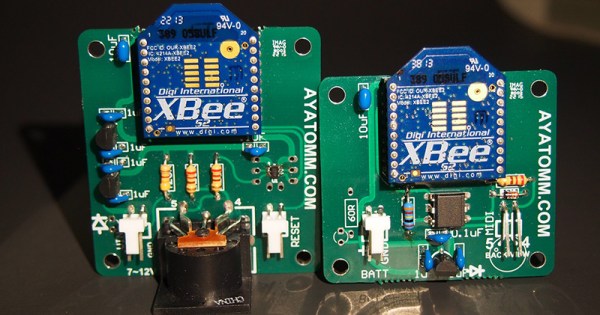
With a brand new La Crosse WS2305 in hand, his goal was to feed the Lacross’ data to his HTPC which runs XBMC. He pulled the weather station apart and probed around with an oscilloscope until he could find the TTL Tx and Rx pins required to retrieve data from the unit. He hooked the data pins to an XBee wireless transmitter, which he then tucked away in the station’s battery compartment.
Another XBee unit was connected to his computer via an XBee Explorer board, and he was reading data from his weather station in no time.
While his isn’t the first La Crosse weather station hack we’ve seen around here, we like how simple and clean it is. If you’re interested, be sure to check out his flickr stream to see more images of the hacking process.
posted Aug 25th 2011 8:10am by
Mike Nathan
filed under:
home hacks,
led hacks

[SeBsZ] does a lot of work in home automation, using Xbee modules, LEDs, and other home lighting systems. Naturally, people look to him for help with different electronics projects, but one thing he has been asked time and time again is if he can make a simple mood lighting solution that can be easily installed.
He has always been interested in playing around with RGB LEDs, but he wasn’t looking to reinvent the wheel with this project. Instead he based his work off the Ikea Dioder product, an off-the-shelf set of adjustable LED strips. As we’ve seen before, the control module for these LEDs leaves a bit to be desired, so he removed the Dioder’s onboard PIC and wired up a controller of his own. His “Universal IO Board” uses an Atmega88 for control and has all the pins required to attach an Xbee wireless module. With everything wired up, he now has full wireless control of the Dioder light strips, without a ton of fuss.
Although he’s selling a few different hardware kits, the schematics for his IO board are freely available on his site, should you want to make your own. The only thing that we didn’t see was the code for the Atmega, but we’re guessing he has that posted somewhere as well.
posted Aug 5th 2011 10:37am by
Mike Nathan
filed under:
robots hacks

Most people can agree that picking weeds is not a whole lot of fun. [Dave] was not a big fan of sitting out in the heat toiling over his lawn, so he did the only rational thing and built a robot to do it for him.
Nuntius, the Garden Avenger, is a remote controlled robot that [Dave] can use to pick weeds from the comfort of his couch. The robot is controlled by a Propeller microcontroller, taking its commands wirelessly via a pair of XBee modules. Nuntius’ controller is pretty intuitive, consisting of a 5-axis arm complete with a gripper that [Dave] can articulate in any number of directions. His motions cause the robot’s arm to move in sync, and driving Nuntius is as easy as holding down a button and moving the controls in the desired direction.
[Dave] can monitor what Nuntius is doing via a wireless camera he has installed on the robot’s arm, allowing him to sit back and relax indoors while the robot handles the hard work.
Keep reading to see a short video demo of Nuntius in action.
[via Make]
Read the rest of this entry »
posted Aug 1st 2011 10:01am by
Brian Benchoff
filed under:
robots hacks,
wireless hacks

[Dave] posted some pictures and videos of his ‘Nuntius’ robot on the Propeller forums. From the pictures it’s an impressive build, but to really appreciate [Dave]‘s skill, check out the Youtube demo.
The controller is a Propeller protoboard with bits of angle aluminum fastened together. Pots are positioned at the joints of the remote’s arm so the robot’s arm can mirror the shape of the remote. We usually see Armatron bots controlled via computer, or in the rare case of human control, a mouse. [Dave]‘s build just might be one of the first remote manipulator builds we’ve seen on Hack A Day.
Read the rest of this entry »
posted Jul 23rd 2011 4:36pm by
Mike Szczys
filed under:
robots hacks

[PJ Allen] has been working on a little robot which he calls Cypherbot. The control circuitry is quite familiar; a Board of Education which features the Basic Stamp 2 microcontroller. This is an older and slower microprocessor, but it works quite well for this application since there’s no need for speed or heavy number crunching. The wheels of the bot are made out of plastic lids (we’re thinking peanut butter jars) with rubber bands for traction that are each driven by a servo motor. The third wheel is tiny and swivels as needed.
The front of the bot has a PING ultrasonic sensor mounted on a servo motor which lets the bot scan back and forth for a wider obstacle avoidance angle. In addition to the autonomous mode there’s an Xbee remote control. [PJ] picked up an Atari keyboard and is using that as the user input. Check out the little guy driving around the house in the video after the break.
Read the rest of this entry »
posted Jul 18th 2011 6:01am by
Brian Benchoff
filed under:
arduino hacks,
robots hacks,
tool hacks

[Patrick] wanted a remote control to control some of the robots he’s built. He also wanted to get some data back from his robots, so an inexpensive off-the-shelf solution wouldn’t be up to the task. Like all good geeks, [Patrick] decided to build what he needed.
For analog control, [Patrick] decided to use a Wiimote nunchuck. This turned out to be a very good choice – the nunchuck has a 2-axis joystick and 3-axis accelerometer in one small, easy to interface package . The wireless radio is taken care of with an XBee module. For the microcontroller, custom “lcd backpack” was created that provides an I2C port for the nunchuck, inputs for the buttons and the single pot, and 2 serial ports for the FTDI and XBee.
Read the rest of this entry »
posted Jun 28th 2011 2:01pm by
Mike Nathan
filed under:
arduino hacks,
led hacks

When you really want your feelings known, we always say that bigger is better. [Gavin Smith, aka The Mechatronics Guy] must come from the same school of thought, because there’s absolutely no mistaking what he is trying to say with his latest project.
Inspired by this WiFi signal painter we featured a while back, the LightScythe is a 2 meter long bar composed of multi-color LED strips that he bought from Adafruit. The light bar is controlled by a Seeduino micro controller, which takes direction from his laptop via a pair of XBee units. Once he generates an image from text with ImageMagic, a Python script is used to match the colors as close as possible to the RGB color space. The image is then converted to raw serial data for playback on the Scythe. When he is ready to go, he triggers his camera to take a 10-15 second exposure, during which he walks across the frame, painting his images with the LightScythe.
We always enjoy seeing creative derivations of previous projects we have covered, and the LightScythe does it well. He actually built a pair of these that can work in concert or independently, which we imagine can make for some pretty awesome pictures.
Be sure to check out his Flickr photostream for more examples of what the LightScythe can do.
posted Jun 28th 2011 9:45am by
Mike Nathan
filed under:
arduino hacks,
wireless hacks

If you weren’t aware, Adafruit Industries is sponsoring the “Make it Tweet” contest over at Instructables, and this Twitter-enabled bird feeder is [quasiben’s] entry into the competition.
His bird feeder not only sends messages to Twitter, it also sends a picture of each bird to Twitpic. The feeder itself is a standard off the shelf model which has been fitted with a LinkSprite camera. A LilyPad Arduino controls the camera, sending images to his computer via a pair of XBee modules. To detect when a bird has stopped by for something to eat, [quasiben] used an infrared LED and an IR detector. The emitter and detector are positioned at opposing sides of the feeder’s opening, triggering the Arduino to snap a picture whenever the beam is broken. Once the image has been transferred to his computer, it is posted to TwitPic.
We’re pretty sure [quasiben] built this Tweeting bird feeder just because he could, but we think it’s a pretty smart idea for people who don’t necessarily have the free time to gaze out the window into their yard. It’s a great way to keep tabs on all your new winged visitors while on the go.