Press Amazon Dash Button, Summon Uber

Modern life is complicated. When you want to call an Uber car to pick you up, you have to open the app, sign in and set your pickup location. [Geoffrey Tisserand] uses Uber to commute to his job in San Francisco every day, so he came up with a neat way to automate this process, by reprogramming an Amazon Dash button to call an Uber. All he has to do is to hit the button, and a few minutes later an Uber rolls up to his door.

To do this, he used the intercept method, where a Python script running on another computer notices the Amazon Dash button joining his home WiFi network and posts the request to Uber. Because Uber uses the OAuth authentication system, he was able to easily log into the system using Expressjs. And because he is always following the same route, he could also automate the posting of the pickup and dropoff locations, as they don’t change. It’s a neat hack that saves him time, but it doesn’t get around the issue of letting you know how long the car will take to arrive, or if Uber is in Surge Pricing. Perhaps that would work for version 2: a small button with an LCD screen and a warning light.

Arduino TinyGPS Updated To Support GLONASS

GPS is a global technology these days, with the Russian GLONASS system and the forthcoming European Galileo orbiting alongside the original US GPS satellites above our heads. [Florin Duroiu] decided to embrace globalism by forking the TinyGPS library for the Arduino platform to add support for these satellite constellations.

In addition to the GLONASS support, the new version of the venerable TinyGPS adds some neat new features by incorporating the NMEA 3.0 standard (warning: big-ass PDF link). Using this, you can extract interesting stuff such as the calculated position from each satellite constellation, the signal strength of each satellite and a lot more technical stuff about what the satellites are saying about you to your GPS receiver. [Florin] claims it is a drop-in replacement for TinyGPS that should require no rewriting. There is no support for Galileo just yet (as the satellites are still being launched: eight are in orbit now), but [Florin] is looking for help to add this, as well as the new Chinese BEIDOU system once it is operational.

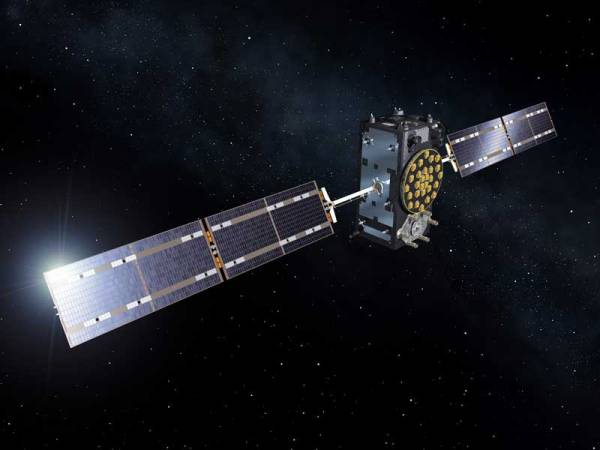
(top image: artists’ view of a Galileo satellite in orbit, courtesy of ESA)

CubeSat Challenge Winners Show Interesting Design Approaches

The winners are in for the GrabCad CubeSat Challenge, which asked designers to rethink the way that CubeSats are built. These tiny 10 cm square satellites are the hot thing in orbit, and the competition was looking for new ways to build and pack more into this tiny space. The winners offered some fascinating new approaches to building CubeSats, and some excellent design lessons that anyone can use.

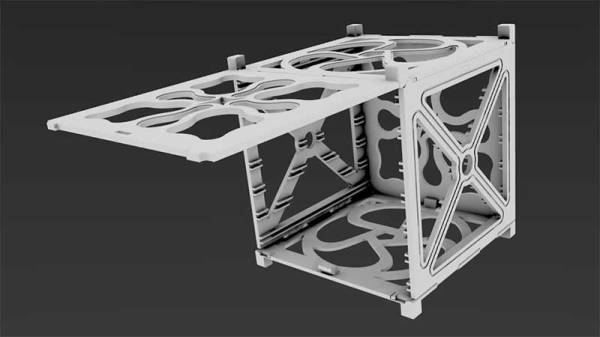
The winner was FoldSat, by [Paolo Minetola]. His excellent design is a 3D printed folding case for a satellite that is built from just two 3D printed parts. The case can be snapped together and offers multiple ways to mount electronic components and sensors inside. [Paolo] estimates that it could save 40% time and 30% materials from existing CubeSat casings, which means more space inside and more time to build. It is an excellent example of how 3D printing can make things cheaper, easier and better, all at the same time.

Continue reading “CubeSat Challenge Winners Show Interesting Design Approaches”

ESP8266 Web Server Farm

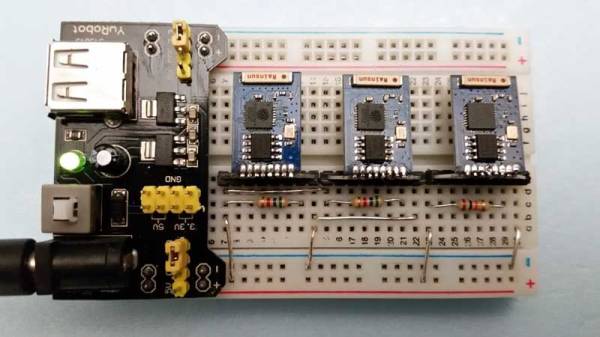
There seems to be a hacker maxim that whatever gadget you are working with, it would be better to have several of them running together. That might explain the ESP8266 web server farm that [Eldon Brown] has built. Yup, a web server farm made from three of everyone’s favorite WiFi dongle, the humble ESP8266.

Eldon’s server farm is currently serving web pages here, running on three ESP8266 boards. Or it was before this posting reduced it to a smoking ruin (screenshot below just in case). Each module is running a dynamic web page and some clever programming he came up with that makes transferring data over these cheap devices quicker.

His page isn’t anything too fancy but it is impressive considering it is running on about $30 worth of hardware, including the breadboard it is wired into. The page includes dynamically-generated graphics and some back-end stuff. I don’t think that it will replace any LAMP servers anytime soon (the ESP8266 took about 2.6 seconds to generate the page below), but it is an impressive hack. [Eldon] has made the full code of the web server that is running the pages available. So, lets add web server farm to the list of things that this neat little device can handle, next to plant weigher, Bitcoin price tracker, MP3 player and many more

Thanks to [PuceBaboon] for the tip!

Continue reading “ESP8266 Web Server Farm”

Sending Serial Data From… Excel?

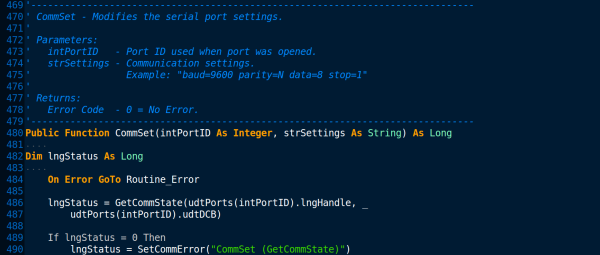
When you think about serial communications, Microsoft Excel isn’t typically the first program that springs to mind. But this spreadsheet has a rather powerful scripting language hidden away inside it, which can, with a little coding, be used to send and receive data over your serial port (Internet Archive Link, as of 2023). The scripting language is called Visual Basic for Applications (VBA), and it has been a part of Microsoft’s Office suite since 1993. Since then, it has evolved into a powerful (if sometimes frustrating) language that offers a subset of the features from Visual Basic.

It can be a useful tool. Imagine, for instance, that you are logging data from an instrument that has a serial port (or even an emulated one over USB). With a bit of VBA, you could create a spreadsheet that talks to the instrument directly, grabbing the data and processing it as required straight into the spreadsheet. It’s a handy trick that I have used myself several times, and [Maurizio] does a nice job of explaining how the code works, and how to integrate this code into Excel.

If you’re looking for other ways to leverage this Excel feature, consider watching movies at work or building a virtual machine inside of your sheets.

Transformers, Birthday Cakes In Disguise

[Russel Munro] decided to go all-out for his son’s birthday cake: he made a Transformers robot cake that, well, transforms from a truck into a robot, Optimus Prime style. His impressive build has the actions of the original: first, the front rears up to lift the head, then the back lifts to form the body and the head and arms pop out of the top. Underneath the thin fondant exterior is a 3D printed body, driven by a mechanism in the base. He used fishing line to lift the parts, which is pulled by a motor salvaged from a CD player, being driven by an EasyDriver board from Sparkfun.

The main issue he had to overcome was weight: apparently he underestimated the weight of the fondant that covers the cake, and had to do some last-minute work to strengthen the drive mechanism, and skip plans for the more ornately decorated version that his wife had planned. But the look of glee on his son’s face when he operates it at the party is the best bit. In these days of CGI and computer games, it is good to remind the kids that there is still a lot of fun to be found in ingenuity and liberal quantities of hot glue.

Continue reading “Transformers, Birthday Cakes In Disguise”

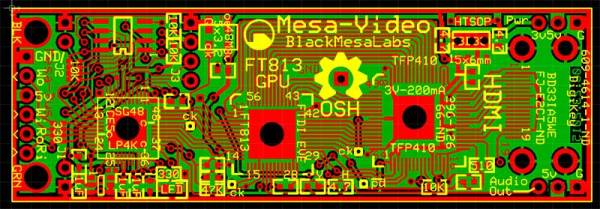
Arduino Video Over 2 Wires For Under $50: Mesa-Video

If you want video support on your project, you might start from a device like a Raspberry Pi that comes with it built in. [Kevinhub88] doesn’t accept such compromises, so he and his Black Mesa Labs have come up with a whole new way to add video support to devices like the Arduino and other cheap controllers. This project is called Mesa-Video, and it can add digital video at a resolution of up to 800 by 600 pixels to any device that has a single serial output.

The video is created by an FT813, a low cost GPU from FTDI that offers a surprising amount of video oomph from a cheap, low power chip (he has demoed it running from a lemon battery), meaning that he is hoping to be able to sell the Mesa-Video for under $50.

UPDATE: [KevinHub88] let us know that he didn’t actually power the device from a lemon battery, as you would need a lot of lemons to make 50mA at 5V. Apologies for any confusion!

However, Mesa-Video is just the beginning. [Kevinhub88] wanted to get around the problem of stacking shields on Arduinos: add more  than one and you get problems. He wanted to create an interface that would be simpler, faster and more open, so he created the Mesa-Bus. This effectively wraps SPI and I2C traffic together over a simple, fast serial connection that doesn’t require much decoding. This means that you can send power and bi-directional data over a handful of wires, and still connect multiple devices at once, swapping them out as required. You could, for instance, do your development work on a PC talking to the prototype devices over Mesa-Bus, them swap the PC out for an Arduino when you have got the first version working in your dev environment. Is the Arduino not cutting it? Because Mesa-Bus is cross-platform and open source, it is easy to swap the Arduino for a Raspberry Pi without having to change your other devices. And, because all the data is going over a simple serial connection in plain text, it is easy to debug.

It’s an ambitious project, and [Kevinhub88] has a way to go: he is currently working on getting his first prototype Mesa-Bus devices up and running, and finalizing the design of the Mesa-Video. But it is an impressive start and we’ll be keeping a close eye on this work. Hopefully he can avoid that head crab problem as well because those things are as itchy as hell.