Pokemon Blue Becomes An IDE

With WiFi, Wonder Trade, and new Pokemon that are freakin’ keys, you’d think the latest generation of everyone’s reason to own a Nintendo portable is where all the action is, right? Apparently not, because Pokemon Blue just became a development tool for the Game Boy.

Despite all notions of sanity, this isn’t the first time we’ve seen someone program a Game Boy from inside a first generation Pokemon game. Around this time last year, [bortreb] posted a tool assisted run that deposited and threw away in-game items to write to the Game Boy’s RAM. Using this method, [bortreb] was able to craft a chiptune version of the My Little Pony theme inside Pokemon Yellow.

A year later, [TheZZAZZGlitch] has gone above and beyond what [bortreb] did. Instead of a tool assisted run, [ZZAZZ]’s hack can be done manually on a real Game Boy. This trick works by using an underflow glitch to obtain item ‘8F’ in the player’s inventory. Here’s a great tutorial for doing that. With this 8F item, a few items can be tossed and a ‘programming’ mode is activated where code can be written to RAM by walking to an X Y position on the map, using the 8F item, and writing a program byte by byte.

The maximum amount of code that can be written to the Game Boy RAM is 254 bytes, just large enough for [TheZZAZZGlitch] to write a very, very simple version of Akranoid, Breakout, or one-player Pong. Not much, but very, very impressive.

Video of [ZZAZZ] ‘jailbreaking’ his copy of Pokemon Blue available below.
Continue reading “Pokemon Blue Becomes An IDE”

Crafting A Liquid Crystal Display

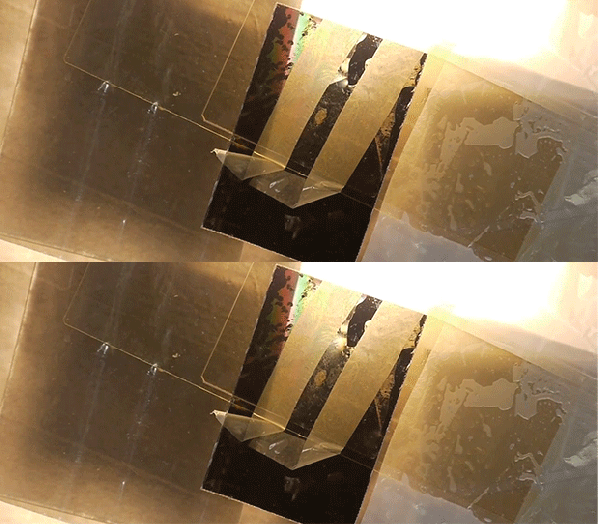
Throughout the 1960s, the management at RCA thought LCD displays were too difficult to commercialize and sent their engineers and researchers involved in LCDs off into the hinterlands. After watching [Ben Krasnow]’s efforts to build a liquid crystal display, we can easily see why the suits thought what they did. It’s an amazing engineering feat.

Before building his own version of an LCD (seen above in action), he goes through the mechanics of how LCDs operate. Light enters the display, goes through a polarizer, and is twisted by a liquid crystal material. The first successful LCDs used two types of liquid crystals – chiral and nematic. By combining these two types of molecules in the right proportion, the display can ‘twist’ the polarized light exactly 90 degrees so it is blocked by the second piece of polarizing film in the display.

Besides getting the right crystals and engineering processes, another major hurdle for the development of LCDs displays is transparent electrically conductive traces. [Ben], along with every other LCD manufacturer, uses a thin layer of indium tin oxide, or ITO. By embedding these clear electrodes in the display, segments can be built up, like the seven segment displays of a calculator or a bunch of tiny dots as found in a TV or computer monitor.

In the end, [Ben] was able to build an extremely simple single-segment LCD display out of a pair of microscope slides. It does modulate light, just barely. With a lot of work it could be made in to a calculator type display but for now it’s an awesome demonstration of how LCDs actually work. Continue reading “Crafting A Liquid Crystal Display”

Hackaday Links: December 1, 2013

hackaday-links-chain

Since our ‘ol buddy [Caleb] left Hackaday for EE Times, he’s been very busy. One of his latest projects is doing Antique Electronics Autopsies. This time around it’s a 1953 Heathkit Grid Dip Meter. It’s a beautiful piece of engineering with Point to Point wiring and metal gears.

We love microcontroller breakout boards, and so does [Tim] apparently. He built a breadboard friendly breakout for the NXP LPC812. It’s an ARM Cortex M0+ with 16kb of Flash and 4kb of SRAM. The entire breakout board is smaller than the through-hole DIP LPC1114. When are we going to see these on Tindie, [Tim]? Here’s the Git with the board files. You can also pick up a board at OSH Park – $3.30 for a set of three.

What do you do when you have the perfect idea for a Kickstarter, but don’t have the funds for the perfect sales pitch? The obvious solution is to start an Indiegogo campaign to raise funds for your Kickstarter. Unfortunately, this campaign has already been successfully funded, so it’s already too late to get in on the ground floor. Relevant xkcd.

We’ve seen this DIY cell phone before but now it’s just about ready for production. [David] at the MIT Media Lab has been working on a bare-bones, ATMega & GSM module phone for a while now, and now you can grab the firmware and board files. Make your own cell phone!

Here comes Hanukkah, so drink your gin and tonica. Here’s a pedal powered menorahica so put on your yarmulke, it’s time to celebrate Hanukkah.

DIY Thermal Imaging Camera

Thermal imaging cameras – those really useful devices that give you Predator vision – are incredible tools. If you’re looking for heat escaping your house through a window, or just trying to figure out where your electronics project will explode next, they’re invaluable, if expensive, tools. [Kaptein QK] figured out an easy and cheap way to make your own thermal imaging camera using nothing just a few dollars worth of parts.

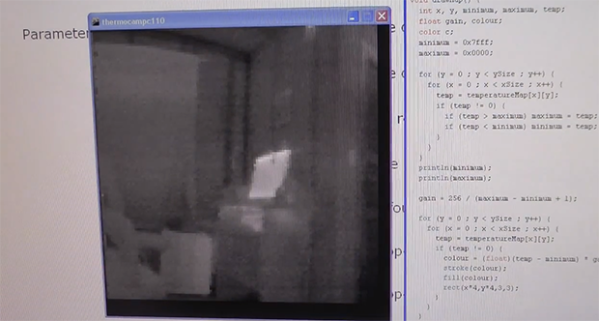
[Kaptein] based his camera off of a non-contact IR temperature gun. This device is useful for spot checking temperatures, but can’t produce an IR image like it’s $1000 cousins. By taking the thermopile out of this temperature gun, adding an op-amp, an A/D converter, and connecting it to an Arduino Nano with pan and tilt servos, [Kaptein] was able to slowly scan the thermopile over a scene and generate an image.

In the video below, you can see [Kaptein]’s scanning camera in action reading the ambient temperature and creating an imaging program for his PC. It works very well, and there a lot more [Kaptein] can improve on this system; getting rid of the servos and moving to mirrors would hopefully speed everything up, and replacing the 8-bit grayscale display with colors would give a vastly improved dynamic range.

Continue reading “DIY Thermal Imaging Camera”

A Shell For The Stellaris & Tiva

cli

When [antoker] is working on a microcontroller project, he often has to write short bits of test code to make sure everything in his circuit is working properly. This is a time-consuming task, and a while back he started on a small side project. It’s a command line interface for a microcontroller that allows him to send short commands to the uC over a serial connection to play around with the ADC, UART, and GPIO pins.

[antoker]’s tiny Unix-like environment is based on modules  that can keep track of the time, print the current commands and stack to a terminal, and query things like the current speed of the uC and the available Flash and RAM.

This tiny shell also has scripting capabilities and a jump function, making this a true programming language, however minimal it is. Right now [antoker]’s work is available for the TI Stellaris and Tiva series microcontrollers, and a video of a scripted Larson scanner is available below.

Continue reading “A Shell For The Stellaris & Tiva”

The Flow Of Time Draws On A River

river

You would think Hackaday would see more projects from public art exhibitions. They really do have everything – the possibility to mount electronics to just about anything in a way that performs interesting but an ultimately useless function. So far, though, [Richard Schwartz’s] Flow of Time is on the top of a very short list of public art installations we like.

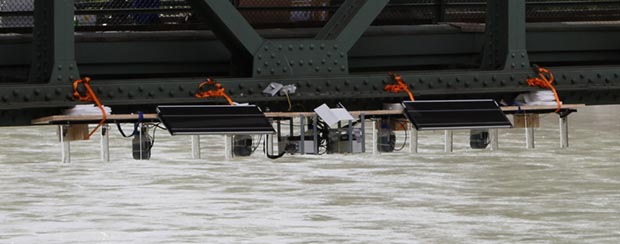
The idea behind the build is a German phrase that means something similar to ‘time trickles away’. [Richard]’s project implements this by printing the current time onto the surface of a flowing river in [Richard]’s native Innsbruck.

The build uses five micro piezo pumps to dispense food coloring from a bridge. Every minute, an Arduino pumps this food coloring in a 5×7 pixel digit to ‘write’ the time onto the surface of a river.

Surprisingly, [Richard]’s installation doesn’t require much upkeep. The pumps only use about 70ml of food coloring a day, and the entire device – including the Raspi WiFi webcam – is solar powered with a battery backup.

You can see a video of the time printing on a river below.

Continue reading “The Flow Of Time Draws On A River”

Improving A Cheap Guitar Pedal

pedul

If something doesn’t suit your needs, just change it. That’s a motto we live by, and it looks like [Doug] took up the same creed when he modified a cheap effects pedal.

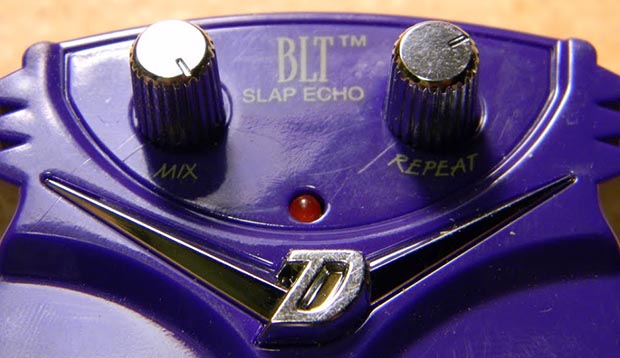
The victim of [Doug]’s soldering iron is a Danelectro BLT Slap Echo – a tiny, cheap pedal in Danelectro’s mini ‘food named’ pedal series. Stock, this pedal’s slap back echo is set to a fixed amount of time. [Doug]’s mod changes that.

The mod consists of desoldering a single SMD resistor and replacing that with a 50k pot [Doug] had lying around. After mounting the pot between the two stock knobs, the new and improved pedal had a variable length echo. There are a few more mods possible with this pedal – changing some of the resistors on the filter for a better sound, or even connecting the rate pot to a wah-style rocker pedal for some wobbly Echoplex or Space Echo action.

You can check out [Doug]’s gallery of pics here.