Pictures From Weather Satellites With A USB TV Tuner

europe

Several times a day, a NOAA weather satellite passes over your head, beaming down pictures of weather systems and cloud formations. These transmissions aren’t encrypted, and given the requisite hardware it’s possible for you to download these images from space as [Lovro] shows us in a tutorial video.

To get these near real-time satellite pictures, [Lovro] used one of those USB TV tuners we’ve grown so fond of. A somewhat specialized antenna is required to receive the right hand polarized transmissions from NOAA weather satellites, but with a few bits of wood and wire, [Lovro] made a helical antenna to listen in on the weather satellites transmitting around 137 MHz. After gathering a whole bunch of data from the satellites with SDRsharp, [Lovro] used an image decoder to turn an audio file into a picture taken from space just hours ago.

This isn’t the first time we’ve seen images from a NOAA weather satellite downloaded with a software defined radio; last year [hpux735] did just that with a somewhat inexpensive Softrock SDR. [Lovro]’s use of a USB TV tuner to receive the transmission from NOAA satellites is a lot easier on the pocketbook, though, with the largest expense being an investment in time to build a helical antenna.
Touchscreen Control For A Reprap

display

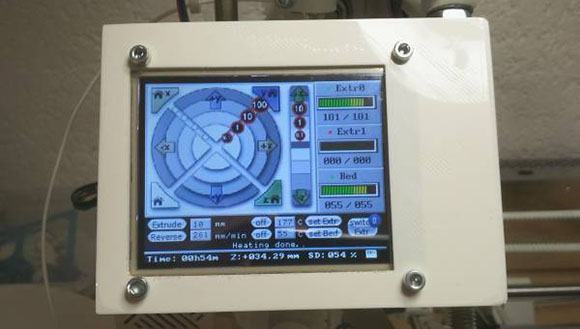
After you’ve got your Reprap running smoothly with acceptable resolution and good quality prints, the next order of business for any 3D printer hobbyist is headless printing. While the greatest and newest 3D printers come with controls to allow jogging, homing, temperature control, and printing from an SD card, the home-built versions will require an add-on attached to the electronics board. [Marco] has been spending his time improving the character LCD control panel projects we’ve seen for Repraps with an awesome graphical version that emulates the control interface found in the Pronterface control software.

The biggest problem with adding a control interface to a Reprap is the number of pins available on the electronics board. While an electronics board like RAMPS has enough spare I/O pins to drive a display, other boards such as the Sanguinololu and the Melzi are extremely limited in their expansibility. To get around this limitation, [Marco] used a 4D Systems serial touchscreen display.

This display only requires two pins to fully interact with a printer running the Marlin firmware; the graphical processing, communication, and SD card access is handled by the on-board PICASO micocontroller, leaving the ATMega on the electronics board free for important things like printing stuff out of plastic.

[Marco] has a git full of modified Marlin firmware and firmware for the 4D Systems display. There’s also a neat printed case for the display, making a very professional-looking standalone controller a weekend project instead of a months-long ordeal.

Thanks [Antonio] for sending this one in.

Turning A Raspberry Pi Into An SNES

snes

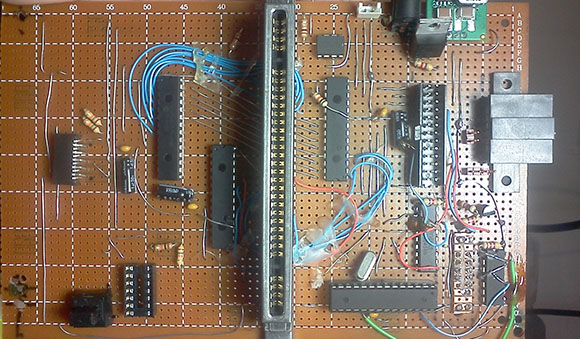
Back at the turn of the century, shoving MiniITX motherboards into just about everything was all the rage with the technologist crowd. [waterbury] had the idea of making a computer out of an SNES, but with the added ability of reading SNES cartridges. This idea had been floating around in [waterbury]’s head for years now, and with a Raspberry Pi he can finally make his project a reality.

After desoldering a cartridge connector from an original SNES, [waterbury] plugged it in to a piece of perf board and started to figure out how to actually read the cartridge. An SNES cartridge need 16 address pins, 8 data pins, 8 bank control pins and 4 other control pins to be read; a total of 36 pins that [waterbury] accessed with the help of a neat I/O expander and a whole bunch of level converters.

[waterbury] accessed these data, address, and control lines via the Raspberry Pi’s I2C interface, a non-trivial task that took 70 minutes to read Donkey Kong Country before he found a way to speed up the Raspi by a factor of two. You can check out [waterbury]’s complete project – able to read cartridges and play roms with EmulationStation after the break. Also, the code for the cart reader is available on [waterbury]’s git
.

Continue reading “Turning A Raspberry Pi Into An SNES”

An Absurdly Clever Thermal Imaging Camera

Thermal imaging cameras, cameras able to measure the temperature of an object while taking a picture, are amazingly expensive. For the price of a new car, you can pick up one of these infrared cameras and check out where the drafts are in your house. [Max Justicz] thought he could do better than even professional-level thermal imaging cameras and came up with an absurdly clever DIY infrared camera.

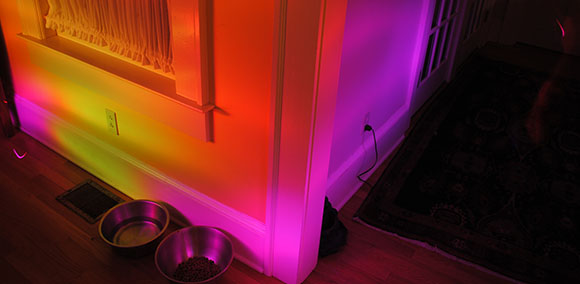
While thermal imaging cameras – even inexpensive homebrew ones – have an infrared sensor that works a lot like a camera CCD, there is a cheaper alternative. Non-contact infrared thermometers can be had for $20, the only downside being they measure a single point and not multiple areas like their more expensive brethren. [Max] had the idea of using one of these thermometers along with a few RGB LEDs to paint different colors of light around a scene in response to the temperature detected by an infrared thermometer sensor.

To turn his idea into a usable tool, [Max] picked up an LED flashlight and saved the existing LED array for another day. After stuffing the guts of the flashlight with a few RGB LEDs, he added the infrared thermometer sensor and an Arduino to change the color of the LED in response to the temperature given by the sensor.

After that, it’s a simple matter of light painting. [Max] took a camera, left the shutter open, and used his RGB thermometer flashlight to paint a scene with multicolor LEDs representing the temperature sensed by the infrared thermometer. It’s an amazingly clever hack, and an implementation so simple we’re surprised we haven’t seen before.

Accurate Timers With An AVR

timer

An awful lot of microcontroller projects use timers to repeat an action every few minutes, hours, or days. While these timers can be as accurate as a cheap digital wrist watch, there are times when you need a microcontroller’s timer to measure exactly, losing no more than a few milliseconds a day. It’s not very hard to get a timer to this level as accuracy, as [Karl] shows us in a tutorial.

The problem with keeping time with a microcontroller has to do with the crystal, clock frequency, and hardware prescalers of your chip of choice. [Karl] started his project with an ATMega168 and a 20 MHz crystal and the prescaler set at 256. This made the 78.125 interrupts per second, but the lack of floating point arithmetic means one second for the microcontroller will be 0.9984 seconds to you and me.

[Karl]’s solution to this problem was to have the ATMega count out 78 interrupts per second for seven seconds, then count out 79 interrupts for one second. It’s not terribly complicated, and now [Karl]’s timers are as accurate as the crystal used for the ‘168’s clock.

Tentacles And Phalanges Made From Drinking Straws

arnie

He human hand is one of the most impressive pieces of machinery – biological, mechanical, or otherwise – that you’ll ever lay eyes on.  With two dozen degrees of freedom, the hand can gently caress the most fragile flower petal without bruising it, or beat a hammer into an anvil with tremendous force. Simulating the human hand, however, is quite a challenge that requires dozens of servos and complex mechanical linkages. [Tomdf] over on Instructables is able to create hands, tentacles, and other weird biological contraptions using spring-loaded drinking straws and custom-made 3d printed joints.

[Tomdf] got the idea for drinking straw phalanges after seeing a few 3D printed drinking straw connectors meant to be used for creating 3D objects out of disposable plastic tubes. After designing a new spring-loaded joint for drinking straws, [Tomdf] is able to add a few lengths of thread to serve as ligaments to control the segments of drinking straws. It’s a similar setup to the horrible demon spawn we saw at Maker Faire last year, but far more extendable for any project that might pop into your head.

You can check out the drinking straw tentacles in action after the break.

Continue reading “Tentacles And Phalanges Made From Drinking Straws”

A Gamecube And N64 Console Mashup

gc

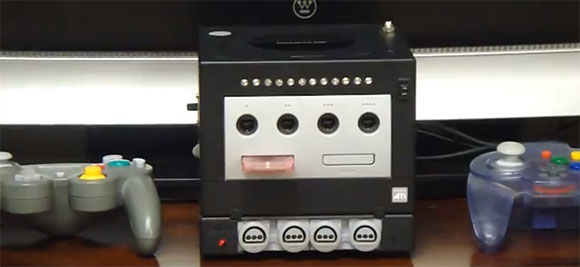
[Hailrazer] over on the Made by Bacteria forums was a bit tired of all his consoles cluttering up the space underneath his TV. No worries, though, because it’s actually fairly easy to combine a Gamecube and an N64 into one system that looks very professional.

While [Hailrazer]’s Gamecube was left reasonably complete, not including the addition of a mod chip and SD card to hold Gamecube disk images, the N64 portion of the build required quite a bit of hardware hacking. After finding a Game Boy Advance player for a Gamecube – a neat hardware add-on that allows you to play GBA games on a Game Cube – [Hailrazer] thought he found the perfect enclosure for an N64 case mod.

The guts of the GBA player were thrown out and the guts of an N64 were carefully filed down to fit inside their new home. An Everdrive 64 holds almost every US N64 release on an SD card, making access to the cartridge port unnecessary.

A switch on the side of the Gamecube toggles the video and audio output between the Gamecube and N64. It’s a neat little setup, and packs two consoles into the space of the tiny Gamecube.

Continue reading “A Gamecube And N64 Console Mashup”