Parts Storage For All Your Components

When [Steve] saw that we requested reader’s solutions to storing hundreds of different components, he had to send in his solution to storing bunches of ICs, resistors, transistors, and other components.

Like most of the suggestions we’ve seen, [Steve]’s solution relies on #10 envelopes stored in boxes specifically designed for holding envelopes. While there’s nothing new about storing handfuls of ICs in envelopes, we really like [Steve]’s method of organization.

On the top of each envelope, [Steve] printed a bunch of very useful information including the type and kind of part, the tolerance, speed, voltage, and package information. Also included are the manufacturer and vendor part numbers, making reordering a breeze.

Of course printing out hundreds or thousands of envelopes with this information would be a pain. [Steve] got around that by automating the process with iWork, typing in the values for each field in a spreadsheet app and using Mail Merge to print them all on envelopes.

It’s a very neat system that forced [Steve] to have all his parts on a spreadsheet, inching ever closer to a complete inventory management system. He’s thinking about adding QR codes to the envelopes to make reordering parts trivial, but after figuring out how to send hundreds of envelopes through a printer, we can understand if [Steve] wants to be a little lazy from here on out.
TouchIt Fabulously With Other People On The Internet

[John] from MIT is working on a project to bring a little bit of interactivity to the hacks he does. Because his hacks receive much more attention on the Internet than in real life, [John] made it so clicking a button in your browser can change something in the real world. He calls his creation TouchIt Fabulously (check out that URL!), and it allows a queue of people on the Internet to take part in a real-world hack.

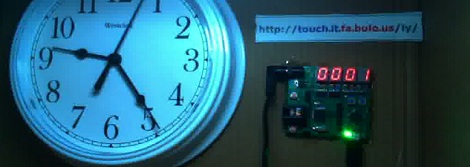
The basic idea of [John]’s build is very simple: a microcontroller connected to the Internet and a 7-segment display receives button presses from random people on the web. [John] did a lot of work to make sure everything is ‘fair’ when a lot of people are hitting his server by including per-IP queuing and rate limiting.

Right now, it’s just a 7-segment display connected to the Internet with a live video stream. With each press of a button, the counter decrements by one, and the person to take it all the way to zero gets to put their comment up on the web site.

If this build receives a lot of interest, [John] plans on turning it into a much bigger build that will control the lights in his office, shoot ping-pong balls at him, and an interactive display where people can draw graffiti in one of MIT’s many hallways.

Now that [John]’s build is up on Hackaday, we look forward to the stress testing our readers will graciously provide.

Thanks go to [Steve Baconmeister] for sending this in and having the best fake name ever.

Making A Game Boy Color Louder

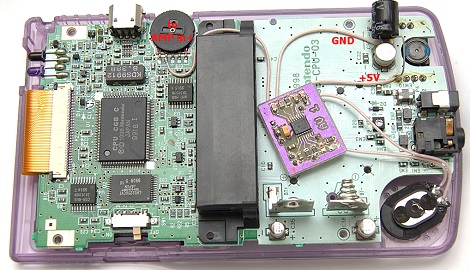
When [Anton] picked up an old translucent purple Game Boy Color, he noticed a nearly complete lack of sound coming from the speaker. This simply would not do, so [Anton] replaced the speaker and soldered in a 2 Watt amp, making his Game Boy very loud indeed.

After cracking open his Game Boy, [Anton] noticed the speaker was rusted. He replaced it by soldering in a speaker from a Motorola cell phone, fixing the most immediate problem. After plugging in a few batteries, he still noticed a nearly complete lack of sound.

Turning to his electronics junk drawer, [Anton] pulled out a TI TPA2000D1 Class D amplifier. This tiny amplifier is able to provide 2 Watts to a speaker and is very power efficient given it’s Class D pedigree.

After making a PCB and wiring up his amp to the Game Boy’s circuit board, [Anton] spent a little time tracking down the source of some high-frequency hissing. As it turns out, the power regulators and converters on a 15-year old Game Boy aren’t of the highest quality, but after adding a few capacitors [Anton] got everything under control.

Now [Anton]’s Game Boy has very loud, crystal-clear sound. Considering the lengths chiptune artists take modifying old ‘brick’ style game boys for use with Little Sound DJ or nanoloop, [Anton]’s build could become a worthwhile modification for musicians looking for a little more oomph to their performance.

Digital Marker Communicates With Touch Screen

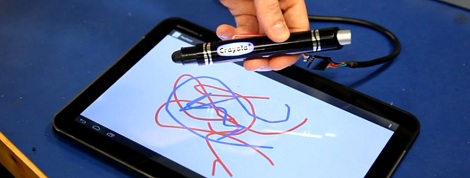
In an effort to be more relevant to children that just aren’t impressed with crayons and markers anymore, Crayola released the ColorStudio HD pen. Instead of ink, this pen is filled with electronics that communicate with a tablet to draw different colors in the Crayola ColorStudio app.

[Rob Hemsley] had done some work with capacitive touch screens before, so when he heard the clicking of a tiny relay inside the pen, he automatically knew how it worked. Of course this meant tearing apart the Crayola marker to look at the electronics, but [Rob] also went so far as to replace the microcontroller, allowing you to craft your own ColorStudio HD pen.

The digital Crayola marker communicates with the app by switching a relay on and off very quickly. This completes a circuit between the user’s hand and the touch screen, allowing the tablet to interpret the desired color by measuring how many touches are received per second.

Inside the pen, [Rob] found an RGB LED, a relay, and a PIC microcontroller. Not having any experience with PICs, [Rob] changed out the ‘micro to an ATtiny44 and started writing some firmware with the help of the Arduino IDE.

[Rob]’s updated version functions exactly like the stock version, communicating with the Crayola app by pulsing the relay to indicate the selected color. Even though the Crayola app only has three possible colors, [Rob] says it’s feasible to program the digital pen to send an RGB color value to a tablet, allowing you to choose what color to draw with on the pen.

You can see a video of [Rob]’s updated pen after the break.

Continue reading “Digital Marker Communicates With Touch Screen”

Arduino Voice Changer Turns You Into [Vader]

Halloween is just around the corner, so of course we’re looking forward to a bunch of awesome costumes put together by Hackaday readers. In an effort to match his voice to his costume, [Phil Burgess] over at Adafruit (and former Hackaday alumnus) put together an Arduino-powered voice changer to give his voice the gravitas of [James Earl Jones] or the lightheartedness of a member of the Lollipop Guild.

If you’ve ever played with a turntable, you’ll know playing a 33 RPM record at 45 or 78 RPM turns your treasured copy of Dark Side of the Moon into a lighthearted aural experience with a pitch that is much too high. Likewise, playing a single at 33 or 16 RPM means those once dulcet tones are now recordings of tormented souls in an acoustic hell.

[Phil]’s voice changer operates on the same principle by recording sounds from a microphone into a circular array and playing them back at a different rate; faster if the desired effect is a Munchkin, and slower if this year’s Halloween costume will be a Sith lord.

The completed build incorporates a 10k pot to dynamically change the timbre of the voice changer, as well as an Adafruit Wave Shield to play back a few pre-recorded sounds of lightsabers clashing. In all, a very cool project for your Halloween costume that’s also a very good introduction to DSP and real-time audio modifications with a microcontroller.

Continue reading “Arduino Voice Changer Turns You Into [Vader]”

Still More Software Defined Radio Fun On The Mac

Even though the world of software defined radio started out as a Linux-only endeavor, several recent software releases have put the ball fully into the court of OS X users. [hpux735]’s new Cocoa Radio release provides a (nearly) fully functional software defined radio for anyone with a USB TV tuner and a mac.

Earlier this week, we saw (and tested)  [Elias]‘ port of gqrx and were reasonably impressed. [hpux735]’s app does the same job and also provides the source so you can compile it yourself.

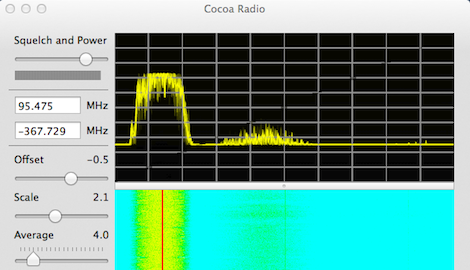
Previously, [hpux735] ported the osmocom driver for these RTL2832U-based USB TV tuner dongles to the Mac and wrote a small Cocoa driver. The new Cocoa Radio software uses this driver and adds all the features you’d expect from a software radio package; in the title pic for this post, you can see a top 40 radio station near my house and their insipid hatred of dynamic range.

[hpux735] posted a few videos of his development process. You can check those out after the break.

Continue reading “Still More Software Defined Radio Fun On The Mac”

Acoustic Barcodes Deliver Data With A Fingernail And Microphone

Either through QR codes, RFID, or near field communication, there seems to be some desire to share tiny pieces of data in a more physical and accessible form. [Chris Harrison], [Robert Xiao], and [Scott E. Hudson] of the HCI Institute at Carnegie Mellon have come up with a fairly interesting solution of making data more physical. They call it Acoustic Barcodes, and it’s able to store over a billion unique IDs in a small strip of plastic.

By engraving a barcode pattern into a piece of wood, stone, glass, or plastic, the guys then attached a microphone to the barcode and ran their fingernails across their invention. A computer interprets the sounds of a finger scraping against the acoustic barcode and produces a series of 1s and 0s.

This binary code can be used to look up various items in a database, or perform actions on a computer. In the video after the break, you can see these acoustic barcodes attached to a whiteboard to provide real tactile control of a video projector.

You can check out a PDF of the Acoustic Barcode paper here.

Continue reading “Acoustic Barcodes Deliver Data With A Fingernail And Microphone”