Giving The Rigol DS1052E ‘scope A Spectrum Analyzer

Like a lot of hardware tinkerers, [dexter2048] has a Rigol DS1052E oscilloscope sitting on his bench. One day when trying to coax some information out of the FFT setting, [dexter] threw his hands up in frustration and decided to write a file viewer with FFT spectrum analysis. The resulting viewer gives this very capable and inexpensive oscilloscope a spectrum analyzer.

[dexter2048]’s app is able to capture signals from 0 Hz to 500 MHz and demonstrated this fact by sticking a piece of wire into one of the Rigol’s inputs. The resulting waveform is then sent to a computer where [dexter] got a nice picture of the radio spectrum between 82MHz and 114MHz. In his graph, you can clearly see the FM radio stations that can be picked up in [dexter]’s lab.

This small modification to the Rigol DS1052E oscilloscope it the latest in a long line of hacks that give this wonderful, inexpensive scope double the bandwidth, data collection via Python, and even a homebrew version of Pong. Anything that provides new functionality for old gear is great news to us, and we look forward to many, many more 1052E hacks in the future.

Tip ‘o the hat to [Murlidhar] for sending this in.

Putting Guitar Pedals In A Web Page

Only half of playing guitar – according to a few musician friends of mine – is moving your fingers up and down a fretboard and banging out some chords. The other half is the artistry of mastering your tone, usually through amp settings and stomp boxes.

Effects pedals – little boxes of electronics that go between the guitar and amp – are able to amplify and distort a guitar’s output, add reverb and delay, and even filter the tone via a wha or envelope pedal. These pedals can be simulated in software, but we can’t believe that they can now be emulated completely in JavaScript.

Pedalboard.js is a project put together by [dashersw], and aims to put a slew of pedals ‘in the cloud’ and turn editing and effects board as easy as building a web page.

The project is built around Webkit’s W3C audio API, allowing this virtual pedal board to work in Chrome, Safari, and other Webkit-enabled browsers. Pedals are programmed as nodes, each configurable to have and input, output, or analyzer that is able to modify the gain, wave shape, or filter of anything received by the line in on your computer.

Thee is a small demo of Pedalboard.js available here with a pre-recorded guitar track feeding into a few stomp boxes. It’s a pretty cool idea if you’d like to play around with a few guitar effect, but we can’t wait to see this bit of JavaScript implemented by effects pedal manufacturers allowing us to try before we buy.

Using Arduino Shields With The Raspi

With hundreds of Arduino shields available for any imaginable application, it’s a shame they can’t be used with the Raspberry Pi. Breaking out the Raspi GPIO pins to Arduino-compatible headers would allow makers and tinkerers to reuse their shields with a far more capable computing platform.

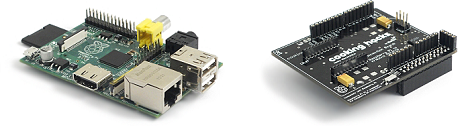
The folks over at Cooking Hacks realized a Raspi to Arduino shield bridge would be an awesome device, so they made their own, complete with a software library that allows you to port your Arduino code directly to the Raspberry Pi.

There are a few limitations with the Raspberry Pi’s GPIO headers; the Raspi doesn’t have analog inputs, so the Cooking Hacks team added an 8-channel ADC. Along with analog inputs and the headers required to pop a shield on the board, there’s also a socket for an XBee module.

The software library contains most of the general Arduino functions such as digitalWrite() and digitalRead(). There Serial, Wire, and SPI libraries are also implemented, allowing any device that communicates through UART, I2C, or SPI to talk directly to the Raspberry Pi.

While the Raspi Arduino bridge doesn’t allow for PWM in the same capacity as an Arduino, you’re always welcome to whip up a servo or LED shield for this neat little adapter.

Free Software Foundation Certifies Hardware That Respects Your Freedom

The Free Sofware Foundation, the very same organization responsible for the GNU General Public License and open source advocacy on the part of the Free Software stalwart [Richard Stallman], has certified its first piece of hardware as Respecting Your Freedom.

This new certification goes far beyond the goals of Open Source Hardware. In addition to providing documentation, schematics, and design files, hardware certified as Respecting Your Freedom must meet much more stringent requirements.

Of course, all software used with RYF hardware must be Free Software, but the certification also carries with it a few more requirements. The source and CAD files must be provided, it must use formats unencumbered by closed licenses, and the hardware must not spy on the user.

The honor of the first RYF-certified piece of hardware goes to, of course, a 3D printer. It’s the AO-100 printer developed and sold by Aleph Objects, Inc., a.k.a. Lulzbot out of Colorado.

With so many Open Source Hardware projects coming down the pipe, it’s great to see a somewhat more militant organization (that’s a good thing!) such as the Free Software Foundation provide a certification process for hardware projects. Keep in mind this isn’t a ‘certified once and forget about it’ proposition; the FSF is willing to provide a bounty to encourage the public to report violations of RYF certification. Anything to keep them honest, right?

Playing Around With MRAM

For the longest time, hardware tinkerers have only been able to play around with two types of memory. RAM, including Static RAM and Dynamic RAM, can be exceedingly fast but is volatile and loses its data when power is removed. Non-volatile memory such as EPROMS, EEPROMS, and Flash memory retains its state after power is removed, but these formats are somewhat slower.

There have always been competing technologies that sought to combine the best traits of these types of memory, but not often have they been available to hobbyists. [Majenko] got his hands on a few MRAM chips – Magneto-Resistive RAM – and decided to see what they could do.

Magneto-Resistive RAM uses tiny pairs of magnetic plates to read and write 1s and 0s. [Majenko] received a sample of four MRAM chips with an SPI bus (it might be this chip, 4 Megabits for $20, although smaller capacity chips are available for about $6). After wiring these chips up on a home-made breakout board, [Majenko] had 16 Megabits of non-volatile memory that was able to run at 40 MHz.

The result was exactly what the datasheet said: very fast write and read times, with the ability to remove power. Unlike EEPROMS that can be destroyed by repeated reading and writing, MRAM has an unlimited number of write cycles.

While MRAM may be a very young technology right now, it’s a wonderful portent of things to come. In 20 (or 30, or 40) years, it’s doubtful any computer from the largest server to the smallest microcontroller will have the artificial separation between disk space and memory. The fact that any hardware hacker is able to play around with this technology today is somewhat amazing, and we look forward to more builds using MRAM in the future.

Bootloader Brings USB, Firmware Updating To The ATtiny85

[Jenna] sent in a very cool bootloader she thought people might like. It’s called Micronucleus and it turns the lowly ATtiny 85 into a chip with a USB interface capable of being upgraded via a ‘viral’ uploader program. Micronucleus weighs in at just over 2 kB, making it one of the smallest USB-compatible bootloaders currently available.

The USB support comes from V-USB, a project that puts a virtual USB port on a suite of AVR microcontrollers. With V-USB, it’s easy to turn a Tiny85 into a keyboard, custom joystick, data logger, or computer-attached LED display.

One very interesting feature of Micronucleus is the ‘viral updater’ feature. This feature takes a new piece of firmware, and writes it to a Tiny85, disabling the current bootloader. If you’re designing a project that should have a means of updating the firmware via USB instead of the usual AVR programmer, this might be the bootloader for you.

Not bad for a bootloader that emphasizes small code size. At just over 2 kB, it’s possible to use this bootloader on the similar, smaller, and somewhat cheaper ATtiny45.

Bringing Java To The World Of Microcontrollers

C is a beautiful language perfectly suited for development on low-power devices such as the 8-bit microcontrollers. With newer, more powerful ARM microcontrollers making their way onto the market and workbenches around the world, it was only fitting that Oracle got in on the action. They released a version of Java targeted at these newer, more powerful microcontrollers called Java ME embedded.

The new embedded version of Java has everything you would expect from a microcontroller development platform – access to GPIO pins, including SD cards and I2C devices. The new Java machine is designed for full headless operation and is capable of running on devices with as little as 130 kB of RAM and 350 kB of ROM.

As for the utility of programming a microcontroller in Java, it’s still the second most popular language, after spending the better part of a decade as the number one language programmers choose to use. The requirements of the new embedded version of Java are far too large to fit onto even the best 8-bit microcontrollers, but with a new crop of more powerful ARM devices, we’ll expect to see more and more ARM/Java projects making their way into the Hackaday tip line in the coming months.

Tip ‘o the hat to [roger] for sending this one in.